
1. Safety Instructions
Please read all instructions carefully before installation and use. Retain this manual for future reference.
- Electrical Safety: This appliance must be installed by a qualified electrician in accordance with national and local wiring regulations. Ensure the power supply matches the voltage specified on the product label.
- Water Proximity: Do not install the towel warmer directly above or too close to a bathtub, shower, or other water source. Maintain a safe distance as specified by local regulations.
- Ventilation: Ensure adequate ventilation in the room where the towel warmer is installed.
- Children and Vulnerable Persons: This appliance is not intended for use by persons (including children) with reduced physical, sensory, or mental capabilities, or lack of experience and knowledge, unless they have been given supervision or instruction concerning use of the appliance by a person responsible for their safety. Children should be supervised to ensure they do not play with the appliance.
- Overheating: Do not cover the towel warmer with excessive clothing or other materials as this can cause overheating and a fire hazard. Ensure air vents for the fan heater are not obstructed.
- Cleaning: Always disconnect the appliance from the main power supply before cleaning.
- Damage: Do not operate the appliance if it has a damaged cord or plug, or if it has malfunctioned or been dropped or damaged in any manner. Contact qualified service personnel for examination and repair.
2. Package Contents
Carefully unpack the box and ensure all items are present and undamaged. If any items are missing or damaged, contact your retailer immediately.
- ACOVA ATOLL SPA+AIR Electric Towel Warmer Unit (Model TSL-050-050/IFS)
- Wall Mounting Kit (brackets, screws, wall plugs)
- User Manual (this document)
3. Installation and Setup
Installation of this electric towel warmer must be performed by a qualified professional to ensure safety and compliance with all electrical codes.
3.1. Choosing a Location
- Select a wall location that is structurally sound and can support the weight of the towel warmer (approximately 17.2 kg) plus the weight of wet towels.
- Ensure the location complies with local electrical safety zones for bathrooms, maintaining required distances from water sources.
- The unit requires a dedicated electrical connection.
3.2. Mounting the Unit
- Mark the desired mounting points on the wall using the provided template or by carefully measuring the bracket positions on the unit.
- Drill holes at the marked positions suitable for the wall plugs and screws.
- Insert wall plugs into the drilled holes.
- Secure the mounting brackets to the wall using the screws.
- Carefully lift the towel warmer and attach it to the wall brackets, ensuring it is securely seated and level.
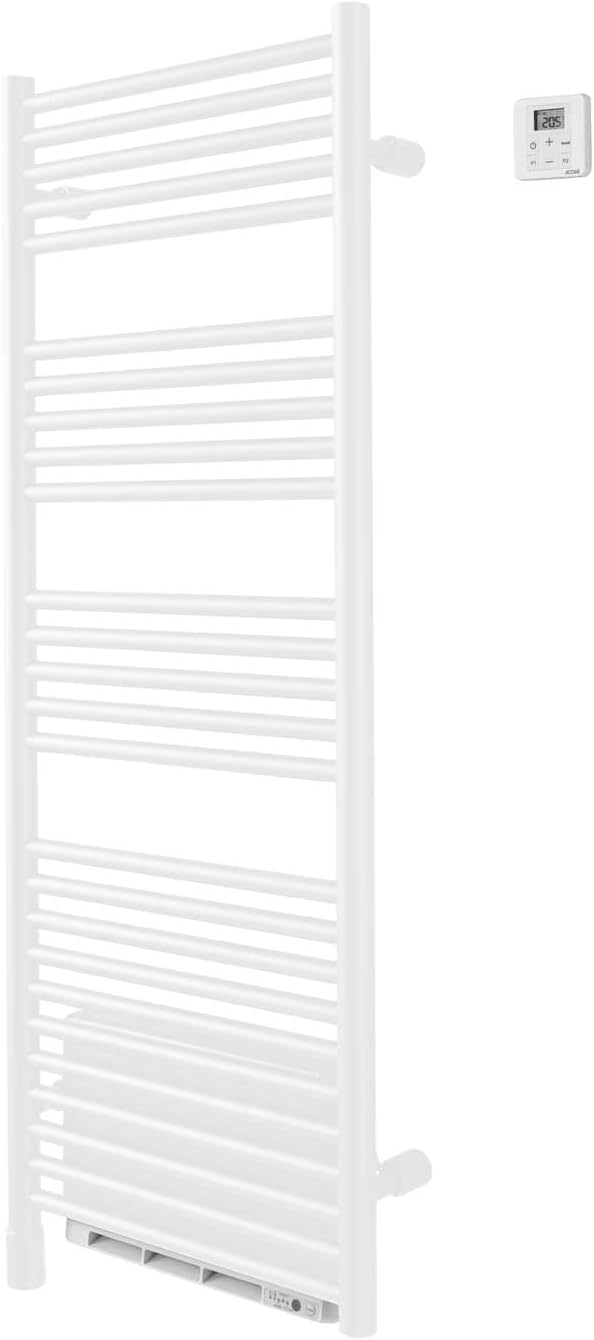
Image 1: ACOVA ATOLL SPA+AIR Electric Towel Warmer showing the main unit and digital control panel. This image illustrates the overall design for installation reference.
3.3. Electrical Connection
- All electrical connections must be made by a qualified electrician.
- Ensure the main power supply to the circuit is turned off at the consumer unit before making any connections.
- Connect the towel warmer to a suitable fused spur or circuit breaker as per local regulations.
- Once connections are complete, restore power and proceed to initial testing.

Image 2: ACOVA ATOLL SPA+AIR Electric Towel Warmer installed in a modern bathroom setting, demonstrating typical placement and scale.
4. Operating Instructions
The ACOVA ATOLL SPA+AIR towel warmer features a digital control panel for easy operation.
4.1. Control Panel Overview
The control panel typically includes:
- Power Button: To turn the unit ON/OFF.
- Temperature Display: Shows the current or set temperature.
- '+' / '-' Buttons: To adjust temperature settings or timer duration.
- Mode/Function Button: To select different operating modes (e.g., constant heat, fan boost, timer).
4.2. Basic Operation
- Power On: Press the Power button to turn on the towel warmer. The display will illuminate.
- Set Temperature: Use the '+' and '-' buttons to adjust the desired room temperature or towel warming temperature. The display will show the set temperature.
- Fan Heater (Boost) Function: Press the Mode/Function button to activate the fan heater for a quick boost of heat. This function typically operates for a set period (e.g., 15-30 minutes) and then returns to the previous setting. Refer to the specific icons on your control panel for fan activation.
- Timer Function: If available, press the Mode/Function button repeatedly until the timer icon appears. Use '+' and '-' to set the desired operating duration.
- Power Off: Press the Power button again to turn off the unit.
5. Maintenance
Regular cleaning will help maintain the appearance and efficiency of your towel warmer.
- Cleaning: Always ensure the towel warmer is switched off and disconnected from the power supply before cleaning. Allow it to cool completely. Wipe the exterior surfaces with a soft, damp cloth. Do not use abrasive cleaners, solvents, or harsh chemicals, as these can damage the finish.
- No User Serviceable Parts: The internal components of the towel warmer are not user-serviceable. Do not attempt to open or repair the unit yourself. Refer all servicing to qualified personnel.
- Air Vents: Periodically check and gently clean the air intake and outlet vents of the fan heater to ensure they are free from dust and lint, which could impede airflow.
6. Troubleshooting
If you experience issues with your ACOVA ATOLL SPA+AIR towel warmer, consult the following table before contacting customer support.
| Problem | Possible Cause | Solution |
|---|---|---|
| Unit does not power on. | No power supply. Circuit breaker tripped. | Check the main power supply. Check and reset the circuit breaker. Ensure the unit is properly connected. |
| Towel warmer is not heating. | Temperature setting too low. Unit in standby mode. | Increase the set temperature. Ensure the unit is actively heating and not just powered on. |
| Fan heater not working. | Fan function not activated. Air vents obstructed. | Activate the fan boost function via the control panel. Check and clear any obstructions from the air vents. |
| Display shows an error code. | Internal malfunction. | Note the error code and refer to the manufacturer's website or contact customer support for specific guidance. |
If the problem persists after attempting these solutions, contact a qualified service technician or ACOVA customer support.
7. Specifications
| Feature | Detail |
|---|---|
| Brand | ACOVA |
| Model | TSL-050-050/IFS |
| Type | Electric Towel Warmer with Fan Heater |
| Power Output | 1500W (Towel Warmer + Fan Heater) |
| Color | White |
| Weight | Approximately 17.2 kg |
| Dimensions (L x W x H) | Refer to product packaging for accurate dimensions. (Note: The provided dimension '1 x 1 x 1 cm' is likely a packaging placeholder and does not represent the product's actual size.) |
| Power Source | Mains Electric |
8. Warranty and Support
This ACOVA product is covered by a manufacturer's warranty. Please refer to the warranty card included with your purchase or visit the official ACOVA website for detailed warranty terms and conditions.
For technical support, spare parts, or service inquiries, please contact your retailer or ACOVA customer service directly. Ensure you have your product model number (TSL-050-050/IFS) and proof of purchase available when contacting support.