
1. Introduction
Thank you for choosing the ACOVA FASSANE SPA ASYMETRIQUE Electric Towel Dryer Radiator. This manual provides essential information for the safe and efficient installation, operation, and maintenance of your new appliance. Please read this manual thoroughly before installation and retain it for future reference.
The ACOVA FASSANE SPA ASYMETRIQUE is designed to provide comfortable warmth and dry towels in your bathroom. Its elegant design and advanced features ensure optimal performance and user convenience.
2. Safety Instructions
To prevent personal injury or damage to the appliance, always observe the following safety precautions:
- This appliance must be installed by a qualified electrician in accordance with local and national wiring regulations.
- Ensure the power supply voltage matches the rating label on the appliance.
- Do not operate the appliance with a damaged cord or plug. If the supply cord is damaged, it must be replaced by the manufacturer, its service agent, or similarly qualified persons to avoid a hazard.
- Do not immerse the appliance in water or other liquids.
- Keep children and pets away from the appliance when it is in operation. The surface can become hot.
- Do not cover the radiator with clothing or other materials, as this can cause overheating.
- Ensure adequate ventilation around the appliance.
- Before cleaning or maintenance, always disconnect the appliance from the main power supply.
3. Package Contents
Please check that all components are present and undamaged:
- 1 x ACOVA FASSANE SPA ASYMETRIQUE Electric Towel Dryer Radiator
- 2 x Wall Brackets (patères)
- Instruction Manual (this document)
4. Installation
4.1 Mounting the Radiator
The radiator must be securely mounted to a solid wall surface. Use appropriate fixings for your wall type. Ensure the mounting location allows for sufficient clearance around the radiator for proper heat distribution and access to controls.
Refer to the included mounting template (if provided) for precise drilling locations. The wall brackets should be installed level and at the specified distances to support the radiator's weight (approximately 34 kg).
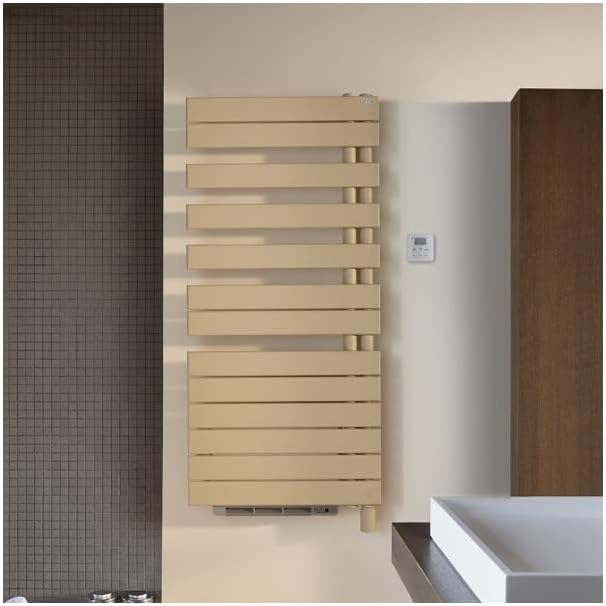
Image: An example of the ACOVA FASSANE SPA ASYMETRIQUE Electric Towel Dryer Radiator installed in a bathroom setting, demonstrating typical placement and appearance.
4.2 Electrical Connection
All electrical connections must be performed by a qualified electrician. The appliance requires a dedicated electrical circuit. Ensure the power supply is disconnected before commencing any wiring work.
Connect the radiator to the mains supply according to the wiring diagram provided with the product and local electrical codes. Ensure proper grounding.
5. Setup
5.1 Initial Power-On
Once the radiator is securely installed and electrically connected, restore power at the main circuit breaker. The control panel display should illuminate, indicating the appliance is ready for setup.
5.2 Control Panel Overview
The control panel allows you to manage the radiator's functions. Familiarize yourself with the buttons and display:
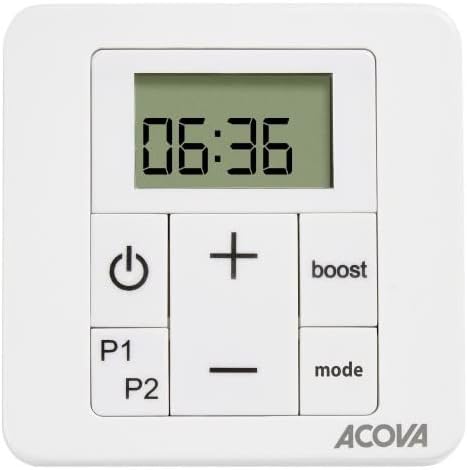
Image: A detailed view of the control panel for the ACOVA FASSANE SPA ASYMETRIQUE radiator, showing the digital display, power button, temperature adjustment buttons (+/-), 'boost' button, and 'mode' button.
- Power Button (⏻): Turns the radiator on or off.
- Temperature Adjustment (+/-): Increases or decreases the desired temperature.
- Boost Button: Activates a temporary high-power heating cycle.
- Mode Button: Cycles through available operating modes (e.g., Comfort, Eco, Frost Protection).
- P1/P2 Buttons: May be used for programming or advanced settings, refer to specific programming instructions.
- Digital Display: Shows current time, temperature, or selected mode.
6. Operating Instructions
6.1 Power On/Off
Press the Power button (⏻) once to turn the radiator on. Press it again to turn the radiator off. When off, the display may show the current time or remain blank depending on the model's standby settings.
6.2 Temperature Adjustment
With the radiator on, use the '+' and '-' buttons to set your desired room temperature. The display will show the set temperature temporarily, then revert to the current room temperature or time.
6.3 Mode Selection
Press the 'mode' button to cycle through the available operating modes. Common modes include:
- Comfort: Maintains the set temperature.
- Eco: Operates at a slightly lower temperature than Comfort mode to save energy.
- Frost Protection: Maintains a minimum temperature (e.g., 7°C) to prevent freezing.
- Program (P1/P2): Follows a pre-set weekly heating schedule. Refer to the programming section for detailed instructions on setting P1 and P2.
6.4 Boost Function
Press the 'boost' button to activate a temporary period of maximum heating. This is useful for quickly warming the room or drying towels. The boost function typically runs for a set duration (e.g., 30 minutes, 1 hour, 2 hours) and then automatically returns to the previous operating mode. The display may show a countdown during the boost period.
7. Maintenance
7.1 Cleaning
Before cleaning, ensure the radiator is switched off and disconnected from the main power supply. Allow the appliance to cool down completely.
- Wipe the exterior surfaces with a soft, damp cloth.
- Do not use abrasive cleaners, solvents, or chemical cleaning agents, as these can damage the finish.
- Ensure no water enters the electrical components.
7.2 General Care
Regularly check the power cord for any signs of damage. If any damage is observed, contact a qualified technician for repair or replacement. Do not attempt to repair the appliance yourself.
8. Troubleshooting
If you encounter issues with your radiator, refer to the following common problems and solutions:
- Radiator not heating:
- Check if the appliance is plugged in and the power supply is on.
- Ensure the power button on the control panel is pressed.
- Verify that the set temperature is higher than the current room temperature.
- Check your household's circuit breaker for tripped fuses.
- Display not working:
- Ensure the power supply is connected and active.
- Try turning the radiator off and on again.
- Radiator making unusual noises:
- Minor expansion and contraction noises are normal during heating and cooling.
- If noises are loud or persistent, disconnect power and contact customer support.
If the problem persists after attempting these solutions, please contact ACOVA customer support or a qualified technician.
9. Specifications
Product specifications for the ACOVA FASSANE SPA ASYMETRIQUE Electric Towel Dryer Radiator TFR100-055IFS:
| Feature | Specification |
|---|---|
| Manufacturer | ACOVA |
| Product Dimensions (L x W x H) | 1 x 1 x 1 cm |
| Model Reference | TFR100-055IFS |
| Size | Standard |
| Color | White |
| Power Type | hand_powered |
| Wattage | 1 Watts |
| Quantity of Items | 1 |
| Included Components | 1 radiator, 2 wall brackets |
| Batteries Included? | No |
| Batteries Required? | No |
| Weight | 34000 Grams (34 kg) |
| Spare Parts Availability | Information unavailable |
| ASIN | B0BZWD24CL |
| First Available Date on Amazon.fr | 14 October 2022 |
Note: The product title indicates 1000W, while the specification table lists 1 Watt. Please refer to the product packaging or contact ACOVA support for clarification on the exact wattage.
10. Warranty and Support
Your ACOVA FASSANE SPA ASYMETRIQUE Electric Towel Dryer Radiator is covered by a manufacturer's warranty. Please refer to the warranty card included with your purchase for specific terms and conditions, including the warranty period and coverage details.
For technical assistance, spare parts, or warranty claims, please contact ACOVA customer support through their official website or the contact information provided in your purchase documentation. When contacting support, please have your model number (TFR100-055IFS) and proof of purchase readily available.