
1. Introduction
This manual provides detailed instructions for the installation, operation, and maintenance of your Retevis MA09 GMRS Base Antenna. Please read this manual thoroughly before using the product to ensure proper function and safety.
Package Contents
Verify that all components are present in the package:
- 1 x Retevis MA09 GMRS Base Antenna (Fiberglass sections)
- 2 x Fixing rings (U-bolts)
- 2 x Fixing screws
- 3 x Bracket Rods (for ground plane radials)
- Mounting hardware (nuts, washers)

Image: Contents of the Retevis MA09 GMRS Base Antenna package, showing the fiberglass antenna sections, U-bolts, fixing screws, and bracket rods.
2. Specifications
| Feature | Value |
|---|---|
| Frequency Range | GMRS 462-467MHz |
| VSWR | <1.5 |
| Impedance | 50Ω |
| Gain | 4.5/7.2Bi |
| Maximum Power Input | 200W |
| Antenna Type | Omni-directional Base Antenna |
| Material | Heavy-duty Fiberglass, Alloy Connector |
| Product Dimensions | 37 x 4 x 4 inches (approx. 94 x 10 x 10 cm) |
| Item Weight | 2.74 pounds (approx. 1.24 kg) |

Image: Diagram illustrating key specifications and features of the Retevis MA09 GMRS Base Antenna, including frequency range, VSWR, gain, and power input.
3. Setup and Installation
Follow these steps to assemble and install your GMRS base antenna. Ensure all connections are secure before operation.
3.1 Antenna Assembly
- Unpack all components and verify against the package contents list.
- Connect the fiberglass antenna sections by screwing them together. Ensure the alloy connectors are tightly fastened to reduce power loss.
- Attach the three bracket rods (radials) to the base of the antenna. These rods form the ground plane for optimal performance.

Image: The fully assembled Retevis MA09 GMRS Base Antenna, showing the fiberglass mast and the three radial elements at the base.
3.2 Mounting the Antenna
The antenna is designed for outdoor base station use. Choose a mounting location that is as high as possible and clear of obstructions for best performance.
- Secure the antenna to a mast or pole using the provided fixing rings (U-bolts) and screws.
- Ensure the antenna is mounted vertically and is stable against wind and other environmental factors.
- Connect your GMRS radio or repeater to the antenna using a suitable coaxial cable with a PL259 connector.
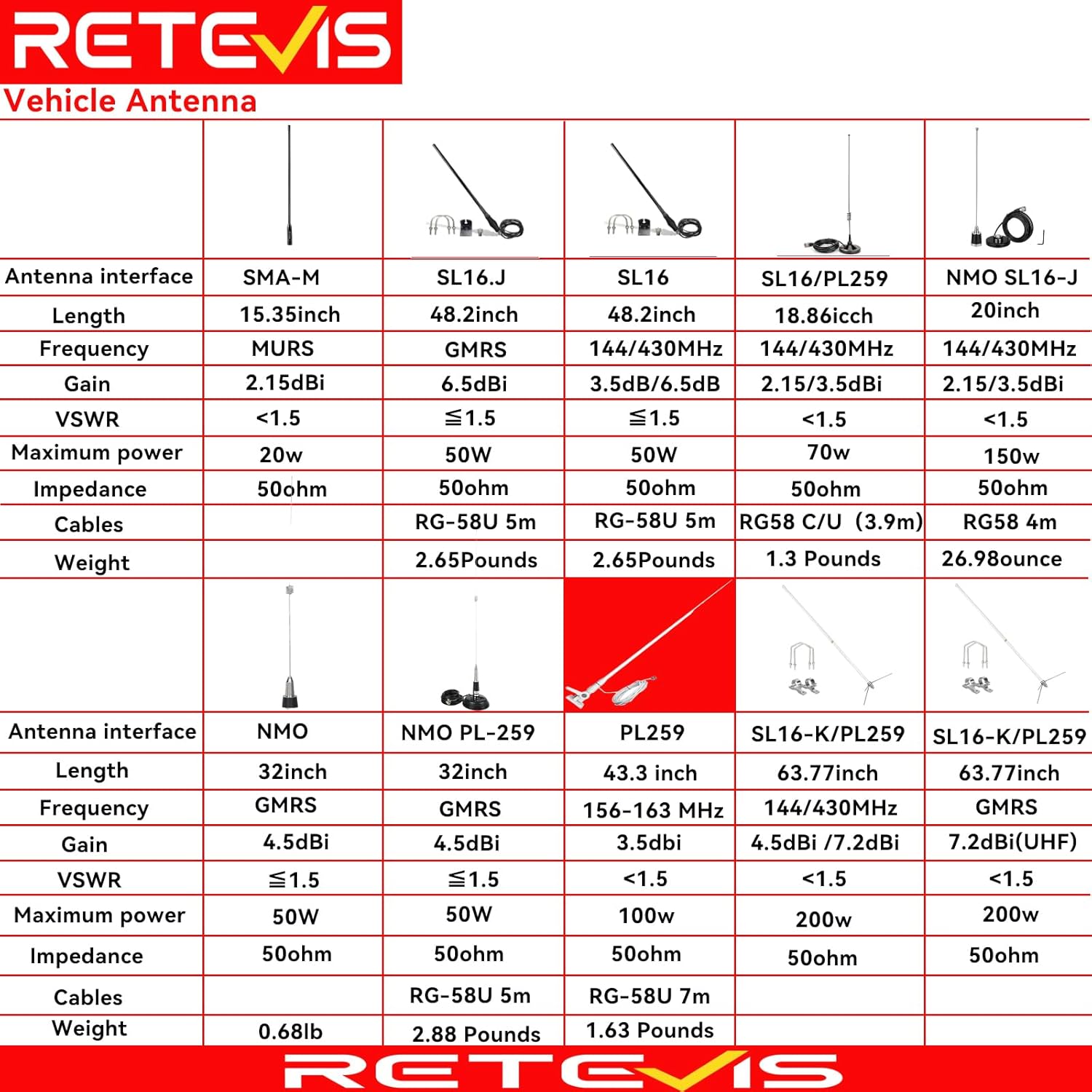
Image: The Retevis MA09 GMRS Base Antenna mounted on a pole, demonstrating a typical installation scenario.
3.3 Important Installation Considerations
- Avoid installing the antenna near tall buildings or large metal structures, as this can affect the Standing Wave Ratio (SWR) and overall performance.
- Ensure proper grounding for lightning protection.
- Use high-quality coaxial cable to minimize signal loss.

Image: Visual representation of the GMRS frequency bands (462-467MHz) for which the antenna is designed.
4. Operating the Antenna
Once installed, the Retevis MA09 GMRS Base Antenna operates passively to enhance your radio's signal transmission and reception. No direct user interaction is required with the antenna itself during operation.
4.1 Connecting to a Radio/Repeater
- Connect the coaxial cable from your GMRS radio or repeater to the antenna's N-type connector.
- Ensure the radio/repeater is configured for the GMRS frequency range (462-467MHz).

Image: A close-up view of the antenna's alloy interface, highlighting the robust connection point for coaxial cables.
4.2 Optimal Performance
- The antenna's high gain (4.5/7.2Bi) and low VSWR (<1.5) are designed to provide clear and stable communication over extended ranges.
- Regularly check the SWR of your antenna system to ensure optimal performance.
Video: This video demonstrates the assembly process of a GMRS base antenna, showing how the fiberglass sections and radial elements are connected.
5. Maintenance
The Retevis MA09 GMRS Base Antenna is constructed from heavy-duty fiberglass and alloy, designed for durability and minimal maintenance.
- Regular Inspection: Periodically inspect the antenna and its mounting hardware for any signs of wear, corrosion, or damage, especially after severe weather conditions.
- Cleaning: Clean the antenna with a damp cloth to remove dirt and debris. Avoid using harsh chemicals that could damage the fiberglass or alloy components.
- Connection Check: Ensure all connections, including the coaxial cable and mounting hardware, remain tight and secure.

Image: The Retevis MA09 GMRS Base Antenna shown in diverse outdoor settings, emphasizing its robust construction for various environmental conditions.
6. Troubleshooting
If you experience issues with your antenna system, refer to the following common troubleshooting tips:
6.1 High SWR Readings
A high SWR (Standing Wave Ratio) indicates that the antenna is not efficiently transmitting power. This can be caused by several factors:
- Improper Installation: Ensure the antenna is mounted in a clear area, away from large metal objects or buildings.
- Damaged Cable/Connectors: Inspect the coaxial cable and connectors for any damage or poor connections.
- Antenna Damage: Check the antenna elements for any physical damage.
- Incorrect Frequency: Verify that your radio is operating on the correct GMRS frequencies (462-467MHz).

Image: A guide to SWR (Standing Wave Ratio) questions and answers, explaining common causes of high SWR and troubleshooting steps.
6.2 Poor Reception/Transmission
- Antenna Height: Ensure the antenna is mounted as high as possible. Height significantly impacts range.
- Obstructions: Clear any new obstructions that may have appeared in the antenna's line of sight.
- Radio Settings: Double-check your radio's power output and other settings.
7. Warranty and Support
Retevis provides a 1-year warranty for accessories and a 30-day no-reason return policy. Beyond the warranty period, maintenance services are still offered, with buyers responsible for associated costs.
For support or warranty claims, please contact Retevis Direct on Amazon. They aim to reply within 12 hours.
