
Introduction
This manual provides comprehensive instructions for the installation, operation, and maintenance of your SCS Sentinel MBA0054 12V Articulated Arm Swing Gate Motorization System and the AAM0049 4-Channel Remote Control. Please read this manual carefully before installation and use to ensure proper function and safety.
Product Overview
The SCS Sentinel MBA0054 is a 12V articulated arm motorization system designed for swing gates up to 4 meters wide and 400 kg total weight (2 meters and 200 kg per leaf). It offers various functionalities for convenient and secure gate operation. The AAM0049 is a 4-channel remote control with rolling code technology for enhanced security, compatible with the motorization system.

Figure 1: SCS Sentinel MBA0054 Articulated Arm Swing Gate Motorization System with AAM0049 Remote Control. This image displays the complete kit, including the two motor units, the flashing light, and two remote controls.
MBA0054 Motorization Kit Components:
- 2 x 12V Motors (1 master motor + 1 slave motor)
- 2 x Articulated Arms
- 2 x 4-Channel Remote Controls (AAM0049)
- 1 x 12V Flashing Light
- Mounting Hardware (screws, fixing brackets, stops)
- 1 x Manual Release Key
- Instruction Manual
AAM0049 Remote Control Features:
- 4 Channels for controlling multiple functions or devices.
- Rolling code technology for enhanced security against unauthorized access.
- Emission Frequency: 433.92 MHz.
- Power: 2 x CR2016 Lithium batteries (included).
- Durable plastic casing with ergonomic design and robust steel attachment.
Safety Instructions
Always prioritize safety during installation and operation. Failure to follow these instructions may result in injury or damage to the product.
- Ensure the power supply is disconnected before performing any installation, maintenance, or repair work.
- Installation should be performed by qualified personnel or under strict supervision.
- Keep children and pets away from the gate area during operation.
- Do not attempt to repair or modify the system components yourself. Contact qualified service personnel.
- Regularly check the gate and motorization system for any signs of wear, damage, or malfunction.
- Ensure the gate operates freely without obstruction before and after motorization installation.
Installation (MBA0054 Motorization System)
The installation process involves three main steps: mechanical installation, electrical connection, and programming/synchronization.
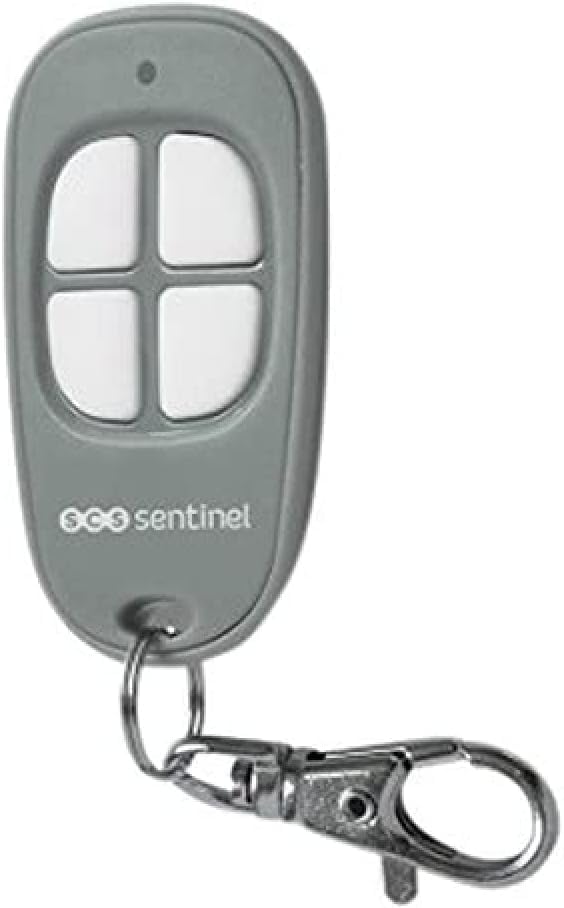
Figure 2: Simplified diagram illustrating the three main installation steps: 1. Mechanical Installation, 2. Electrical Connection, and 3. Programming & Synchronization.
1. Mechanical Installation
Mount the motor units and articulated arms securely to your swing gate and gate posts. Ensure correct alignment and freedom of movement for the gate leaves. Use the provided fixing brackets and hardware. Refer to the detailed diagrams in the included paper manual for precise measurements and mounting positions.
- Determine the optimal mounting points for the motors on the gate posts and the articulated arms on the gate leaves.
- Securely fasten all components using the provided screws and brackets.
- Ensure the articulated arms allow for the full range of gate movement (up to 120° opening angle).
- Install the physical stops to define the fully open and fully closed positions of the gate.
2. Electrical Connection
Connect the motor units, flashing light, and power supply to the control board. All electrical connections must comply with local regulations and safety standards.
- Connect the master and slave motors to the control board as indicated in the wiring diagram (refer to the paper manual).
- Connect the 12V flashing light to the designated terminals on the control board.
- Connect the main power supply (12V DC) to the control board. Ensure the power is off during wiring.
- Verify all connections are secure and properly insulated.
3. Programming & Synchronization
Once mechanically installed and electrically connected, the system needs to be programmed and synchronized for proper operation.
- Travel Learning: The system will need to learn the full opening and closing travel of your gate. Follow the specific steps in the paper manual to initiate this process. This typically involves manually moving the gate or pressing specific buttons on the control board.
- Remote Control Pairing: Pair the AAM0049 remote controls with the motorization system. This usually involves pressing a programming button on the control board and then a button on the remote control.
- Function Configuration: Configure desired functions such as automatic closing time, pedestrian opening, and obstacle detection sensitivity.
Operating Instructions
MBA0054 Motorization System Operation:
The system offers various operational modes and features:
- Total Opening: Opens both gate leaves completely.
- Partial/Pedestrian Opening: Opens only one gate leaf for pedestrian access.
- Automatic Closing: The gate will automatically close after a set delay once opened. This feature can be enabled or disabled.
- Slowdown at End of Travel: The gate slows down before reaching its fully open or closed position for smoother operation and reduced wear.
- Obstacle Detection: The system is designed to stop or reverse if an obstruction is detected during operation, enhancing safety.
- Manual Override: In case of power failure or malfunction, the gate can be manually unlocked using the provided key to operate it by hand.
AAM0049 Remote Control Operation:

Figure 3: SCS Sentinel AAM0049 4-Channel Remote Control. This remote features four buttons for controlling different gate functions or multiple devices.
Each button on the AAM0049 remote control can be programmed to perform a specific function (e.g., full open, pedestrian open, stop). Refer to the programming section of your motorization system's manual for detailed instructions on assigning functions to each button.
- Press the programmed button to activate the desired gate function.
- The rolling code technology ensures secure communication between the remote and the gate system.
Remote Control Battery Replacement:
When the remote control's range decreases or it stops responding, the batteries may need replacement. The AAM0049 uses two CR2016 Lithium batteries.
- Carefully open the remote control casing.
- Remove the old CR2016 batteries.
- Insert new CR2016 batteries, ensuring correct polarity.
- Close the casing securely.
Maintenance
Regular maintenance ensures the longevity and reliable operation of your gate motorization system.
- Monthly: Check the gate's mechanical components (hinges, wheels, articulated arms) for smooth operation and lubrication. Clean any debris from the gate's path.
- Quarterly: Inspect all electrical connections for corrosion or loose wiring. Test the obstacle detection safety features.
- Annually: Have a qualified technician perform a thorough inspection and service of the entire system.
- Keep the motor units clean and free from dust, dirt, and moisture.
Troubleshooting
This section addresses common issues you might encounter. For more complex problems, consult a qualified technician.
| Problem | Possible Cause | Solution |
|---|---|---|
| Gate does not respond to remote control. |
|
|
| Gate opens/closes partially or stops unexpectedly. |
|
|
| Flashing light does not operate. |
|
|
Specifications
MBA0054 Motorization System:
- Motor Type: Articulated Arm
- Motor Voltage: 12V DC
- Max Gate Width: 4 meters (2 meters per leaf)
- Max Gate Weight: 400 kg (200 kg per leaf)
- Opening Angle: Up to 120°
- Opening Time: Approximately 15 seconds
- Features: Total/Partial opening, Slowdown, Obstacle detection, Automatic closing, Manual override, Travel learning.
AAM0049 Remote Control:
- Channels: 4
- Emission Frequency: 433.92 MHz
- Security: Rolling Code
- Batteries: 2 x CR2016 Lithium (included)
- Compatibility: Compatible with SCS Sentinel control boards CB100/P100 PCB1 (rams), CB100/P100 PCB2 (articulated arms), P501BH PCB1 (sliding), CTR51, and CTR52.
Not compatible with CTR50, CTR57, CTR58, and F12E boards.
Warranty and Support
SCS Sentinel products are designed for quality and reliability. For warranty information, technical support, or spare parts availability, please refer to the documentation included with your product or visit the official SCS Sentinel website. Keep your purchase receipt as proof of purchase.
For further assistance, you may contact SCS Sentinel customer service through their official channels.