
1. Introduction
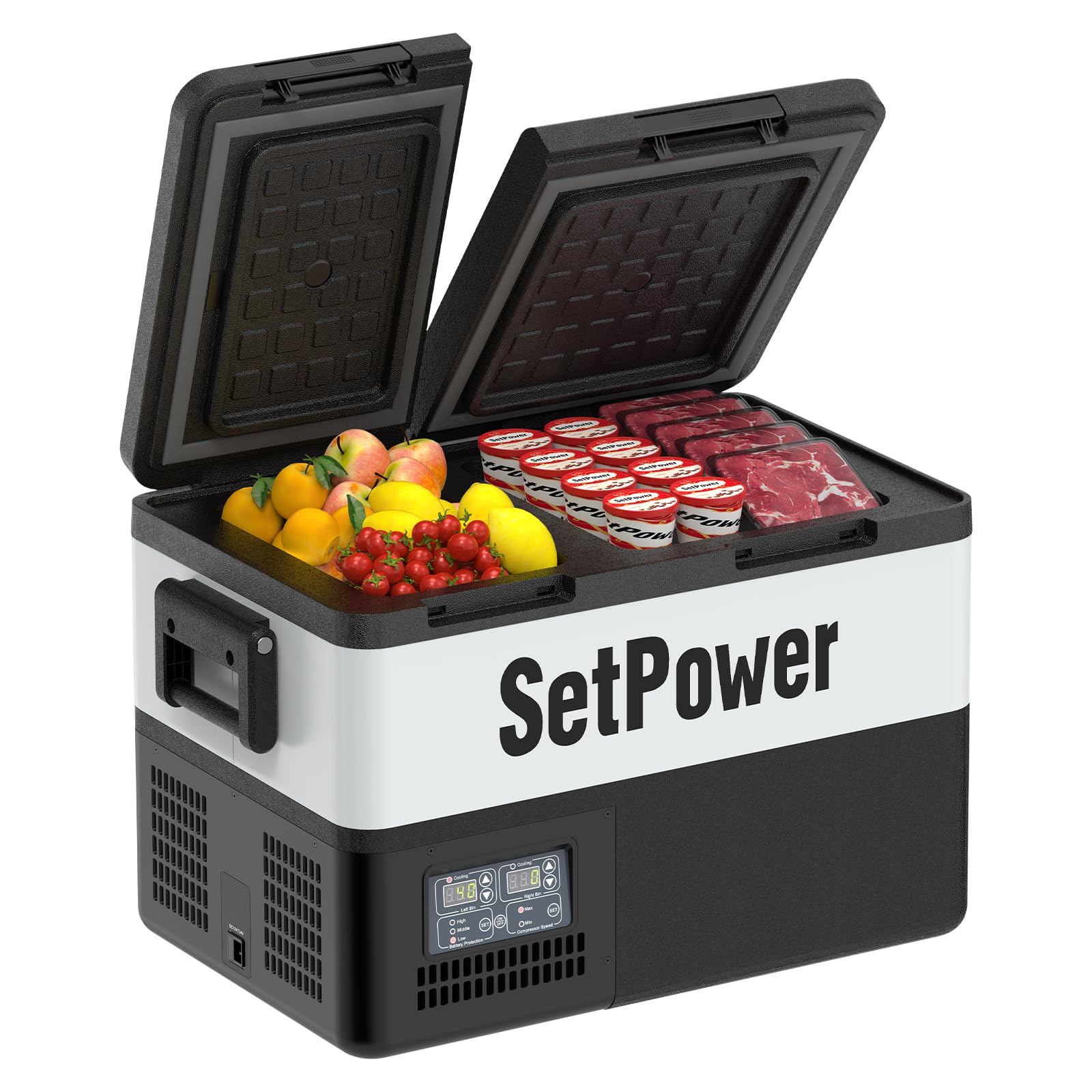
The Setpower PT35 is a versatile dual-zone portable refrigerator and freezer designed for various applications, including car, camping, RV, truck, vehicle, travel, and home use. This electric cooler operates on both 12/24V DC and 110/240V AC power, offering flexible cooling and freezing capabilities from 0℉ to 50℉ ( -18℃ to 10℃).
Its true dual-zone design allows for independent temperature control in each compartment, preventing flavor transfer and cross-contamination. With efficient cooling performance and low power consumption, the PT35 is an ideal solution for keeping food and beverages fresh on the go.
2. Safety Information
Please read all safety instructions carefully before operating the Setpower PT35 car refrigerator to ensure safe and efficient use.
- Ensure proper ventilation around the unit. Do not block air vents.
- Do not immerse the unit in water or expose it to excessive moisture.
- Use only the provided power cables and AC adapter.
- Keep the unit away from heat sources and direct sunlight.
- Do not operate the unit if the power cord is damaged.
- Always disconnect power before cleaning or performing maintenance.
- This appliance is not intended for use by persons (including children) with reduced physical, sensory or mental capabilities, or lack of experience and knowledge, unless they have been given supervision or instruction concerning use of the appliance by a person responsible for their safety.
3. Setup
3.1 Unpacking
Carefully remove the Setpower PT35 from its packaging. Inspect the unit for any signs of damage. Retain the packaging for future transport or storage.
3.2 Power Connection
The PT35 can be powered by either a 12/24V DC power source (e.g., car cigarette lighter socket) or a 110/240V AC power source (e.g., standard wall outlet) using the included AC adapter.
- DC Power (12/24V): Connect the 12/24V DC power cable to the DC input port on the refrigerator and then to your vehicle's power outlet.
- AC Power (110/240V): Connect the AC adapter to the AC input port on the refrigerator, then plug the adapter into a standard wall outlet.

3.3 Initial Operation
After connecting to a power source, press the power button on the control panel to turn on the unit. The display will illuminate, showing the current temperatures of both zones. Allow the unit to cool down for approximately 15-30 minutes before loading items, especially if setting to freezing temperatures.
4. Operating Instructions
4.1 Control Panel Overview
The control panel features an LCD display for each zone, temperature adjustment buttons (up/down arrows), a SET button, and buttons for MAX/ECO cooling modes and battery protection settings.

4.2 Temperature Adjustment
To adjust the temperature for each zone:
- Press the 'SET' button for the desired zone (Left Bin or Right Bin). The temperature display will flash.
- Use the up or down arrow buttons to set the desired temperature.
- Press 'SET' again or wait a few seconds for the setting to be saved.
The temperature range is 0℉ to 50℉ (-18℃ to 10℃). The PT35 features a true dual-zone design, allowing one compartment to function as a freezer and the other as a refrigerator simultaneously, or both as either.

4.3 Cooling Modes (MAX/ECO)
The PT35 offers two cooling modes:
- MAX Mode: Provides rapid cooling, ideal for quickly reaching desired temperatures. Power consumption is typically less than 52W/H.
- ECO Mode: Offers energy-efficient operation, consuming less than 35W/H, suitable for maintaining temperatures over longer periods.
To switch between modes, press the 'MAX/ECO' button on the control panel.

4.4 Battery Protection
The unit is equipped with a 3-stage battery monitor to prevent over-discharging of your vehicle's battery. You can select the protection level (High, Medium, Low) based on your battery type and usage needs. Refer to the control panel for specific voltage cut-off points for each level.

5. Maintenance
5.1 Cleaning
Regular cleaning helps maintain the performance and longevity of your refrigerator.
- Always disconnect the power supply before cleaning.
- Wipe the interior and exterior surfaces with a damp cloth and a mild detergent.
- Do not use abrasive cleaners or harsh chemicals, as these can damage the surfaces.
- Ensure the unit is completely dry before reconnecting power.
5.2 Ventilation
Periodically check that the ventilation openings are clear of dust and debris to ensure efficient cooling. Use a soft brush or vacuum cleaner to gently clean the vents.
6. Troubleshooting
If you encounter issues with your Setpower PT35, refer to the following common troubleshooting steps:
- Unit does not power on: Check if the power cable is securely connected to both the unit and the power source. Verify that the power source (vehicle outlet or wall socket) is functional.
- Unit is not cooling: Ensure the temperature settings are correctly configured. Check if the ventilation openings are clear. If using DC power, verify the battery protection setting is not too high, which might cause the unit to shut off prematurely if the battery voltage drops.
- Unusual noise: A slight humming sound from the compressor is normal. If you hear loud or unusual noises, ensure the unit is on a stable, flat surface and not touching any objects that could vibrate.
- Error codes on display: If an error code appears, disconnect power for a few minutes and then reconnect. If the error persists, contact customer support.
7. Specifications
| Feature | Specification |
|---|---|
| Model Name | PT35 with AC |
| Capacity | 35 Liters (37 Quarts) |
| Product Dimensions (D x W x H) | 24.4" x 15.7" x 17.1" |
| Item Weight | 38 Pounds |
| Voltage | 12/24V DC & 110/240V AC |
| Temperature Range | 0℉ - 50℉ (-18℃ - 10℃) |
| Cooling Method | Compressor |
| Noise Level | Below 42dB |
| Power Consumption (ECO Mode) | Less than 35W/H |
| Power Consumption (MAX Mode) | Less than 52W/H |
| Special Features | Dual Zone, Dual Temperature Control, Anti-Shake (up to 40 degrees), 3-Stage Battery Protection, Interior LED Light |

8. Warranty Information
The Setpower PT35 car refrigerator comes with the following warranty:
- Compressor: 3-year technical support and warranty.
- Other Parts: 1-year warranty for all other components.
Please retain your proof of purchase for warranty claims.
9. Customer Support
For any product questions, technical assistance, or warranty inquiries, please do not hesitate to contact Setpower customer service. Refer to the contact information provided in your purchase documentation or visit the official Setpower website for support details.


