
1. Product Overview
The Davis Instruments Wireless Vantage Pro2 Plus is a professional-grade weather station designed for accurate and reliable environmental monitoring. This system provides real-time data updates every 2.5 seconds and features an industry-leading transmission range of 300 meters from the sensor suite to the console. It is engineered for durability and precision, making it suitable for a wide range of applications.
Key Features:
- Accurate Data: Real-time weather data updates every 2.5 seconds.
- Extended Range: 300 m (1000 ft) wireless transmission range.
- Comprehensive Sensors: Includes outside temperature and humidity sensors in a passive radiation shield, wind speed and direction, rainfall, and integrated UV and Solar Radiation sensors.
- Flexible Anemometer Placement: Anemometer can be mounted up to 12 m (40 ft) from the rest of the sensor suite.
- WeatherLink Console: Features a vibrant, HD color touchscreen for data display and interaction.
- Durable Construction: Rugged, weather-proof housing for the sensor suite ensures years of reliable data collection.
- Power Options: Sensor suite is solar-powered with battery backup; console is AC-powered with battery backup.
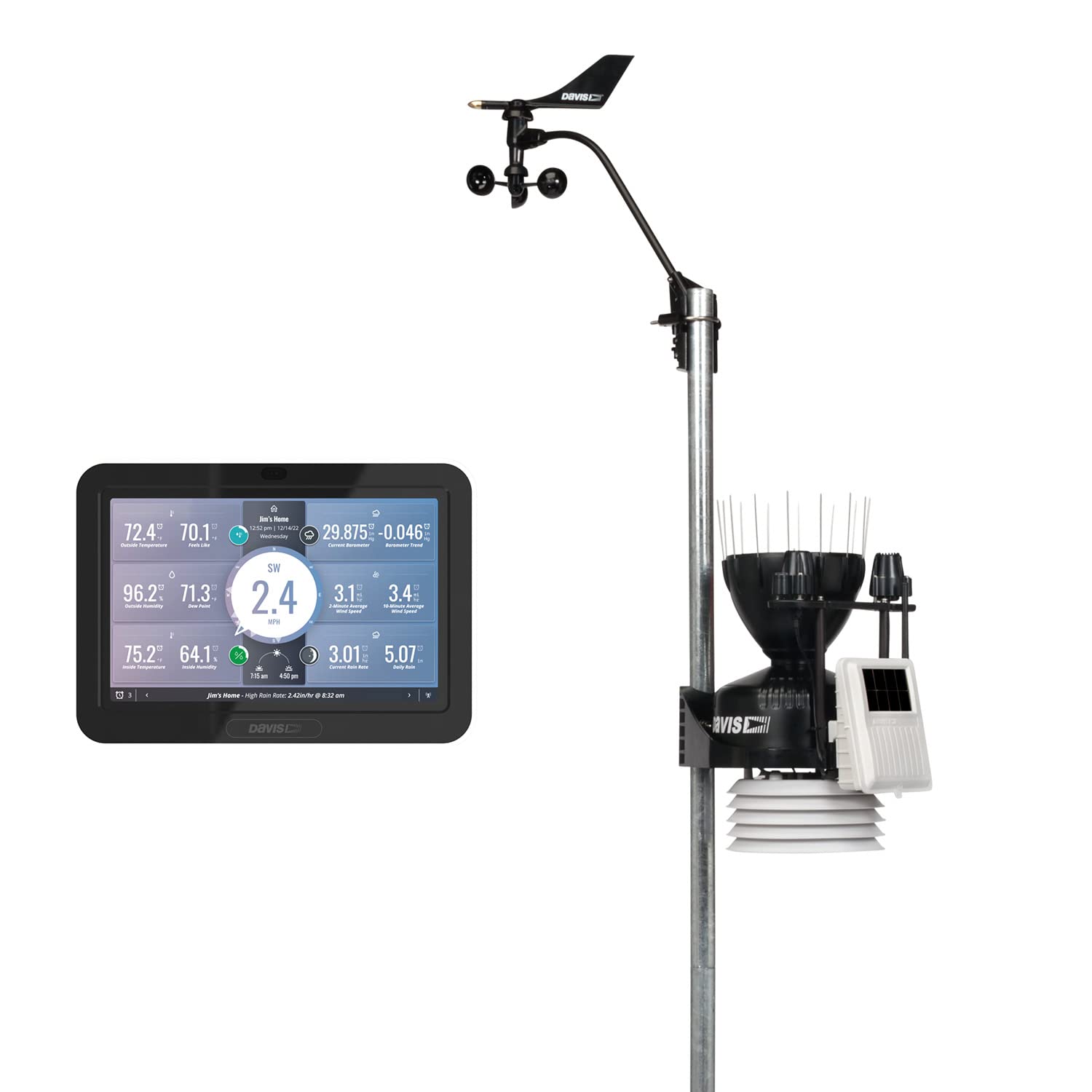
The Vantage Pro2 Plus is designed, assembled, and rigorously tested in the USA, ensuring high standards of quality and performance. It is trusted by professionals worldwide for its scientific-grade precision and adaptability.
2. Setup and Installation
Proper setup is crucial for accurate data collection. This section outlines the general steps for installing your Vantage Pro2 Plus weather station.
2.1 Sensor Suite Installation
The integrated sensor suite (ISS) includes sensors for temperature, humidity, rainfall, UV, and solar radiation. The anemometer, which measures wind speed and direction, is separate and can be mounted up to 12 meters (40 feet) away from the ISS for optimal wind readings.
- Site Selection: Choose a location for the ISS that is free from obstructions (buildings, trees) that could interfere with wind, rain, or solar readings. Ensure good sun exposure for the solar panel.
- Mounting: Securely mount the ISS to a pole or mast using the provided hardware. Ensure it is level for accurate rain collection.
- Anemometer Placement: Mount the anemometer in an area with clear airflow, ideally at a height of 10 meters (33 feet) above ground level, away from the ISS. Connect it to the ISS using the provided cable.
- Power: The sensor suite is solar-powered and includes a battery backup. Ensure the solar panel is oriented to receive maximum sunlight.


2.2 WeatherLink Console Setup
The WeatherLink Console is your primary interface for viewing and interacting with your weather data.
- Power Connection: Connect the console to an AC power source. It also has a battery backup.
- Initial Configuration: Follow the on-screen prompts to connect to your Wi-Fi network and configure your devices. This includes setting up the sensor suite and any additional sensors.
- Data Synchronization: Once connected, the console will begin receiving data from the sensor suite and can push this data to the WeatherLink Cloud.

2.3 Setup Video Guide
For a visual guide on the robust design and setup considerations for the Vantage Pro2, please refer to the following video:
3. Operation
Operating your Davis Instruments Vantage Pro2 Plus involves interacting with the WeatherLink Console and the associated WeatherLink app/website to access and analyze your weather data.
3.1 WeatherLink Console Interface
The console features an intuitive HD color touchscreen display. You can customize the dashboard to view up to 21 different weather parameters, including temperature, humidity, wind speed and direction, rainfall, UV index, and solar radiation. The console also allows you to view current data, daily highs/lows, and historical records from over 80 Davis sensors.
- Real-time Data: View live updates of all measured parameters.
- Historical Data: Access daily, weekly, monthly, and yearly summaries.
- Customization: Personalize your display to show the most relevant information.
- Alarms: Set over 100 custom alarms for various weather conditions, with a choice of 12+ sounds.
3.2 WeatherLink Cloud and App
The WeatherLink Console seamlessly integrates with the WeatherLink Cloud, allowing you to access your data anytime, anywhere, via the WeatherLink app on your smartphone or tablet, or through the WeatherLink.com website.
- Remote Access: Monitor your weather station from any internet-connected device.
- Data Analysis: View and analyze historical data through charts and graphs.
- Community Sharing: Join a global network of weather enthusiasts and share your real-time weather data.
- Alerts: Receive notifications for custom alarms directly on your mobile device.

3.3 Console Operation Video Guide
To understand how to access, analyze, and understand your hyperlocal weather data using the WeatherLink Console, watch this video:
4. Maintenance
Regular maintenance ensures the longevity and accuracy of your Davis Instruments Vantage Pro2 Plus weather station.
- Sensor Cleaning: Periodically inspect and clean the rain collector, radiation shield, and anemometer cups/vane to remove debris, dust, or insects that could affect readings. Use a soft cloth and water; avoid abrasive cleaners.
- Battery Check: While the sensor suite is solar-powered, it uses a battery backup. Check the battery status periodically, especially after extended periods of low sunlight. The console also has a battery backup that should be checked.
- Firmware Updates: Ensure your WeatherLink Console and any connected devices have the latest firmware. Updates often include performance improvements and bug fixes. Check the Davis Instruments website or WeatherLink app for notifications.
- Physical Inspection: Annually inspect all mounting hardware, cables, and connections for wear, corrosion, or damage. Tighten any loose components.
5. Troubleshooting
This section provides general guidance for common issues you might encounter with your weather station.
5.1 No Data on Console
- Check Power: Ensure the console is properly connected to AC power and its battery backup is charged.
- Sensor Suite Power: Verify the sensor suite's solar panel is receiving adequate sunlight and its battery backup is functional.
- Wireless Connection: Confirm the sensor suite and console are within range and have a clear line of sight. Check for any new obstructions.
- Device Configuration: Re-check the device configuration on the console to ensure the sensor suite is correctly paired.
5.2 Inaccurate Readings
- Sensor Obstructions: Inspect all sensors (rain collector, anemometer, radiation shield) for any physical obstructions or debris.
- Mounting: Ensure the sensor suite is level and securely mounted. The anemometer should be in an area with unobstructed wind flow.
- Environmental Factors: Extreme local conditions or microclimates can sometimes cause readings to differ from regional forecasts.
5.3 Connectivity Issues (WeatherLink Cloud/App)
- Wi-Fi Connection: Verify the console's Wi-Fi connection is active and stable.
- Internet Access: Ensure your home network has active internet access.
- Account Status: Log in to WeatherLink.com to check your account status and ensure your station is registered and active.
- App/Browser: Try restarting the WeatherLink app or clearing your browser's cache if using the website.
6. Specifications
Below are the technical specifications for the Davis Instruments Wireless Vantage Pro2 Plus Weather Station.
| Feature | Specification |
|---|---|
| Brand | Davis Instruments |
| Model | Vantage Pro2 Plus |
| Power Source | Solar Powered (Sensor Suite), AC Powered (Console) |
| Special Feature | Weather Resistant |
| Connectivity Technology | Wi-Fi |
| Temperature Accuracy | 0.5 °C |
| Included Components | Instruction Manual, WeatherLink Console |
| Color | Black, White |
| Style | Modern |
| Batteries Required | 1 Lithium Polymer battery (included) |
| Date First Available | March 28, 2023 |
7. Warranty and Support
Davis Instruments stands behind the quality of its products. For detailed warranty information, please refer to the warranty card included with your product or visit the official Davis Instruments website. For technical support, troubleshooting assistance, or to purchase replacement parts, please contact Davis Instruments customer service directly.
Online Resources:
- Visit the Davis Instruments website for product manuals, FAQs, and support articles.
- Explore the WeatherLink.com platform for data access and community forums.


