1. Introduction
This manual provides essential information for the safe and effective use of your OSIM uSqueez 2 Smart Leg Massager. Please read it thoroughly before operating the device and retain it for future reference. The OSIM uSqueez 2 Smart is designed to provide a comprehensive leg massage experience, targeting feet, calves, and thighs with various massage techniques.

Image 1.1: The OSIM uSqueez 2 Smart Leg Massager, showcasing its ergonomic design and dark grey finish with purple accents.
2. Safety Information
To ensure safe operation and prevent injury or damage, please observe the following safety precautions:
- Always unplug the massager from the power outlet immediately after use and before cleaning.
- Do not use the massager near water or in damp environments.
- Keep the power cord away from heated surfaces.
- Do not operate the massager if it has a damaged cord or plug, or if it is not working properly.
- Consult a physician before using if you have medical conditions such as heart disease, pregnancy, diabetes, or if you use a pacemaker.
- Do not use the massager on swollen, inflamed, or injured areas.
- This appliance is not intended for use by persons with reduced physical, sensory, or mental capabilities unless supervised or instructed.
- Ensure the voltage specified on the product matches your local power supply.
3. Product Features
The OSIM uSqueez 2 Smart Leg Massager incorporates advanced features for a comprehensive massage experience:
3.1 Massage Techniques
- Kneading Plates: Emulate the hands of a professional masseuse for deep tissue relief.
- Acupressure Massage Nodes: Target specific acupressure points on the feet, calves, and thighs.
- Reflex Rollers: Provide stimulating reflexology massage to the soles of the feet.
- Warm Air: Integrated heat therapy to enhance relaxation and circulation.
- Vibration: Gentle vibrations to soothe muscles and improve comfort.
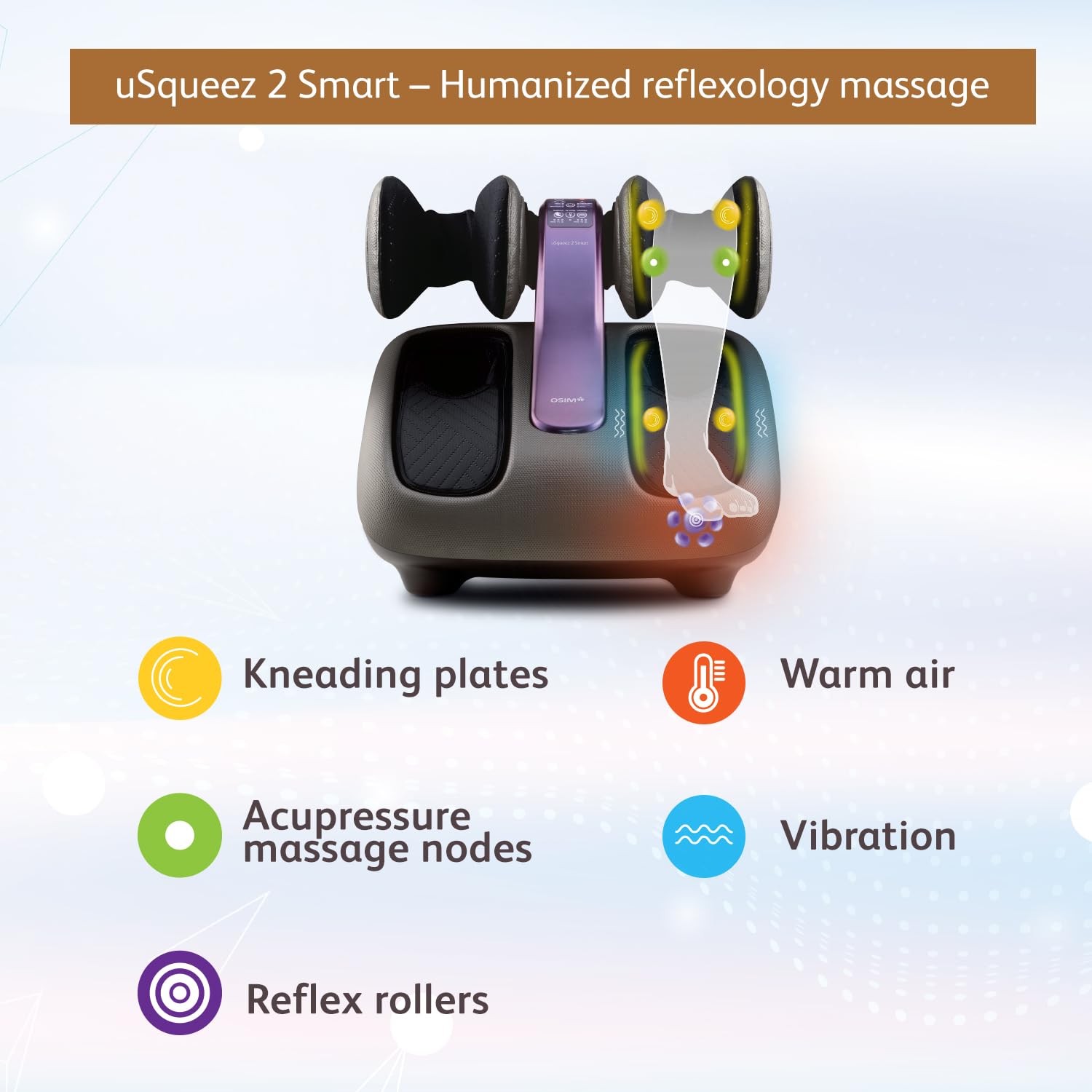
Image 3.1: Diagram illustrating the five core massage techniques: Kneading Plates, Acupressure Massage Nodes, Reflex Rollers, Warm Air, and Vibration.
3.2 Auto Massage Programs
The device offers 6 pre-programmed massage routines tailored for different needs:
- Reflexology: Focuses on stimulating reflex zones in the feet.
- Calves: Targets calf muscles for relief and relaxation.
- Thighs: Provides massage to the thigh area.
- Sleep: A gentle program designed to promote relaxation before sleep.
- Circulation: A program aimed at improving blood flow.
- Deep Comfort: A comprehensive program for overall leg comfort.

Image 3.2: The control panel of the uSqueez 2 Smart, displaying options for vibration, warm air, kneading, and the six auto massage programs.
3.3 Adjustable Design
- 158° Adjustment: The kneading plates can be adjusted up to 158 degrees to target feet, calves, and thighs effectively.
- Wide & Narrow Modes: The kneading plates can be adjusted to accommodate different leg sizes and allow for a stronger massage experience in Narrow mode.

Image 3.3: Visual representation of the 5 adjustable positions for full leg coverage and the Wide/Narrow modes for the kneading plates.
3.4 Additional Features
- Sleek Design: Encased with textured leatherette, the uSqueez 2 features a modern aesthetic.
- Washable Cloth: The fabric covering the base massager can be easily removed and washed for hygiene.

Image 3.4: The OSIM uSqueez 2 Smart shown in different environments (office, living room, bedroom) and close-ups of its sleek design and washable cloth feature.
4. Setup
Follow these steps to set up your OSIM uSqueez 2 Smart Leg Massager:
- Unpacking: Carefully remove the massager from its packaging. Ensure all components, including the user manual, are present.
- Placement: Place the massager on a flat, stable surface. Ensure there is enough space around the unit for comfortable use and proper ventilation.
- Power Connection: Connect the power cord to the massager's power inlet, then plug it into a suitable 220-240V ~ 50-60Hz electrical outlet.
- Initial Inspection: Before first use, inspect the massager for any visible damage.
5. Operating Instructions
To begin using your OSIM uSqueez 2 Smart Leg Massager:
- Positioning: Sit comfortably in a chair or sofa. Place your feet, calves, or thighs into the massage compartments. Adjust the angle of the massager to target the desired area using the adjustable plates.
- Power On: Press the power button on the control panel to turn on the massager.
- Select Program: Choose one of the 6 auto massage programs (Reflexology, Calves, Thighs, Sleep, Circulation, Deep Comfort) by pressing the corresponding button.
- Adjust Settings:
- Intensity: Adjust the massage intensity as desired.
- Heat Therapy: Activate or deactivate the warm air function.
- Kneading Width: Select between Wide or Narrow mode for the kneading plates based on your leg size and preferred massage strength.
- Vibration: Turn the vibration function on or off.
- Duration: The massager has an auto-timer of 15 minutes. It will automatically shut off after this period. You can manually stop the massage at any time by pressing the power button.
- Power Off: After your massage session, press the power button to turn off the unit and unplug it from the power outlet.

Image 5.1: A user comfortably seated on a sofa, utilizing the OSIM uSqueez 2 Smart Leg Massager for a full leg massage.
6. Maintenance
Proper maintenance ensures the longevity and hygiene of your massager:
- Cleaning: Always unplug the massager before cleaning. Wipe the exterior with a soft, damp cloth. Do not use abrasive cleaners or solvents.
- Washable Cloth: The fabric covers inside the massage compartments can be removed and hand-washed with mild detergent. Allow them to air dry completely before reattaching.
- Storage: Store the massager in a cool, dry place, away from direct sunlight and extreme temperatures. Avoid placing heavy objects on top of the unit.
- Cord Care: Do not wrap the power cord tightly around the unit. Avoid twisting or bending the cord excessively.
7. Troubleshooting
If you encounter any issues with your OSIM uSqueez 2 Smart Leg Massager, refer to the following common problems and solutions:
- Massager does not turn on:
- Ensure the power cord is securely plugged into both the massager and a working electrical outlet.
- Check if the power outlet is functional by plugging in another appliance.
- Massage feels weak or inconsistent:
- Adjust the kneading plates to 'Narrow' mode for a stronger massage.
- Ensure your legs are properly positioned within the compartments.
- Select a different auto program or adjust intensity settings.
- Unusual noises during operation:
- Turn off the massager and check for any obstructions in the massage mechanisms.
- If the noise persists, discontinue use and contact customer support.
- Heat function not working:
- Ensure the warm air function is activated on the control panel.
- Allow a few minutes for the heat to build up.
If the problem persists after attempting these solutions, please contact OSIM customer support.
8. Specifications
| Feature | Detail |
|---|---|
| Model Name | uSqueez 2 Smart |
| Model Number | OS-393S |
| Voltage | 220-240V ~ 50-60Hz |
| Power Consumption | 60W |
| Auto Timer | 15 minutes |
| Vibration Speed | Approx. 1750 - 2600 rpm |
| Kneading Speed | Approx. 4 - 8 rpm |
| Warm Air Temperature | Approx. 38 - 45°C |
| Product Dimensions (LxWxH) | 51.5 x 44.5 x 47 cm |
| Item Weight | 10 kg |
| Material | Acrylonitrile Butadiene Styrene |
| Included Components | uSqueez2 Smart Foot Massager, User Manual |

Image 8.1: Diagram illustrating the dimensions and key specifications of the OSIM uSqueez 2 Smart Leg Massager.
9. Warranty and Support
Your OSIM uSqueez 2 Smart Leg Massager comes with a 1-Year Warranty from the OSIM brand.
For warranty claims, technical support, or any inquiries, please contact:
- Manufacturer: Osim International - Health care Company, Headquarters: 65 Ubi Avenue 1, 408939, Singapore
- Importer (India): Osim India (A Division Of Paramount Surgimed Limited), No. 1, L. S. C., Okhla Industrial Area, Phase- 2, New Delhi – 110020, Delhi
- Contact Number: 09311660866 (for India inquiries)
Please retain your proof of purchase for warranty validation.


