1. Introduction
This manual provides essential information for the safe and effective use of your LOKITHOR J402 Jump Starter. Please read this manual thoroughly before operating the device and retain it for future reference. The LOKITHOR J402 is a powerful and versatile portable lithium car battery booster pack designed to jump-start vehicles with up to 9.0L gasoline and 7.0L diesel engines. It also functions as a power bank with 100W two-way fast charging capabilities and features a smart digital screen for real-time monitoring.

Figure 1.1: LOKITHOR J402 Jump Starter Unit and Accessories
2. Safety Information
Always observe the following safety precautions to prevent injury or damage to the device and vehicle:
- Do not short-circuit the jumper clamps. Ensure positive (+) and negative (-) terminals do not touch.
- Do not expose the device to extreme temperatures outside the operating range (-4°F to 140°F).
- Keep the device away from moisture and water, although it is IP65 water-resistant, prolonged submersion should be avoided.
- Do not attempt to disassemble or modify the device. Refer all servicing to qualified personnel.
- Ensure proper ventilation during use and charging.
- Keep out of reach of children.
- Always connect the positive (red) clamp to the positive (+) battery terminal and the negative (black) clamp to the negative (-) battery terminal or a suitable ground point on the vehicle chassis.
- Disconnect the clamps in reverse order: negative first, then positive.

Figure 2.1: Integrated Safety Protection Technologies
3. Product Overview
3.1 Package Contents
Verify that all items are present in the package:
- J402 Portable Lithium Car Battery Jump Starter
- LO-CLAMP-Pro (Jump start clamps)
- 12V adapter
- User Manual
- USB-C to USB-C cable
- USB-A to USB-C cable

Figure 3.1: What's in the Box
3.2 Key Features
- Powerful Performance: 3000A peak current, capable of up to 60 jump-starts on a full charge. Suitable for 9.0L gas and 7.0L diesel engines.
- Intelligent Multi-Protection: Real-time battery voltage detection, Spark-Proof, Reverse-Charge, Over-Charge, Over-Current, Short-Circuit, Reverse-Polarity, Low-Temp, High-Temp, Over-Voltage, and Over-Load Protection.
- 100W Two-way Fast Charging: Fully recharges in approximately 54 minutes. Can provide enough charge to start a car in just 3 minutes.
- Extended Standby: Up to 48-month standby time due to ultra-low self-discharge rate.
- Durable Design: IP65 water-resistant and 94V0 flame retardant enclosure, designed to withstand harsh environments (-4°F to 140°F).
- Multi-functional: Functions as a jump starter, power bank for USB-C devices, and features a 300 lumen LED flashlight with multiple modes (lighting, SOS, strobe).

Figure 3.2: Key Performance Indicators
3.3 Control Panel and Indicators
The J402 features a 3.75-inch digital display interface that provides real-time information about the device's status.
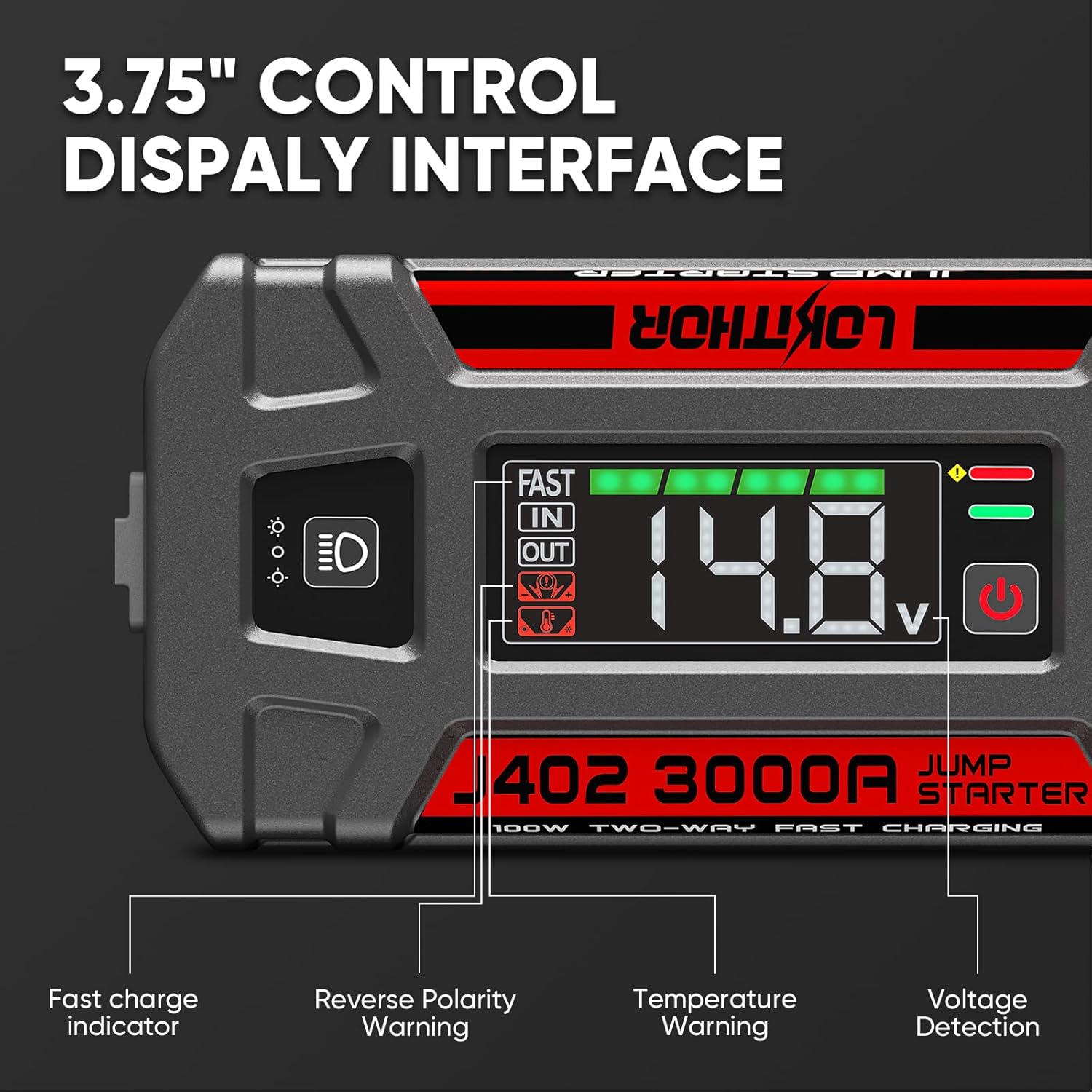
Figure 3.3: Control Display Interface
- Fast Charge Indicator: Indicates when fast charging is active.
- IN/OUT Indicators: Shows whether the device is charging (IN) or discharging (OUT).
- Reverse Polarity Warning: Alerts if clamps are connected incorrectly.
- Temperature Warning: Indicates if the device temperature is outside safe operating limits.
- Voltage Detection: Displays the real-time voltage of the connected battery.
- Battery Indicator: Shows the internal battery level of the jump starter.
- LED Light Power Button: Activates the built-in flashlight.
- Power Button: Turns the unit on/off.
4. Setup
4.1 Initial Charging
Before first use, fully charge your LOKITHOR J402. Use the provided USB-C to USB-C cable and a compatible 100W USB-C power adapter (not included) for fastest charging. The digital display will show the charging status.
4.2 Connecting Clamps
Ensure the jump starter is turned off before connecting the clamps. Insert the jumper cable connector firmly into the jump starter's output port. The unit is designed with an integrated spark-proof system for safety.

Figure 4.1: Integrated Spark-Proof Design
5. Operating Instructions
5.1 Jump Starting a Vehicle
Follow these steps to jump-start your vehicle:
- Ensure the LOKITHOR J402 is sufficiently charged.
- Connect the red (positive, +) clamp to the positive terminal of the vehicle's battery.
- Connect the black (negative, -) clamp to the negative terminal of the vehicle's battery or a solid, unpainted metal part of the engine block/chassis.
- Turn on the LOKITHOR J402. The display will show the battery voltage.
- Start your vehicle.
- Once the vehicle starts, immediately disconnect the black (negative) clamp first, then the red (positive) clamp.
- Turn off the LOKITHOR J402.
Force Start Function (for batteries below 8V)
If the vehicle battery voltage is extremely low (below 8V), the normal jump-start procedure may not work. In this case, use the force start function:
- Connect the clamps as described above.
- Long press the 'Power' button and the 'LED Light' button simultaneously until the green indicator flashes.
- Start your vehicle within 30 seconds.
- Immediately disconnect the clamps after the vehicle starts.

Figure 5.1: Jump Start Procedures
5.2 Using as a Power Bank
The LOKITHOR J402 can charge various electronic devices via its USB-C (100W max) and USB-A (18W max) output ports.
- Connect your device to the appropriate USB port using a compatible cable.
- The device will automatically begin charging.

Figure 5.2: Multi-Device Charging Capability
5.3 Using the LED Flashlight
The built-in 300 lumen LED flashlight offers multiple modes for various situations:
- To turn on/off: Long press the LED light power button.
- To cycle modes: Short press the LED light power button. Modes include: Continuous Lighting, SOS (Morse code), and Strobe.

Figure 5.3: LED Flashlight Modes and Uses
6. Charging the Device
The LOKITHOR J402 supports 100W two-way fast charging, allowing for quick recharges.
6.1 Fast Charging via USB-C
For optimal charging speed, use the provided USB-C to USB-C cable with a 100W compatible power adapter.
- Connect the USB-C cable to the J402's USB-C port and to a power adapter.
- A full charge takes approximately 54 minutes.
- A 3-minute charge can provide enough power for a single jump start.

Figure 6.1: 100W Two-Way Fast Charging
6.2 Charging via 12V Adapter
You can also charge the J402 using the provided 12V adapter in your vehicle's cigarette lighter socket.
- Connect the 12V adapter to the J402's input port and then to your vehicle's 12V accessory socket.
- This method is convenient for charging on the go.

Figure 6.2: Charging Anytime, Anywhere
7. Maintenance
- Storage: Store the LOKITHOR J402 in a cool, dry place away from direct sunlight and extreme temperatures.
- Battery Care: To maintain optimal battery health, recharge the unit every 3-6 months, even if not in use. The device boasts an ultra-low self-discharge rate, allowing for up to 48 months of standby time.
- Cleaning: Use a soft, dry cloth to clean the exterior of the device. Do not use harsh chemicals or abrasive materials.
- Inspection: Regularly inspect the jumper clamps and cables for any signs of damage or wear. Replace if necessary.

Figure 7.1: Extended Standby Time

Figure 7.2: IP65 Waterproof Level Assembly Design
8. Troubleshooting
The LOKITHOR J402 is equipped with a self-inspection system that displays error codes for various conditions. Refer to the table below for common issues and their solutions.

Figure 8.1: Error Code Display
| Problem | Possible Cause | Solution |
|---|---|---|
| Device does not turn on | Low battery; Device malfunction | Charge the device; Contact customer support |
| Vehicle does not start | Incorrect clamp connection; Vehicle battery too low; Engine issue | Check clamp polarity; Use force start function; Consult a mechanic |
| Error code displayed | Specific fault detected (e.g., reverse polarity, over-temperature) | Refer to the device's display for the specific error code and consult the full manual for detailed resolution steps. Generally, disconnect and reconnect clamps, allow device to cool, or recharge. |
| Device not charging | Faulty cable/adapter; Charging port issue | Try a different cable/adapter; Ensure connections are secure; Contact customer support |
9. Specifications
| Feature | Specification |
|---|---|
| Model | J402 |
| Peak Current | 3000 Amps |
| Battery Capacity | 24000mAh (Lithium Polymer) |
| Engine Compatibility | Up to 9.0L Gas, 7.0L Diesel |
| Charging Input | USB-C (100W Max) |
| Charging Output | USB-C (100W Max), USB-A (18W Max) |
| Dimensions (D x W x H) | 4.19" x 9.45" x 2.36" |
| Item Weight | 3.86 pounds (1750 Grams) |
| Operating Temperature | -4°F to 140°F |
| Water Resistance | IP65 |
| Flashlight Luminosity | 300 Lumens |
10. Warranty and Support
10.1 Warranty Information
The LOKITHOR J402 Jump Starter comes with a 12-month warranty from the date of purchase. This warranty covers manufacturing defects and workmanship under normal use. Please retain your proof of purchase for warranty claims.
10.2 Customer Support
If you encounter any issues or have questions regarding your LOKITHOR J402 Jump Starter, please do not hesitate to contact LOKITHOR customer service. Our team is available to provide lifetime service support.
For contact information, please refer to the official LOKITHOR website or the contact details provided on your product packaging.


