
USHINING T380
USHINING T380 4G Unlocked Flip Phone
User Manual
1. Introduction
Thank you for choosing the USHINING T380 4G Unlocked Flip Phone. This device is designed with simplicity and ease of use in mind, making it ideal for seniors. It features large buttons, a clear display, and essential functions like SOS emergency calls, speed dial, and a charging dock for convenient power management. This manual provides detailed instructions to help you set up, operate, and maintain your new phone.

Image: The USHINING T380 flip phone, closed and resting in its charging dock. The phone is blue with a black dock.
2. Package Contents
Please check the box for the following items:
- USHINING T380 4G Senior Cell Phone
- Charging Dock
- Long Lasting Battery (1000mAh Lithium Ion)
- User Manual (this document)
- Speedtalk SIM Card (if included with your purchase)
- Charging Cord (USB to Micro USB)
- Power Adapter

Image: A visual representation of the items included in the product package, showing the phone, charging dock, battery, user manual, Speedtalk SIM card, and charging cable with adapter.
3. Product Features
The USHINING T380 is equipped with a range of features designed for convenience and safety:
- 4G LTE Connectivity: For reliable call quality and basic internet access.
- Large Buttons & Clear Display: Easy to see and press for comfortable dialing and navigation.
- SOS Emergency Button: Quickly contacts pre-set emergency numbers with a single press.
- Speed Dial: Assign up to 8 contacts for quick calling.
- Charging Dock: Simple drop-in charging, eliminating the need to fumble with cables.
- FM Radio & MP3 Player: Enjoy audio entertainment.
- Basic Camera: For simple photo capture.
- Flashlight: Convenient for low-light situations.
- Bluetooth: For connecting to compatible headsets or other devices.
- Calendar & Alarm Clock: Useful daily tools.
- Blacklist Function: Protects against unwanted calls.

Image: A graphic displaying various practical features of the phone, including FM Radio, Camera, Bluetooth, 4G LTE, MP3 player, Calendar, Call logs, Flashlight, Speed Dial, Alarm Clock, SMS, SOS, and Large buttons.
4. Setup
4.1 Battery Installation
- Open the back cover of the phone by gently prying it from the notch at the bottom.
- Align the battery's gold contacts with the phone's terminals.
- Press the battery down firmly until it clicks into place.
- Replace the back cover, ensuring it snaps securely.
4.2 SIM Card & Micro SD Card Installation
The phone supports dual SIM cards (Standard SIM) and one Micro SD card for expanded storage.
- With the back cover and battery removed, locate the SIM card slots. There are two standard SIM slots and one Micro SD card slot.
- Gently slide your SIM card(s) into the designated slot(s) with the gold contacts facing down, following the diagram on the phone.
- If installing a Micro SD card, carefully slide it into its slot. Note: There may be a small plastic cover over the Micro SD slot; slide the card underneath it.
- Reinsert the battery and replace the back cover.
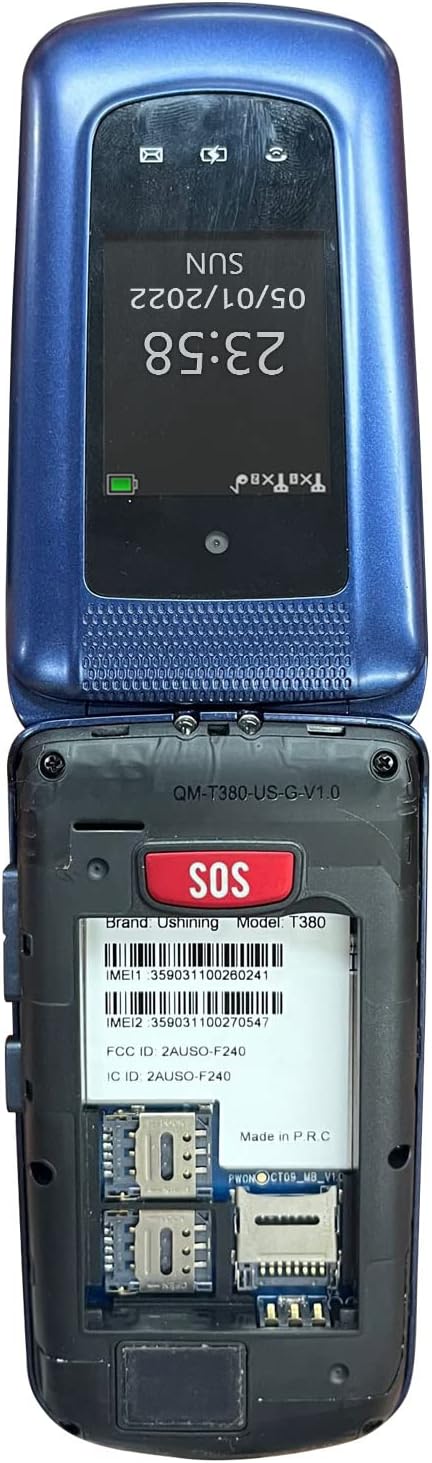
Image: The back of the USHINING T380 flip phone with the cover removed, revealing the battery compartment and slots for two SIM cards and one Micro SD card.
4.3 Charging the Phone
Before first use, fully charge the phone for approximately 3 hours.
- Using the Charging Dock: Place the phone into the charging dock, ensuring it sits securely. The charging indicator on the phone's screen will activate.
- Direct Charging: Connect the Micro USB charging cable directly to the phone's charging port and the other end to the power adapter, then plug into a wall outlet.
4.4 Power On/Off
- To Power On: Press and hold the red End Call/Power button (⏏) until the screen lights up.
- To Power Off: Press and hold the red End Call/Power button (⏏) until the power off options appear, then select 'Power off'.
4.5 Network Compatibility
The USHINING T380 is designed to work with T-Mobile and its associated MVNOs (Mobile Virtual Network Operators) in the United States. It is not compatible with AT&T, Sprint, or Verizon networks.
Compatible Carriers (T-Mobile Network):
- T-Mobile
- Metro by T-Mobile
- RedPocket (GSMT)
- Speedtalk Mobile
- Tello
- Lyca Mobile
- Ultra Mobile
- Mint Mobile

Image: A diagram illustrating compatible carriers (T-Mobile, Metro, RedPocket, Speedtalk, Tello, Lyca, Ultra, Mint Mobile) and incompatible carriers (AT&T, Sprint, Verizon) for the USHINING T380 phone.
5. Operating Instructions
5.1 Basic Call Functions
- Making a Call: Enter the phone number using the keypad and press the green Call button (✆).
- Answering a Call: When the phone rings, open the flip or press the green Call button (✆).
- Ending a Call: Press the red End Call button (⏏) or close the flip.
- Adjusting Volume: Use the volume buttons on the side of the phone during a call.
5.2 SOS Emergency Call
The SOS button is located on the back of the phone. It allows you to quickly contact pre-set emergency contacts.
- Setting Up SOS Contacts: Navigate to the SOS settings in the phone's menu. You can typically add up to 5 emergency numbers. These numbers will be called in sequence until one answers. The phone will also send an emergency SMS message to these contacts.
- Using the SOS Function: In an emergency, press and hold the SOS button on the back of the phone for a few seconds. The phone will activate an alarm, send an SMS to your emergency contacts, and then begin dialing them one by one.

Image: A visual explanation of the SOS Emergency Call feature, showing how it supports up to 5 family numbers and guarantees safety, alongside a Blacklist feature for protection from fraud calls.
5.3 Speed Dial
Assign frequently called numbers to specific keys for quick dialing.
- Setting Up Speed Dial: Go to the phone's settings or contacts menu to find the speed dial options. You can typically assign numbers to keys 2-9.
- Using Speed Dial: Press and hold the assigned number key (e.g., '2' for Son, '3' for Daughter) to automatically dial the pre-set contact.

Image: A graphic demonstrating the 8 speed dial buttons on the phone, allowing users to assign contacts like Son, Daughter, Mom, Dad, etc., for quick access.
5.4 Messaging (SMS)
- Navigate to the 'Messages' menu.
- Select 'Write message' to compose a new SMS.
- Enter the recipient's number or select from contacts, then type your message using the keypad.
- Press 'Send'.
5.5 FM Radio
- Access the 'FM Radio' application from the main menu.
- Use the navigation keys to scan for stations or manually tune to a frequency.
- Headphones may be required to act as an antenna for optimal reception.
5.6 MP3 Player
- Ensure you have MP3 files stored on a Micro SD card inserted into the phone.
- Go to the 'MP3 Player' or 'Music' application.
- Browse and select your desired audio files to play.
5.7 Camera
- Open the 'Camera' application from the menu.
- Frame your shot using the display.
- Press the 'OK' or center navigation button to capture the photo.
5.8 Flashlight
- The flashlight can typically be activated by a dedicated button on the side of the phone or through the main menu.
5.9 Bluetooth
- Go to 'Settings' and then 'Bluetooth'.
- Turn Bluetooth 'On'.
- Search for available devices and pair with your desired Bluetooth headset or speaker.
5.10 Calendar & Alarm Clock
- Access 'Calendar' to view dates and add reminders.
- Access 'Alarm Clock' to set multiple alarms with custom times and tones.
6. Maintenance
- Cleaning: Use a soft, dry cloth to clean the phone's exterior. Avoid liquid cleaners.
- Battery Care: To prolong battery life, avoid extreme temperatures. Do not leave the phone fully discharged for extended periods.
- Storage: Store the phone in a cool, dry place when not in use.
- Avoid Drops: While durable, repeated drops can damage the internal components.
7. Troubleshooting
| Problem | Possible Cause / Solution |
|---|---|
| Phone does not power on | Battery is low or not installed correctly. Charge the phone for at least 30 minutes. Ensure battery is properly seated. |
| "Emergency Call Only" or No Network | SIM card not installed correctly or not activated. Ensure your carrier is compatible with the phone (T-Mobile network only). Contact your service provider. |
| Cannot hear caller / Low sound | Volume is too low. Press the volume up button during a call. Ensure speaker is not blocked. |
| Cannot send/receive SMS | Check network signal. Verify SMS center number in message settings (contact your carrier for this). |
| Flashlight is dim | This phone's flashlight is designed for basic illumination and may not be as bright as smartphone flashlights. Ensure battery is charged. |
| Phone freezes or is unresponsive | Remove the battery, wait a few seconds, then reinsert it and power on the phone. |
8. Specifications
| Feature | Detail |
|---|---|
| Model Name | T380 |
| Brand | USHINING |
| Form Factor | Flip Phone |
| Color | Blue |
| Cellular Technology | 4G |
| Wireless Carrier Compatibility | T-Mobile Network (e.g., T-Mobile, Metro, Speedtalk, Mint Mobile) |
| Screen Size | 2.4 Inches |
| Resolution | 240 x 320 pixels |
| RAM | 64 MB |
| Memory Storage Capacity | 128 MB (Internal) |
| Expandable Storage | Micro SD card slot (card not included) |
| Battery Capacity | 1000 Milliamp Hours (Lithium Ion) |
| Connectivity Technologies | Bluetooth, Cellular |
| Human Interface Input | Buttons, Dial |
| Product Dimensions | 4.09 x 2.11 x 0.83 inches |
| Item Weight | 10.2 ounces |
9. Warranty and Support
For warranty information and technical support, please refer to the documentation provided with your purchase or contact USHINING customer service directly. Contact details can typically be found on the manufacturer's official website or on the product packaging.
Ask a question about this manual
Ask about setup, troubleshooting, compatibility, parts, safety, or missing instructions. Manuals+ will review the question and use this page’s manual context to help answer it.