
1. Introduction
The truefree O1 Open Ear Headphones are designed for comfort and situational awareness, allowing you to enjoy high-quality audio while remaining connected to your surroundings. Featuring a unique open-ear design, these headphones sit outside the ear canal, providing a pain-free listening experience even during extended use.
Equipped with large 16.2mm dynamic drivers, the TRUEFREE O1 delivers powerful stereo sound with crisp highs and rich bass. Advanced directional sound transmission technology minimizes sound leakage, ensuring your audio experience remains private. With Bluetooth 5.3, enjoy stable and fast connections, and benefit from features like crystal clear calls with ENC noise-canceling microphones and extended playtime.

Open-ear Comfort: Experience all-day comfort with nothing covering your ears.

Powerful Stereo Sound: 16.2mm drivers deliver deep bass and high-fidelity audio.

Crystal Clear Calls: Equipped with 4 microphones and ENC noise-canceling technology.

Aware of Danger: Hear surrounding sounds to avoid potential dangers.
2. What's in the Box
Your truefree O1 Open Ear Headphones package includes the following items:
- truefree O1 Open Ear Headphones (Left and Right)
- Charging Case
- USB-C Charging Cable
- User Manual

Contents of the truefree O1 package.
3. Product Diagram
Familiarize yourself with the different parts of your truefree O1 Open Ear Headphones:

Key components of the truefree O1 earbud.
4. Setup
4.1 Charging
Before first use, fully charge your truefree O1 headphones and charging case. The charging case provides up to 45 hours of total playtime, with the earbuds offering up to 10 hours on a single charge.
- Place the earbuds into the charging case.
- Connect the USB-C charging cable to the port on the back of the case and to a power source.
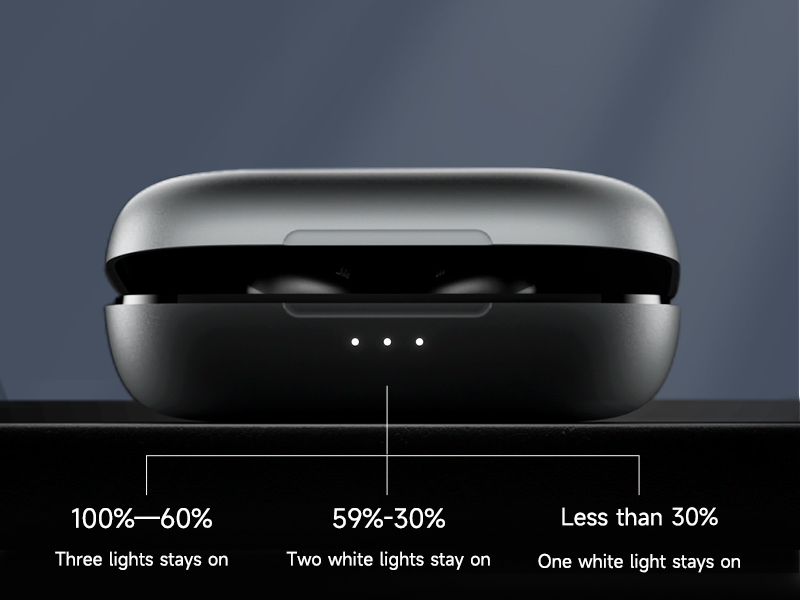
- The LED indicators on the charging case will show the battery level:
- Three lights: 100%–60% charge
- Two lights: 59%–30% charge
- One light: Less than 30% charge

Extended playtime with the charging case.

Charging case LED indicators.
4.2 Pairing
The truefree O1 headphones utilize advanced Bluetooth 5.3 technology for quick and stable connections.
- Open the lid of the charging case. The earbuds will automatically turn on and enter pairing mode.
- On your device (smartphone, tablet, etc.), enable Bluetooth.
- Select "TRUEFREE O1" from the list of available Bluetooth devices to connect.
- Once connected, you will hear a confirmation prompt.

Seamless Bluetooth 5.3 pairing.
Connecting to Multiple Devices (Multipoint Connection)
The truefree O1 supports multipoint connection, allowing you to connect to two devices simultaneously and switch between them easily. This feature needs to be enabled via the Truefree APP.

Dual Connection & Seamless Switching (requires Truefree APP activation).
Video: Learn how to connect your truefree O1 headphones to your phone.
Video: Instructions on connecting truefree O1 headphones to two mobile phones or computers.
5. Operating Instructions
5.1 Wearing the Earbuds
To ensure optimal sound and comfort, wear the truefree O1 earbuds correctly:
- Identify the left (L) and right (R) earbuds.
- Gently hook the earbud over your ear, ensuring the speaker portion rests comfortably in front of your ear canal.
- Adjust for a secure and comfortable fit. The open-ear design means nothing is inserted into your ear canal.

Correct wearing position for truefree O1 earbuds.
5.2 Smart Touch Control
The truefree O1 earbuds feature intuitive touch controls for easy management of music, calls, and other functions:

Overview of touch control gestures.
- Music Play/Pause: Double-tap L/R earbud.
- Previous Track: Press and hold L earbud for 1.5s.
- Next Track: Press and hold R earbud for 1.5s.
- Volume +: Single-tap R earbud.
- Volume -: Single-tap L earbud.
- Answer/Hang up Call: Double-tap L/R earbud.
- Reject a Call: Press and hold L/R earbud for 1.5s.
- Voice Assistant: Triple-tap R earbud.
- Switch Game Mode: Triple-tap L earbud.
5.3 Game Mode
Activate Game Mode for a low-latency audio experience, crucial for gaming and video playback. This mode ensures real-time syncing of audio with visuals, allowing you to accurately hear in-game cues like footsteps and gunfire.

Enhanced gaming experience with low latency Game Mode.
5.4 Truefree APP Control
Download the "Truefree" APP from your device's app store to unlock additional features and customize your listening experience. The app allows you to:
- View earbud battery levels.
- Personalize EQ settings for optimal sound.
- Conduct a hearing test to fine-tune audio.
- Disable touch controls.
- Toggle Game Mode and Dual Device Connection.
- Update earbud firmware.
Customize your truefree O1 experience with the Truefree APP.
Video: Explore the multipoint connection feature of TRUEFREE O1 Open Ear Headphones.
6. Maintenance
Proper maintenance ensures the longevity and optimal performance of your truefree O1 headphones.
- Cleaning: Regularly wipe the earbuds and charging case with a soft, dry, lint-free cloth. Avoid using harsh chemicals or abrasive materials.
- Water Resistance: The truefree O1 headphones are IPX4 water resistant, meaning they are protected against splashes of water from any direction. They are suitable for workouts and light rain, but should not be submerged in water.
- Storage: When not in use, store the earbuds in their charging case to protect them from dust and damage. Store in a cool, dry place away from extreme temperatures.
7. Troubleshooting
If you encounter any issues with your truefree O1 headphones, refer to the common troubleshooting steps below:
| Problem | Possible Solution |
|---|---|
| Earbuds not pairing/connecting | Ensure earbuds are charged. Turn off and on Bluetooth on your device. Forget "TRUEFREE O1" from your device's Bluetooth list and re-pair. Try resetting the earbuds. |
| No sound or low volume | Check device volume and earbud volume. Ensure earbuds are properly seated on your ears. Try adjusting EQ settings in the Truefree APP. |
| Touch controls unresponsive | Ensure your fingers are clean and dry. If enabled, disable and re-enable touch controls via the Truefree APP. |
| Sound leakage | This is inherent to the open-ear design. Ensure earbuds are positioned correctly. Lower the volume if necessary. |
Resetting Your truefree O1 Headphones
If you experience persistent issues, a factory reset can often resolve them:
Video: Step-by-step guide on how to reset your truefree O1 headphones.
8. Specifications
| Feature | Specification |
|---|---|
| Model Name | Truefree O1 |
| Connectivity Technology | Wireless (Bluetooth 5.3) |
| Audio Driver Size | 16.2 Millimeters |
| Battery Life (Earbuds) | Up to 10 hours (single charge) |
| Battery Life (with Charging Case) | Up to 45 hours |
| Charging Time | Approx. 2.5 Hours (for full charge) |
| Control Type | Touch Control |
| Water Resistance Level | Water Resistant (IPX4) |
| Item Weight | 3.63 ounces (103 Grams) |
| Product Dimensions | 2.04 x 2.26 x 1 inches |
| Included Components | Cable, User Manual, Charging Station |
9. Warranty and Support
TRUEFREE is committed to providing you with an excellent experience. If you have any problems or suggestions regarding the product, please do not hesitate to reach out to us. We are ready to offer you a satisfactory solution.
For further assistance, you may refer to the official user manual PDF available here.


