
1. Introduction
The Haozee MmWave Human Presence Sensor is an advanced device designed for detecting both human motion and static presence using 24G millimeter wave radar technology. This sensor integrates with WiFi for smart home automation, offering enhanced detection capabilities compared to traditional Passive Infrared (PIR) sensors. It is suitable for a wide range of applications, from lighting control to security systems.

Figure 1.1: Top view of the Haozee MmWave Human Presence Sensor.
2. Product Overview
This sensor utilizes 24G millimeter wave radar to accurately detect human presence, including subtle movements and static states. It provides real-time data and allows for intelligent scene linkage within your smart home ecosystem.

Figure 2.1: Key functionalities of the Human Presence Sensor.
3. Features
- 24G MMW Radar Sensor: Detects both motion and static presence with enhanced response time and precise distance detection compared to traditional PIR or 5.8G radar sensors.
- Smart Scene Linkage: Enables automatic control of smart devices, such as turning lights on or off, based on detected human presence.
- USB 5V1A Powered: This is a wired sensor that requires continuous 5V USB power for operation.
- APP Remote Control: Configure settings, receive real-time alerts, and monitor presence via a dedicated mobile application.
- Wide Application: Ideal for use in lighting systems, security setups, home appliances, hotels, garages, buildings, transportation, and various Internet of Things (IoT) applications requiring micro-movement and human presence detection.
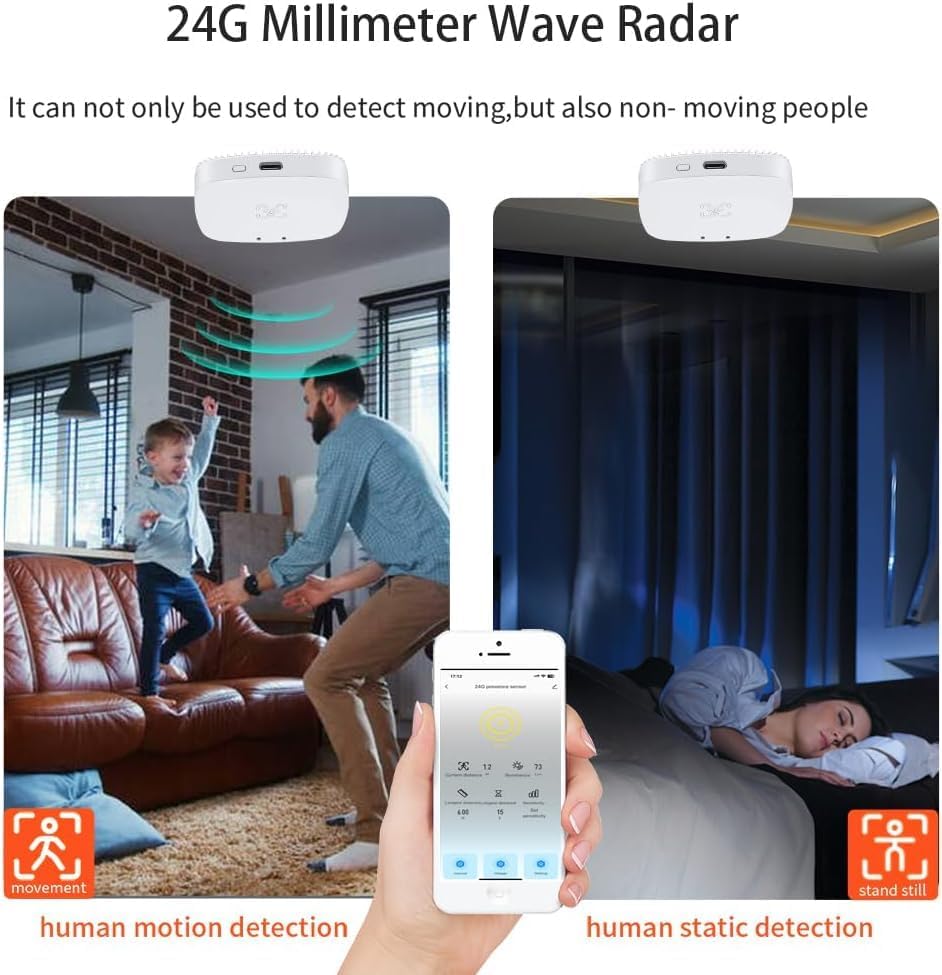
Figure 3.1: The sensor's ability to detect both moving and stationary individuals.
4. Package Contents
The package typically includes:
- Haozee MmWave Human Presence Sensor (Model ZY Wifi Wall Presence)
- USB Power Cable (for 5V1A power supply)
- Mounting Accessories (e.g., screws, adhesive tape for wall/ceiling mounting)
5. Setup
5.1 Powering the Device
Connect the provided USB cable to the sensor's USB port and plug the other end into a 5V1A USB power adapter (not always included). The sensor requires continuous power to operate.

Figure 5.1: Side view of the sensor with its USB power input.
5.2 Mounting
The sensor can be mounted on a wall or ceiling. Choose a location that provides an unobstructed view of the area you wish to monitor. Use the included mounting accessories to secure the sensor firmly.
5.3 App Integration and WiFi Connection
Download the recommended smart home application (e.g., Tuya Smart or Smart Life, as implied by product images) from your device's app store. Follow the in-app instructions to add the sensor and connect it to your 2.4GHz WiFi network. No additional hub is required for WiFi connectivity.
6. Operating Instructions
6.1 Basic Operation
Once powered and connected, the sensor will begin detecting human presence within its configured range. You can monitor its status and receive alerts through the mobile application.
6.2 Smart Scene Automation
Utilize the mobile application to create smart scenes. For example, you can configure the sensor to automatically turn on lights when presence is detected in a room and turn them off when no presence is detected for a set period.

Figure 6.1: Example of smart scene linkage for lighting control.
6.3 Remote Monitoring and Records
The app allows you to remotely view detection records, providing a history of human presence and absence. This feature can be useful for security monitoring.

Figure 6.2: Remote viewing of detection records via the mobile application.
7. Advanced Settings and Customization
7.1 Sensitivity Adjustment
Within the mobile application, you can adjust the sensor's sensitivity level, typically from 0 to 9, to fine-tune its detection capabilities for your specific environment.
7.2 Target Detection Distance
The app allows you to set and view the target detection distance, enabling you to define the precise area the sensor should monitor.
7.3 Illuminance Value
The sensor may provide an illuminance value, which can be used in advanced automation rules, for example, to only turn on lights if the ambient light level is below a certain threshold.

Figure 7.1: App interface for adjusting sensitivity, target distance, and viewing illuminance.
7.4 Minimum and Maximum Detection Distance
You can configure the minimum and maximum detection distances to create a specific alarm zone, optimizing the sensor's performance for your space.

Figure 7.2: Setting the minimum and maximum detection range.
8. Maintenance
To ensure optimal performance, keep the sensor clean and free from dust. Use a soft, dry cloth for cleaning. Avoid using abrasive cleaners or solvents. Ensure the sensor's detection area remains unobstructed.
9. Troubleshooting
- False Alarms or Missed Detections: Adjust the sensitivity settings in the app. Ensure the sensor is mounted correctly and its field of view is clear. Consider adjusting the minimum and maximum detection distances.
- Connectivity Issues: Verify that the sensor is within range of your 2.4GHz WiFi network. Restart the sensor and your WiFi router. Ensure the app is updated to the latest version.
- Reducing False Alarms: To minimize false alarms and improve integration with other sensors, you can configure the interval time for alternating between 'human detected' and 'no one' statuses within the application.
- Sensor Not Powering On: Check the USB cable connection and ensure the 5V1A power adapter is functioning correctly.
10. Specifications
| Manufacturer | Haozee |
| Model Number | ZY Wifi Wall Presence |
| Product Dimensions | 10 x 10 x 5 cm |
| Weight | 80 grams |
| Power Type | USB 5V |
| Maximum Range | 9 Meters |
| Mounting Type | Wall Mount |
| Operating Temperature | Up to 35°C (Ambient) |
| Compatible Devices | Smartphone, WiFi compatible devices |
| Components Included | Human Presence Sensor |
| Batteries Required | No |

Figure 10.1: Product dimensions.
11. Safety Information
- Do not expose the device to extreme temperatures, direct sunlight, or moisture.
- Do not attempt to disassemble or repair the device yourself. Refer to qualified service personnel.
- Keep the device away from strong electromagnetic fields.
- Ensure the power supply meets the specified 5V1A requirements.
12. Warranty and Support
Specific warranty details and support contact information are not available in the provided product data. Please refer to the product packaging or the manufacturer's official website for warranty terms and customer support contacts.


