
ROVE R2-4K PRO
ROVE R2-4K PRO Dash Cam User Manual
Model: R2-4K PRO | Brand: ROVE
1. Introduction
Welcome to the ROVE R2-4K PRO Dash Cam user manual. This guide provides detailed instructions on how to set up, operate, and maintain your new dash camera. The ROVE R2-4K PRO is designed to capture stunning 4K UHD video, offering advanced features like built-in GPS, 5G WiFi connectivity, and a comprehensive 24-hour parking mode to ensure your vehicle's safety and provide crucial evidence when needed.
Please read this manual thoroughly before using your device to ensure proper functionality and to maximize your user experience.
2. What's in the Box
Your ROVE R2-4K PRO Dash Cam package includes the following items:
- R2-4K PRO Dash Cam
- 360° Suction Mount
- 360° Spare 3M Sticky Mount
- DUAL USB Car Charger with Spare USB-C Port
- 12Ft USB Type-C Charging Cable for Power
- 1M USB Type-C Data Cable
- Electrostatic Film for 3M Sticky Mount
- Dash Cam Window/Bumper Sticker
- 2x Cleaning Pads
- 5x Cable Hiding Clip
- Car Wire Trim Tool
- Quick Start Guide
- User Manual (English)

Figure 2.1: Package Contents of ROVE R2-4K PRO Dash Cam. Includes the dash cam, various mounts, charging cables, car charger, cleaning accessories, and documentation.
3. Product Overview
3.1 Key Features
- 4K UHD Recording: Captures video at 2160P @30FPS or 2.5K @60FPS for clear, detailed footage.
- Advanced 5G WiFi: Connects to your smartphone (iOS/Android) via dual-band 5G & 2.4GHz WiFi for fast video transfer and app control.
- Built-in GPS: Records real-time speed, compass, precise driving routes, and location stamps directly on the video.
- Supercapacitor: Extends product life and ensures reliable operation in extreme temperatures (-15°C to +60°C).
- 24-Hr Parking Mode: Custom-designed parking mode with voice guidance, 1fps timelapse, motion detection, and collision detection (requires hardwire kit, sold separately).
- Sony IMX335 CMOS Sensor & f1.5 Aperture: Enhances night vision and captures more light for small details.
- 150° Wide Angle Lens: Provides a broad view of the road.
- Loop Recording & G-Sensor: Automatically overwrites older files and locks emergency video footage upon impact.
- Voice Guidance & Alerts: Provides real-time feedback and alerts for various events.
- USB Type-C Compatibility: High-speed data transfer and charging.
3.2 Dash Cam Components & Controls

Figure 3.1: ROVE R2-4K PRO Dash Cam highlighting its compact design and smartphone app integration.

Figure 3.2: Side view of the dash cam, illustrating the high-speed USB Type-C port for power and data, and the built-in GPS module for accurate location tracking.

Figure 3.3: The 2.4" IPS screen displaying menu options for video resolution, loop recording, and G-Sensor settings, indicating user-friendly software.
4. Setup
4.1 Memory Card Installation
The ROVE R2-4K PRO Dash Cam supports microSD cards up to 512GB (not included). It is recommended to use ROVE PRO or ROVE Ultimate microSD cards for optimal performance. Before first use, the memory card must be formatted within the camera.
- Insert the microSD card into the designated slot on the dash cam.
- Power on the dash cam.
- Navigate to the settings menu and select "Format" to format the memory card. Confirm the action.

Figure 4.1: Recommended ROVE microSD card for optimal performance with the dash cam.
4.2 Mounting the Dash Cam
The dash cam comes with both a 360° Suction Mount and a 360° Spare 3M Sticky Mount. Choose the mount that best suits your needs.
- Clean the desired area on your windshield using the provided cleaning pads.
- For the 3M Sticky Mount, apply the electrostatic film to the windshield first, then attach the sticky mount to the film. This allows for easier removal without residue.
- Attach the dash cam to the chosen mount. Ensure it is securely fastened.
- Adjust the camera angle to ensure a clear view of the road. The lens can be rotated 360° to record in any preferred direction.

Figure 4.2: The dash cam mounted on a windshield, illustrating the adjustable angle and secure attachment for optimal road visibility.
4.3 Power Connection
Connect the dash cam to your vehicle's power source using the provided DUAL USB Car Charger and USB Type-C Charging Cable. The dash cam is programmed to turn on and start recording automatically when it receives power, and shut down automatically when power is disconnected.

Figure 4.3: Connecting the USB Type-C cable to the dash cam for power, highlighting its enhanced durability and flexibility.
5. Operating Instructions
5.1 Basic Operation
- Automatic Recording: The dash cam automatically begins recording when connected to power and stops when power is disconnected.
- Emergency Video Lock: The built-in G-Sensor detects impacts and automatically locks the current video footage to prevent it from being overwritten.
- Loop Recording: Continuously records video in segments (e.g., 1-min, 3-min, 5-min) and automatically overwrites the oldest unlocked files when the memory card is full.

Figure 5.1: Seamless loop recording feature, showing how older clips are overwritten when the memory card is full, ensuring continuous recording.
5.2 24-Hour Parking Mode
The custom-designed 24-hour parking mode offers three options: 1fps timelapse video, motion detection, and collision detection. A hardwire kit (ASIN: B0B7235VLX) is required and sold separately for this feature.
- If an event (collision, vicious scratch, theft) occurs while parked, the camera will record a 1-minute video, lock it safely, and provide a voice alert upon your next car start.

Figure 5.2: The 24-hour auto trigger parking monitor, which activates recording and locks footage if a collision, scratch, or theft is detected while the vehicle is parked.
Video 5.1: Official ROVE video demonstrating the 24-hour parking mode feature of the R2-4K PRO Dash Cam.
5.3 ROVE Dash Cam App & WiFi Connectivity
Connect your dash cam to your iPhone (iOS) or Android smartphone using the ROVE Dash Cam App and the dual-band 5G & 2.4GHz WiFi feature.
- Easy WiFi Configuration: Pair your smartphone with the dash cam's WiFi network.
- Live Preview: View live video feed from the dash cam on your phone.
- Play, Download & Share Videos: Easily access, download, and share your recorded videos.
- Over-The-Air Firmware Updates: Update your dash cam's firmware effortlessly via the app to ensure you have the latest features and improvements.
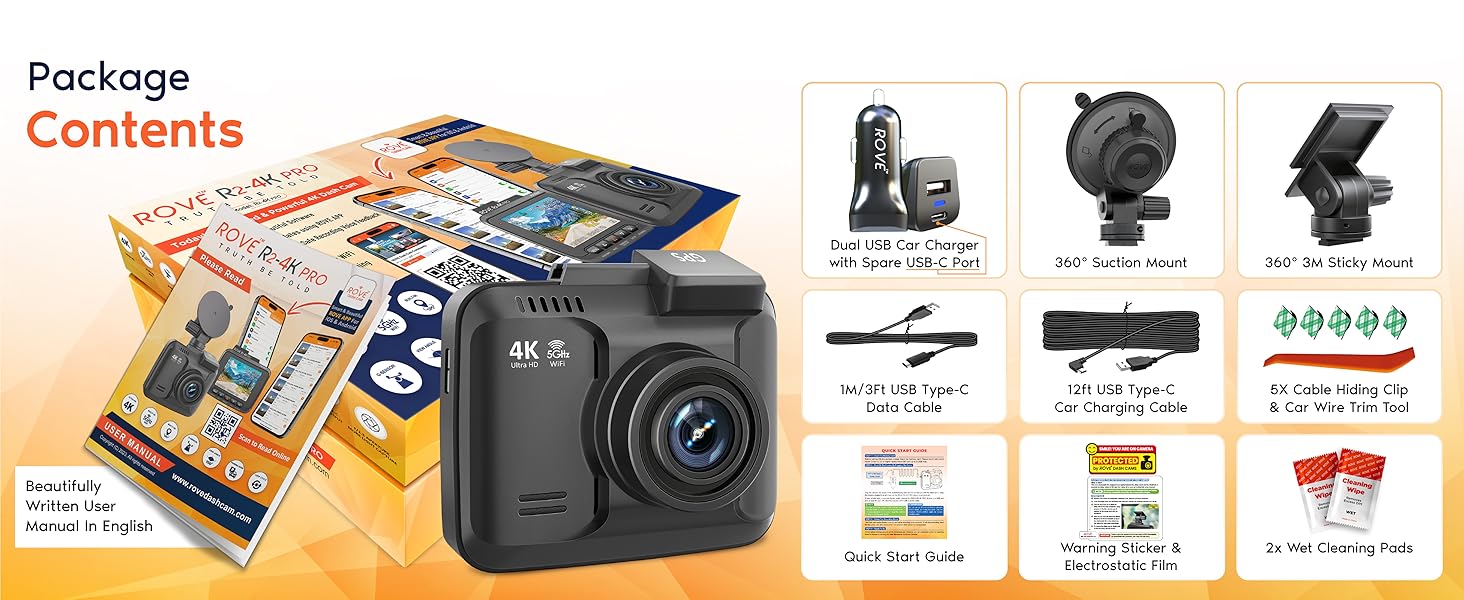
Figure 5.3: The ROVE Dash Cam App interface, showcasing its features for easy WiFi configuration, live preview, and video management.

Figure 5.4: Illustration of the over-the-air firmware update process, allowing users to seamlessly update their dash cam via the ROVE App.
5.4 GPS Functionality
The built-in GPS enables you to view real-time live speed and compass on the 2.4" IPS Camera Screen. It records precise driving routes, locations, and speed stamps directly on the video as additional evidence.
- GPS Player: Watch recordings, GPS logs, and G-Sensor data through your PC/MAC by using the free ROVE GPS PLAYER software.

Figure 5.5: The dash cam displaying live speed and compass, alongside the ROVE GPS Player software on a computer, showing detailed route and G-Sensor data.
5.5 Wide Dynamic Range (WDR) & Night Vision
The ROVE R2-4K PRO's WDR feature improves exposure by fusing over-exposed and under-exposed images into one, refining footage in various light conditions, including night. The f1.5 large aperture, 6-glass lens, and Sony STARVIS IMX335 Sensor ensure super night vision video in clear details.

Figure 5.6: Comparison demonstrating the effectiveness of Wide Dynamic Range (WDR) in improving video clarity in both too dark and overexposed conditions.

Figure 5.7: Super Night Vision technology, enabled by the f1.5 aperture and Sony STARVIS IMX335 Sensor, ensuring clear video details even in low-light conditions.
5.6 Voice Guidance & Screen Saver
- Voice Guidance: The dash cam provides various voice alerts, including warnings if it's not recording or if parking mode has been activated.
- Screen Saver: The screen saver mode automatically activates after 1-minute, continuously recording in the background while displaying essential driving information.

Figure 5.8: The voice guidance feature providing alerts and feedback, such as when parking mode is activated or if recording issues occur.

Figure 5.9: The screen saver feature displaying date, time, live speed, compass, and recording status while continuously recording in the background.
6. Maintenance
6.1 Cleaning the Lens and Screen
Regularly clean the dash cam's lens and screen to ensure optimal video quality and clear visibility. Use the provided cleaning pads or a soft, lint-free cloth.
- Gently wipe the lens and screen to remove dust, fingerprints, or smudges.
- Avoid using abrasive materials or chemical cleaners that could damage the surfaces.
6.2 Firmware Updates
Keep your dash cam's firmware updated to benefit from the latest features, improvements, and bug fixes. Firmware updates are provided over-the-air via the ROVE Dash Cam App.
- Connect your dash cam to the ROVE Dash Cam App on your smartphone.
- Navigate to the firmware update section within the app and follow the on-screen instructions to download and install the update.
- Ensure the dash cam remains powered during the entire update process.
7. Troubleshooting
If you encounter any issues with your ROVE R2-4K PRO Dash Cam, please refer to the common problems and solutions below:
| Problem | Possible Cause / Solution |
|---|---|
| Dash cam does not power on. |
|
| Recording stops unexpectedly or footage is missing. |
|
| WiFi connection issues with the app. |
|
| Poor video quality (blurry, glare). |
|
| Parking mode not working. |
|
8. Specifications
| Feature | Detail |
|---|---|
| Product Dimensions | 1.57 x 2.56 x 2.95 inches |
| Item Weight | 1.45 pounds |
| Model Number | R2-4K PRO |
| Video Resolution | 2160p @30FPS, 1440p @60FPS, 1080p @60FPS |
| Display | 2.4" IPS Screen |
| Lens Angle | 150° Wide Angle |
| Connectivity | Dual-band 5G & 2.4GHz Wi-Fi |
| Storage Support | Up to 512GB microSD (Class 10, U3 or higher) |
| Power Source | Built-in Supercapacitor |
| Operating Temperature | 5°F to 140°F (-15°C to +60°C) |
| Special Features | Built-In GPS, G-Sensor, WDR, Night Vision, Voice Guidance, Time-Lapse Video, Screen Saver |
9. Warranty and Support
The ROVE R2-4K PRO Dash Cam is backed by a 1-year warranty. ROVE is a 100% USA-Chicago based customer-centric company dedicated to providing quick and efficient assistance.
- Customer Care: For any issues or inquiries, contact our dedicated customer care team based in Chicago.
- User Manual (PDF): A detailed User Manual is available for download here.
Related documentsR2-4K PRO


Ask a question about this manual
Ask about setup, troubleshooting, compatibility, parts, safety, or missing instructions. Manuals+ will review the question and use this page’s manual context to help answer it.