
Introduction
The BLACK+DECKER Multi-Tool Car Polisher Head EBP183 is designed to provide a high-speed, even finish for car waxing and polishing. This accessory is compatible with BLACK+DECKER EVO185 and EVO183 series multi-tools, transforming your tool into an efficient car care device.

Image: The BLACK+DECKER EBP183 Car Polisher Head, showing its ergonomic design and compatibility with EVO185/EVO183 series multi-tools. It features a φ150mm pad size and a large handle for stable operation.
Key Features:
- Ergonomic Design: Features a large handle for stable and comfortable holding during operation, reducing user fatigue.
- Random Action Rotation: Delivers up to 3,500 rotations per minute, ensuring a smooth, swirl-free, and even finish.
- Pad Size: Equipped with a φ150mm polishing pad, suitable for various polishing tasks.
- Accessory: Includes one pad cover for immediate use.
Setup
Attaching the Polisher Head to the Multi-Tool
- Ensure your BLACK+DECKER multi-tool (EVO185 or EVO183 series) is turned off and the battery is removed for safety.
- Align the polisher head with the multi-tool's attachment point.
- Push the polisher head onto the multi-tool until it clicks securely into place. Verify that it is firmly attached and does not wobble.
- Attach the included pad cover to the polishing pad surface.
- Reinsert the battery into the multi-tool.
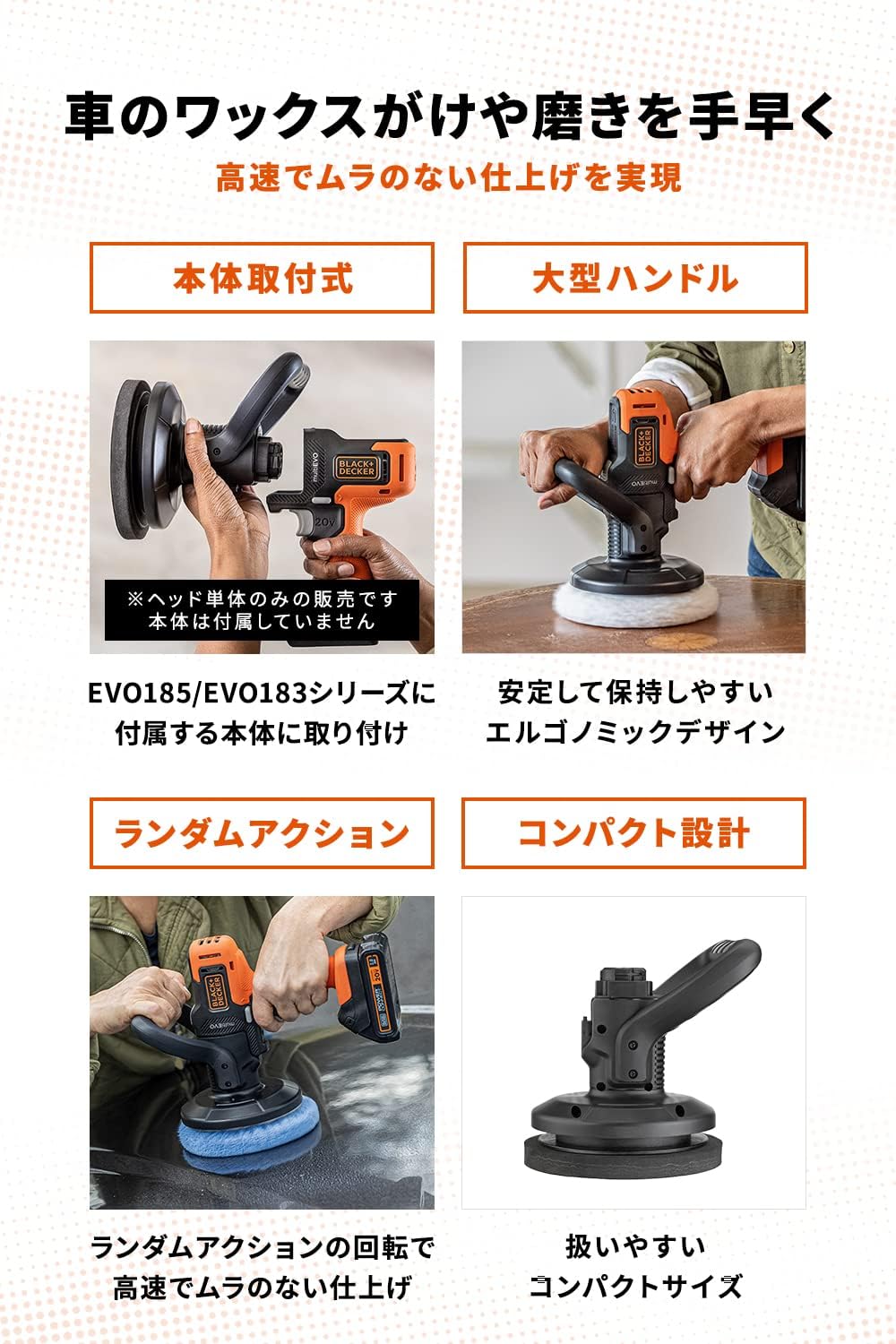
Image: Visual guide demonstrating the attachment of the polisher head to the main multi-tool unit, highlighting the large handle and compact design.
Operating
General Polishing Guidelines
- Prepare the Surface: Ensure the vehicle surface is thoroughly clean and dry before applying any polish or wax.
- Apply Product: Apply a small amount of polish or wax directly to the pad cover or evenly distribute it on a small section of the vehicle surface. Do not over-apply.
- Grip the Tool: Hold the multi-tool with the attached polisher head firmly with both hands using the ergonomic handle for maximum control and stability.
- Start Polishing: Turn on the multi-tool. Begin by moving the polisher head slowly and evenly over the surface in overlapping passes. Apply only light pressure; the random action rotation is designed to work effectively without heavy force.
- Maintain Movement: Keep the polisher head moving constantly to avoid concentrating heat in one spot, which can damage the paint.
- Achieve Even Finish: The random action rotation helps prevent swirl marks and ensures an even application and finish.
- Avoid Excessive Pressure: Applying too much pressure can slow down the rotation, reduce the effectiveness of the random action, and potentially lead to an uneven finish or damage.

Image: A user operating the BLACK+DECKER Multi-Tool with the Car Polisher Head attached, demonstrating its use for car waxing.
Maintenance
Cleaning the Polisher Head
- After each use, remove the pad cover from the polisher head.
- Clean the pad cover according to the polish or wax manufacturer's instructions. Most pad covers can be hand-washed with mild soap and water, then air-dried.
- Wipe down the body of the polisher head with a clean, damp cloth to remove any polish or wax residue.
- Do not immerse the polisher head in water or any other liquids.
- Store the polisher head in a clean, dry place away from direct sunlight and extreme temperatures.
Pad Cover Replacement
The included pad cover is designed for optimal performance. Over time, pad covers will wear out and lose their effectiveness. If your pad cover becomes worn, torn, or no longer attaches securely, replace it with an official BLACK+DECKER replacement pad cover to ensure continued high-quality results.

Image: The BLACK+DECKER Car Polisher Head, highlighting the included pad cover.
Troubleshooting
| Problem | Possible Cause | Solution |
|---|---|---|
| Polisher head stops rotating under light pressure. | Insufficient power from the multi-tool battery or excessive pressure being applied. | Ensure the multi-tool battery is fully charged. Reduce the pressure applied during polishing. The random orbital action is designed to work effectively with minimal pressure. |
| Pad cover does not attach securely to the polisher head. | The pad cover is worn out, damaged, or not correctly aligned. | Ensure the pad cover is properly aligned with the polisher head. If the pad cover is old or damaged, replace it with a new, official BLACK+DECKER pad cover. Note that commercially available hook-and-loop pads may not be compatible. |
| Uneven finish or swirl marks. | Incorrect application technique, worn pad cover, or unsuitable polish/wax. | Ensure you are moving the polisher head slowly and evenly. Replace the pad cover if worn. Use high-quality polish or wax suitable for your vehicle's finish. |
Specifications
- Brand: BLACK+DECKER
- Model: EBP183
- Product Type: Car Polisher Head (Multi-Tool Accessory)
- Rotation Speed: 0-3,500 RPM (Rotations Per Minute)
- Pad Size: φ150mm
- Power Source: Battery-powered (requires compatible BLACK+DECKER multi-tool, e.g., EVO185/EVO183 series)
- Included Components: Pad cover x 1
- Color: Black
- Country of Origin: China
Warranty
This BLACK+DECKER Multi-Tool Car Polisher Head EBP183 comes with a manufacturer's warranty of 1 year from the date of purchase.
To make a warranty claim, please retain your original proof of purchase (receipt or invoice). The warranty covers defects in materials and workmanship under normal use. It does not cover damage resulting from misuse, abuse, unauthorized repairs, or normal wear and tear.
For detailed warranty terms and conditions, please refer to the documentation included with your original multi-tool or visit the official BLACK+DECKER website.
Support
For technical assistance, spare parts, or further information regarding your BLACK+DECKER Multi-Tool Car Polisher Head EBP183, please contact your local BLACK+DECKER service center.
You can also visit the official BLACK+DECKER website for product registration, FAQs, and additional support resources.


