
LEKATO JM-92
LEKATO JM-92 Electronic Digital Metronome User Manual
Model: JM-92
1. Introduction
Thank you for choosing the LEKATO JM-92 Electronic Digital Metronome. This versatile 2-in-1 device combines a metronome and a tone generator, designed to assist musicians in developing precise rhythm and pitch. Its compact size, rechargeable battery, and multiple sound options make it an ideal tool for practice across various instruments, including piano, guitar, drums, ukulele, violin, and wind instruments.
Please read this manual thoroughly to understand the features and proper operation of your new metronome. Keep this manual for future reference.

Image: The LEKATO JM-92 Electronic Digital Metronome, showcasing its black and orange design with a clear digital display.
2. Safety Information
- Do not disassemble or modify the device. This may cause damage or malfunction.
- Keep the device away from water, moisture, and extreme temperatures.
- Avoid dropping the device or subjecting it to strong impacts.
- Use only the provided USB Type-C cable for charging.
- Do not expose the battery to excessive heat, such as direct sunlight or fire.
- Dispose of the device and its battery responsibly according to local regulations.
3. Product Overview
3.1 Components and Features
The LEKATO JM-92 is designed for intuitive use with clearly labeled controls and a backlit display.

Image: A detailed diagram highlighting the key components of the metronome, including the adjustable bracket, backlit screen, red/green indicator lights, rhythm and sound control knobs, volume control, headphone jack, USB Type-C charging port, and built-in speaker.
- Backlit Screen: Clear digital display for tempo, beat, rhythm, timer, and sound settings.
- Volume Control Knob: Adjusts the output volume of the metronome and tone generator sounds.
- Headphone Jack: For private practice using 3.5mm headphones.
- USB Type-C Port: For charging the internal lithium battery.
- Speaker: Built-in speaker for audible metronome and tone generator sounds.
- Rhythm Knob: Used to select different rhythm patterns.
- Sound Knob: Used to select different metronome sound types.
- Red/Green Indicator: Visual beat indicator.
- Adjustable Bracket: Allows the metronome to stand upright on a flat surface.

Image: The metronome held in a hand, illustrating its compact, pocket-sized design.
4. Setup
4.1 Charging the Device
The LEKATO JM-92 features a built-in rechargeable lithium battery. Before first use, it is recommended to fully charge the device.
- Connect the provided USB Type-C charging cable to the charging port on the side of the metronome.
- Connect the other end of the USB cable to a standard USB power adapter (not included) or a computer USB port.
- The battery indicator on the screen will show charging status. A full charge typically takes approximately 45 minutes and provides up to 5 hours of continuous playtime.

Image: The metronome being used while charging, highlighting its rechargeable battery and charging specifications.
4.2 Powering On/Off
Press and hold the power button located on the side of the device to turn it on or off.
4.3 Adjusting the Stand
The integrated bracket on the back of the metronome can be unfolded to allow the device to stand upright on a flat surface for convenient viewing during practice.

Image: A close-up view demonstrating how to unfold the adjustable bracket on the back of the metronome.
5. Operating Instructions
5.1 Switching Modes (Metronome / Tone Generator)
The device can seamlessly switch between Metronome mode and Tone Generator mode. Use the dedicated button on the front panel to toggle between these two functions.
5.2 Metronome Mode
In Metronome mode, you can set the tempo, beat, rhythm pattern, and sound type.
- Tempo Adjustment: Use the '+' and '-' buttons to adjust the tempo from 30 to 250 beats per minute (BPM).
- Beat Selection: The metronome supports 9 different beats (0, 1, 2, 3, 4, 5, 6, 7, 8, 9). Use the appropriate controls to cycle through these options.
- Rhythm Pattern Selection: Rotate the 'RHYTHM' knob to choose from 9 different rhythm patterns.
- Sound Type Selection: Rotate the 'SOUND' knob to select from 8 different metronome sound types, including Mechanical Metronome, Electronic Metronome, Temple Block, Drum Sticks, Clapping, Cowbell, and more.
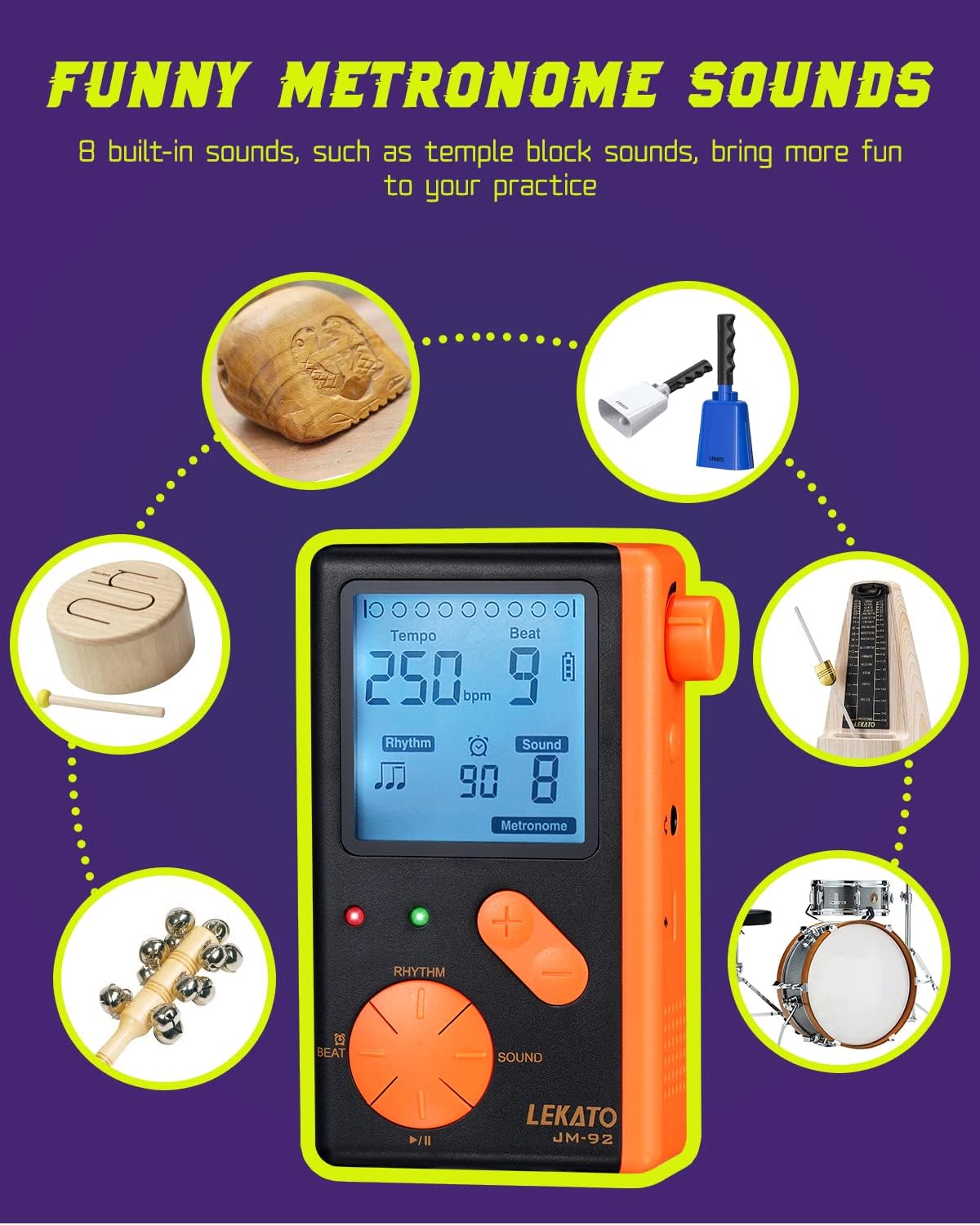
Image: The metronome display showing tempo and beat settings, surrounded by icons representing the 8 different built-in metronome sounds.
5.3 Tone Generator Mode
In Tone Generator mode, the device produces a continuous tone at a specific pitch, useful for tuning instruments.
- Pitch Adjustment: Use the '+' and '-' buttons to adjust the pitch frequency. The standard calibration is 440Hz.
- Note Selection: The tone generator can produce tones for all standard musical notes (A, A#, B, C, C#, D, D#, E, F, F#, G, G#).

Image: The metronome display in tone generator mode, showing the 440Hz calibration and note selection, with illustrations of various instruments it can help tune.
5.4 Timer Function
The metronome includes a customizable timer function, allowing you to set practice sessions from 1 to 90 minutes.
- Setting the Timer: Access the timer function through the menu or dedicated button. Use the '+' and '-' buttons to set the desired practice duration in minutes.
- Timer Indication: The display will show the remaining time. The metronome will stop or provide an alert once the set time has elapsed.

Image: The metronome display showing the timer function set to 90 minutes, emphasizing its precision and utility for timed practice sessions.
5.5 Volume Adjustment
Rotate the volume control knob on the side of the device to increase or decrease the sound output level.

Image: A close-up showing the adjustable volume knob on the side of the metronome.
6. Maintenance
- Cleaning: Use a soft, dry cloth to clean the surface of the device. Do not use abrasive cleaners, solvents, or strong chemicals.
- Storage: When not in use for extended periods, store the metronome in a cool, dry place, away from direct sunlight and extreme temperatures.
- Battery Care: To prolong battery life, avoid fully discharging the battery frequently. Charge the device regularly, even if not in constant use.
7. Troubleshooting
| Problem | Possible Cause | Solution |
|---|---|---|
| Device does not power on. | Battery is depleted. | Charge the device using the provided USB Type-C cable. |
| No sound output. | Volume is too low or muted. | Increase the volume using the volume knob. Ensure headphones are not plugged in if you intend to use the speaker. |
| Metronome tempo or beat is incorrect. | Settings are not correctly adjusted. | Verify the tempo, beat, and rhythm settings on the display and adjust as needed. |
| Tone generator pitch is off. | Calibration or note setting is incorrect. | Check the Hz calibration and note selection in Tone Generator mode. |
8. Specifications
- Model: JM-92
- Dimensions: 5.12 x 1.18 x 3.94 inches
- Item Weight: 4.6 ounces
- Tempo Range: 30-250 BPM
- Beat: 0, 1, 2, 3, 4, 5, 6, 7, 8, 9
- Rhythm Patterns: 9 types
- Metronome Sounds: 8 types (e.g., Mechanical, Electronic, Temple Block, Drum Sticks, Clapping, Cowbell)
- Tone Generator Notes: A, A#, B, C, C#, D, D#, E, F, F#, G, G#
- Calibration: 440Hz (adjustable)
- Timer Function: 1-90 minutes
- Battery: Built-in Lithium Polymer (600 mAh)
- Charging Time: Approximately 45 minutes
- Playtime: Up to 5 hours
- Charging Port: USB Type-C
- Headphone Jack: 3.5mm
- Country of Origin: China
9. Warranty and Support
LEKATO products are manufactured with high-quality standards. For warranty information or technical support, please refer to the contact details provided with your purchase or visit the official LEKATO website. Keep your purchase receipt as proof of purchase for any warranty claims.
For further assistance, please contact LEKATO customer service.
Related Documents - JM-92
 |
LEKATO M65 Metronome User Manual: Features, Operation, and Specifications Comprehensive user manual for the LEKATO M65 mini metronome. Learn about its features, how to operate it, specifications, and important notices. Includes details on rhythm types, tempo settings, beat sounds, and tone generation. |
 |
LEKATO Digital Drum Owner's Manual Comprehensive owner's manual for the LEKATO Digital Drum, covering installation, setup, operation, pad settings, recording, and practice modes. Learn how to get the most out of your electronic drum kit. |
 |
LEKATO PD705 Drum Pad Sampler User Manual Comprehensive user manual for the LEKATO PD705 Drum Pad Sampler, detailing its features, operation, and maintenance. Learn about drum pads, LCD screen, buttons, connectivity, modes like Kit, Click, Record, and advanced applications. |
 |
LEKATO Looper & Drum Machine Owner's Manual This manual provides detailed instructions for operating the LEKATO Looper & Drum Machine, including features, layout, operational modes for looper and rhythm, editor software usage, and technical specifications. |
 |
LEKATO WaveManager V0.30 Software Manual A comprehensive guide to downloading and using the LEKATO WaveManager V0.30 software for managing drum kits, tone groups, and MIDI settings on LEKATO percussion instruments. |
 |
LEKATO Looper&Drum Machine Mac Software Installation Guide Step-by-step instructions for installing the LEKATO Looper&Drum Machine software on macOS, including how to bypass developer verification warnings and configure security settings. |
Ask a question about this manual
Ask about setup, troubleshooting, compatibility, parts, safety, or missing instructions. Manuals+ will review the question and use this page’s manual context to help answer it.