
LEDIARY 92a72960-d568-4618-af96-684acd601a85
LEDIARY 16.5 inch Black Caged Ceiling Fan with Light Instruction Manual
Model: 92a72960-d568-4618-af96-684acd601a85 | Brand: LEDIARY
Introduction
This manual provides detailed instructions for the safe and efficient installation, operation, and maintenance of your LEDIARY 16.5 inch Black Caged Ceiling Fan with Light. Please read this manual thoroughly before installation and keep it for future reference.

Figure 1: LEDIARY 16.5 inch Black Caged Ceiling Fan with Light.
Safety Information
- Always turn off the power at the main circuit breaker before installation or maintenance.
- Ensure all electrical connections comply with local codes and ordinances.
- Do not install the fan in a location where the blades could come into contact with objects or people.
- Use only E26 standard base bulbs (bulbs not included). Maximum 60W for incandescent bulbs, Max 10W for LED bulbs.
- This fan is designed for indoor use only.
- If you are unsure about any part of the installation, consult a qualified electrician.
Package Contents
Verify that all components are present before beginning installation:
- Caged Ceiling Fan Unit (with 7 ABS fan blades)
- Remote Control
- Down Rods (2 lengths included)
- Mounting Hardware and Accessories
- Detailed Instruction Manual

Figure 2: Included components: Remote Control. Bulbs and wall switch are not included.
Setup and Installation
The LEDIARY Caged Ceiling Fan is designed for self-installation with complete accessories and detailed instructions provided. Follow these general steps for a smooth setup:
- Prepare the Installation Area: Ensure power is off at the circuit breaker. Clear the area around the ceiling where the fan will be installed.
- Mount the Bracket: Securely attach the mounting bracket to the ceiling junction box. Ensure it is capable of supporting the fan's weight.
- Assemble the Down Rod: Choose the appropriate down rod length (4-inch or 8-inch) for your ceiling height. Attach the down rod to the fan motor assembly.
- Wire the Fan: Connect the electrical wires from the ceiling to the fan's wiring according to the provided wiring diagram in the detailed instructions. Ensure all connections are secure.
- Attach the Fan to the Bracket: Carefully lift the fan assembly and hang it onto the mounting bracket. Secure it with the provided screws.
- Install Light Bulbs: Insert four E26 standard base bulbs (not included) into the sockets.
- Secure the Cage: Attach the metal cage securely around the fan and light assembly.

Figure 3: Fan dimensions (16.5"L x 16.5"W x 6"H) and recommended room size (49-100 sq ft).

Figure 4: Detail of the downrod and ceiling mount.
Operating Instructions
Your LEDIARY ceiling fan comes with a convenient remote control for easy operation of both the fan and light functions.
Remote Control Functions:
- Light ON/OFF: Turn the fan's light on or off.
- Fan Speed Adjustment: Select from 6 wind speeds to suit your comfort needs.
- Timing Function: Set the fan to turn off automatically after 1, 2, 4, or 8 hours.
- Reversible Motor: Switch between summer mode (downward airflow for cooling) and winter mode (upward airflow for air circulation and heat distribution).
- No Beep Sound: The remote control includes a button to eliminate the beeping sound for quiet operation.
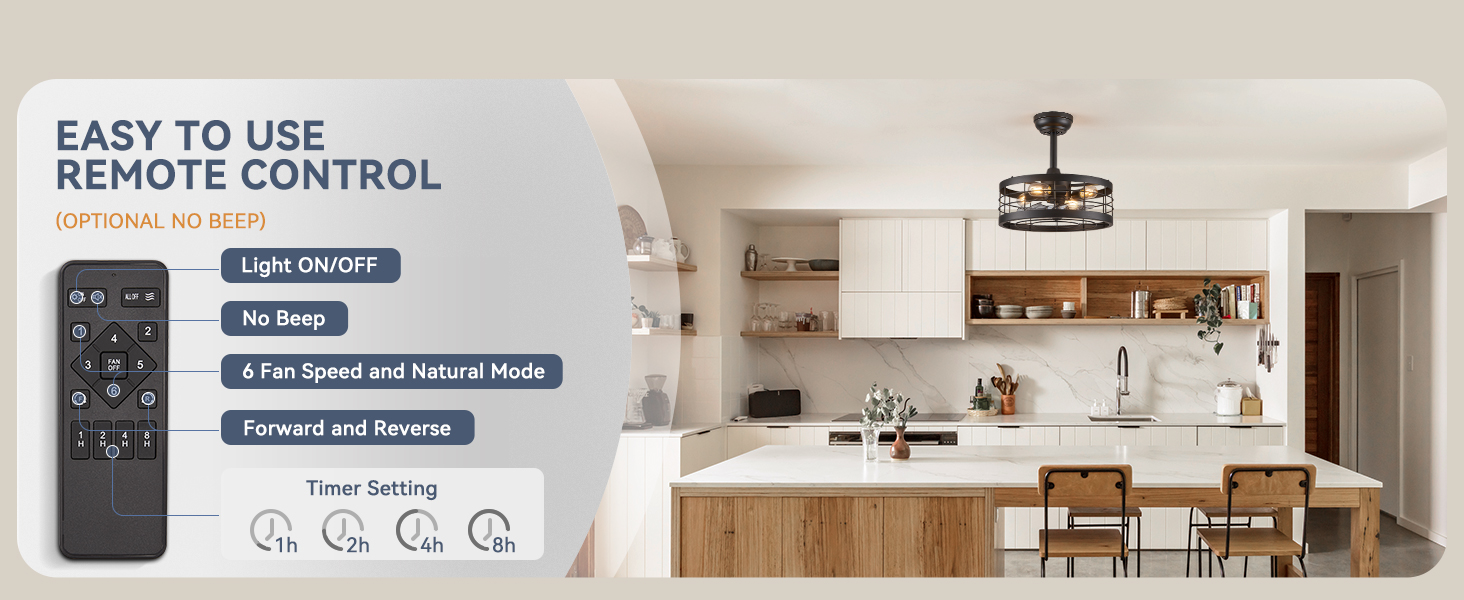
Figure 5: Remote control layout and functions.
Quiet Operation:
The fan features a quiet motor, ensuring stable and powerful performance with minimal noise, ideal for bedrooms and living spaces.
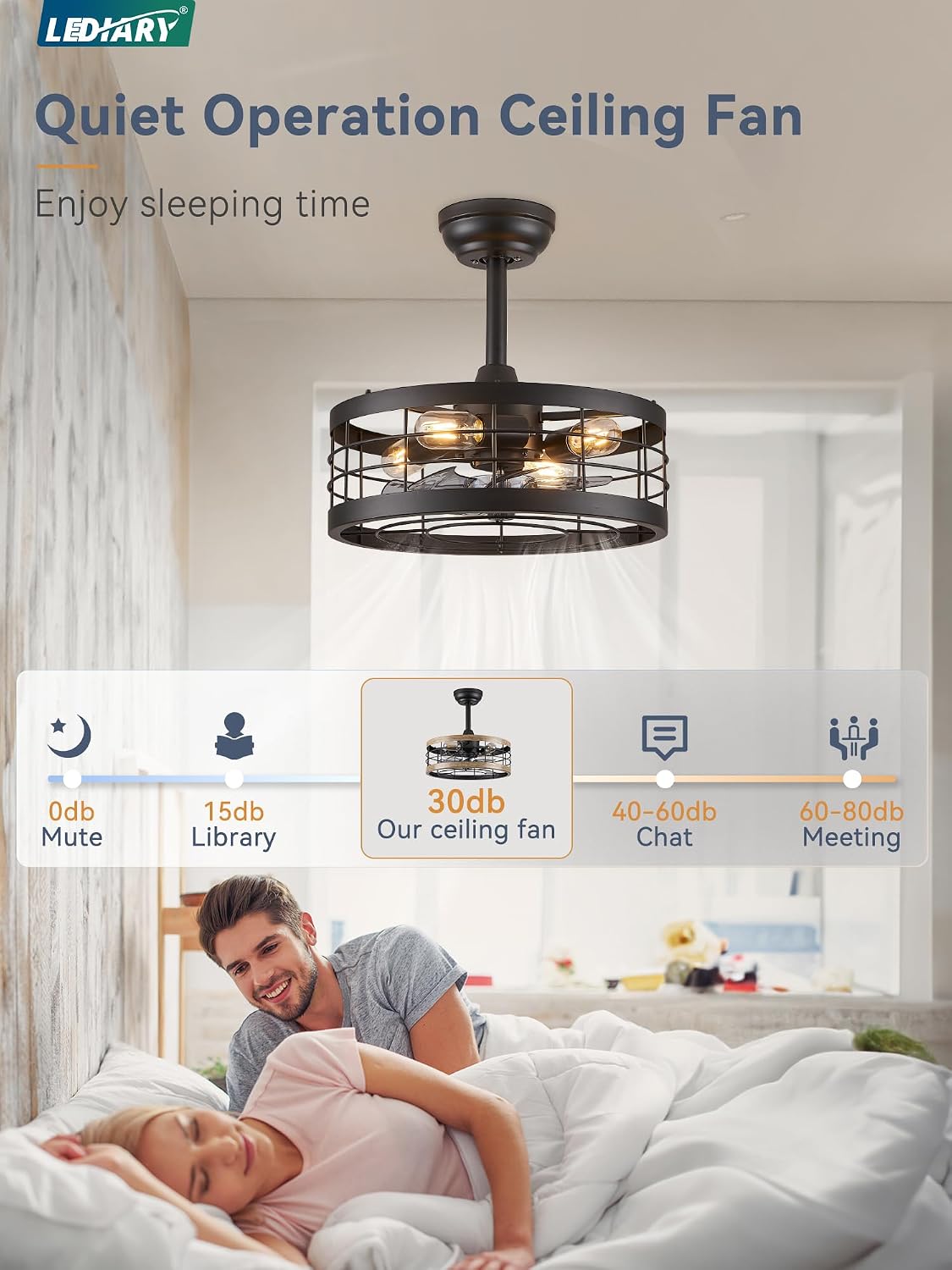
Figure 6: Quiet operation for undisturbed sleep.
Seasonal Modes:
Utilize the reversible motor function to optimize comfort throughout the year:
- Summer Mode (Clockwise Rotation): Creates a downward draft for a cooling effect.
- Winter Mode (Counter-clockwise Rotation): Increases air circulation to promote heat distribution and maintain equilibrium temperature.
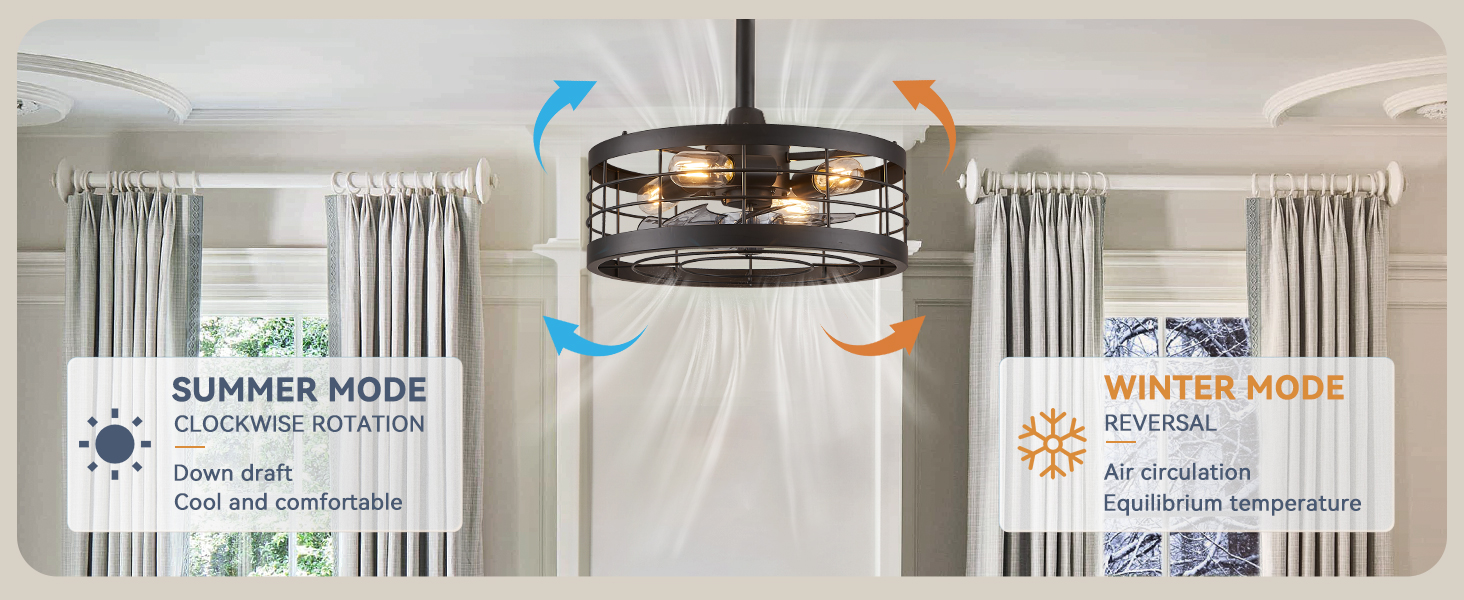
Figure 7: Summer and Winter operating modes.
Maintenance
Regular maintenance ensures the longevity and optimal performance of your ceiling fan:
- Cleaning: To clean the fan, wipe with a soft, damp cloth. Do not use abrasive cleaners or solvents. Ensure power is off before cleaning.
- Bulb Replacement: Always turn off power before replacing bulbs. Allow bulbs to cool before handling.
- Tighten Screws: Periodically check and tighten all screws on the fan and mounting hardware to ensure secure operation.
Troubleshooting
If you encounter issues with your fan, refer to the following common problems and solutions:
| Problem | Possible Cause | Solution |
|---|---|---|
| Fan does not start | Loose wire connections, no power, remote control battery dead. | Check all wiring connections. Ensure power is on at the circuit breaker. Replace remote control battery. |
| Light does not work | Loose bulb, faulty bulb, wiring issue. | Tighten bulbs. Replace faulty bulbs. Check light wiring connections. |
| Fan is noisy | Loose screws, fan not properly balanced. | Tighten all screws on the fan and mounting bracket. Ensure fan is installed level. |
| Remote control not working | Dead battery, remote not paired. | Replace remote battery. Refer to the detailed manual for remote pairing instructions. |
Specifications
- Brand: LEDIARY
- Model: 92a72960-d568-4618-af96-684acd601a85
- Color: Black
- Material: Metal
- Style: Farmhouse, Industrial
- Product Dimensions: 16.5"L x 16.5"W x 6"H
- Item Weight: 8.98 pounds
- Power Source: AC
- Voltage: 120 Volts
- Wattage: 60 watts (Max for incandescent bulbs)
- Bulb Base: E26 (Bulbs not included)
- Number of Light Sources: 4
- Control Method: Remote Control, Push Button (via wall switch)
- Special Features: Remote Controlled, Adjustable Height (via downrods), Timer, Bladeless (design), Reversible Motor
- Indoor/Outdoor Usage: Indoor
- Assembly Required: Yes
Warranty and Support
LEDIARY offers a 2-year (730 days) warranty for this product, covering manufacturing defects and performance issues. We are committed to providing high-quality products and excellent customer service.
For any problems or inquiries, please feel free to contact us. We will reply and solve your problem within 24 hours.
Friendly Customer Service: Provide 24-hour online technical support and worry-free warranty.
Ask a question about this manual
Ask about setup, troubleshooting, compatibility, parts, safety, or missing instructions. Manuals+ will review the question and use this page’s manual context to help answer it.