
Buture Pro JR600
BuTure JR600 Cordless Vacuum Cleaner User Manual
Model: JR600
1. Important Safety Instructions
Please read all instructions carefully before using the appliance and retain them for future reference. Failure to follow these instructions may result in electric shock, fire, or serious injury.
- Do not use outdoors or on wet surfaces.
- Do not allow to be used as a toy. Close attention is necessary when used by or near children.
- Use only as described in this manual. Use only manufacturer's recommended attachments.
- Do not use with damaged cord or plug. If appliance is not working as it should, has been dropped, damaged, left outdoors, or dropped into water, return it to a service center.
- Do not pull or carry by cord, use cord as a handle, close a door on cord, or pull cord around sharp edges or corners. Do not run appliance over cord. Keep cord away from heated surfaces.
- Do not unplug by pulling on cord. To unplug, grasp the plug, not the cord.
- Do not handle plug or appliance with wet hands.
- Do not put any object into openings. Do not use with any opening blocked; keep free of dust, lint, hair, and anything that may reduce air flow.
- Keep hair, loose clothing, fingers, and all parts of body away from openings and moving parts.
- Do not pick up anything that is burning or smoking, such as cigarettes, matches, or hot ashes.
- Do not use to pick up flammable or combustible liquids, such as gasoline, or use in areas where they may be present.
- Do not pick up toxic material, such as chlorine bleach, ammonia, or drain cleaner.
- Do not use without dust bag and/or filters in place.
- Turn off all controls before unplugging.
- Use extra care when cleaning on stairs.
- Do not charge the unit outdoors.
- Recharge only with the charger specified by the manufacturer.
2. Package Contents
Carefully unpack all components and check against the list below. If any items are missing or damaged, please contact customer service.
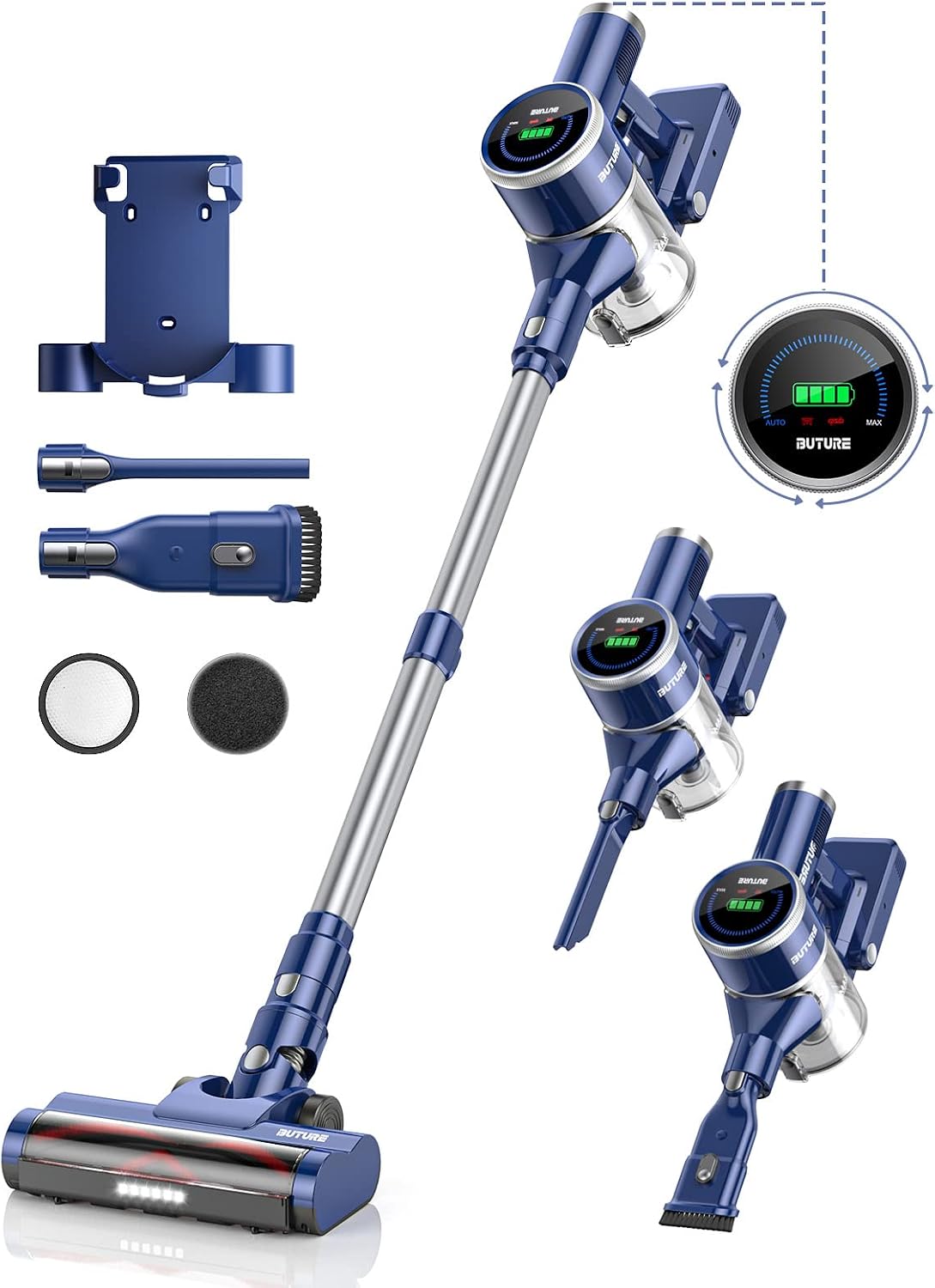
Cordless Vacuum Motor Unit

Battery

Electric Brush

Roller Brush

Dustbin

2 x HEPA Filters (1 integrated + 1 spare), 1 x Sponge Filter
Telescopic Extension Tube

2-in-1 Brush

Crevice Tool
Brush Cleaning Tool

Charger

Wall Mount
User Manual
3. Product Overview
The BuTure JR600 is a powerful and versatile cordless vacuum cleaner designed for efficient home cleaning. Key features include a 400W brushless motor, a 3.8-inch color display, automatic suction power adjustment, and an anti-tangle LED electric brush.
3.1 Main Components
- Motor Unit: Contains the 400W brushless motor, dustbin, and control panel.
- Battery: Removable and rechargeable Lithium-ion battery.
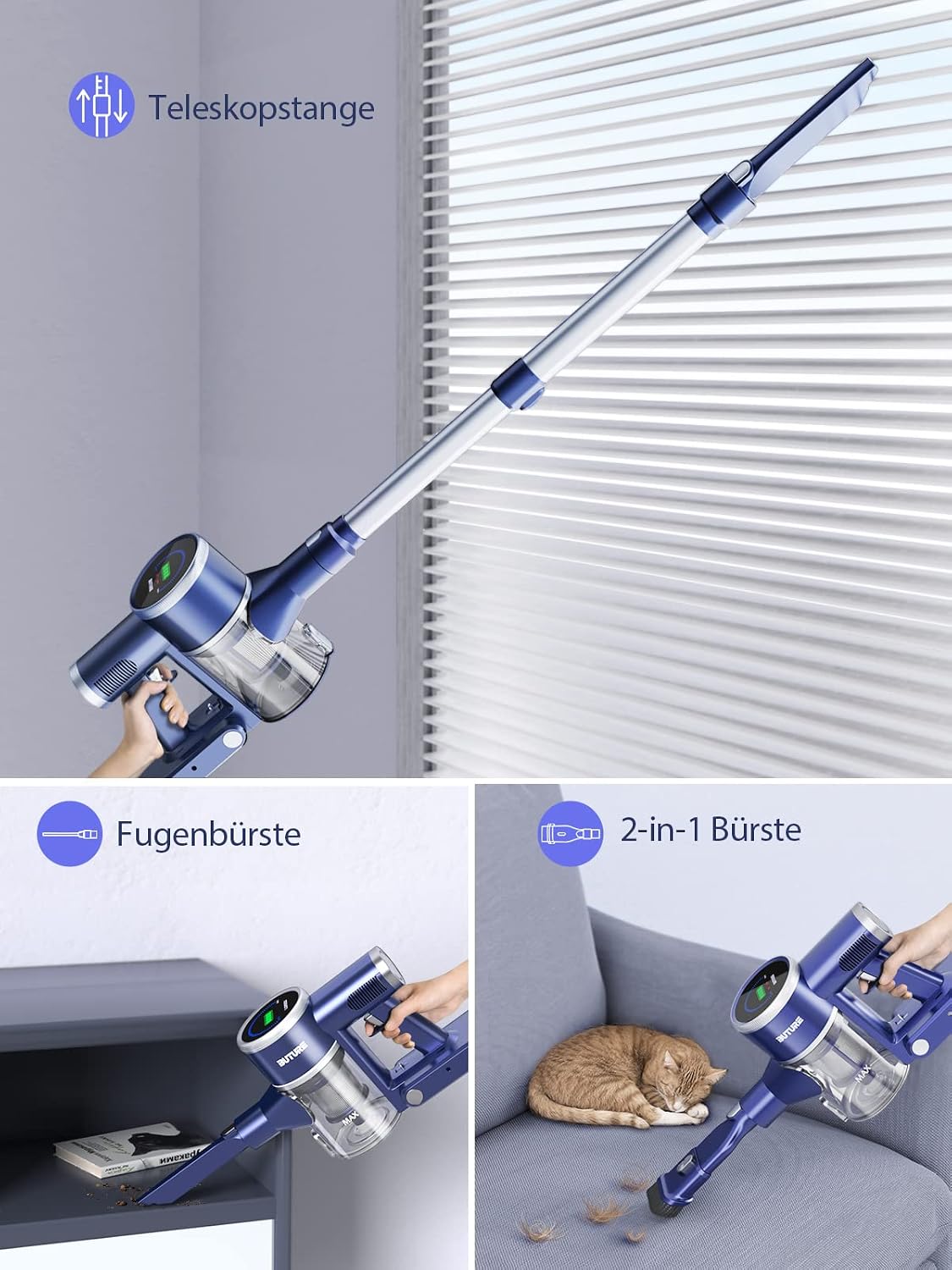
- Telescopic Extension Tube: Adjustable length for comfortable cleaning.
- Electric Brush: Features LED lights and an anti-tangle comb for effective cleaning on various surfaces.
- Dustbin: 1.2-liter capacity with one-touch emptying.
- Filter System: Multi-stage cyclone filtration with HEPA and sponge filters.
Figure 3.1: Main Components of BuTure JR600
3.2 Display and Controls
The 3.8-inch color display provides real-time information on battery status, suction power, and error indicators. The 360-degree rotary knob allows for precise suction power adjustment.

Figure 3.2: Color Display and Rotary Knob
3.3 Attachments
- 2-in-1 Brush: Suitable for cleaning furniture, keyboards, and delicate surfaces.
- Crevice Tool: Ideal for narrow gaps, corners, and hard-to-reach areas.
Figure 3.3: Versatile Attachments
4. Setup and Assembly
4.1 Assembling the Vacuum Cleaner
- Attach the Extension Tube: Insert the telescopic extension tube into the main motor unit until it clicks into place.
- Attach the Electric Brush: Connect the electric brush head to the other end of the extension tube, ensuring it locks securely.
- Install the Battery: Slide the battery pack into the slot on the back of the motor unit until it clicks.
4.2 Charging the Battery
Before first use, fully charge the battery. A full charge takes approximately 4 hours.
- Connect the charger to a power outlet.
- Plug the charging cable into the charging port on the battery pack or directly into the vacuum's motor unit if the battery is installed.
- The display will show charging progress. Once fully charged, the indicator will change.
Figure 4.1: Battery Charging and Runtimes
4.3 Installing the Wall Mount
The included wall mount provides a convenient storage solution for your vacuum cleaner.
- Choose a suitable location near a power outlet, ensuring it's at an appropriate height.
- Mark the drilling points on the wall using the mount as a template.
- Drill holes and insert wall plugs (if necessary).
- Secure the wall mount to the wall using the provided screws.
- Hang the vacuum cleaner on the mount for storage and charging.
5. Operating Instructions
5.1 Powering On/Off
Press the power button on the motor unit to turn the vacuum cleaner on or off.

Figure 5.1: Vacuum in Operation
5.2 Adjusting Suction Power
The BuTure JR600 offers both manual and automatic suction power adjustment.
- Manual Adjustment: Rotate the 360-degree knob on the display to cycle through 10 levels of suction power, from minimum (10KPa) to maximum (33KPa).
- Automatic Mode (AUTO): Press the AUTO button on the display. The vacuum will automatically detect the amount of dust and adjust suction power accordingly, optimizing battery life and cleaning efficiency.

Figure 5.2: Automatic Suction Power Adjustment
5.3 Using Different Attachments
Select the appropriate attachment for your cleaning task:
- Electric Brush: Best for floors (hardwood, tile, carpet) due to its powerful motor and LED lights for dark areas.
- 2-in-1 Brush: Use the brush bristles for delicate surfaces like upholstery or curtains, and the nozzle for general dusting.
- Crevice Tool: Perfect for tight spaces, corners, and car interiors.
6. Maintenance
Regular maintenance ensures optimal performance and extends the lifespan of your vacuum cleaner.
6.1 Emptying the Dustbin
Empty the dustbin regularly, especially when the 'Dustbin Full' indicator appears on the display.
- Hold the vacuum cleaner over a trash can.
- Press the one-touch release button on the dustbin to open the bottom flap and empty contents.
- Close the flap securely until it clicks.
Figure 6.1: One-Touch Dustbin Emptying
6.2 Cleaning Filters
The vacuum features a 6-stage cyclone filter system. Clean the filters regularly to maintain strong suction.
- Twist and remove the dustbin from the motor unit.
- Remove the HEPA filter and sponge filter.
- Tap off loose dust. For thorough cleaning, rinse the filters under cold running water.
- Allow filters to air dry completely for at least 24 hours before reassembling. Do not use the vacuum with wet filters.

Figure 6.2: 6-Stage Cyclone Filter System
6.3 Cleaning the Roller Brush
The anti-tangle comb helps prevent hair entanglement, but occasional cleaning of the roller brush is recommended.
- Detach the electric brush head from the extension tube.
- Locate the release tab on the side of the brush head and open it to remove the roller brush.
- Use the provided cleaning tool or scissors to cut and remove any tangled hair or debris from the roller brush.
- Reinsert the roller brush and close the release tab securely.
Figure 6.3: LED Electric Brush with Anti-Tangle Comb
7. Troubleshooting
Refer to this section for common issues and their solutions. The color display provides helpful error indicators.
| Problem | Possible Cause | Solution |
|---|---|---|
| Vacuum does not turn on. | Battery is low or depleted. Battery not properly installed. | Charge the battery fully. Ensure battery is securely clicked into place. |
| Weak suction power. | Dustbin full. Filters clogged. Obstruction in nozzle/tube. | Empty the dustbin. Clean or replace filters. Check for and remove any blockages. |
| Roller brush not spinning. | Hair/debris tangled in brush. Brush head obstructed. | Remove and clean the roller brush. Check for obstructions in the brush head. |
| Display shows error message (e.g., clogged HEPA, tangled brush). | Specific component issue. | Follow the on-screen instructions. Clean the indicated component (HEPA filter, roller brush). |
| Short runtime. | Battery not fully charged. Using MAX suction mode constantly. | Ensure battery is fully charged. Use AUTO mode or lower suction for longer runtime. |
If the problem persists after trying these solutions, please contact customer support.
8. Specifications
| Feature | Specification |
|---|---|
| Brand | Buture Pro |
| Model Number | JR600 |
| Color | Navy Blue |
| Product Dimensions (L x W x H) | 32.77 x 43.94 x 19.81 cm |
| Weight | 4.16 Kilograms |
| Dustbin Capacity | 1.2 Liters |
| Power | 400 Watts |
| Voltage | 22.2 Volts |
| Noise Level | ≤ 58 dB |
| Runtime | Up to 55 minutes (Min suction) |
| Charging Time | 4 hours |
| Special Features | 360° Rotary Knob, 3.8" Color Display, Automatic Suction Adjustment, LED Electric Brush with Anti-Tangle Comb, Washable Filters |
| Power Source | Battery Powered |
| Included Components | Motor Unit, Battery, Electric Brush, Roller Brush, Dustbin, 2 HEPA Filters, Sponge Filter, Telescopic Extension Tube, 2-in-1 Brush, Crevice Tool, Brush Cleaning Tool, Charger, Wall Mount, User Manual |
9. Warranty and Support
9.1 Warranty Information
The BuTure JR600 Cordless Vacuum Cleaner comes with a 24-month warranty from the date of purchase. This warranty covers manufacturing defects and material faults under normal use. Please retain your proof of purchase for warranty claims.
The warranty does not cover:
- Damage caused by improper use, neglect, or accident.
- Normal wear and tear of consumable parts (e.g., filters, brushes).
- Damage caused by unauthorized repairs or modifications.
9.2 Customer Support
For any questions, technical assistance, or warranty claims, please contact our customer service team:
Email: sales@ibuture.com
Our customer service is available 7 days a week, 24 hours a day.
Related documentsJR600


Ask a question about this manual
Ask about setup, troubleshooting, compatibility, parts, safety, or missing instructions. Manuals+ will review the question and use this page’s manual context to help answer it.