
Product Overview
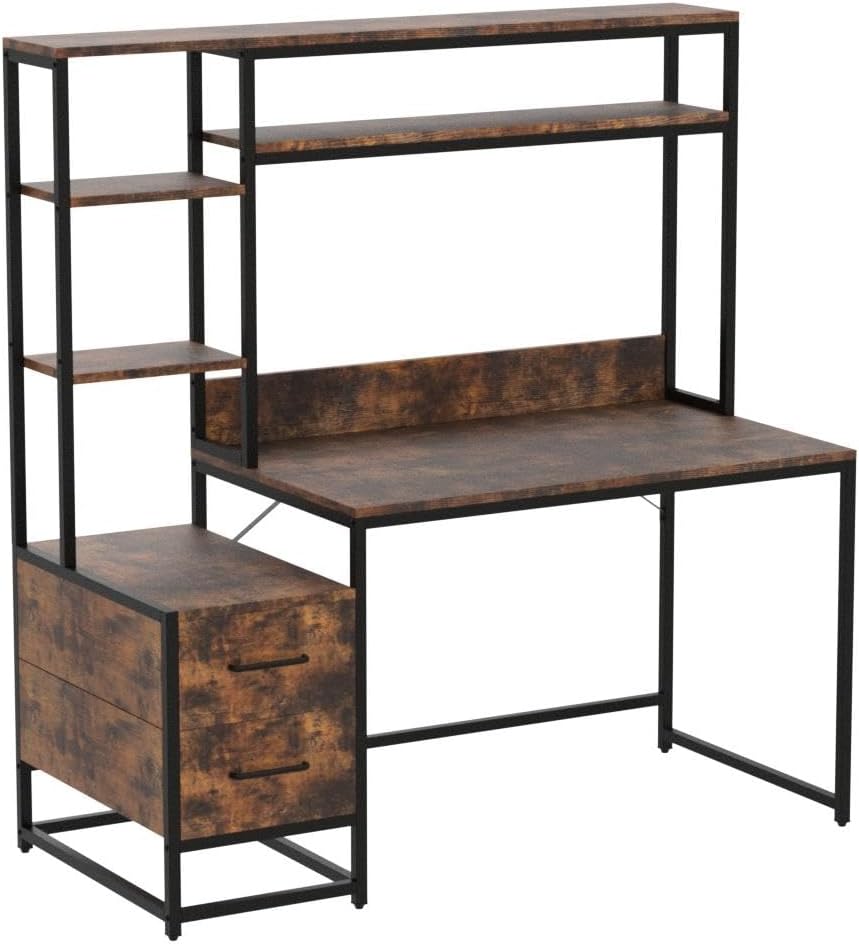
The Tribesigns 55 Inch Computer Desk is a versatile workstation designed for home office, study, writing, or gaming. It features a spacious desktop, two integrated drawers, a top hutch, and additional storage shelves to maximize your workspace and keep your area organized. Its industrial design with a rustic veneer finish and black metal frame ensures both durability and a stylish appearance.

Safety Information
Please read and understand all safety instructions before assembly and use to prevent injury or damage to the product.
- Always assemble the desk according to the provided instructions.
- Ensure the desk is properly assembled and stable before use.
- Do not overload the desk, as this could cause it to tip over or collapse.
- Always supervise children when they are near the desk to prevent any accidents.
- Keep small parts and packaging materials away from children to avoid choking hazards.
Components List
Before beginning assembly, verify that all parts are present and undamaged. Refer to the included instruction manual for a detailed list and diagrams of all components and hardware.
- Desktop Panel
- Hutch Shelves (various sizes)
- Drawer Panels (for 2 drawers)
- Metal Frame Components (legs, support bars)
- Hardware Kit (screws, bolts, nuts, L-wrench, screwdriver)
- Adjustable Foot Pads

Setup and Assembly
Assembly is required for this product. It is recommended that one person assembles the desk. Follow the step-by-step instructions provided in the included manual. Ensure you have adequate space and all tools before starting.
- Unpack and Identify: Carefully unpack all components and lay them out on a clean, soft surface to prevent scratches. Identify each part using the provided diagrams.
- Assemble the Main Frame: Begin by connecting the main metal frame components using the designated screws and bolts. Do not fully tighten screws until all parts are aligned.
- Attach Desktop: Secure the desktop panel to the assembled main frame.
- Construct and Install Drawers: Assemble the two drawers according to the instructions, then slide them into their designated slots.
- Install Hutch and Shelves: Attach the hutch frame and position the storage shelves as indicated in the manual.
- Final Tightening and Adjustment: Once all parts are in place, systematically tighten all screws. Adjust the foot pads at the base of the desk to ensure stability and levelness on uneven floors.

Assembly Video Guide
This video provides a visual overview of the Tribesigns 55 Inch Computer Desk, demonstrating its features and potential uses, which can aid in understanding the assembly process and overall design.
Operating Instructions
The Tribesigns Computer Desk is designed for versatile use in various settings. Utilize its features to optimize your workspace.
- Spacious Desktop: The 55-inch desktop provides ample space for your computer, monitor, keyboard, mouse, and other office necessities. The heightened baffle design helps prevent items from falling off the back.
- Storage Shelves: The top hutch and side shelves are ideal for organizing books, displaying decorative items, or storing frequently accessed supplies.
- Integrated Drawers: The two drawers offer concealed storage for documents, stationery, and personal items, helping to keep your desktop clutter-free.
- Leg Room: The open design at the bottom ensures ample leg room, allowing for comfortable seating and movement.


Maintenance
To ensure the longevity and appearance of your Tribesigns Computer Desk, follow these simple maintenance guidelines:
- Cleaning: Wipe the desk surfaces with a damp cloth. Avoid using harsh chemicals or abrasive cleaners, as they may damage the finish.
- Spills: Promptly wipe up any spills to prevent water damage or staining, especially on the rustic veneer finish.
- Tighten Fasteners: Periodically check and tighten all screws and bolts to maintain the desk's stability and structural integrity.
- Avoid Excessive Weight: Do not place excessively heavy items on the shelves or desktop beyond their intended capacity.
- Protect Surfaces: Use coasters for drinks and desk pads for writing or heavy equipment to protect the desktop from scratches and heat.

Troubleshooting
If you encounter any issues with your Tribesigns Computer Desk, refer to the following common solutions:
- Desk Wobbles:
Solution: Check that all screws and bolts are securely tightened. Adjust the adjustable foot pads at the bottom of the legs to level the desk on uneven floors. - Drawers are Stiff or Difficult to Open/Close:
Solution: Ensure the drawers are correctly aligned within their tracks. If the issue persists, inspect the wooden drawer components for any rubbing against the metal frame. Applying a small amount of furniture wax or silicone spray to the contact points can improve smoothness. - Missing or Damaged Parts:
Solution: Refer to the customer support section for assistance with obtaining replacement parts. - Assembly Difficulties (Holes not deep enough):
Solution: While the desk comes with all necessary tools, some users have reported issues with pre-drilled holes not being deep enough. If you encounter this, carefully deepen the pilot holes with a drill bit slightly smaller than the screw diameter, ensuring not to drill through the material.
Specifications
| Feature | Detail |
|---|---|
| Brand | Tribesigns |
| Model Number | J0151 |
| Product Dimensions (D x W x H) | 21.65"D x 55.11"W x 59.84"H |
| Item Weight | 75 Pounds |
| Color | Brown |
| Style | Industrial |
| Base Material | Metal |
| Top Material Type | Engineered Wood |
| Finish Type | Painted, Veneer (Rustic) |
| Special Feature | Scratch Resistant |
| Number of Drawers | 2 |
| Number of Shelves | 2 (on hutch) |
| Required Assembly | Yes |
| Recommended Number of People for Assembly | 1 |
| Includes All Assembly Tools | Yes |
Warranty Information
The Tribesigns 55 Inch Computer Desk comes with a quality assurance warranty. For specific details regarding the warranty period and coverage, please refer to the documentation included with your purchase or contact Tribesigns customer service.
Additionally, protection plans may be available for purchase:
- 2-Year Protection Plan
- 3-Year Protection Plan
- Complete Protect (monthly plan covering eligible purchases)
These plans offer extended coverage beyond the standard manufacturer's warranty.
Customer Support
For any inquiries, assistance with assembly, missing parts, or warranty claims, Tribesigns offers professional customer service.
- Contact: Please refer to the contact information provided in your product packaging or visit the official Tribesigns website for support options.
- Free Exchange: Enjoy a worry-free experience with a free exchange for damaged and missing parts.
For more information, you can visit the Tribesigns Store on Amazon.


