
Smiling Shark GZ-0892
Contents
Smiling Shark GZ-0892 LED Work Light User Manual
Model: GZ-0892
1. Introduction
Thank you for choosing the Smiling Shark GZ-0892 LED Work Light. This portable and versatile work light is designed to provide reliable illumination for a wide range of activities, from professional job sites to outdoor adventures. Featuring multiple light modes, a robust magnetic base, and a convenient hanging hook, it offers adaptable lighting solutions. This manual provides essential information for the safe and effective use of your device.

Image 1.1: The Smiling Shark GZ-0892 LED Work Light, showcasing its compact design and bright LED panel.
2. Package Contents
Please verify that all items listed below are included in your package:
- 1 x Smiling Shark GZ-0892 LED Work Light
- 1 x USB Charging Cable
- 1 x User Manual (this document)

Image 2.1: Visual representation of the items included in the product package.
3. Product Features
The GZ-0892 LED Work Light is equipped with several features designed for optimal performance and convenience:
- High Brightness Output: Delivers up to 4000 lumens for powerful illumination.
- Multiple Light Modes: Features 18 distinct light effects, including various color temperatures (white, warm white, warm, yellow) and warning modes (red, red strobe).
- Integrated Power Bank: Built-in 5000 mAh battery can also charge other devices via USB in emergencies.
- Magnetic Base: Strong magnets on the back allow for secure attachment to metal surfaces.
- Rotatable Hook: A 180-degree rotatable hook provides versatile hanging options.
- Durable Construction: Water-resistant and drop-resistant design for challenging environments.
- Compact and Portable: Measures approximately 4.33"L x 1.77"W x 3.94"H and weighs 0.9 lbs (0.41 kg).

Image 3.1: Key specifications including 4000 lumens, 5000 mAh battery, and up to 12 hours working time.

Image 3.2: A detailed view of the 142 LED beads that provide diverse lighting options.
4. Setup and Charging
4.1 Initial Charge
Before first use, fully charge the work light. Connect the provided USB charging cable to the charging port on the device and plug the other end into a standard USB power adapter (not included) or a computer USB port. The charging indicator lights will show the charging status.
4.2 Battery Indicator
The work light features a battery level indicator, typically a series of LED lights, to show the remaining power. Ensure the device is adequately charged before extended use.
5. Operation
5.1 Power On/Off
Press the power button once to turn the light on. Press and hold the power button for a few seconds to turn the light off.
5.2 Changing Light Modes
With the light on, short press the power button repeatedly to cycle through the 18 available light modes. These modes include:
- White Light (various brightness levels)
- Warm White Light (various brightness levels)
- Warm Light (various brightness levels)
- Yellow Light (various brightness levels)
- Red Light
- Red Strobe Light (warning mode)

Image 5.1: Illustration of the 18 adjustable light effects, including different colors and brightness levels.
5.3 Using the Magnetic Base and Hook
The integrated strong magnets allow you to attach the work light to any ferrous metal surface, such as car hoods, metal beams, or workshop equipment. For hanging, unfold the 180-degree rotatable hook and secure it to tents, branches, or other suitable fixtures.
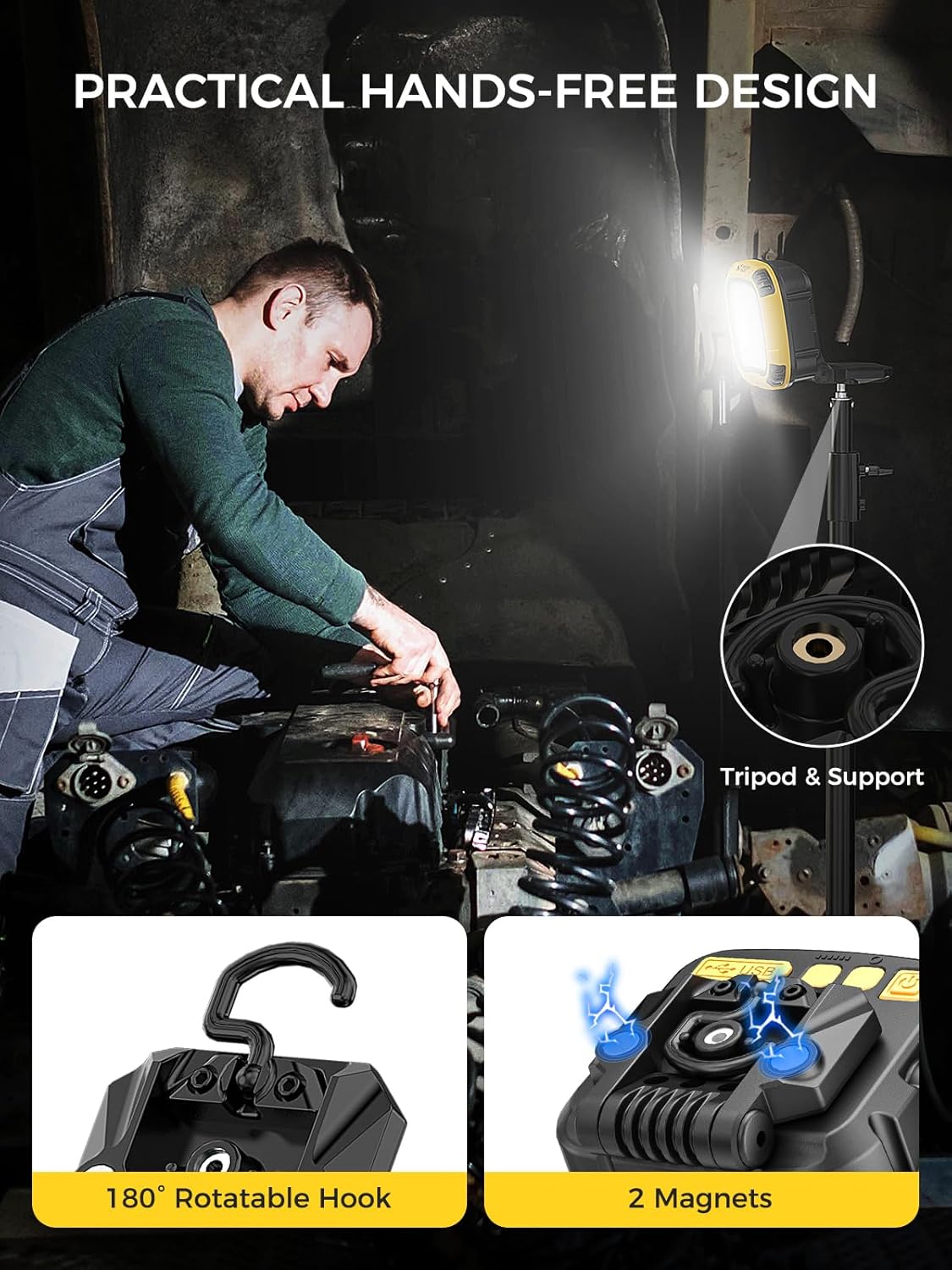
Image 5.2: Demonstrates the practical hands-free design, including the rotatable hook and strong magnets.
5.4 Power Bank Function
To use the work light as a power bank, connect your device (e.g., smartphone) to the USB output port on the work light using your device's charging cable. This feature is intended for emergency charging.
6. Maintenance
6.1 Cleaning
Wipe the surface of the work light with a soft, damp cloth. Do not use abrasive cleaners or solvents, as they may damage the finish. Ensure the charging port cover is securely closed to maintain water resistance.
6.2 Storage
Store the work light in a cool, dry place away from direct sunlight and extreme temperatures. If storing for an extended period, charge the battery to approximately 50% every three months to prolong battery life.
7. Troubleshooting
- Light does not turn on: Ensure the battery is charged. Connect the work light to a power source using the USB cable and allow it to charge for at least 30 minutes before attempting to turn it on again.
- Light modes are not changing: Short press the power button firmly. If the issue persists, fully discharge and then recharge the device.
- Charging is slow or not working: Verify that the USB cable is securely connected to both the work light and the power source. Try a different USB cable or power adapter. Ensure the power source provides sufficient current (e.g., 5V/2A).
- Power bank function not working: Ensure the work light has sufficient battery charge. Some devices may require specific charging protocols; try connecting to a different device if possible.
8. Specifications
| Feature | Detail |
|---|---|
| Model Number | GZ-0892 |
| Brightness | 4000 Lumens |
| Battery Capacity | 5000 mAh (Lithium Ion) |
| Voltage | 7.4 Volts |
| Light Source Type | LED (142 beads) |
| Light Modes | 18 (White, Warm White, Warm, Yellow, Red, Red Strobe) |
| Material | Acrylonitrile Butadiene Styrene (ABS) |
| Dimensions (L x W x H) | 4.33" x 1.77" x 3.94" |
| Item Weight | 0.41 Kilograms (14.4 ounces) |
| Mounting Type | Magnetic Mount, Hook, Tripod Threaded Hole |
| Water Resistance | Yes |
9. Safety Information
- Do not look directly into the LED light when it is on, as this may cause eye damage.
- Keep out of reach of children.
- Do not disassemble, modify, or attempt to repair the device yourself. This will void the warranty and may cause damage or injury.
- Avoid exposing the device to extreme temperatures, open flames, or corrosive liquids.
- Use only the provided or a certified USB cable for charging.
- Dispose of the battery according to local regulations. Do not dispose of in household waste.
10. Warranty and Support
10.1 Warranty
The Smiling Shark GZ-0892 LED Work Light comes with a 1-year limited warranty from the date of purchase. This warranty covers manufacturing defects and workmanship under normal use. It does not cover damage caused by misuse, accidents, unauthorized modifications, or normal wear and tear.
10.2 Customer Support
For technical assistance, warranty claims, or any questions regarding your Smiling Shark product, please contact our customer support team. Refer to the contact information provided on the product packaging or the official Smiling Shark website.
Documents and downloads
Ask a question about this manual
Ask about setup, troubleshooting, compatibility, parts, safety, or missing instructions. Manuals+ will review the question and use this page’s manual context to help answer it.