
Braun IS 7262 GY
Contents
Braun CareStyle 7 Pro Steam Generator Iron
Model: IS 7262 GY
Product Overview

The Braun CareStyle 7 is the world's first steam generator iron certified for its ergonomics. It offers a new level of ironing quality and innovative functions designed to easily and quickly tackle the most resistant fabrics and stubborn creases. Achieve professional ironing results comfortably and effortlessly, thanks to its ergonomic design and unique technologies. Featuring FreeGlide 3D technology, a global innovation unique to Braun, it ensures 360° ironing. Its soleplate, curved backward, allows the iron to glide over all obstacles like buttons and pockets, without damaging the soleplate or garment.
Key Features
- Ergonomics Certified: The world's first ergonomically certified steam generator iron. Its ergonomic design with an open handle reduces wrist strain, ensuring maximum comfort and effortless ironing.
- PowerSteam Technology: Braun's most powerful steam generator iron delivers professional ironing results. Innovative technology quickly and easily smooths even the most difficult creases.
- FreeGlide 3D Soleplate: A world-first, the slightly curved soleplate shape allows the iron to glide backward, over buttons and pockets, without creating false creases or damaging your soleplate.
- EloxalPlus Soleplate: Features an aluminum coating offering exceptional durability and scratch resistance, making it twice as hard as stainless steel.
- iMode Technology: The intelligent iCare mode protects your clothes with a safe and adapted temperature, ensuring faster and easier ironing.
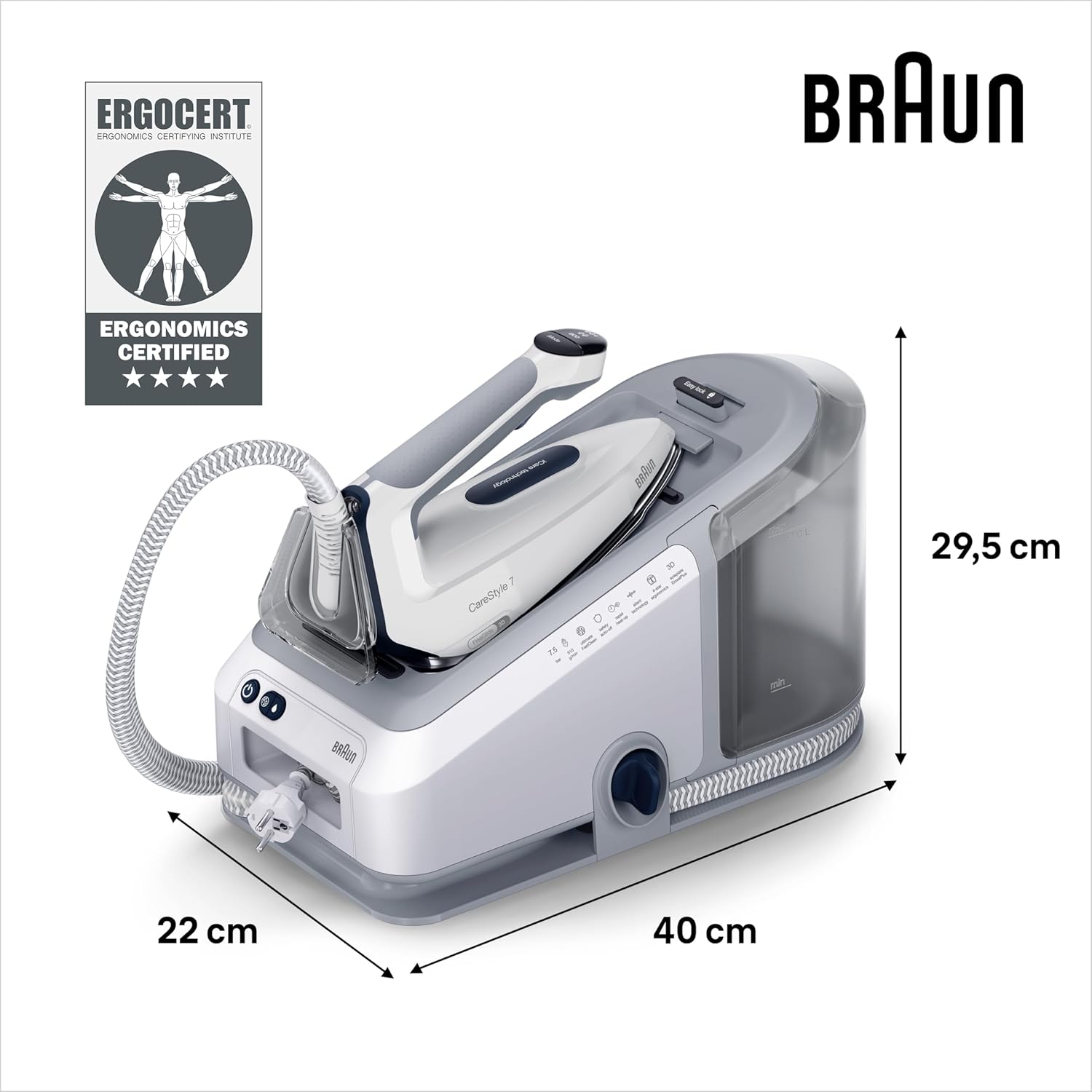
The Braun CareStyle 7 is certified for its ergonomic design, reducing wrist strain during ironing.

Experience powerful steam output for professional ironing results with PowerSteam Technology.

iMode Technology offers three simple modes (iCare, Eco, Turbo) for optimal ironing.

The unique FreeGlide 3D soleplate allows effortless gliding over obstacles like buttons and pockets.
Important Safety Instructions
Please read all instructions carefully before using the appliance and retain them for future reference. Failure to follow these instructions may result in electric shock, fire, or serious injury.
- Always ensure the voltage indicated on the rating plate corresponds to your mains voltage.
- Do not immerse the appliance, power cord, or plug in water or other liquids.
- Keep the iron and its cord out of reach of children and persons with reduced physical, sensory, or mental capabilities.
- Never leave the iron unattended while it is connected to the mains supply.
- Do not operate the appliance with a damaged cord or plug, or if it has been dropped or damaged.
- Always unplug the iron from the electrical outlet when filling with water, emptying, or during cleaning.
- The soleplate and steam can become extremely hot and cause burns. Handle with care.
- Only use distilled or demineralized water to prevent limescale buildup and ensure optimal performance.
Setup
Unpacking
Carefully remove the iron and all accessories from the packaging. Dispose of packaging materials responsibly.
Filling the Water Tank
- Ensure the appliance is unplugged from the power outlet.
- Remove the detachable 2-liter water tank from the base unit.
- Fill the water tank with distilled or demineralized water up to the 'MAX' mark. Do not use tap water, perfumed water, or water from tumble dryers, as this can damage the appliance.
- Replace the water tank securely into the base unit until it clicks into place.
First Use
- Place the steam generator iron on a stable, heat-resistant surface.
- Unwind the power cord completely and plug it into a grounded electrical outlet.
- Press the ON/OFF button. The indicator light will illuminate.
- Allow the iron to heat up for approximately 2 minutes until the temperature indicator light stops flashing and remains solid.
- For the first use, press the steam trigger several times away from garments to prime the pump and ensure consistent steam output.
Operating Instructions
Powering On/Off
Press the ON/OFF button located on the base unit to turn the appliance on or off. The iron will automatically shut off after 10 minutes of inactivity for safety and energy saving.
iMode Technology
The CareStyle 7 features iMode Technology, offering three intelligent settings to optimize your ironing experience:
- iCare Mode: This intelligent mode automatically sets a safe temperature for all types of fabrics, from delicate silks to tough denim, protecting your clothes and simplifying ironing.
- Eco Mode: For delicate fabrics or when less steam is needed, Eco mode reduces power consumption by up to 55% while still providing excellent results.
- Turbo Mode: For maximum steam performance and tackling stubborn creases on thick fabrics like linen or cotton, select Turbo mode.
To switch between modes, press the 'Mode' button on the iron's handle.
Ironing with FreeGlide 3D Soleplate
The unique FreeGlide 3D soleplate is designed with a curved shape, allowing the iron to glide effortlessly in all directions, even backward. This feature makes it easy to iron over buttons, pockets, and zippers without snagging or damaging your garments or the soleplate.
Vertical Steaming
The CareStyle 7 Pro can be used for vertical steaming of hanging garments, curtains, or drapes. Hold the iron vertically, close to the fabric, and press the steam trigger. Ensure the fabric is suitable for steaming and test on an inconspicuous area first.
Steam Shot Function
For extra stubborn creases, press the steam shot button (if available on your model) for a powerful burst of steam. This function is ideal for thick fabrics and can be used horizontally or vertically.
Maintenance and Cleaning
FastClean System (Descaling)
The FastClean system helps maintain the performance of your steam generator iron by removing limescale buildup. Follow these steps for descaling:
- Ensure the appliance is cool and unplugged.
- Locate the FastClean valve/cap on the base unit (refer to diagram in physical manual if available).
- Place a container under the valve.
- Open the valve to drain the water and limescale.
- Close the valve once the water has stopped flowing.
- Perform this procedure regularly, especially in areas with hard water, or when the descaling indicator light illuminates.
Cleaning the Soleplate
To clean the EloxalPlus soleplate, ensure the iron is cool and unplugged. Wipe the soleplate with a damp cloth and a non-abrasive liquid cleaner if necessary. Do not use abrasive pads or harsh chemicals, as they can damage the soleplate coating.
Storage
After use, allow the iron to cool down completely. Empty any remaining water from the tank. Use the 'Lock & Carry System' to secure the iron to its base for safe and convenient transport and storage. Wrap the power cord neatly around the designated area on the base unit.
Troubleshooting
| Problem | Possible Cause | Solution |
|---|---|---|
| No steam or low steam output. | Water tank is empty. Iron not hot enough. Limescale buildup. | Refill the water tank. Wait for the iron to reach operating temperature. Perform the FastClean descaling procedure. |
| Water leaking from the soleplate. | Temperature too low for steam. Overfilling the water tank. | Increase the temperature setting or wait for the iron to heat up. Do not fill past the 'MAX' line. |
| Iron not heating up. | Not plugged in. Power outlet issue. Automatic shut-off activated. | Ensure the power cord is securely plugged in. Test the outlet with another appliance. Press the ON/OFF button to restart. |
| White flakes coming from the soleplate. | Limescale buildup. | Perform the FastClean descaling procedure. Use only distilled or demineralized water. |
Specifications

Product dimensions: 40 cm (length) x 22 cm (width) x 29.5 cm (height).

Key features: 2700W power, 510 g/min steam shot, 150 g/min continuous steam, 1.7m cord length.
| Feature | Specification |
|---|---|
| Brand | Braun |
| Model Number | IS 7262 GY |
| Power | 2700 Watts |
| Voltage | 220 Volts |
| Steam Shot | 510 g/min |
| Continuous Steam | 150 g/min |
| Water Tank Capacity | 2 Liters (removable) |
| Cord Length | 1.7 meters |
| Soleplate Material | EloxalPlus (Aluminum) |
| Weight | 5 Kilograms |
| Color | Grey |
| Special Features | Lock & Carry System, Vertical Steam, Anti-drip |
Warranty and Support
This Braun CareStyle 7 Pro Steam Generator Iron comes with a standard manufacturer's warranty. Please refer to the warranty card included in your product packaging for specific terms and conditions, including warranty period and coverage details.
For technical support, service, or to inquire about spare parts, please contact Braun customer service through their official website or the contact information provided in your product documentation. Always have your model number (IS 7262 GY) and purchase date ready when contacting support.
Documents and downloads
Ask a question about this manual
Ask about setup, troubleshooting, compatibility, parts, safety, or missing instructions. Manuals+ will review the question and use this page’s manual context to help answer it.