1. Introduction
The GENERIC K3 Professional RC Drone is a compact, foldable drone equipped with a 4K dual camera system, designed for ease of use and stable flight. This manual provides essential information for setting up, operating, maintaining, and troubleshooting your drone to ensure a safe and enjoyable experience.

Figure 1: K3 Drone showing its folded (12.5x8x5.5cm) and unfolded (29x23x5.5cm) dimensions.
2. What's in the Box
Please check the package contents upon unboxing to ensure all items are present:
- Aircraft (Drone) x 1
- Remote Control x 1
- Protective Frame x 4
- Screwdriver x 1
- USB Charging Cable x 1
- Manual x 1
- Battery x 1
3. Product Features
-
Hover Air Intelligent Hover: The drone utilizes air pressure technology to maintain a stable hover at a consistent height, allowing for better control and clearer aerial photography.
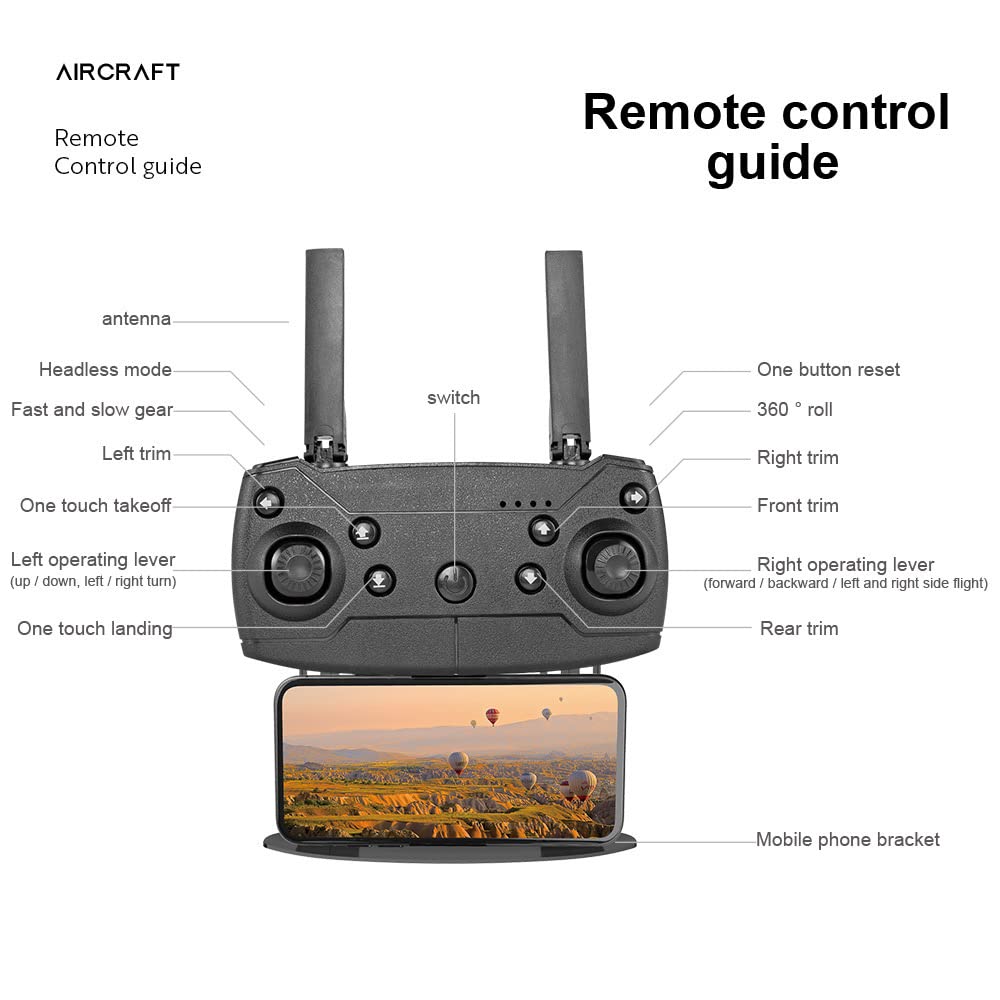
Figure 2: Drone demonstrating stable hover capability.
-
Night Flight Capability: Equipped with high-brightness LED night lights, the drone can be operated in low-light conditions, aiding navigation and direction discrimination during night flights.

Figure 3: Drone with illuminated LED lights for night operation.
-
50x Zoom Shooting: The integrated camera features 1-50x zoom technology, allowing the remote control to enlarge and capture distant scenes with clarity.

Figure 4: Visual representation of the 50x zoom function.
-
4K Dual Camera System: Features dual 4K cameras with adjustable angles, providing both head-up and top-view shooting options for diverse photographic needs.

Figure 5: Drone's dual 4K cameras with adjustable viewing angles.
4. Setup Guide
4.1. Battery Installation and Charging
- Insert the provided 1800mAh modular battery into the drone's battery compartment. Ensure it clicks securely into place.
- Connect the USB charging cable to the drone's charging port and a suitable USB power adapter (not included).
- Allow approximately 100 minutes for a full charge. The battery provides about 20 minutes of flight time per charge.

Figure 6: Modular battery installation into the drone.
4.2. Drone Unfolding
Gently unfold the drone's arms until they lock into position. Ensure all four arms are fully extended before flight.
4.3. Remote Control Setup
Install batteries into the remote control (batteries not included). Extend the antennas and attach your mobile phone to the bracket if using the app for FPV (First Person View) or advanced controls.

Figure 7: Remote Control Guide with labeled functions.
5. Operating Instructions
5.1. Pairing the Drone and Remote Control
- Place the drone on a flat, level surface.
- Turn on the drone's power switch. The indicator lights will flash.
- Turn on the remote control. Push the left operating lever (throttle) fully up, then fully down. The drone's lights will become solid, indicating successful pairing.
5.2. Basic Flight Controls (Refer to Figure 7 for button locations)
- One Touch Takeoff: Press the 'One touch takeoff' button to automatically launch the drone to a stable hovering height.
- One Touch Landing: Press the 'One touch landing' button to automatically land the drone.
- Left Operating Lever (Throttle/Yaw): Push up/down to control altitude. Push left/right to rotate the drone (yaw).
- Right Operating Lever (Forward/Backward/Side Flight): Push up/down for forward/backward movement. Push left/right for left/right side flight.
- Headless Mode: Activates headless mode, where the drone's orientation is relative to the pilot, simplifying control.
- Fast and Slow Gear: Adjusts the drone's flight speed (3 gear speed regulation).
- Trims (Left, Right, Front, Rear): Use these buttons to fine-tune the drone's stability if it drifts in any direction during hover.
- 360° Roll: Press this button and move the right operating lever in a direction to perform a 360-degree flip.
- One Button Reset: Resets certain flight parameters or calibration.
5.3. Camera Operation
- Photo/Video Capture: Specific buttons on the remote control or within the mobile app are used to initiate photo capture or video recording.
- Zoom Function: Use the designated controls on the remote or app to activate the 1-50x zoom feature.
- Angle Adjustment: The camera angle can be adjusted manually or via remote control, depending on the model variant.
6. Maintenance
- Cleaning: Use a soft, dry cloth to clean the drone body and camera lens. Avoid using harsh chemicals.
- Propeller Inspection: Regularly check propellers for damage or cracks. Replace any damaged propellers immediately using the provided screwdriver.
- Battery Care: Store batteries in a cool, dry place. Do not overcharge or over-discharge. If storing for extended periods, charge to approximately 50% capacity.
- Storage: When not in use, fold the drone and store it in its designated storage bag to protect it from dust and physical damage.

Figure 8: Drone and remote control stored in the designated bag.
7. Troubleshooting
| Problem | Possible Cause | Solution |
|---|---|---|
| Drone does not power on. | Battery is not charged or not properly installed. | Ensure battery is fully charged and correctly inserted. |
| Remote control does not connect to drone. | Incorrect pairing procedure or low remote control battery. | Repeat pairing steps (Section 5.1). Replace remote control batteries. |
| Drone drifts during flight. | Improper calibration or environmental factors (wind). | Perform a flight calibration. Use trim buttons to adjust stability. Fly in calm conditions. |
| Camera not recording or taking photos. | SD card full/missing or camera not activated. | Ensure an SD card is inserted and has free space. Activate camera via remote or app. |
| Short flight time. | Battery not fully charged or aging battery. | Ensure battery is fully charged. Consider replacing the battery if it's old. |
8. Specifications
| Feature | Detail |
|---|---|
| Model Name | K3 |
| Item Model Number | DGMT-4338-SRK001 |
| Product Dimensions (Folded) | 12 x 10 x 5 cm |
| Product Dimensions (Expanded) | 26 x 26 x 5.5 cm (approximate, derived from image) |
| Item Weight | 410 g |
| Color | Black |
| Material | Plastic |
| Camera | Dual 4K cameras, adjustable angle, 50x zoom |
| Video Capture Resolution | 4K |
| Battery Capacity | 1800 mAh |
| Charging Time | Approximately 100 minutes |
| Battery Life | Approximately 20 minutes |
| Remote Control Signal | 2.4G, Wi-Fi |
| Remote Control Distance | Approximately 100 meters |
| Flying Speed | 3 Gear Speed Regulation |
| Special Features | Foldable, Integrated Camera, Rechargeable, Hover Air, LED Night Lights |
| Age Range (Description) | Adult |
| Skill Level | Professional |
9. Warranty and Support
For warranty information, technical support, or service inquiries, please refer to the documentation provided with your purchase or contact the seller directly. Keep your proof of purchase for any warranty claims.


