1. Introduction
Thank you for choosing the ZOKOP Portable Evaporative Cooler. This 3-in-1 unit functions as an evaporative air cooler, air purifier, and humidifier, designed to provide a comfortable environment in various settings. It features a powerful fan, a large water tank, and convenient controls for ease of use. Please read this manual thoroughly before operation to ensure proper use, maintenance, and safety.

Image: The ZOKOP Portable Evaporative Cooler, showcasing its sleek design, front air vents, and a remote control. Blue airflow lines indicate its cooling function.
2. Important Safety Instructions
To reduce the risk of fire, electric shock, or injury, always follow these basic safety precautions:
- Read all instructions before using this appliance.
- Ensure the power supply voltage matches the rating label on the appliance (110V/60Hz).
- Do not operate the cooler with a damaged cord or plug. If the cord or plug is damaged, contact customer support.
- Do not place the cooler near heat sources, open flames, or in direct sunlight for extended periods.
- Always unplug the cooler from the power outlet before filling or emptying the water tank, cleaning, or performing any maintenance.
- Do not immerse the cooler, cord, or plug in water or other liquids.
- Keep the cooler out of reach of children and pets. Close supervision is necessary when the appliance is used by or near children.
- Do not block the air inlets or outlets. Ensure adequate clearance around the unit for proper airflow.
- Use the cooler only on a flat, stable surface to prevent tipping and water spillage.
- Do not use the cooler in bathrooms or other excessively humid environments where it could come into contact with water.
- If you do not add water, do not press the "Cool" button. The unit can be used as a fan without water.
3. Package Contents
Please check the package contents upon opening. If any items are missing or damaged, contact customer support immediately.
- 1 x ZOKOP Evaporative Air Cooler Unit
- 1 x Remote Control
- 4 x Wheels (2 locking, 2 non-locking)
- 2 x Ice Packs
- 1 x Instruction Manual
4. Product Components
Familiarize yourself with the main parts of your evaporative cooler:
- Control Panel (Top)
- Air Outlet Louvers (Front)
- Water Tank (Bottom, 10.56 Gallon / 40 Liter capacity)
- Water Level Indicator (Front of water tank)
- Water Inlet (Top)
- Air Filter / Cooling Pad (Sides/Rear)
- Casters / Wheels (Bottom)
- Drain Hole (Back)
- Built-in Handle (Top rear)

Image: Close-up view of the cooler's top water tank for filling and the transparent bottom water tank, indicating its 10.56 Gallon capacity.

Image: The cooler with its overall dimensions (19.29" x 14.37" x 38.19") and detailed views of the portable handle and flexible 360-degree rolling wheels.
5. Setup and Initial Use
5.1 Attaching the Wheels
- Carefully unbox the evaporative cooler and place it on its side or upside down on a soft surface to avoid scratching.
- Locate the four wheels provided. Two wheels have locking mechanisms, and two do not.
- Insert the stem of each wheel into the designated holes on the bottom of the cooler. Push firmly until they click into place.
- Return the cooler to an upright position. Ensure the locking wheels are positioned at the front for easy access.
5.2 Filling the Water Tank and Adding Ice Packs
For cooling and humidifying functions, water must be added to the tank.
- Ensure the cooler is unplugged from the power outlet.
- Open the water inlet cover located on the top of the unit.
- Pour clean, cool water into the tank. Monitor the water level indicator on the front of the unit. Do not exceed the "MAX" line. The tank capacity is approximately 10.56 Gallons (40 Liters).
- For enhanced cooling, place the two provided ice packs (after freezing them) into the top water tank compartment.
- Close the water inlet cover securely.

Image: The top compartment of the cooler with its lid open, revealing two blue ice packs placed inside, ready to enhance cooling.
5.3 Placement
Place the cooler on a firm, level surface. For optimal cooling, position the unit near an open window or door to allow fresh air intake and exhaust of humid air.
6. Operating Instructions
Your ZOKOP Evaporative Cooler can be operated using the touch control panel on the top of the unit or the included remote control.
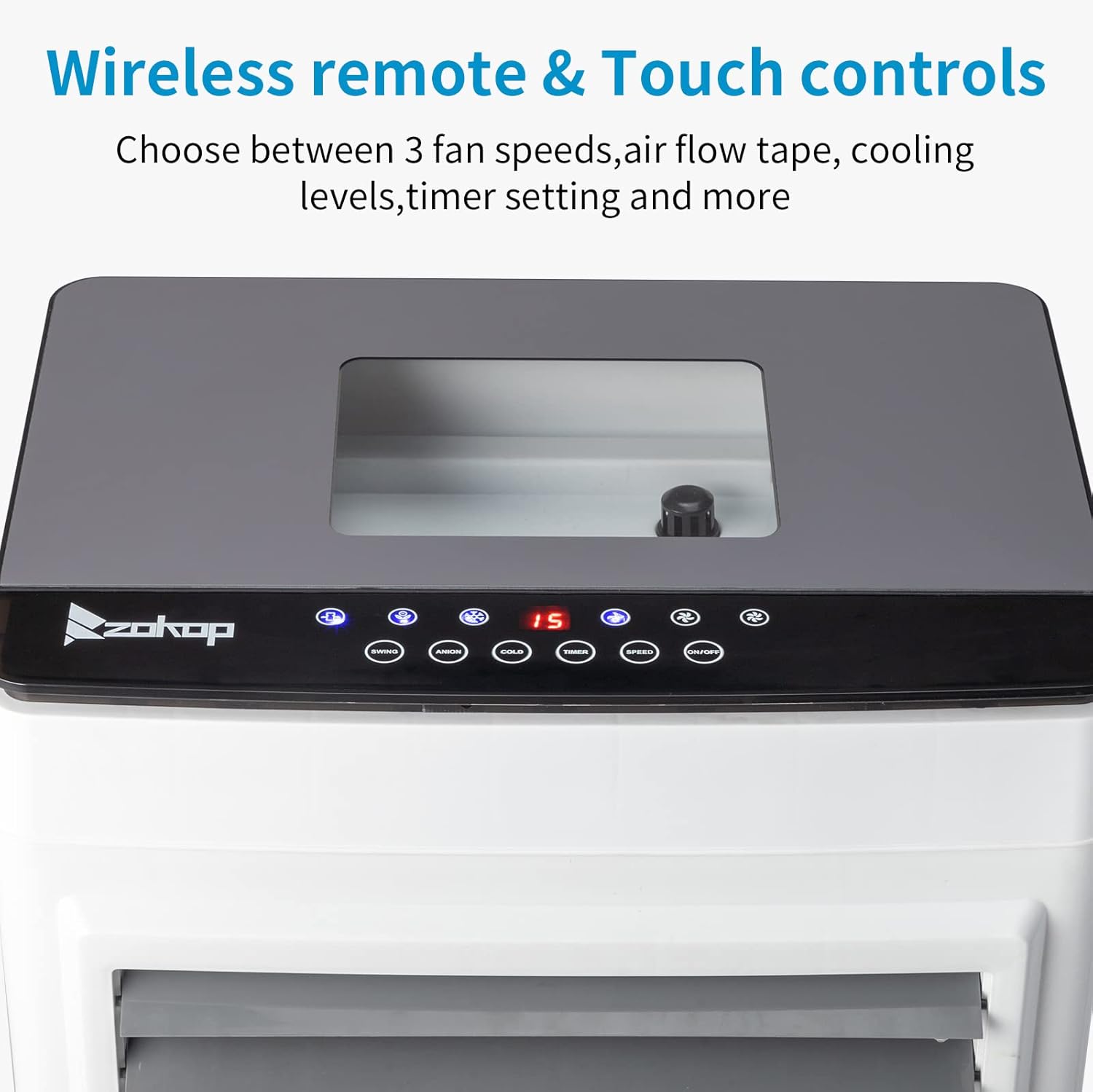
Image: A close-up of the cooler's top control panel with LED display and touch buttons, alongside its wireless remote control.
6.1 Control Panel and Remote Functions
| Button/Function | Description |
|---|---|
| POWER | Turns the unit On or Off. |
| SPEED | Cycles through fan speeds: Low, Medium, High. |
| MODE | Selects operating mode: Normal, Natural, Sleep. |
| COOL / HUMIDIFY | Activates or deactivates the water pump for evaporative cooling/humidifying. Requires water in the tank. |
| SWING | Activates or deactivates automatic horizontal oscillation (100°). Vertical airflow (120°) is adjusted manually. |
| TIMER | Sets the auto-off timer from 1 to 8 hours. Each press adds 1 hour. |
6.2 Operating Modes
- Normal Mode: Provides a constant fan speed based on your selection (Low, Medium, High).
- Natural Mode: Simulates natural breeze by varying fan speed intermittently.
- Sleep Mode: Gradually decreases fan speed over time to provide quiet operation for sleeping.

Image: Visual representation of the three operating modes (Natural, Normal, Sleep) and their corresponding fan speed levels (Low, Medium, High).

Image: The cooler demonstrating its wide-angle airflow adjustment, with illustrations for 100-degree automatic horizontal swing and 120-degree manual vertical adjustment.
7. Maintenance and Cleaning
Regular cleaning and maintenance will ensure optimal performance and extend the lifespan of your evaporative cooler.
7.1 General Cleaning
- Always unplug the unit before cleaning.
- Wipe the exterior surfaces with a soft, damp cloth. Do not use abrasive cleaners or solvents.
- Do not spray water directly onto the unit.
7.2 Water Tank Cleaning
- Unplug the cooler.
- Drain any remaining water from the tank using the drain hole located at the back of the unit.
- Clean the inside of the water tank with a soft cloth and mild detergent. Rinse thoroughly with clean water.
- Allow the tank to air dry completely before refilling or storing the unit.
- Regularly clean the water tank to prevent mold and mildew growth, especially if using the humidifying function frequently.
7.3 Air Filter / Cooling Pad Cleaning
The air filter and cooling pad should be cleaned periodically, depending on usage and air quality.
- Unplug the cooler.
- Carefully remove the air filter/cooling pad from the side or rear of the unit (refer to product diagram for exact location).
- Rinse the filter/pad under running water to remove dust and debris. For stubborn dirt, use a soft brush and mild soap.
- Allow the filter/pad to air dry completely before reinserting it into the unit. Do not use the cooler without the filter/pad properly installed.
7.4 Storage
- Before storing, ensure the water tank is completely empty and dry.
- Clean all components as described above.
- Store the cooler in a cool, dry place, away from direct sunlight and extreme temperatures.
- Cover the unit to protect it from dust.
8. Troubleshooting
If you encounter issues with your evaporative cooler, please refer to the following table before contacting customer support.
| Problem | Possible Cause | Solution |
|---|---|---|
| Unit does not turn on. | Not plugged in; Power outlet malfunction; Power button not pressed. | Ensure the power cord is securely plugged into a working outlet. Press the POWER button. |
| No cooling effect. | Water tank is empty; COOL function not activated; Cooling pad is dry or dirty. | Fill the water tank. Press the COOL button. Clean or wet the cooling pad. |
| Weak airflow. | Air inlets/outlets blocked; Fan speed set too low; Air filter dirty. | Clear any obstructions. Increase fan speed. Clean the air filter. |
| Unusual noise. | Unit not on a level surface; Water pump running dry; Debris in fan. | Place on a flat surface. Check water level and refill if necessary. Unplug and inspect for debris. |
| Water leakage. | Water tank overfilled; Unit tilted; Drain plug not secure. | Do not overfill past MAX line. Ensure unit is level. Check drain plug. |
| Remote control not working. | Batteries dead or incorrectly inserted; Obstruction between remote and unit. | Replace batteries. Ensure clear line of sight to the unit's receiver. |
9. Specifications
| Feature | Specification |
|---|---|
| Model | ESC-45P-4R (10.56 Gal) |
| Color | Gray / White |
| Material | Plastic |
| Rated Voltage | 110V / 60Hz |
| Rated Power | 120W |
| Water Tank Capacity | 10.57 Gallons (40 Liters) |
| Air Flow (CFM) | 2650 CFM |
| Air Flow (m³/h) | 4500 m³/h |
| Coverage Area | Up to 320 Square Feet |
| Wind Modes | Natural, Normal, Sleep |
| Fan Speeds | High, Medium, Low |
| Timer | 1-8 Hours |
| Horizontal Oscillation | 100° Automatic |
| Vertical Airflow Adjustment | 120° Manual |
| Product Dimensions | 19.29" D x 14.37" W x 38.19" H (49 x 36.5 x 97 cm) |
| Product Weight | 27.5 lbs (12.5 kg) |
| Cord Length | 4.92 Feet (150 cm) |
| Noise Level | 9 dB |
10. Warranty and Customer Support
For any questions, concerns, or issues not covered in this manual, please contact ZOKOP customer support. Please have your product model number (ESC-45P-4R) and purchase information ready when contacting support.
Specific warranty details may vary. Please refer to the warranty card included with your purchase or contact customer support for more information.


