
Tkisko TO1
Tkisko TO1 Projector User Manual
Model: TO1 | Brand: Tkisko
1. Product Overview
The Tkisko TO1 Projector is designed to deliver a high-quality visual experience with native 1080P resolution and 4K support. It features electric focus, 4D/4P keystone correction, and versatile connectivity options including Wi-Fi and Bluetooth.
What's in the Box
- Tkisko TO1 Projector
- Remote Control
- Carrying Backpack
- Power Cord
- AV Cable
- HDMI Cable
- User Manual
Video Description: A brief overview of the Tkisko TO1 projector, showcasing its compact size and ease of use in a home setting, projecting onto a ceiling.
Video Description: An unboxing video demonstrating the contents of the Tkisko TO1 projector package, including the projector, remote, and various cables.
2. Setup Guide
2.1 Initial Placement and Power
Place the projector on a stable, flat surface or mount it securely. Ensure adequate ventilation around the device. Connect the power cord to the projector and then to a power outlet.
2.2 Focus and Keystone Correction
The Tkisko TO1 features electric focus and 4D/4P keystone correction for optimal image clarity and shape. Use the remote control to adjust these settings.
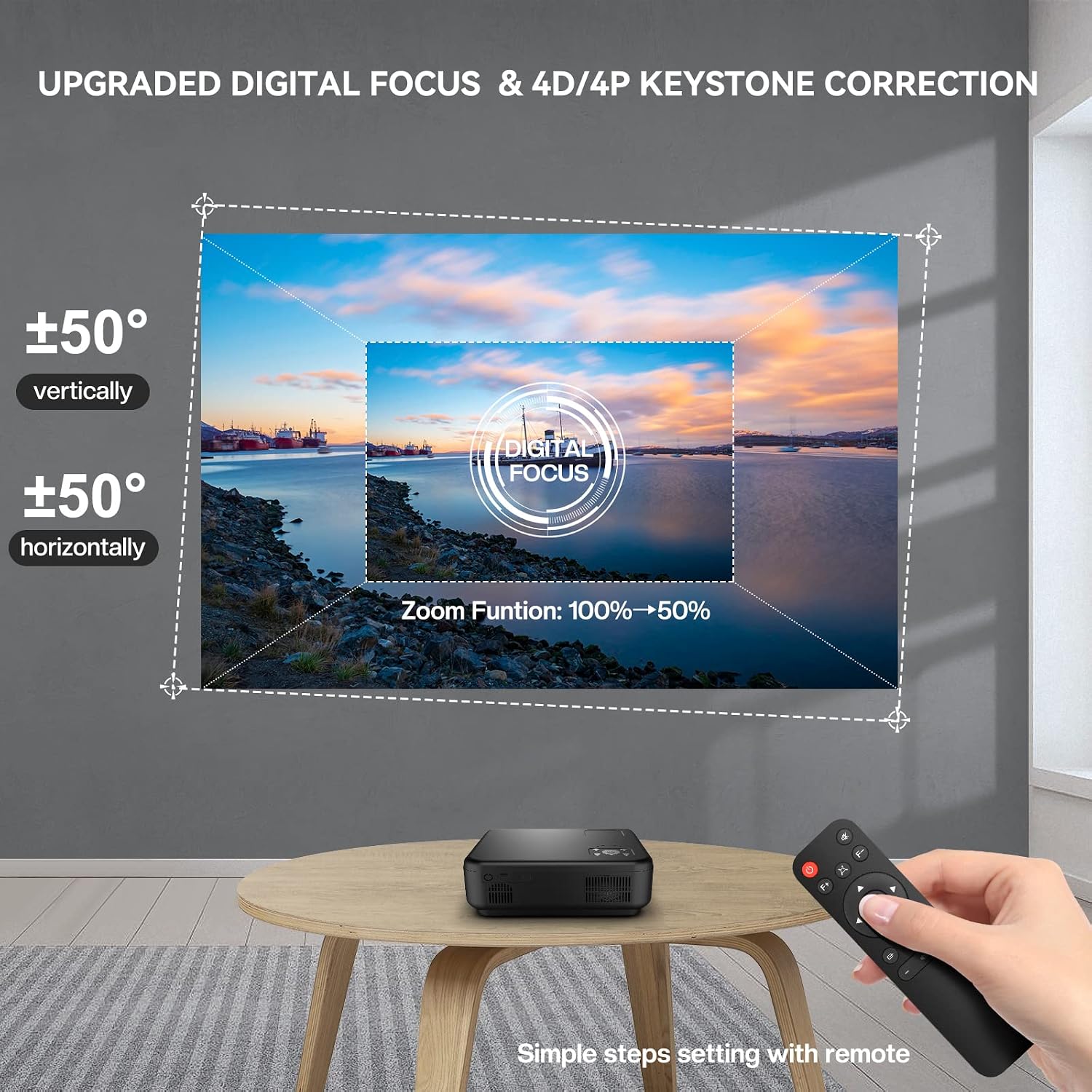
Image Description: A Tkisko TO1 projector projecting an image onto a wall, with a remote control in hand demonstrating the digital focus and 4D/4P keystone correction features. The projected image shows vertical and horizontal adjustment capabilities and a 50% zoom function.
Video Description: A demonstration of the Tkisko TO1 projector's menu navigation and projection settings, including adjusting the projection mode and keystone correction.
2.3 Connectivity
The projector offers multiple input options:
- HDMI: Connect devices like laptops, gaming consoles, or TV sticks using an HDMI cable.
- USB: Plug in USB drives for media playback.
- AV: Use the AV cable for older devices.
- 3.5mm Audio Jack: Connect external speakers or headphones.

Image Description: The Tkisko TO1 projector displayed with various connectivity options such as AV, AUX, USB, and HDMI, alongside compatible devices like a smartphone, tablet, gaming controller, and headphones.
3. Operating Instructions
3.1 Power On/Off
Press the power button on the projector or the remote control to turn the device on or off.
3.2 Wireless Connection (Wi-Fi)
The projector supports 5G+2.4G Wi-Fi for smooth streaming. Navigate to the Wi-Fi settings in the projector's menu, select your network, and enter the password.

Image Description: A Tkisko TO1 projector projecting a large image onto a wall, demonstrating 5G wireless screening from a smartphone. Icons indicate compatibility with iPhone, Android phones, MacBook, and Windows laptops.
3.3 Bluetooth Audio
Connect external Bluetooth speakers or headphones for enhanced audio. The projector features 5.1 bidirectional Bluetooth. Go to Bluetooth settings, enable Bluetooth, and pair with your desired device.

Image Description: The Tkisko TO1 projector connected via Bluetooth 5.1 to an external speaker, illustrating its bidirectional Bluetooth capability. It also shows the projector being used as a standalone Bluetooth speaker, with a smartphone connected.
3.4 Image Size Adjustment (Zoom)
The projector supports a 50% zoom function, allowing you to reduce the image size from 100% to 50% without moving the projector. This can be adjusted via the remote control.

Image Description: A visual representation of the Tkisko TO1 projector's adjustable screen size, showing projections of 50, 100, and 300 inches against a scenic backdrop, emphasizing optimal viewing distance.
Video Description: A quick demonstration of the Tkisko TO1 projector's initial setup, showing the projected image and basic functionality.
4. Maintenance
Proper maintenance ensures the longevity and optimal performance of your Tkisko TO1 Projector.
4.1 Lens Care
- Use a soft, lint-free cloth to gently wipe the projector lens.
- For stubborn smudges, use a lens cleaning solution specifically designed for optical surfaces.
- Avoid abrasive materials or harsh chemicals that can scratch the lens.
4.2 Dust Protection
The Tkisko TO1 features a fully sealed optical engine designed to protect the lens from dust and scratches, contributing to a longer lifespan. However, regular cleaning of the exterior and ensuring the projector is stored in a clean environment is recommended.
4.3 General Cleaning
- Wipe the exterior of the projector with a soft, dry cloth.
- Do not use liquid cleaners or aerosols directly on the projector.
- Ensure ventilation ports are clear of obstructions to prevent overheating.
5. Troubleshooting
If you encounter issues with your Tkisko TO1 Projector, refer to the following common problems and solutions:
5.1 No Image or Blurry Projection
- Check Focus: Use the electric focus function via the remote control to sharpen the image.
- Adjust Keystone: If the image is trapezoidal, use the 4D/4P keystone correction to square it.
- Input Source: Ensure the correct input source (HDMI, USB, AV) is selected.
- Cable Connection: Verify all cables are securely connected.
5.2 No Sound
- Volume Level: Increase the volume on both the projector and the connected device.
- Audio Output: Check if external speakers or headphones are properly connected via Bluetooth or the 3.5mm audio jack.
- Source Audio: Ensure the audio is enabled on the source device.
5.3 Remote Control Issues
- Batteries: Replace the remote control batteries.
- Line of Sight: Ensure there are no obstructions between the remote and the projector's IR receiver.
- Distance: Operate the remote within the recommended range.
5.4 Wireless Connection Problems
- Wi-Fi Signal: Ensure the projector is within range of your Wi-Fi router and the signal is strong.
- Network Password: Double-check the Wi-Fi password.
- Device Compatibility: Confirm your device supports the projector's wireless screening protocols (e.g., AirPlay, Miracast).
6. Specifications
| Feature | Specification |
|---|---|
| Brand | Tkisko |
| Model Name | TO1 |
| Native Resolution | 1920 x 1080 |
| Display Resolution Maximum | 1920 x 1080 (4K Supported) |
| Brightness | 700 ANSI (20000 Lux) |
| Contrast Ratio | 20000:1 |
| Connectivity Technology | HDMI, USB, AV, 3.5mm Audio Jack, Wi-Fi (5G+2.4G), Bluetooth 5.1 |
| Display Type | DLP |
| Form Factor | Portable |
| Mounting Type | Tabletop Mount |
| Recommended Uses | Indoor |
| Light Source Operating Life | 30000 Hours |
| Minimum Image Size | 40 Inches |
| Maximum Image Size | 300 Inches |
| Item Dimensions L x W x H | 10.24"L x 8.27"W x 4.02"H |
| Item Weight | 5 Grams |
7. Warranty and Support
The Tkisko TO1 Projector comes with a 3-year warranty. For any technical assistance or product-related inquiries, please contact Tkisko customer support. Our team is ready to help you within 24 hours.
Contact Information:
- Email: support_us@tkisko.com
- Website: Tkisko Official Store
Ask a question about this manual
Ask about setup, troubleshooting, compatibility, parts, safety, or missing instructions. Manuals+ will review the question and use this page’s manual context to help answer it.