
1. Introduction
This manual provides essential information for the safe and efficient operation, setup, and maintenance of your Airwheel SE3S Smart Rideable Suitcase. Please read this manual thoroughly before using the product to ensure proper function and to prevent damage or injury.
2. Safety Information
Your safety is paramount. Please observe the following safety guidelines:
- Weight Limit: Do not exceed the maximum load capacity of 110 kg (242 lbs) when riding.
- Age Restriction: This product is intended for adult use. Children should not operate the rideable function.
- Battery Safety: The lithium-ion battery is rechargeable and designed to meet airline carry-on requirements. Always remove the battery before checking the suitcase as luggage. Do not expose the battery to extreme temperatures or puncture it.
- Operating Environment: Use the rideable function on flat, stable surfaces. Avoid steep slopes, uneven terrain, wet conditions, or areas with heavy pedestrian traffic.
- Awareness: Always be aware of your surroundings when operating the suitcase in ride-on mode. Maintain a safe distance from others.
- Maintenance: Regularly inspect tires, brakes, and the handle mechanism for wear or damage.
3. Product Overview
The Airwheel SE3S is a smart rideable suitcase designed for convenient travel. It features a lightweight design, a retractable handle for ride-on or pull-behind use, and integrated charging capabilities.

Figure 3.1: The Airwheel SE3S Smart Rideable Suitcase in silver, showcasing its compact design and integrated wheels.
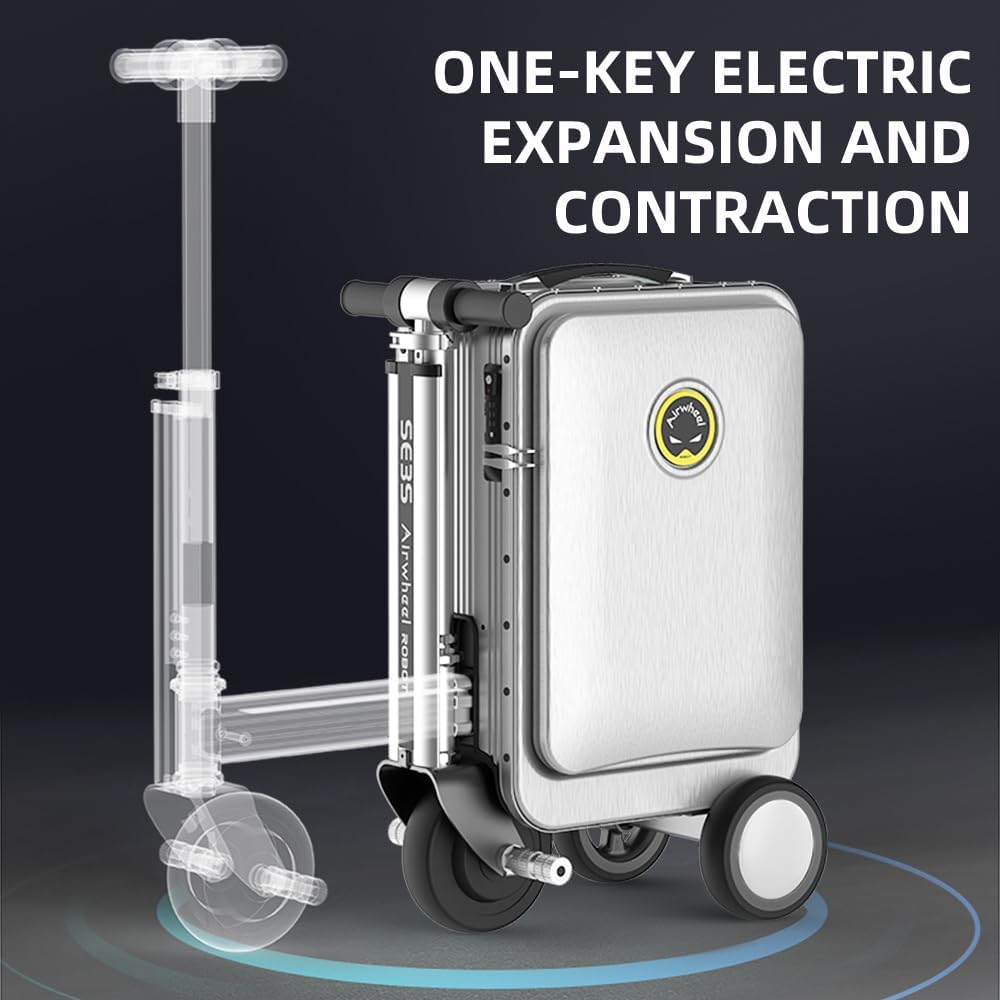
Figure 3.2: Illustration of the one-key electric expansion and contraction mechanism, allowing the scooter components to extend or retract.

Figure 3.3: Detailed view of key features: (1) Rubber Anti-Skid Handle, (2) International TSA Password Lock, (3) Breathing Light Effect of LED, and (4) External USB Interface.

Figure 3.4: The Airwheel SE3S with its handle extended, indicating its compliance with cabin size regulations for air travel.
Key Features:
- Ride-on Functionality: Easily switch between ride-on mode and traditional pull-behind luggage.
- Removable Battery: Rechargeable lithium-ion battery that meets airline carry-on requirements.
- Dual USB Output: External USB ports for charging mobile devices simultaneously.
- TSA Combination Lock: Integrated lock for enhanced security.
- Durable Tires: Wear-resistant, puncture-resistant solid tires for various terrains.
- App Control: Bluetooth connectivity for remote control, speed adjustment, and monitoring.
4. Setup
4.1 Unboxing and Initial Inspection
Upon receiving your Airwheel SE3S, carefully unpack all components. Verify that the following items are present:
- Airwheel SE3S Smart Rideable Suitcase
- Charger
- Power Bank (if included)
- Power Cord
- Cushion
- User Manual (this document)

Figure 4.1: The complete set of items included with the Airwheel SE3S, showing the suitcase, charger, power bank, power cord, and cushion.
4.2 Battery Installation and Charging
- Locate the battery compartment on the side of the suitcase.
- Insert the lithium-ion battery into the compartment, ensuring it clicks securely into place.
- Connect the charger to the charging port on the suitcase and then to a power outlet. The charging indicator will illuminate.
- Allow the battery to fully charge before first use. A full charge typically takes several hours.
- To remove the battery for airline travel, press the release button and carefully pull the battery out.
4.3 App Connection
To unlock advanced features and control options, download the official Airwheel app from your device's app store. Enable Bluetooth on your smartphone and follow the in-app instructions to pair with your SE3S suitcase.

Figure 4.2: The Airwheel mobile application interface, demonstrating features like remote control, Bluetooth alarm, speed adjustment, and cruise control for the smart suitcase.
5. Operating Instructions
5.1 Ride-on Mode
- Ensure the suitcase is on a flat, stable surface.
- Press the one-key electric expansion button to extend the scooter components. The handle and footrests will deploy.
- Carefully sit on the suitcase, placing your feet on the designated footrests.
- Use the handlebar controls to accelerate and steer. The maximum speed is approximately 13 km/h.
- To brake, use the designated brake lever on the handlebar.

Figure 5.1: A user demonstrating the ride-on mode of the Airwheel SE3S suitcase.

Figure 5.2: The suitcase in ride-on mode, highlighting a speed of 13 km/h and a load capacity of 110 kg, with an endurance of 8 km.
5.2 Pull-behind Mode
- If in ride-on mode, press the one-key electric contraction button to retract the scooter components.
- Extend the telescopic pull rod from the top of the suitcase.
- Tilt the suitcase and pull it behind you like traditional luggage.

Figure 5.3: A user pulling the Airwheel SE3S suitcase in its traditional luggage configuration.
5.3 Using the External USB Charging Ports
The Airwheel SE3S is equipped with dual high-speed USB output ports. Simply connect your mobile phone, tablet, or other USB-powered devices to these ports for convenient charging during your travels.
6. Maintenance
6.1 Cleaning
- Wipe the exterior of the suitcase with a soft, damp cloth.
- Avoid using abrasive cleaners or solvents that could damage the finish.
- Ensure all ports and electrical components are dry before use or charging.
6.2 Battery Care
- Charge the battery regularly, even if not in use, to maintain its lifespan.
- Store the battery in a cool, dry place away from direct sunlight.
- If the battery will not be used for an extended period, charge it to approximately 50-60% before storage.
6.3 Tire and Mechanism Inspection
- Periodically check the solid tires for any signs of wear or damage.
- Inspect the retractable handle and scooter mechanism to ensure smooth operation. Do not force any components.
7. Troubleshooting
7.1 Suitcase Not Turning On/Riding
- Check if the battery is properly installed and fully charged.
- Ensure the power button is pressed firmly.
7.2 App Connectivity Issues
- Ensure Bluetooth is enabled on your smartphone and the suitcase is powered on.
- Restart the app and try pairing again.
- Ensure your phone's operating system is up to date.
7.3 Charging Problems
- Verify that the charger is correctly connected to both the suitcase and a working power outlet.
- Check the charging cable for any visible damage.
For issues not covered here, please refer to the official Airwheel support channels.
8. Specifications
| Feature | Specification |
|---|---|
| Model Number | SE3S |
| Product Dimensions | 1.18 x 0.79 x 1.8 inches (folded) |
| Item Weight | 20.7 pounds (9.39 kg) |
| Capacity | 20 Liters |
| Max Load (Ride-on) | 110 kg (242 lbs) |
| Battery Type | Lithium Ion (included, removable) |
| Max Speed | Approx. 13 km/h |
| Connectivity | Bluetooth (for app control) |
| USB Output | Dual high-speed USB ports |

Figure 8.1: Detailed dimensions of the Airwheel SE3S suitcase.
9. Warranty and Support
For warranty information, product support, or service inquiries, please contact the official Airwheel customer service or visit their authorized website. Keep your purchase receipt as proof of purchase for any warranty claims.


