
1. Introduction
The MESTEK Pinless Wood Moisture Meter (Model WM700B) is a professional and precise instrument designed for non-destructive moisture detection. Utilizing a high-precision alloy probe and advanced processing chip, it provides accurate and fast readings for various materials without causing any damage to the surface. Its ability to detect moisture up to 40mm below the surface makes it an invaluable tool for identifying hidden moisture issues in homes, construction sites, and recreational vehicles.
2. Safety Information
- This product is designed for measuring moisture in non-metallic materials. Do not use it to measure metals, as this may lead to inaccurate readings or damage to the device.
- Keep the device away from water and high humidity environments to prevent damage.
- Do not attempt to disassemble or modify the device. Repairs should only be performed by qualified personnel.
- Ensure batteries are inserted with correct polarity. Remove batteries if the device will not be used for an extended period.
- Keep out of reach of children.
3. Package Contents
Please check the package contents to ensure all items are present:
- 1 x MESTEK WM700B Moisture Meter
- 1 x Screwdriver
- 3 x AAA 1.5V Batteries
- 1 x Storage Bag
- 1 x Product Manual (English)

Figure 3.1: MESTEK WM700B Moisture Meter with included screwdriver and AAA batteries.
4. Product Overview
The MESTEK WM700B features a user-friendly design with a large color LCD display for intuitive readings. The device utilizes a spherical probe for non-destructive measurements, allowing for quick and easy scanning of surfaces.
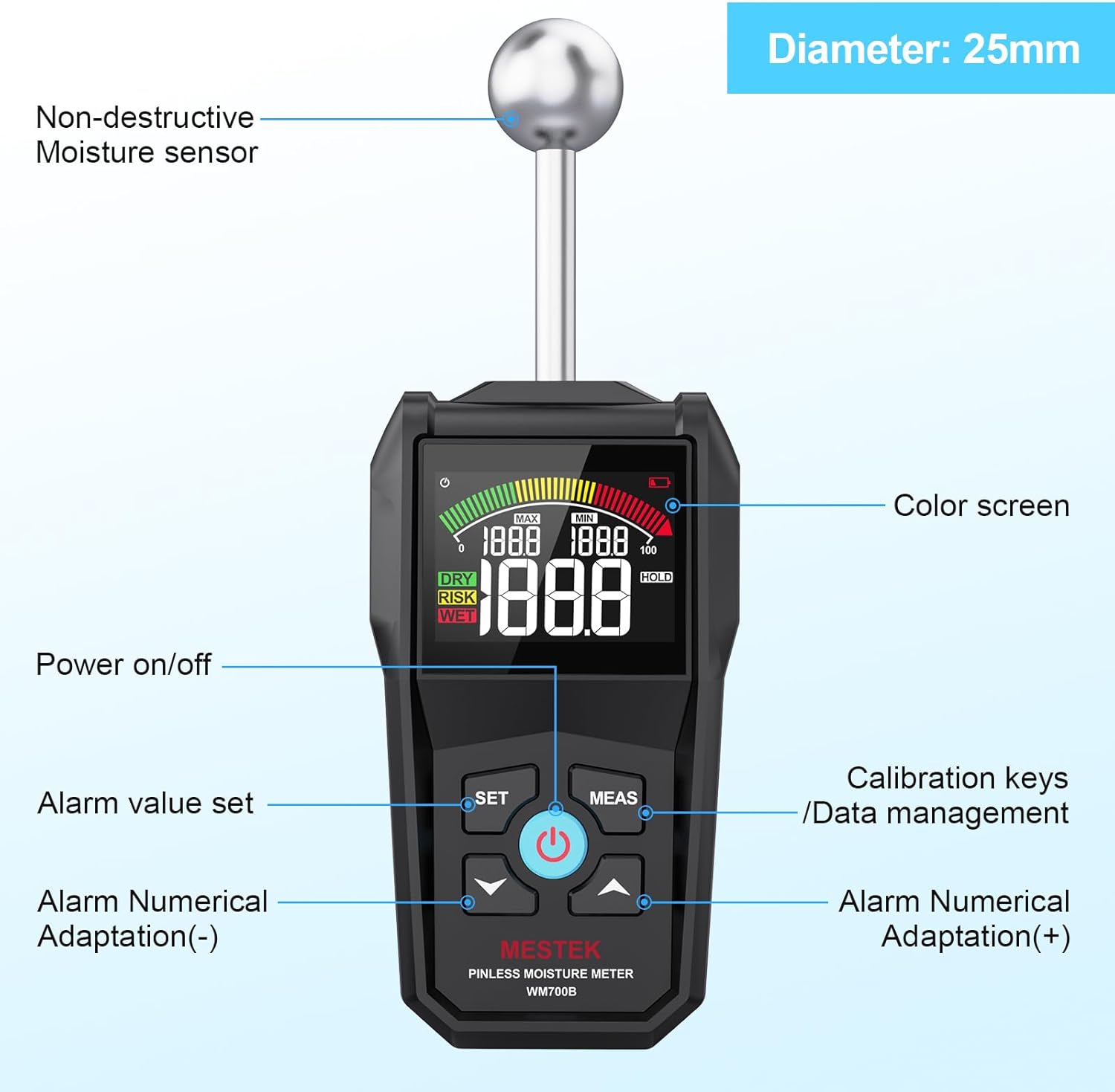
Figure 4.1: Front view of the MESTEK WM700B with labeled components.
- Non-destructive Moisture Sensor: Spherical probe for surface scanning without damage.
- Color Screen: Large LCD display with backlight for clear visibility.
- Power On/Off Button: Central button to power the device.
- SET Button: Used for setting alarm values and other parameters.
- MEAS Button: Initiates measurement and calibration.
- Arrow Buttons (Up/Down): For numerical adaptation of alarm values.

Figure 4.2: Key features of the MESTEK WM700B.
5. Setup
5.1 Battery Installation
The device requires 3 AAA 1.5V batteries for operation. Use the included screwdriver to open the battery compartment.
- Locate the battery compartment on the back of the device.
- Use the provided screwdriver to loosen the screw on the battery cover.
- Remove the battery cover.
- Insert 3 AAA 1.5V batteries, ensuring correct polarity (+/-).
- Replace the battery cover and tighten the screw.
5.2 Initial Calibration
Before first use or if readings appear inaccurate, perform a calibration:
- Power on the device by pressing the Power On/Off button.
- Hold the device upright in the air, away from any objects or surfaces.
- Press the 'MEAS' button. The display will show 'CAL' indicating calibration is in progress.
- Wait for a few seconds until the display shows '0.0', indicating successful calibration.

Figure 5.1: Calibration steps for the MESTEK WM700B.
6. Operating Instructions
6.1 Taking a Measurement
The MESTEK WM700B uses a non-destructive method to measure moisture. Simply place the spherical probe against the surface of the material you wish to test.
- Ensure the device is calibrated (refer to Section 5.2).
- Place the spherical probe firmly and flat against the surface of the material.
- The device will automatically display the moisture reading.
- For continuous monitoring, keep the probe in contact with the surface. For a single reading, use the 'HOLD' function.

Figure 6.1: Applications of the MESTEK WM700B on different materials.
6.2 Interpreting Readings
The device displays moisture readings numerically (0.0-100.0) and visually with a color analog bar and 'DRY', 'RISK', 'WET' indicators. An audible alarm will sound for 'RISK' and 'WET' conditions.

Figure 6.2: Understanding the display and humidity status.
| Building Material | Humidity Range (Unit) | Humidity Status |
|---|---|---|
| Wood | < 50 | DRY |
| 50-80 | RISK | |
| > 80 | WET | |
| Cement | < 25 | DRY |
| 25-50 | RISK | |
| > 50 | WET | |
| Plaster | < 30 | DRY |
| 30-60 | RISK | |
| > 60 | WET |
The alarm threshold can be adjusted using the 'SET' and arrow buttons to suit specific user requirements.
6.3 Data Hold and MAX/MIN Functions
- Data Hold: Press the 'HOLD' button (often integrated with 'MEAS' or a dedicated button) to freeze the current reading on the display. Press again to release.
- MAX/MIN Value Display: The device can simultaneously display the maximum and minimum values recorded during a measurement session. This helps in identifying the highest and lowest moisture points in a scanned area.

Figure 6.3: Display showing MAX/MIN values and color analog bar.
7. Maintenance
- Cleaning: Wipe the device with a soft, dry cloth. Do not use abrasive cleaners or solvents. Ensure the spherical probe is clean for accurate readings.
- Storage: Store the device in its provided storage bag in a cool, dry place when not in use. Avoid extreme temperatures and direct sunlight.
- Battery Replacement: Replace batteries when the low power alarm is indicated on the display. Refer to Section 5.1 for battery installation instructions.
- Auto-Shutdown: The device features an automatic shutdown function after 30 minutes of inactivity to conserve battery life.
8. Troubleshooting
If you encounter issues with your MESTEK WM700B, please refer to the following common problems and solutions:
- Device does not power on: Check if the batteries are correctly installed and have sufficient charge. Replace if necessary.
- Inaccurate readings: Ensure the device has been properly calibrated before use. Make sure the spherical probe is in full contact with the surface being measured. Avoid measuring metals.
- No reading displayed: Verify the probe is making good contact with the material. The material might be outside the measurable range or the device might be in 'HOLD' mode.
- Alarm sounds continuously: The measured material is likely in the 'RISK' or 'WET' range. Check the humidity status table (Table 6.1) for reference.
If the problem persists after attempting these solutions, please contact MESTEK customer support for assistance.
9. Specifications
| Feature | Detail |
|---|---|
| Model Number | WM700B |
| Measurement Type | Pinless, Non-Destructive |
| Measuring Range | 0.0 - 100.0 (Unitless) |
| Measuring Depth | Max. 40mm |
| Display | Large Color LCD with Analog Bar |
| Power Source | 3 x AAA 1.5V Alkaline Batteries |
| Auto-Shutdown | 30 minutes of no operation |
| Item Weight | 9.6 ounces (approx. 272g) |
| Product Dimensions | 7.7 x 3 x 1.4 inches (approx. 19.5 x 7.6 x 3.5 cm) |
| Color | Black |
10. Warranty and Support
The MESTEK WM700B Pinless Wood Moisture Meter comes with a 24-month warranty from the date of purchase. This warranty covers defects in materials and workmanship under normal use.
For warranty claims, technical support, or any inquiries regarding the product, please contact MESTEK customer service. Our team is committed to providing quick responses within 24 hours to resolve any issues you may encounter.
Please retain your proof of purchase for warranty validation.