
1. Introduction
Thank you for choosing the KENRONE Combination Padlock, Model PL5354. This smart padlock offers a secure and convenient way to protect your belongings with its 4-8 digit combination code. Designed for versatility, it is suitable for various applications including outdoor gates, garden sheds, garages, fences, and warehouses. Its robust zinc alloy construction and IP66 waterproof rating ensure durability and reliable performance in diverse environments.
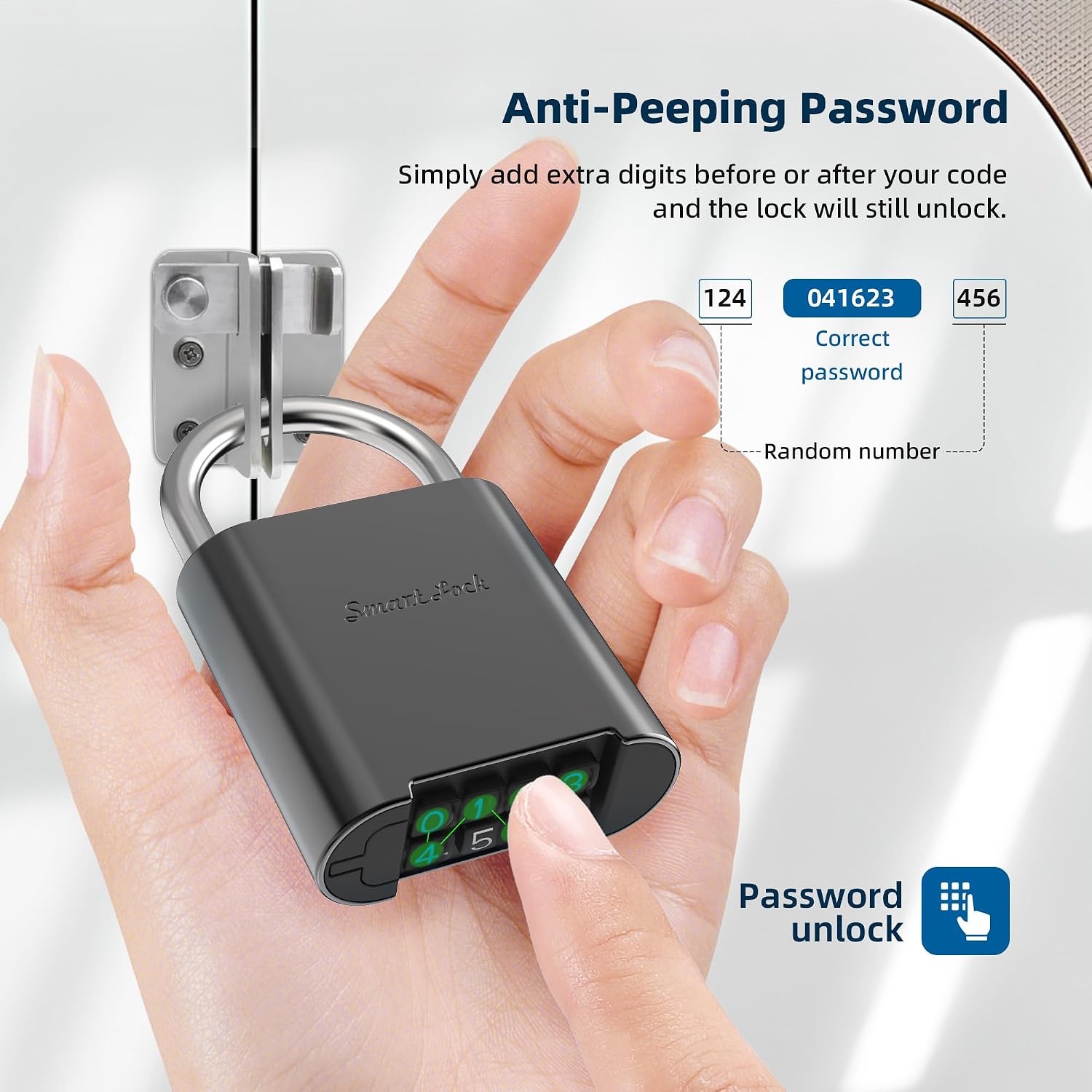
Figure 1: KENRONE Combination Padlock in Gunmetal Gray.
2. Product Components
The KENRONE Combination Padlock package includes the following items:
- 1 x KENRONE Combination Padlock
- 1 x USB Type-C Charging Cable
- 1 x Instruction Manual

Figure 2: Included components of the KENRONE Combination Padlock.
3. Setup Instructions
3.1 Initial Password
The padlock comes with a factory default admin password, typically '012345'. The initial user password is '0000'. It is highly recommended to change these default passwords immediately after first use for enhanced security.
3.2 Changing the Admin Password
- Enter the current admin password (e.g., '012345') followed by '#'. The padlock will indicate successful entry.
- Press '#' again to enter programming mode.
- Enter your new admin password (4-8 digits) followed by '#'.
- Re-enter your new admin password followed by '#' to confirm.
- The padlock will confirm the new password has been set.
3.3 Changing a User Password
- Enter the current user password (e.g., '0000') followed by '#'.
- Press '#' again to enter programming mode.
- Enter your new user password (4-8 digits) followed by '#'.
- Re-enter your new user password followed by '#' to confirm.
- The padlock will confirm the new password has been set.

Figure 3: Password Setup Diagram.
Video 1: Detailed video tutorial on how to set up and change the combination password for the KENRONE Combination Padlock.
4. Operating Instructions
4.1 Unlocking the Padlock
To unlock the padlock, simply enter your correct 4-8 digit combination password. The padlock will automatically unlock upon successful entry. The anti-peeping feature allows you to enter extra random digits before or after your correct code, and the lock will still unlock, preventing others from guessing your actual password.

Figure 4: Anti-Peeping Password Feature.
4.2 Locking the Padlock
To lock the padlock, simply push the shackle down until it clicks into place. No need to re-enter the code to lock it.
Video 2: Demonstrating the basic operation of the KENRONE Combination Padlock, including entering the password and unlocking.
Video 3: Showcasing various practical use scenarios for the KENRONE Combination Padlock, such as securing gates and lockers.
5. Maintenance and Care
5.1 Charging
The padlock is equipped with a rechargeable battery. When the battery is low, the padlock will indicate this with a red light. Use the provided USB Type-C cable to charge the padlock. A single charge can provide standby time for up to one year or over 10,000 unlocks.

Figure 5: USB Charging Port.
5.2 Waterproofing and Durability
Constructed from zinc alloy, the padlock is sturdy and durable. It boasts an IP66 waterproof rating, making it suitable for long-term outdoor use without being affected by rain or moisture. The anti-scratch design helps maintain its premium gunmetal gray finish.

Figure 6: IP66 Waterproof Rating.
Video 4: Demonstrating the durability and anti-hammer features of the KENRONE Combination Padlock through a force test.
6. Troubleshooting
6.1 Incorrect Password Entry
If an incorrect password is entered, the padlock will typically flash a red light or emit an error sound. Re-enter the correct password carefully. Remember the anti-peeping feature allows for extra digits, so ensure your core combination is correct.
6.2 Low Battery Indication
A red light indicator signifies low battery. Connect the padlock to a power source using the provided USB Type-C cable for charging. Ensure the cable is properly inserted into the charging port.
6.3 Padlock Not Responding
If the padlock is unresponsive, try charging it for a few minutes. If the issue persists, ensure the buttons are clean and free from debris. If all else fails, refer to the manual for factory reset instructions or contact customer support.
7. Product Specifications

Figure 7: Padlock Size Details.
| Feature | Detail |
|---|---|
| Brand | KENRONE |
| Model Name | PL5354 |
| Lock Type | Combination Lock |
| Combination Length | 4-8 Digits |
| Material | Zinc Alloy |
| Color | Gunmetal Gray |
| Special Features | Passcode Unlock, Portable, Rechargeable, Weather Resistant |
| Waterproof Rating | IP66 |
| Charging Port | Micro USB (Type-C cable included) |
| Battery Life | Up to 1 year standby, 10,000+ unlocks |
| Item Weight | 0.45 Pounds (approx. 202 grams) |
| Dimensions (H x L x W) | 8.8 cm x 5.8 cm x 2 cm (3.5 x 2.1 x 0.83 inches) |
8. Warranty and Support
For any questions, technical support, or warranty claims regarding your KENRONE Combination Padlock, please contact the seller directly through your purchase platform. Please refer to your purchase documentation for specific warranty terms and contact information.