
Introduction
The Samsung HW-Q800C is a 5.1.2 channel soundbar system designed to enhance your home audio experience. It features Wireless Dolby Atmos for immersive sound, Q-Symphony for synchronized audio with compatible Samsung TVs, and an 8-inch wireless subwoofer for deep bass. This manual provides essential information for setting up, operating, and maintaining your soundbar.

Image: The Samsung HW-Q800C Soundbar and its wireless subwoofer.
What's in the Box
- Soundbar
- Subwoofer
- HDMI Cable
- Wallmount Kit
- Remote Controller
- Batteries for Remote Controller
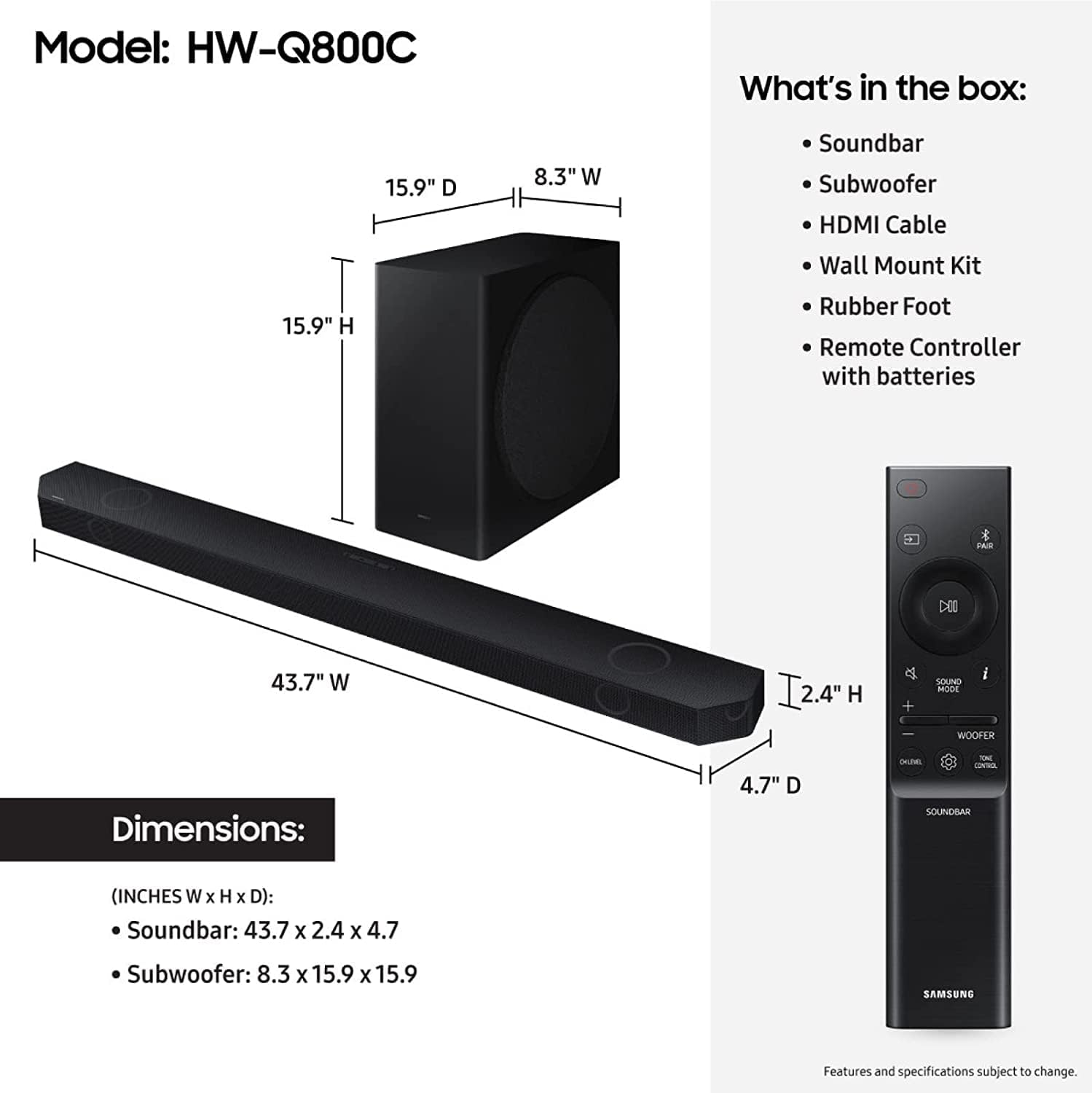
Image: Visual representation of the soundbar, subwoofer, and included accessories.
Setup
To set up your Samsung HW-Q800C Soundbar, ensure all components are unpacked and placed in their desired locations. Connect the soundbar to your television using the provided HDMI cable (HDMI eARC/ARC port recommended for optimal audio). The wireless subwoofer should automatically pair with the soundbar upon power-up. For additional connectivity, Bluetooth and Wi-Fi options are available for streaming from compatible devices.
Refer to your television's user manual for specific instructions on enabling HDMI eARC/ARC and adjusting audio output settings to external speakers.
Operating Instructions
The Samsung HW-Q800C Soundbar offers a range of features to optimize your audio experience:
- Q-Symphony: When paired with a compatible Samsung TV, Q-Symphony allows the TV speakers and soundbar to operate simultaneously, creating a richer, more expansive soundstage.
- Wireless Dolby Atmos: Experience captivating 3D audio without the need for HDMI cables directly to the TV. The soundbar delivers multi-dimensional sound that fills your room.
- 5.1.2 Ch. True Dolby Atmos Sound: This configuration provides layered, rich, and deep sound, unlocking new audio details in your content.
- SpaceFit Sound Pro: The soundbar analyzes your environment and automatically optimizes the audio to provide room-filling sound calibrated to your specific space.
- Built-in Voice Assistant: Utilize integrated voice assistants for hands-free control of your soundbar and connected smart devices.
- Adaptive Sound: This feature intelligently optimizes audio in real-time, analyzing scenes to enhance important audio elements, such as dialogue, even at low volumes.
- Game Mode Pro: Designed for gamers, this mode utilizes powerful up-firing speakers, acoustic beam technology, and strong woofers to deliver a 3D optimized sound for an immersive gaming experience.
- AirPlay 2: Easily stream music, podcasts, and other audio content from compatible iPhone or Apple devices directly to the soundbar.
- AVA (Active Voice Analyzer): AVA breaks down room noise to ensure that on-screen dialogue and commentary remain clear and optimized, preventing them from being drowned out.
- 8-Inch Subwoofer: The included wireless subwoofer provides visceral depth and clarity to the bass, enhancing action movies and music.
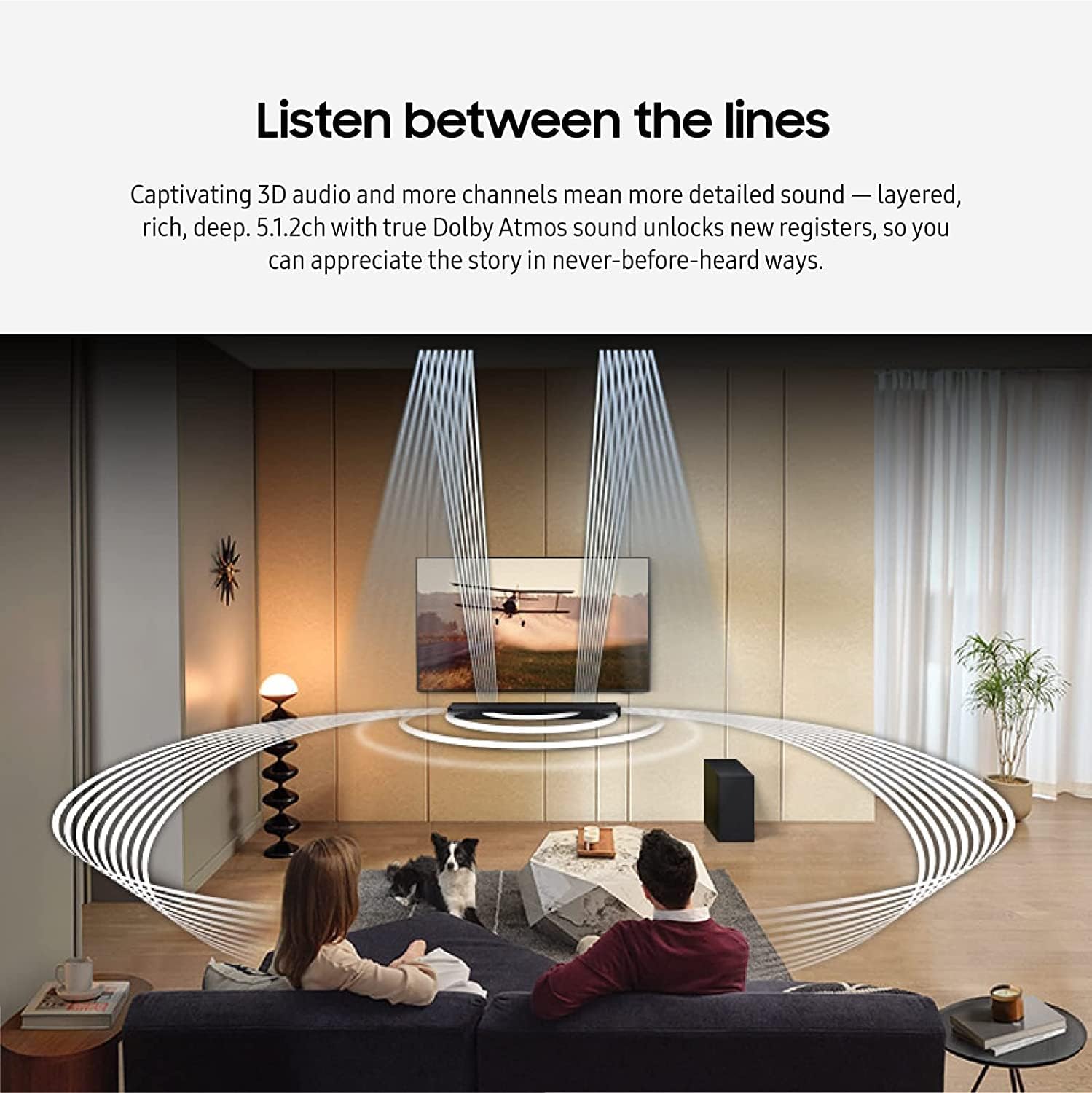
Image: The soundbar creating a multi-dimensional audio experience in a living room setting.
Maintenance
To ensure the longevity and optimal performance of your Samsung HW-Q800C Soundbar, follow these maintenance guidelines:
- Cleaning: Gently wipe the exterior surfaces of the soundbar and subwoofer with a soft, dry cloth. Avoid using abrasive cleaners, waxes, or solvents.
- Ventilation: Ensure adequate ventilation around the soundbar and subwoofer to prevent overheating. Do not block any ventilation openings.
- Software Updates: Periodically check for and install software updates to ensure your device has the latest features and performance enhancements. This can typically be done through the Samsung SmartThings app or your TV's settings.
- Placement: Avoid placing the soundbar or subwoofer in direct sunlight, near heat sources, or in areas with high humidity.
Troubleshooting
If you encounter issues with your Samsung HW-Q800C Soundbar, try the following troubleshooting steps:
- No Power: Check if the power cords for both the soundbar and subwoofer are securely connected to a working power outlet.
- No Sound: Verify that the correct input source is selected on the soundbar and TV. Ensure the volume is not muted or set too low. Check all cable connections (HDMI, optical).
- Subwoofer Not Connecting: If the wireless subwoofer does not connect automatically, refer to the quick start guide for manual pairing instructions. Ensure it is within range and not obstructed.
- Distorted Sound: Try reducing the volume. Check for any interference from other wireless devices. Ensure the soundbar is placed on a stable surface.
- Remote Control Not Working: Replace the batteries in the remote control. Ensure there are no obstructions between the remote and the soundbar.
- Q-Symphony Issues: Ensure your Samsung TV is compatible and that Q-Symphony is enabled in the TV's sound settings.
For more detailed troubleshooting, consult the full product manual available on the Samsung support website.
Specifications
| Feature | Detail |
|---|---|
| Brand | Samsung |
| Model Number | CRTSAMHWQ800C |
| Number of Audio Channels | 5.1.2 |
| Speaker Maximum Output Power | 360 Watts |
| Frequency Response | 20 KHz |
| Connectivity Technology | Bluetooth, Wi-Fi |
| Audio Output Mode | Surround |
| Mounting Type | Bar Mount |
| Subwoofer Diameter | 8 Inches |
| Control Method | Voice |
| Color | Black |
| Item Weight | 32.8 Pounds |
| Soundbar Dimensions (D x W x H) | 4.7"D x 43.7"W x 2.4"H |
| Power Source | Corded Electric |
| UPC | 657768364761 |
Image: Technical drawing showing the dimensions of the soundbar and subwoofer.
Warranty and Support
The Samsung HW-Q800C Soundbar comes with a 90-day limited warranty. Please retain your proof of purchase for warranty claims.
For technical support, service inquiries, or additional product information, please visit the official Samsung support website or contact Samsung customer service directly. You can find contact details and FAQs on their website.


