1. Introduction and Overview
This manual provides detailed instructions for the installation, operation, and maintenance of your Qubo Smart Outdoor 3MP 2K WiFi Bullet Camera. Designed for robust outdoor surveillance, this camera offers advanced features to enhance your home security. Please read this manual thoroughly before using the product to ensure proper functionality and safety.
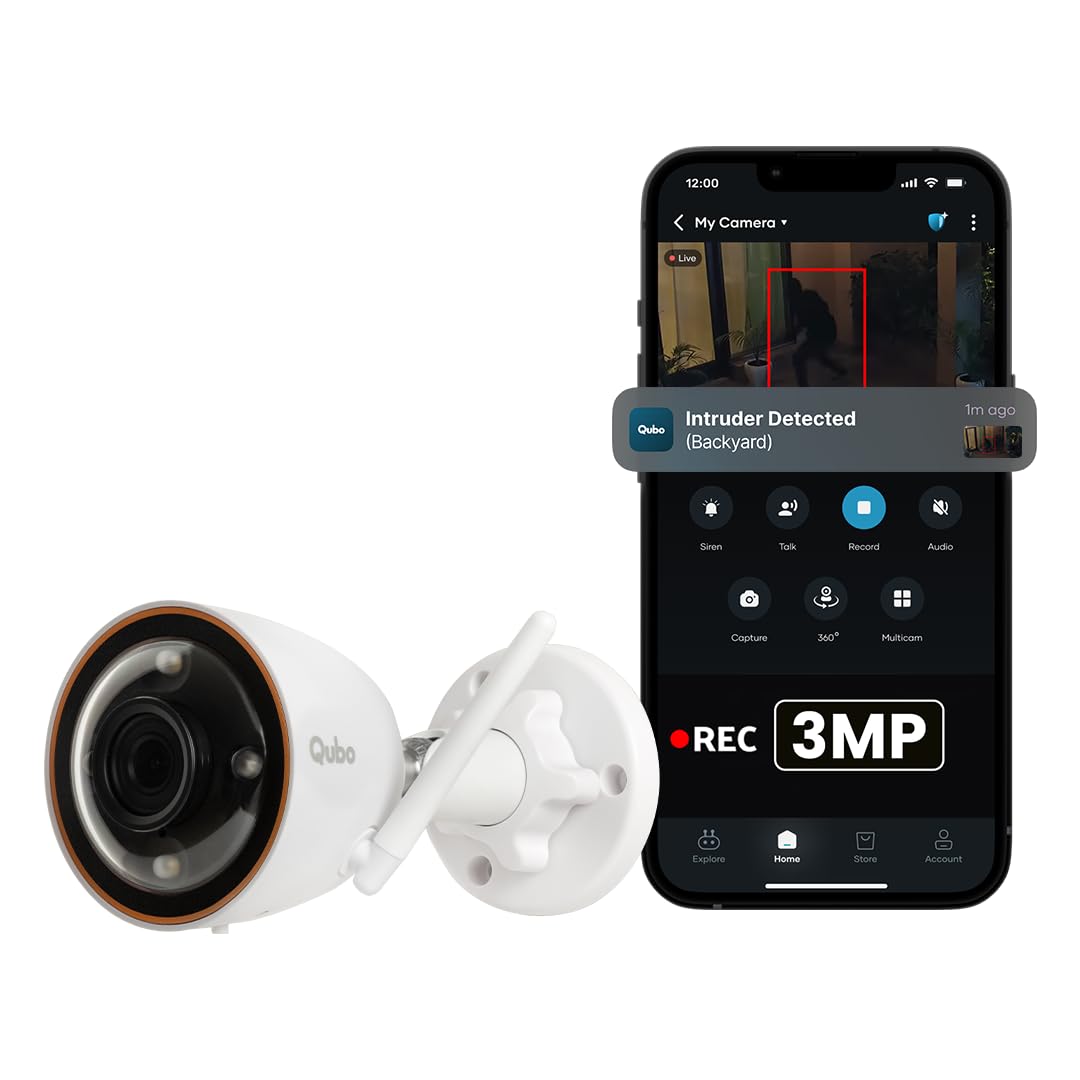
Image 1.1: The Qubo Smart Outdoor 3MP 2K WiFi Bullet Camera, demonstrating its integration with the Qubo mobile application for real-time intruder detection alerts.
2. Product Features
- 3MP (2K) HD Resolution: Delivers ultra-clear video footage at 1296p, ensuring sharp visibility for outdoor monitoring.
- 130° Ultra-Wide Field of View: Provides extensive coverage, monitoring broader areas compared to standard cameras.
- Qubo NightPulse Vision + Automatic Spotlight: Equipped with high-performance IR LEDs and an automatic spotlight for clear visibility in complete darkness, ensuring 24x7 monitoring.
- AI-Powered Person Detection + Intruder Alarm: Advanced AI detects human motion to minimize false alerts. Instant smart notifications are sent to your Qubo App, and the system can trigger a loud intruder alarm with an automatic spotlight.
- 2.4GHz Wi-Fi Connectivity + App Control: Seamlessly connects to secure 2.4GHz Wi-Fi and integrates with the Qubo App for remote access, control, and real-time alerts.
- 24x7 Continuous Recording + Event Capture: Supports round-the-clock live monitoring, optional continuous recording, and event-based capture. User-enabled Privacy Mode offers control when needed.
- Up To 1TB SD Card Storage + Theft Proof Cloud Backup: Store videos locally using an SD Card (up to 1TB, not included) or securely back up to cloud servers hosted in India (cloud subscription sold separately).
- Two-Way Talk With Noise Reduction: Built-in speaker and noise-reducing microphone enable clear communication.
- Works With Alexa & Google Assistant: Compatible with Amazon Alexa and Google Assistant for hands-free voice control and live view on supported smart displays.
- IP66 Weatherproof: Built to withstand various weather conditions, including rain, dust, snow, and sun.
Image 2.1: An overview of the Qubo Smart Bullet Camera's key features, including 3MP 2K resolution, AI person detection, automatic alarm and spotlight, 1TB local storage, data security, and its 'Made in India' origin.
3. What's in the Box
Your Qubo Smart Outdoor 3MP 2K WiFi Bullet Camera package includes:
- Qubo Bullet Cam (1 unit)
- Power Adapter
- Mounting Accessories (screws, wall plugs)
- Quick Start Guide
4. Setup and Installation
Follow these steps for a hassle-free installation of your Qubo Smart Outdoor Bullet Camera:
- Choose a Location: Select an outdoor location with a clear view of the area you wish to monitor. Ensure it is within range of your 2.4GHz Wi-Fi network and has access to a power outlet. The camera is designed for wall mounting.
- Mount the Camera: Use the provided mounting accessories to securely attach the camera to a wall or suitable surface. Adjust the camera angle for optimal coverage.
- Power On: Connect the camera to the power adapter and plug it into an electrical outlet. The camera will power on and indicate its status via an LED light.
- Download the Qubo App: Search for "Qubo" in your smartphone's app store (available on Android and iOS) and download the application.
- Pair the Camera: Open the Qubo App, create an account or log in, and follow the on-screen instructions to add your new camera. This typically involves scanning a QR code on the camera or manually entering its details.
- Connect to Wi-Fi: During the pairing process, you will be prompted to connect the camera to your 2.4GHz Wi-Fi network. Enter your Wi-Fi credentials carefully.
- Final Adjustments: Once connected, use the live view in the Qubo App to make any final adjustments to the camera's position and angle.
Video 4.1: This video provides a visual guide to the Qubo Smart Outdoor Camera's features and installation process, highlighting its ease of setup and key functionalities.
5. Operating Instructions
5.1 Using the Qubo App
The Qubo App is your central control hub for the camera. After successful pairing, you can:
- Live View: Access real-time video feed from your camera anytime, anywhere.
- Two-Way Talk: Use the built-in microphone and speaker to communicate with visitors or deter intruders.
- Event Alerts: Receive instant notifications on your smartphone for detected motion or persons.
- Privacy Mode: Enable this mode to temporarily disable recording and live view for privacy.
- Smart Home Integration: Connect with Amazon Alexa or Google Assistant for voice commands and viewing on compatible smart displays.

Image 5.1: The Qubo mobile application displaying multiple camera feeds, live footage, and real-time alerts, centralizing control for all connected devices.
5.2 Recording and Storage
Your Qubo camera offers flexible recording options:
- Continuous Recording: Record footage 24/7 to a microSD card (up to 1TB, not included). The camera supports loop recording, overwriting the oldest footage when the card is full.
- Event-Based Recording: The camera automatically records short clips when motion or a person is detected, saving storage space and making it easier to review important events.
- Cloud Storage: Opt for a cloud subscription (sold separately) for secure, theft-proof backup of your event recordings on servers located in India.

Image 5.2: Illustration of local storage via SD card (up to 1TB) and secure cloud storage options, emphasizing data safety even if the camera is compromised.
6. Advanced Features
6.1 AI-Powered Person Detection and Intruder Alarm
The camera's integrated AI intelligently distinguishes human figures from other moving objects, significantly reducing false alarms. Upon detecting a person, the camera can:
- Send instant alerts to your Qubo App.
- Activate an automatic spotlight to illuminate the area.
- Trigger a loud siren to deter potential intruders.
- Initiate an SOS call feature to a pre-set contact.
Video 6.1: This video demonstrates the Qubo Smart Bullet Camera's AI-powered person detection, automatic spotlight, and intruder alarm features, showing how it actively deters unauthorized individuals and sends instant alerts.
6.2 Qubo NightPulse Vision
Experience enhanced night surveillance with Qubo NightPulse Vision. This technology combines HDR for improved detail in low-light conditions and WDR for balanced brightness in high-contrast scenes, ensuring vivid and clear footage even in near-dark environments.
6.3 IP66 Weatherproof Design
The camera's IP66 rating ensures it is fully protected against dust ingress and can withstand powerful water jets, making it suitable for continuous outdoor operation in various weather conditions.
7. Maintenance
To ensure optimal performance and longevity of your Qubo Smart Outdoor Bullet Camera, follow these maintenance guidelines:
- Regular Cleaning: Gently wipe the camera lens and body with a soft, damp cloth to remove dust and dirt. Avoid using harsh chemicals or abrasive materials.
- Firmware Updates: Periodically check the Qubo App for available firmware updates. Installing updates ensures your camera has the latest features, security patches, and performance improvements.
- Check Connections: Ensure all cables and connections are secure and free from damage.
- Inspect Mounting: Regularly check the camera's mounting for stability, especially after severe weather conditions.
8. Troubleshooting
If you encounter issues with your Qubo Smart Outdoor Bullet Camera, refer to the following common troubleshooting steps:
- No Power: Ensure the power adapter is securely plugged into both the camera and a working electrical outlet. Check if the outlet is functional.
- Wi-Fi Connectivity Issues: Verify that your Wi-Fi router is on and broadcasting a 2.4GHz network. Ensure the camera is within range of the router. Try restarting both the camera and your router.
- Poor Video Quality: Check your Wi-Fi signal strength in the camera's location. Ensure the lens is clean and free from obstructions.
- No Alerts: Confirm that person detection and notification settings are enabled in the Qubo App. Check your phone's notification settings for the Qubo App.
- SD Card Not Recording: Ensure the SD card is correctly inserted and formatted within the Qubo App. Check if the card has sufficient storage space or if continuous recording is enabled.
For further assistance, please contact Qubo customer support.
9. Specifications
| Feature | Specification |
|---|---|
| Model | Bullet Cam |
| Video Capture Resolution | 1296p (2K) |
| Effective Still Resolution | 3 MP |
| Viewing Angle | 130 Degrees |
| Wireless Communication Technology | Wi-Fi (2.4GHz) |
| International Protection Rating | IP66 |
| Mounting Type | Wall Mount |
| Memory Storage Capacity | Up to 1TB (SD Card, not included) |
| Operating System Compatibility | Android, iOS |
| Special Features | 2 Way Audio, Built In Light, HD Resolution, Motion Sensor, AI Person Detection, Night Color Vision |
| Item Dimensions (LxWxH) | 15.7 x 7.7 x 7.7 Centimeters |
| Material | Plastic |
10. Warranty and Support
Your Qubo Smart Outdoor Bullet Camera comes with a standard brand warranty. For detailed information regarding warranty terms, replacement policies, and other product-related inquiries, please refer to the product detail page on the retailer's website or contact Qubo customer support.
Customer Support
Qubo, a Hero Group venture, is committed to providing excellent customer service. They offer:
- Pre & Post Sales Support
- On-Call & Field support Pan India
- Installation and Service Support across 70+ Cities

Image 10.1: Information highlighting Qubo's commitment to customer support, including pre and post-sales assistance, pan-India service, and installation support, backed by the Hero Group.
Video 10.2: A customer testimonial video discussing the benefits of Qubo Smart Security Cameras, including ease of installation, AI person detection, and smart alerts, emphasizing the peace of mind provided by the system.
11. Important Safety Information
Please observe the following safety precautions:
- Do not attempt to disassemble or modify the camera. This may void the warranty and cause damage.
- Use only the provided power adapter. Using an incompatible adapter may cause damage or fire.
- Ensure the camera is securely mounted to prevent it from falling.
- Keep the camera and its accessories out of reach of children.
- Avoid placing the camera near heat sources or in direct sunlight for prolonged periods, despite its weatherproof rating.
- Do not expose the camera to corrosive chemicals.


