
UGREEN 15550
Contents
UGREEN Uno 30W USB C Charger Block Instruction Manual
Model: 15550 | Brand: UGREEN
1. Introduction
This manual provides essential information for the safe and efficient use of your UGREEN Uno 30W USB C Charger Block. Please read this manual thoroughly before using the product and retain it for future reference.
2. What's in the Box
- UGREEN Uno 30W Robot Fast Charger x 1
- User Manual x 1
3. Product Overview
The UGREEN Uno 30W USB C Charger Block is a compact and efficient charging solution featuring GaN II technology for high-speed power delivery. Its unique robot design includes an intelligent LED screen to display charging status.
Key Features:
- Ultra-Fast Charging: Delivers up to 30W power, charging compatible devices rapidly.
- GaN II Technology: Ensures efficient power conversion with reduced heat generation.
- Intelligent LED Screen: Displays real-time charging status and expressions.
- Compact & Portable: Features a foldable plug and lightweight design for easy travel.
- Safety Protections: UL-certified with built-in short circuit, overcharge, overheat, and surge protection.
- Magnetic Shoes: Removable magnetic feet for convenient storage or attachment to metal surfaces (Note: Does not support magnetic wireless charging).

Figure 1: Front view of the UGREEN Uno 30W USB C Charger Block, showcasing its robot design and LED screen.

Figure 2: Detailed view of the charger's features, including the USB-C port, GaN technology, magnetic shoes, and LED screen.
4. Setup
- Unfold the Plug: Gently pull out the foldable prongs from the back of the charger.
- Connect to Power Outlet: Insert the charger into a standard wall outlet. The LED screen will illuminate, indicating it is ready for use.
- Optional: Attach Magnetic Shoes: If desired, attach the magnetic shoes to the bottom of the charger for stability or to adhere to metal surfaces.
5. Operating Instructions
- Connect Your Device: Use a compatible USB-C charging cable (not included) to connect your device to the USB-C port on the charger.
- Monitor Charging Status: The intelligent LED screen on the charger will display different expressions to indicate the charging status:
- Recharging: An animated expression indicates active charging.
- Recharge Complete: A distinct expression shows when the device is fully charged.
- Standby: A neutral expression indicates the charger is powered on but not actively charging a device.
- Disconnecting: Once charging is complete, disconnect your device from the charger, then remove the charger from the wall outlet.
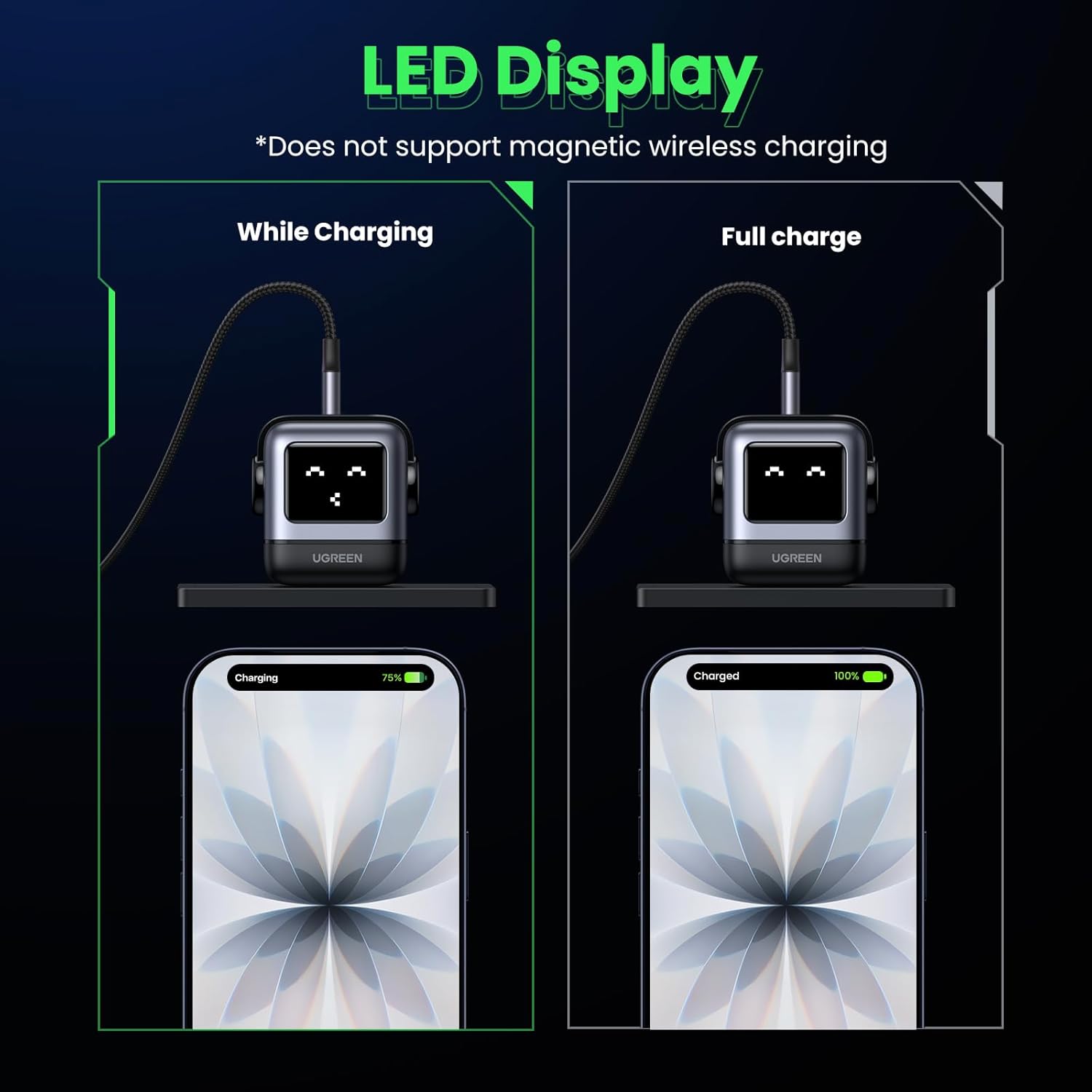
Figure 3: The LED display shows different faces for "While Charging" and "Full Charge" states.
6. Universal Device Compatibility
The UGREEN Uno 30W USB C Charger Block is compatible with a wide range of USB-C powered devices, including but not limited to:
- iPhone Series: iPhone 17 / 17 Air / 17 Pro / 17 Pro Max, iPhone 16 / 16 Plus / 16 Pro / 16 Pro Max, iPhone 15 / 15 Plus / 15 Pro / 15 Pro Max, iPhone 14 / 14 Plus / 14 Pro / 14 Pro Max, iPhone 13 Pro / 13 Pro Max / 13 Mini, iPhone 12 / 12 Pro / 12 Pro Max / 12 Mini
- Samsung Series: Galaxy S25 Ultra / S25, Galaxy S24 Ultra / S24 / S24 Plus, Galaxy S23 Ultra, Galaxy S22 / S22 Plus / S22 Ultra, Galaxy S21 / S21 Plus / S21 Ultra / S21 FE, Galaxy Z Fold 5 / Z Flip 5, Galaxy Z Fold 3 / Z Flip 3
- Google Pixel Series: Pixel 10 Pro / 10, Pixel 9 Pro / 9, Pixel 8 Pro / 8, Pixel 7 Pro / 7, Pixel 6 / 6 Pro
- iPad Series: iPad Pro 12.9'' (6th/5th Gen) / 11'' (4th/3rd Gen), iPad Air (5th/4th Gen), iPad 10th Gen / 9th Gen, iPad mini 6th Gen
- MacBook Series: MacBook Air 13'' (M1/M2, 2020–2023), MacBook Pro 13'' (M1/M2), MacBook Pro 14'' / 16'' (M1 Pro / M2 Pro, 2021–2023)
- Other Devices: Dell XPS 13, Chromebook, AirPods / AirPods Pro / AirPods Max, MagSafe Charger / MagSafe Duo, Apple Watch Series 11 / Ultra 3 / SE 3

Figure 4: The charger demonstrating wide compatibility with multiple devices.
7. Specifications
| Feature | Detail |
|---|---|
| Product Dimensions | 1.3 x 1.5 x 2.2 inches |
| Item Weight | 2.03 ounces |
| Model Number | 15550 |
| Brand | UGREEN |
| Connector Type | USB Type C |
| Input Voltage | 240 Volts |
| Amperage | 6 Amps |
| Total USB Ports | 1 |
| Special Features | 30W Fast charging, Lightweight Design, Short Circuit Protection, Travel, small robot-shaped |
8. Safety Information
Your UGREEN Uno 30W USB C Charger Block is designed with multiple safety features to protect both the charger and your devices:
- UL-Certified: Ensures compliance with safety standards.
- GaN Chip: Provides reliable, real-time protection during charging.
- Short Circuit Protection: Prevents damage from electrical shorts.
- Overcharge Protection: Safeguards against excessive charging.
- Overheat Protection (Thermal Guard™ Tech): Continuously monitors temperature (238+ readings per second) to prevent overheating.
- Surge Protection: Protects against power surges.
Always use the charger in a dry environment and avoid exposure to liquids. Do not attempt to disassemble or modify the charger.

Figure 5: Illustration of GaNFast Technology for efficient and safe charging.

Figure 6: Illustration of Thermal Guard™ Tech for continuous temperature detection.
9. Maintenance
- Keep the charger clean and dry.
- Avoid dropping or subjecting the charger to strong impacts.
- Store in a cool, dry place when not in use.
10. Troubleshooting
If you experience issues with your UGREEN Uno 30W USB C Charger Block, please refer to the following common solutions:
- Charger not powering on: Ensure the charger is securely plugged into a working wall outlet.
- Device not charging:
- Verify that your charging cable is properly connected to both the charger and your device.
- Try using a different USB-C cable to rule out a faulty cable.
- Confirm your device is compatible with USB-C charging and the power output of this charger.
- Slow charging: Ensure your device and cable support fast charging protocols. Some devices may limit charging speed based on battery level or temperature.
11. Warranty & Support
For warranty information or technical support, please refer to the official UGREEN website or contact their customer service directly. The product specifications indicate that the product includes a User Manual, which typically contains detailed warranty terms.
12. Official Product Videos
Product Overview Video
This video provides a general overview of the UGREEN Uno 30W USB C Charger Block, highlighting its design and features.
UGREEN Nexode Robot GaN Charger & Charging Station
This video showcases the UGREEN Nexode Robot GaN Charger, demonstrating its functionality and design, including its use as a charging station.
Charge with a Smile, This Tiny Robot Does It All
An official video highlighting the charming robot design and versatile charging capabilities of the UGREEN Uno 30W charger.
Ugreen Robot GaN Charger, One Charger for Everything
This video emphasizes the UGREEN Robot GaN Charger as a universal charging solution for various devices.
Ask a question about this manual
Ask about setup, troubleshooting, compatibility, parts, safety, or missing instructions. Manuals+ will review the question and use this page’s manual context to help answer it.