
1. Introduction
Thank you for choosing the Tchibo Esperto2 Automatic Coffee Machine. This manual provides essential information for the safe and efficient operation, maintenance, and troubleshooting of your new coffee machine. Please read this manual thoroughly before first use and keep it for future reference.
2. Safety Instructions
- Electrical Safety: Ensure the voltage specified on the appliance matches your local mains voltage before connecting. Do not immerse the appliance, power cord, or plug in water or other liquids.
- Hot Surfaces: The brewing unit and coffee spout can become very hot during operation. Avoid direct contact.
- Children and Vulnerable Persons: This appliance can be used by children aged 8 years and above and persons with reduced physical, sensory or mental capabilities or lack of experience and knowledge if they have been given supervision or instruction concerning use of the appliance in a safe way and understand the hazards involved.
- Maintenance: Always unplug the machine from the power outlet before cleaning or performing maintenance.
- Intended Use: This machine is designed for household use only for preparing coffee from whole coffee beans. Any other use is considered improper and may result in damage or injury.
3. Product Overview
Familiarize yourself with the components of your Tchibo Esperto2 coffee machine.
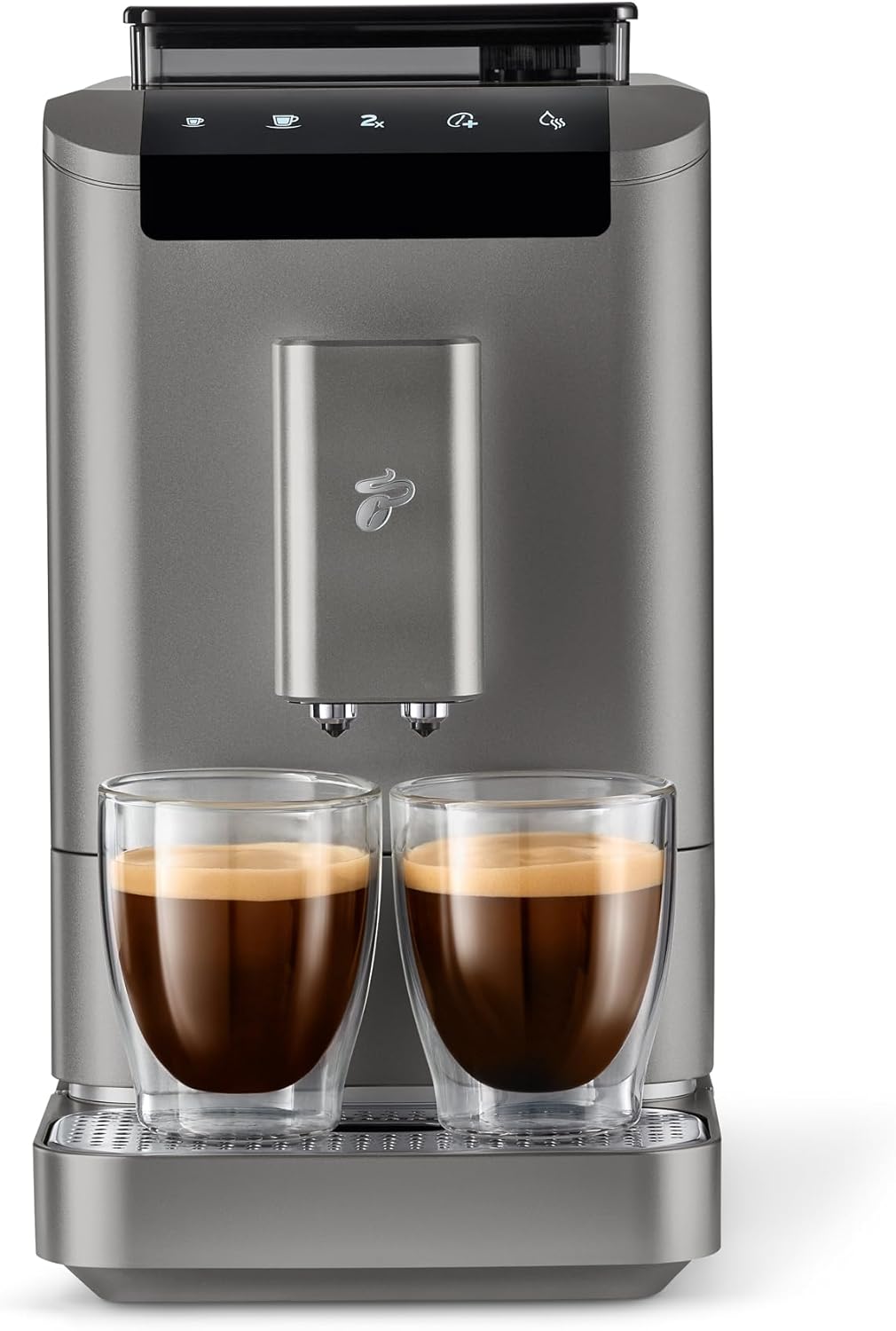
Figure 3.1: Front view of the Tchibo Esperto2 machine, showcasing its sleek design and dual coffee spouts with two cups of freshly brewed coffee.

Figure 3.2: Key features of the Esperto2, highlighting the Double Cup Function, 1.4 Liter Water Tank, and 300 gram Bean Container.
Main Components:
- Bean Container: Located at the top, with a 300g capacity and viewing window.
- Water Tank: 1.4 L capacity, removable from the side for easy refilling.
- Control Panel: Intuitive touch screen for selecting coffee type and adjusting settings.
- Coffee Spout: Dual spout with cup illumination, height-adjustable.
- Drip Tray: Collects excess liquid and spent coffee grounds.
- Brewing Unit: Removable for cleaning.
4. Setup
- Unpacking: Carefully remove all packaging materials and place the machine on a stable, level surface.
- Initial Cleaning: Before first use, clean the water tank, drip tray, and coffee grounds container with warm water and a mild detergent. Rinse thoroughly.
- Fill Water Tank: Fill the water tank with fresh, cold tap water up to the MAX mark. Insert it securely into the machine.
- Add Coffee Beans: Open the bean container lid and fill it with whole coffee beans. Close the lid.
- Power Connection: Plug the power cord into a suitable electrical outlet. The machine will perform an initial self-test.
- First Rinse Cycle: Follow the on-screen instructions to perform a first rinse cycle. This primes the system and cleans internal components.
5. Operating Instructions
5.1 Making Coffee (Caffè Crema or Espresso)
- Place Cup(s): Position one or two cups under the coffee spout. Adjust the spout height as needed.
- Select Coffee: On the intuitive touch screen, select your desired coffee type (e.g., Caffè Crema, Espresso).
- Adjust Intensity (Optional): Use the Intense+ technology option on the screen to customize the coffee intensity to your preference.
- Adjust Volume (Optional): The cup volume is programmable from 25 to 250 ml. Adjust this setting if you desire a different volume than the default.
- Start Brewing: Press the start button. The machine will grind the beans and brew your coffee.
- Dual Cup Function: The dual spout allows for simultaneous preparation of two coffees. Select the 2-cup option if available on the screen.
5.2 Adjusting Settings
- Coffee Intensity: Use the 'Intense+' function on the display to select between different coffee strengths.
- Cup Volume: Program your preferred cup volume between 25 ml and 250 ml via the touch screen settings.
- Water Hardness: It is recommended to set the water hardness level according to your local water supply for optimal descaling reminders. Refer to the full manual for detailed instructions on testing and setting water hardness.
6. Maintenance
Regular cleaning and maintenance ensure the longevity and optimal performance of your coffee machine.
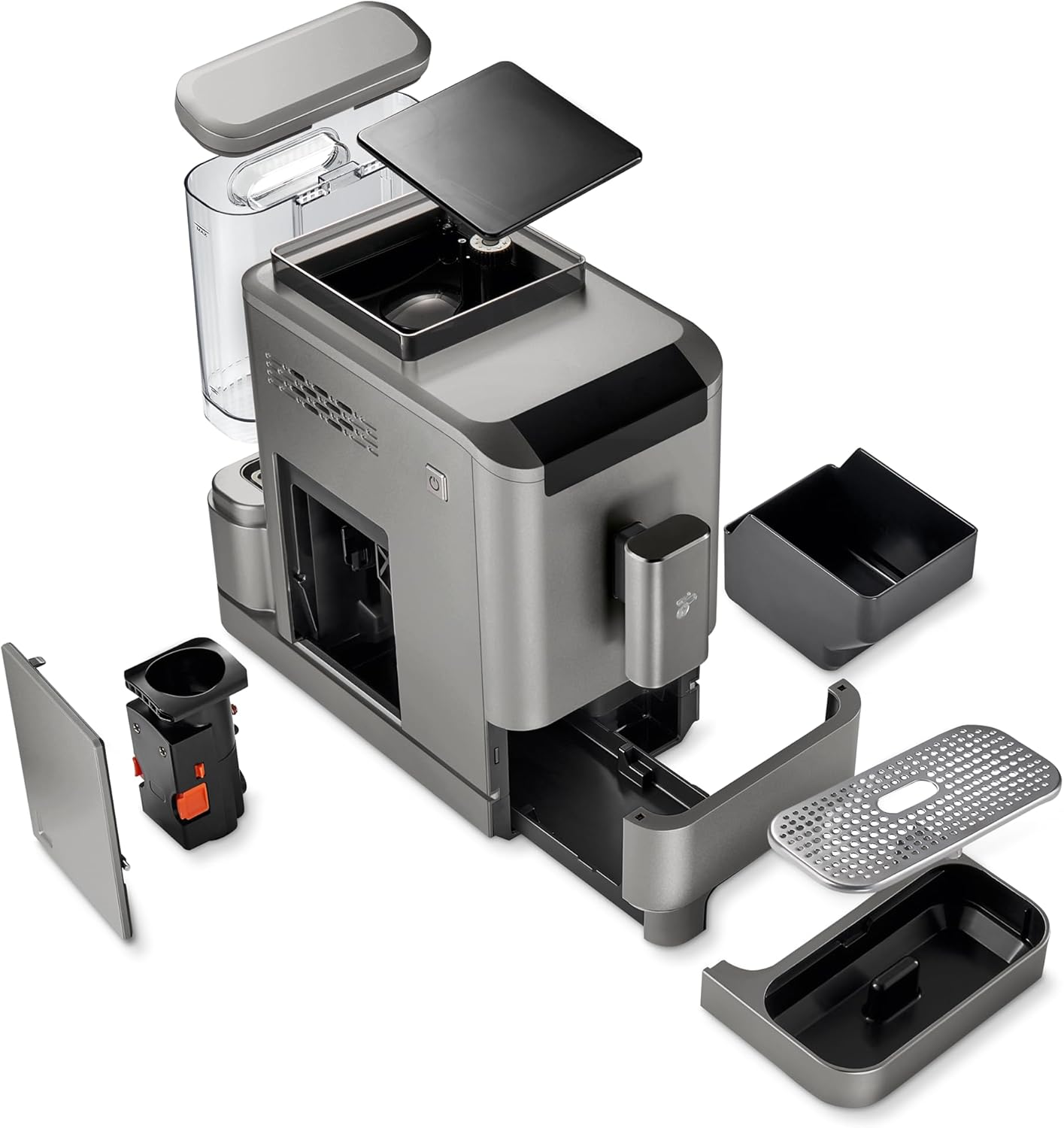
Figure 6.1: Exploded view illustrating the removable components for cleaning and maintenance, including the brewing unit, water tank, and drip tray.
6.1 Daily Cleaning
- Drip Tray and Coffee Grounds Container: Empty and rinse the drip tray and coffee grounds container daily.
- Water Tank: Rinse the water tank daily and refill with fresh water.
- Coffee Spout: Wipe the coffee spout with a damp cloth.
6.2 Weekly Cleaning (Brewing Unit)
- Switch Off: Turn off the machine and unplug it from the power outlet.
- Remove Brewing Unit: Open the service door (usually on the side or front) and carefully remove the brewing unit. Refer to Figure 6.1 for location.
- Rinse: Rinse the brewing unit thoroughly under running lukewarm water until no coffee residues are visible. Do not use detergent.
- Dry and Reinsert: Allow the brewing unit to air dry completely before reinserting it into the machine. Ensure it clicks into place.
6.3 Descaling
The machine features an automatic descaling program. The display will indicate when descaling is required. Use only descaling agents recommended by Tchibo or suitable for automatic coffee machines.
- Prepare Descaling Solution: Follow the instructions on your descaling agent packaging to prepare the solution.
- Start Program: Follow the on-screen prompts to initiate the automatic descaling program.
- Rinse Cycles: The machine will perform several rinse cycles after descaling. Ensure the water tank is refilled with fresh water as prompted.
7. Troubleshooting
If you encounter issues with your machine, refer to the table below for common problems and solutions.
| Problem | Possible Cause | Solution |
|---|---|---|
| No coffee is dispensed. | Water tank empty; brewing unit blocked; machine not primed. | Fill water tank; clean brewing unit; perform a rinse cycle. |
| Coffee is too weak. | Incorrect grind setting; low coffee intensity setting; old beans. | Adjust grind finer; increase coffee intensity; use fresh beans. |
| Machine leaks water. | Water tank not correctly inserted; drip tray full or misplaced. | Ensure water tank is seated properly; empty and correctly place drip tray. |
| Descaling alert appears frequently. | Water hardness setting is too high. | Adjust water hardness setting in the menu according to your local water supply. |
If the problem persists after attempting these solutions, please contact Tchibo customer support.
8. Specifications
Detailed technical specifications for the Tchibo Esperto2 Automatic Coffee Machine.

Figure 8.1: Dimensions of the Tchibo Esperto2 machine, indicating a height of 33.60 cm.
| Feature | Specification |
|---|---|
| Brand | Tchibo |
| Model Number | 618791 / MSA21100 |
| Color | Titanium Silver |
| Product Dimensions (L x W x H) | 43.3 x 18 x 33.6 cm |
| Water Tank Capacity | 1.4 Liters (1400 Millilitres) |
| Bean Container Capacity | 300 grams |
| Power | 1470 Watts |
| Voltage | 230 Volts (AC) |
| Housing Material | Titanium (finish) |
| Noise Level | 70 Decibels |
| Item Weight | 8.6 Kilograms |
| Special Features | Double cup function, Height-adjustable spout, Space-saving design, Programmable cup volume, Cup illumination, Automatic descaling program, Removable brewing unit. |
9. Warranty and Support
For warranty information, please refer to the warranty card included with your product or visit the official Tchibo website. If you require technical assistance or have questions not covered in this manual, please contact Tchibo customer support. Contact details can typically be found on the manufacturer's website or in the product packaging.


