
1. Product Overview
The TEMOLA TN11 is a portable electric air pump designed for convenient inflation of various items. It features a large-capacity rechargeable battery, automatic stop function, and multiple inflation modes. Its compact and lightweight design makes it easy to carry and store.
Key Features:
- Economical & Portable: Built-in large-capacity rechargeable battery for up to 30 minutes of continuous inflation without a power cord.
- Power Bank Functionality: Equipped with a Type-C output port to charge mobile phones.
- Versatile Inflation Modes: Four air pressure units (PSI, BAR, KPA, kg/cm²) and preset modes for cars, motorcycles, bicycles, balls, and inflatables.
- High Pressure Capability: Manual mode supports up to 150 PSI.
- Safety & Automatic Stop: Features short-circuit intelligent control and an upgraded motion protection system with good heat dissipation. Automatically stops when the preset air pressure is reached.
- Digital Display & LED Light: Equipped with a precise chip and a large LCD display showing real-time and preset pressure values. Includes a white illumination LED light, emergency distress light, and flashing light for night use.
- Low Noise Operation: Operates at less than 70 decibels, quieter than similar air compressors.
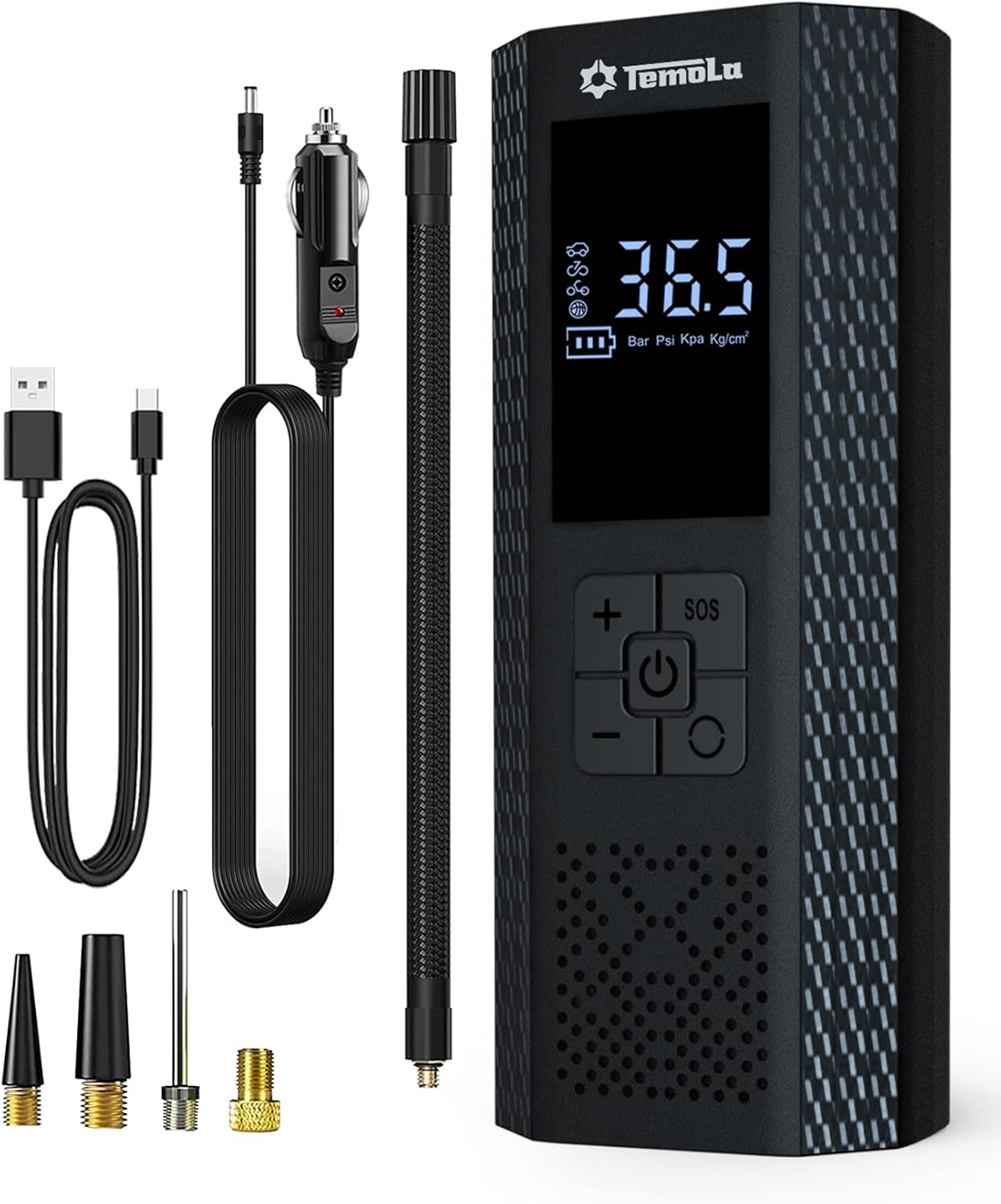
Image 1.1: The TEMOLA TN11 portable electric air pump with its included accessories, including various nozzles and charging cables.
2. Package Contents
Please verify that all items are included in your package:
- 1 x Air Inflator (Main Unit)
- 2 x Air Nozzle Cones
- 1 x Presta/Schrader Valve Adapter
- 1 x Needle Valve Adapter
- 1 x Charging Cable (USB Type-C)
- 1 x Air Tube (Hose)
- 1 x Storage Bag
- 1 x User Manual (Japanese, but this document serves as English manual)

Image 2.1: Visual representation of all items included in the TEMOLA TN11 package.
3. Getting Started & Charging
Before first use, ensure the device is fully charged. The unit can also function as a power bank.
3.1 Charging the Device:
- Connect the provided USB Type-C charging cable to the charging port on the air pump.
- Connect the other end of the USB cable to a compatible USB power adapter (not included) or a power source.
- The battery level indicator on the LCD screen will show charging progress. Charge until the battery icon indicates full.

Image 3.1: The TEMOLA TN11 can be used to charge a smartphone via its Type-C output port, demonstrating its power bank functionality.
3.2 Powering On/Off:
- Press and hold the power button (⏻) to turn the device on.
- Press and hold the power button again to turn the device off.
4. Operating Instructions
Follow these steps to inflate your items using the TEMOLA TN11 air pump.
4.1 Understanding the Display and Controls:

Image 4.1: The digital display shows preset mode, pressure value, pressure unit, and battery level. The control panel includes plus/minus buttons, power button, and SOS button.
- Digital Display: Shows real-time pressure, preset pressure, selected mode, and battery status.
- Power Button (⏻): Press and hold to turn on/off. Short press to start/stop inflation.
- '+' / '-' Buttons: Adjust preset pressure values.
- 'M' Button (Mode/Unit): Cycle through preset modes (Car, Motorcycle, Bicycle, Ball, Manual) and pressure units (PSI, BAR, KPA, kg/cm²).
- SOS Button: Activates the LED light with different modes (illumination, emergency distress, flashing).
4.2 Inflation Steps:
- Connect the Air Tube: Screw the air tube securely onto the inflator's air outlet.
- Attach Nozzle: Select the appropriate nozzle for your item (e.g., Schrader valve for car/bicycle tires, needle for balls, cone for inflatables) and attach it to the other end of the air tube.
- Power On: Press and hold the power button (⏻) to turn on the device. The LCD screen will light up.
- Select Mode and Unit: Press the 'M' button to cycle through the preset modes (car, motorcycle, bicycle, ball) or select manual mode. Press 'M' again to change pressure units (PSI, BAR, KPA, kg/cm²).
- Set Target Pressure: Use the '+' and '-' buttons to adjust the desired target pressure.
- Start Inflation: Short press the power button (⏻) to begin inflation. The device will automatically stop when the preset pressure is reached.
- Disconnect: Once inflation is complete, disconnect the nozzle from your item and then unscrew the air tube from the inflator.

Image 4.2: A visual guide demonstrating the four main steps for using the TEMOLA TN11 to inflate a tire: connect, power on, set pressure, and start inflation.

Image 4.3: The TEMOLA TN11 connected to a car tire, showing the digital display during the inflation process.
5. Maintenance and Care
Proper maintenance ensures the longevity and optimal performance of your TEMOLA TN11 air pump.
- Cleaning: Wipe the device with a soft, dry cloth. Do not use harsh chemicals or abrasive cleaners.
- Storage: Store the air pump and its accessories in the provided storage bag in a cool, dry place, away from direct sunlight and extreme temperatures.
- Battery Care: To prolong battery life, avoid fully discharging the battery frequently. Recharge the device periodically if not used for extended periods (e.g., every 3-6 months).
- Air Tube Inspection: Regularly check the air tube for any signs of wear, cracks, or damage. Replace if necessary to ensure efficient inflation.
6. Troubleshooting
If you encounter issues with your TEMOLA TN11, refer to the following common problems and solutions.
| Problem | Possible Cause | Solution |
|---|---|---|
| Device does not turn on. | Low battery or no charge. | Charge the device fully using the provided USB Type-C cable. |
| Inflation does not start or is slow. |
|
|
| Device does not stop automatically. | Malfunction of the automatic stop sensor. | Manually stop the device by pressing the power button. If the issue persists, contact customer support. |
| Inaccurate pressure reading. | Loose connection or sensor issue. | Ensure all connections are secure. If the problem continues, the sensor may be faulty. |
| Bicycle tire not inflating. | Incorrect valve adapter or improper connection. | Ensure the correct Presta/Schrader valve adapter is used and securely attached to the tire valve and air tube. |
7. Specifications
| Feature | Specification |
|---|---|
| Brand | TEMOLA |
| Model | TN11 |
| Max Pressure | 150 PSI |
| Power Source | Battery Powered (Cordless) |
| Voltage | 12 Volts |
| Product Dimensions | 7.6 L x 5.6 W x 17.5 H cm (Approximate) |
| Product Weight | 690 g |
| Special Features | Quiet Operation, LED Light, Automatic Shut-off, Cordless, Lightweight |
| Battery Included | Yes |

Image 7.1: The compact dimensions of the TEMOLA TN11 portable inflator, highlighting its portability.
8. Warranty and Support
Information regarding specific warranty terms and customer support contact details was not provided in the product data. Please refer to the seller's website or your purchase documentation for warranty information and support contacts.
