
TOPTECH Angel-112
Audio Angel-12 Bluetooth Speaker
Instruction Manual
Introduction
Thank you for choosing the TOPTECH Audio Angel-12 Bluetooth Speaker. This 12-inch LED rechargeable wireless portable speaker system is designed to deliver powerful and clear sound for various applications, including live performances, karaoke, and general audio playback. It features Bluetooth connectivity, a microphone input, and convenient portability with wheels and a handle. This manual provides detailed instructions for setup, operation, maintenance, and troubleshooting to ensure you get the most out of your device.
Safety Information
Please read and understand all safety instructions before using the speaker. Keep this manual for future reference.
- Do not expose the speaker to water or excessive moisture.
- Avoid placing the speaker near heat sources such as radiators, heat registers, stoves, or other apparatus (including amplifiers) that produce heat.
- Use only attachments/accessories specified by the manufacturer.
- Unplug the speaker during lightning storms or when unused for long periods.
- Refer all servicing to qualified service personnel. Servicing is required when the apparatus has been damaged in any way.
- Do not block any ventilation openings. Install in accordance with the manufacturer's instructions.
- Protect the power cord from being walked on or pinched, particularly at plugs, convenience receptacles, and the point where they exit from the apparatus.
Package Contents
Ensure all items listed below are present in your package:
- Audio Angel-12 Bluetooth Speaker
- Wired Microphone
- Power Adapter/Charging Cable
- User Manual (this document)

Image: The Audio Angel-12 Bluetooth Speaker, showing its front view with colorful LED lights and the retractable handle extended. This image represents the main unit included in the package.
Product Overview
Familiarize yourself with the various components and controls of your Audio Angel-12 speaker.
Figure 1: Front View. Shows the main speaker grille, LED light panels, and the overall design.

Figure 2: Top Control Panel. Displays the various knobs, buttons, and ports for controlling the speaker's functions.

Figure 3: Side View. Highlights the robust casing and design features.
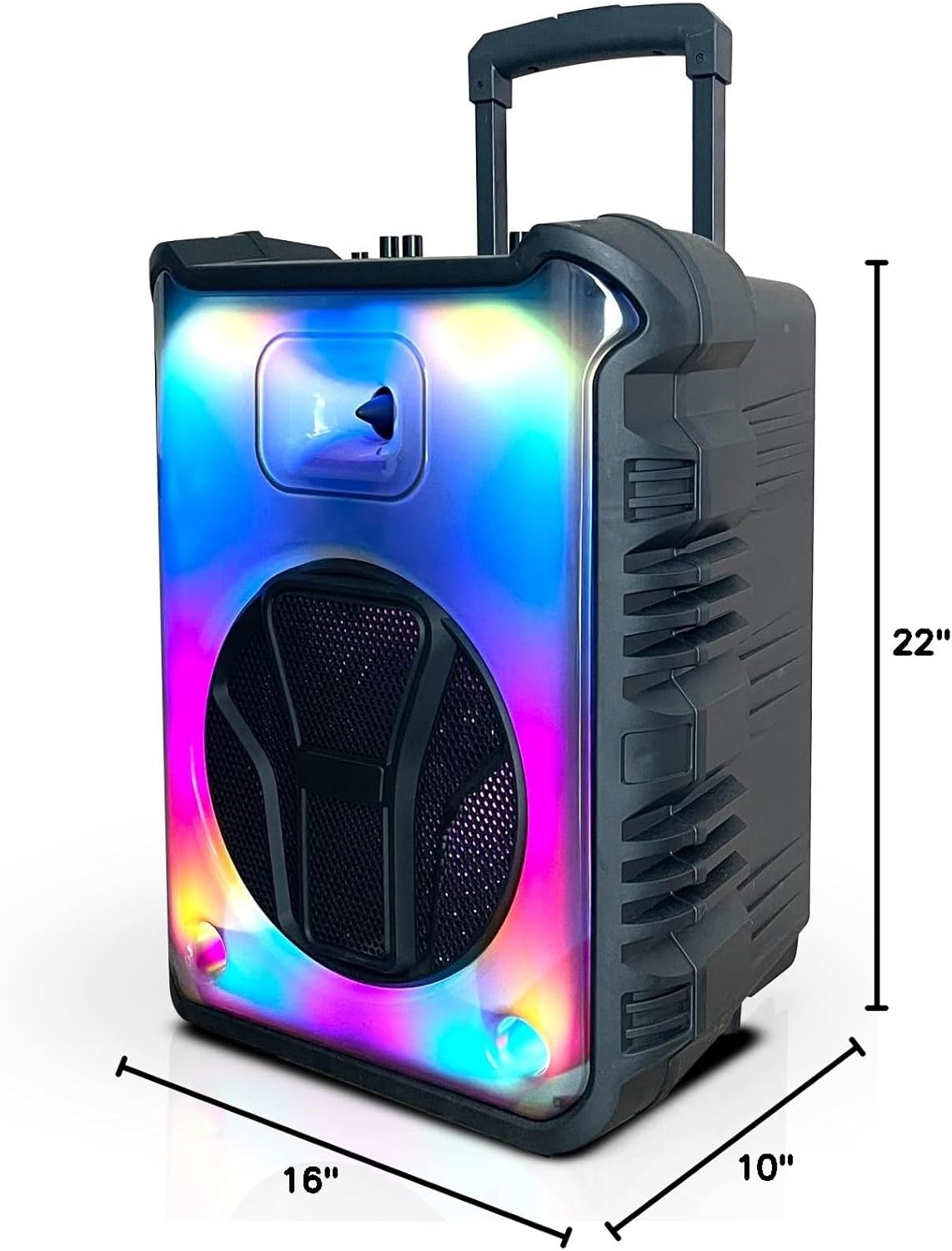
Figure 4: Dimensions. Illustrates the speaker's height (22"), width (16"), and depth (10").
Control Panel Features:
- Power Button: Turns the speaker on/off.
- Volume Knob: Adjusts the master volume.
- Microphone Input (MIC IN): Connects the wired microphone.
- USB Port: For USB flash drive playback.
- TF Card Slot: For TF (MicroSD) card playback.
- Auxiliary Input (AUX IN): For connecting external audio devices via 3.5mm cable.
- Mode Button: Switches between Bluetooth, FM Radio, USB, and TF Card modes.
- Play/Pause Button: Controls playback in media modes.
- Previous/Next Track Buttons: Navigates through tracks or FM radio stations.
- LED Light Button: Controls the LED light effects.
Setup
Charging the Speaker:
Before first use, fully charge the speaker. Connect the provided power adapter to the speaker's charging port and plug it into a standard wall outlet. The charging indicator light will illuminate. Once fully charged, the light may change color or turn off. A full charge provides up to 6 hours of playtime.
Powering On/Off:
Press and hold the Power Button on the control panel to turn the speaker on or off.
Connecting the Microphone:
Insert the plug of the wired microphone into the MIC IN port on the speaker's control panel. Adjust the microphone volume using the dedicated microphone volume knob (if available) or the main volume knob.
Operating
Bluetooth Pairing:
- Turn on the Audio Angel-12 speaker. It will automatically enter Bluetooth pairing mode, indicated by a flashing Bluetooth indicator light or an audible prompt.
- Enable Bluetooth on your smartphone or other compatible device.
- Search for "Angel-12" or "TOPTECH Speaker" in your device's Bluetooth list.
- Select the speaker to connect. Once paired, you will hear a confirmation sound, and the Bluetooth indicator light will become solid.
- You can now stream audio wirelessly from your device to the speaker.
USB/TF Card Playback:
- Insert a USB flash drive or TF (MicroSD) card into the respective port on the control panel.
- The speaker will automatically switch to USB or TF card mode and begin playing audio files. If not, press the Mode Button to select the correct input.
- Use the Play/Pause and Previous/Next Track buttons to control playback.
FM Radio:
- Press the Mode Button repeatedly until you enter FM Radio mode.
- Press the Play/Pause Button once to initiate an automatic scan for available FM stations. The speaker will save all found stations.
- Use the Previous/Next Track buttons to navigate between saved stations.
Microphone Usage:
Once the microphone is connected, simply speak or sing into it. Adjust the microphone volume and echo effects (if available) using the corresponding knobs on the control panel for optimal sound.
LED Light Effects:
Press the LED Light Button to cycle through different light modes or to turn the LED lights off. The speaker features dynamic light displays that can enhance your audio experience.
Maintenance
Cleaning:
- Always power off and unplug the speaker before cleaning.
- Use a soft, dry cloth to wipe the exterior of the speaker.
- Do not use liquid cleaners, aerosols, or abrasive chemicals, as they may damage the finish or internal components.
Storage:
- Store the speaker in a cool, dry place away from direct sunlight and extreme temperatures.
- If storing for an extended period, charge the battery periodically (e.g., every 3 months) to maintain battery health.
Battery Care:
- Avoid fully discharging the battery frequently.
- Do not leave the speaker plugged in for excessively long periods after it is fully charged.
Troubleshooting
If you encounter issues with your speaker, refer to the following table for common problems and solutions.
| Problem | Possible Solution |
|---|---|
| Speaker does not turn on. | Ensure the battery is charged. Connect the power adapter and try again. |
| No sound from speaker. | Check the volume level on both the speaker and the connected device. Ensure the correct input mode (Bluetooth, USB, AUX) is selected. |
| Bluetooth device cannot pair. | Ensure the speaker is in Bluetooth pairing mode. Move the speaker closer to the device. Turn off and on Bluetooth on your device. Forget the speaker from your device's Bluetooth list and try pairing again. |
| Microphone not working. | Ensure the microphone is securely plugged into the MIC IN port. Check microphone volume settings. Test with another microphone if possible. |
| Poor FM radio reception. | Extend the antenna fully (if applicable). Try repositioning the speaker to improve signal. |
Specifications
| Model Name | Angel-112 |
| Brand | TOPTECH |
| Speaker Size | 12 Inches |
| Product Dimensions | 10"D x 16"W x 22"H |
| Power Source | Battery Powered |
| Wireless Communication Technology | Bluetooth, FM |
| Connectivity Technology | Auxiliary, Bluetooth, USB |
| Special Features | Bluetooth, Built In Microphone Input, Display, Radio, USB Port |
| Included Components | Wired Microphone |
| UPC | 752574407241 |
Customer Support
For further assistance, technical support, or warranty inquiries, please contact TOPTECH customer service. Refer to the product packaging or the official TOPTECH website for the most up-to-date contact information.
You can also visit the TOPTECH Store on Amazon for more product information and support resources.
Ask a question about this manual
Ask about setup, troubleshooting, compatibility, parts, safety, or missing instructions. Manuals+ will review the question and use this page’s manual context to help answer it.