
Introduction
This instruction manual provides detailed information for the proper installation, operation, and maintenance of your SP CONNECT Moto Bundle II with Anti Vibrations Module. This product is designed to securely mount your smartphone to your motorcycle handlebars, offering both stability and protection against vibrations. Please read this manual thoroughly before use to ensure optimal performance and safety.
Product Overview
The SP CONNECT Moto Bundle II is a comprehensive system for integrating your smartphone with your motorcycle. It includes a phone case, a Moto Mount Pro, an Anti-Vibration Module, and magnetic rings.
Key Components:
- Phone Case: A protective case designed for your specific smartphone model (Samsung S23 Ultra in this bundle) with an integrated SP CONNECT mounting mechanism. It is MagSafe compatible, thinner, lighter, shockproof, and features a magnetic attachment.
- Moto Mount Pro: The primary mounting hardware for attaching the system to your motorcycle handlebars. It is CNC-machined from aircraft-grade aluminum, features a 360° rotatable head, and a swivel and rotatable arm for flexible positioning.
- Anti-Vibration Module (AVM): An essential component that significantly reduces vibrations transmitted from the motorcycle to your smartphone, protecting its sensitive components. It uses a specially designed elastomer inlay to reduce vibrations by up to 60%.
- Magnetic Rings: Three magnetic rings are included for enhanced magnetic attachment capabilities.

Image: All components of the SP CONNECT Moto Bundle II, including the phone case, Moto Mount Pro, Anti-Vibration Module, and magnetic rings.
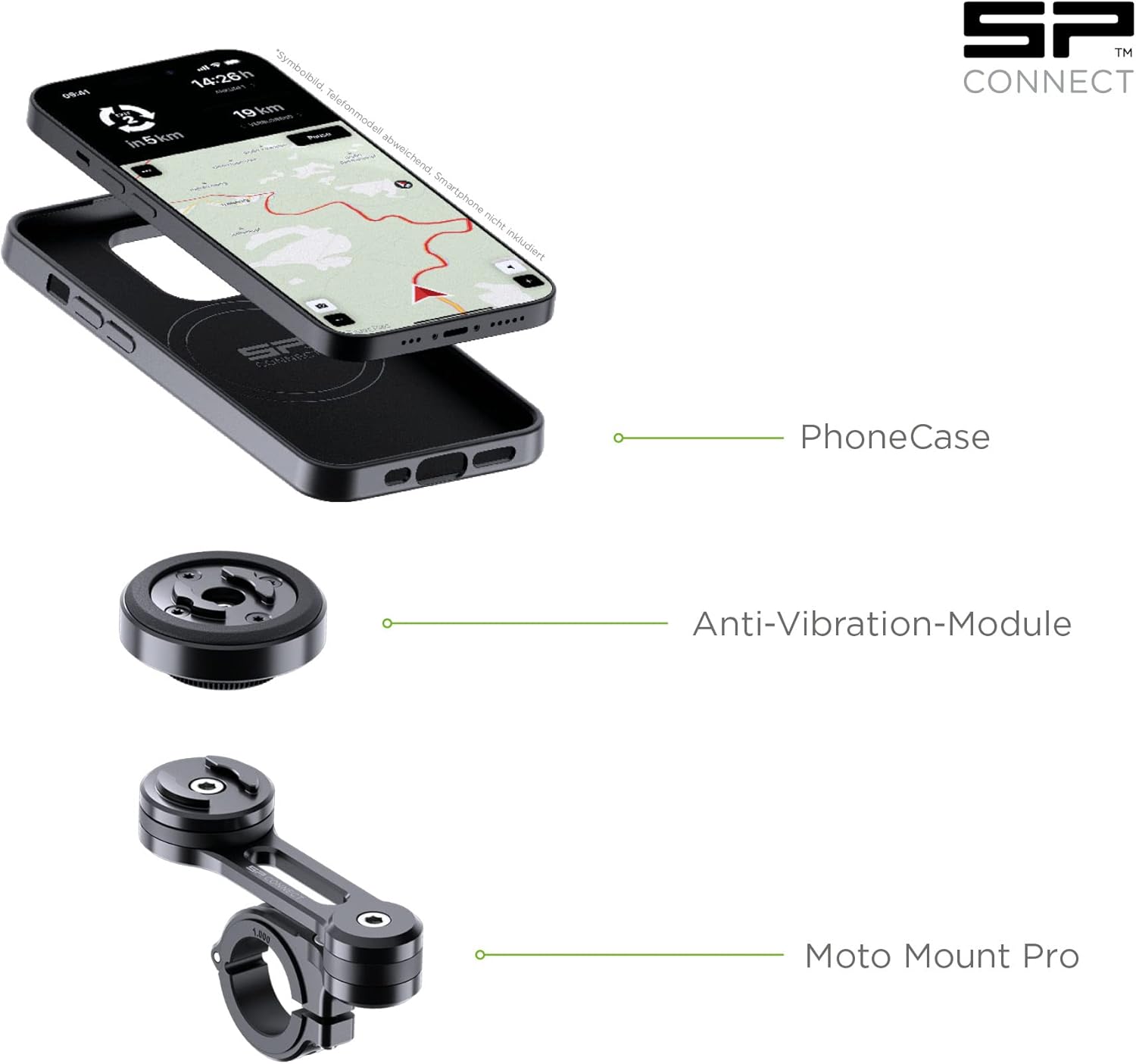
Image: An exploded view illustrating the Phone Case, Anti-Vibration Module, and Moto Mount Pro as separate, connectable units.
Setup and Installation
Follow these steps to properly install your SP CONNECT Moto Bundle II on your motorcycle.
- Attach Phone Case: Place your Samsung S23 Ultra into the provided SP CONNECT Phone Case. Ensure it fits snugly and all buttons and ports are accessible.
- Assemble Mount Components:
- Connect the Anti-Vibration Module to the Moto Mount Pro. The AVM typically twists and locks onto the mount.
- The Moto Mount Pro features a 360° rotatable head and a swivel and rotatable arm for flexible positioning.

Image: The Moto Mount Pro showing its 360° rotatable head, vibration damping features, and swivel arm, all crafted from CNC-machined aircraft aluminum.
- Mount to Handlebars:
- Choose a suitable location on your motorcycle handlebars. The mount fits standard and oversize handlebars with diameters from 7/8” (2.22 cm), 1” (2.54 cm), 1 1/8” (2.86 cm), to 1 ¼” (3.17 cm).
- Use the included stainless steel hardware to secure the Moto Mount Pro clamp to the handlebar. Tighten securely, but do not overtighten.
- The mount can be used with or without the extension arm, depending on your preferred positioning.

Image: Close-up of the Moto Mount Pro handlebar clamp, indicating compatible handlebar diameters and the stainless steel hardware.
- Positioning: Adjust the Moto Mount Pro and Anti-Vibration Module to your desired viewing angle. The mount allows for both portrait and landscape orientations.

Image: Examples of the phone mount installed on a motorcycle, demonstrating both vertical (portrait) and horizontal (landscape) mounting possibilities.
Operating Instructions
Once the Moto Mount Pro and Anti-Vibration Module are securely installed, attaching and detaching your smartphone is quick and easy.
- Attaching Your Phone:
- Hold your smartphone (in its SP CONNECT Phone Case) over the Anti-Vibration Module.
- Align the phone case with the module's mounting interface.
- Place the phone case onto the module and rotate it 90 degrees clockwise until it locks securely into place. You should feel and hear a click.
- Detaching Your Phone:
- To remove your phone, simply rotate the phone case 90 degrees counter-clockwise.
- Once unlocked, lift the phone case off the module.

Image: A sequence of images demonstrating how to attach and detach the phone case to the SP CONNECT mount on a motorcycle, highlighting the secure twist-to-lock mechanism.
Maintenance
Regular maintenance ensures the longevity and optimal performance of your SP CONNECT Moto Bundle II.
- Cleaning: Clean the phone case and mount components with a soft, damp cloth. Avoid harsh chemicals or abrasive materials that could damage the finish.
- Inspection: Periodically check all screws and connections for tightness, especially after long rides or off-road use. Ensure the mount is still securely fastened to the handlebars.
- Lubrication: The locking mechanism typically does not require lubrication. If it feels stiff, consult SP CONNECT support.
- Storage: When not in use for extended periods, store the bundle in a clean, dry place away from extreme temperatures.
Troubleshooting
This section addresses common issues you might encounter with your SP CONNECT Moto Bundle II.
| Problem | Possible Cause | Solution |
|---|---|---|
| Phone feels loose or wobbly on the mount. | Phone case not fully locked onto the module; mount screws are loose. | Ensure the phone case is rotated 90 degrees clockwise until it clicks securely. Check and tighten all handlebar mount screws. |
| Excessive vibrations despite Anti-Vibration Module. | AVM not properly installed; extreme motorcycle vibrations. | Verify the AVM is correctly attached between the phone case and the Moto Mount Pro. While the AVM reduces vibrations significantly, some extreme vibrations may still be felt. |
| Difficulty attaching/detaching phone. | Misalignment; debris in the locking mechanism. | Ensure proper alignment before twisting. Check for any dirt or debris in the locking mechanism and clean if necessary. Do not force. |
| Mount slides on handlebars. | Handlebar clamp not tight enough; incorrect spacer used. | Tighten the handlebar clamp screws. Ensure the correct size spacers/rings are used for your handlebar diameter. |
Specifications
- Model Number: FBA57968
- Compatible Phone Models: Samsung S23 Ultra (specific to this bundle)
- Mounting Type: Handlebar
- Handlebar Diameter Compatibility: 7/8” (2.22 cm), 1” (2.54 cm), 1 1/8” (2.86 cm), 1 ¼” (3.17 cm)
- Special Features: Shock Resistant, Anti-Vibration Module (reduces vibrations by up to 60%), MagSafe compatible (with SPC+ system)
- Material: CNC-machined aircraft-grade aluminum (Moto Mount Pro), durable plastics (Phone Case, AVM)
- Color: SPC+ | Moto Bundle AVM (Black)
- Manufacturer: SP CONNECT

Image: A graph illustrating the effectiveness of the Anti-Vibration Module in reducing strain (vibrations) compared to a motorbike alone and a Moto Mount without the AVM.
Warranty and Support
For warranty information and customer support, please refer to the official SP CONNECT website or contact their customer service directly.
Return Policy: This product typically has a 30-day return policy for refund or replacement, subject to the retailer's terms and conditions.
For further assistance, you may visit the SP CONNECT Store on Amazon.