1. Introduction
This manual provides comprehensive instructions for the ACEIRMC EZP2023 USB High-Speed EEPROM Flash Programmer. This device is designed for reading, writing, and erasing various memory chips, including 24, 25, 93, and 95 series EEPROM and Flash BIOS chips. It offers high-speed operation and broad compatibility, making it suitable for a range of applications from system repair to development.
2. Package Contents
Verify that all items listed below are present in your package:
- 1x EZP2023 USB High-Speed Programmer Unit
- 1x USB Connection Cable
- 1x Software/Driver CD-R
- 5x Various Adapters (e.g., SOP16-DIP8 300mil, SOP8 209mil, SOP8 150mil, MSOP8, and other specialized adapters)
- Pin Headers (for adapter use)

Image 2.1: Complete package contents including the EZP2023 programmer, USB cable, software CD, and various chip adapters.

Image 2.2: Detailed view of the included adapters (SOP16-DIP8 300mil, SOP8 209mil, SOP8 150mil, MSOP8), the software CD, and the USB connection cable.
3. Setup
3.1 System Requirements
- Operating System: Windows (Windows 7, Windows 8, Windows 10, Windows 11). Mac OS is listed in specifications but user reviews indicate primary support for Windows.
- Available USB Port
- CD-ROM Drive (for software installation)
3.2 Software and Driver Installation
- Insert the Software CD: Place the provided CD-R into your computer's CD-ROM drive.
- Install Software: Navigate to the CD content and run the installer for the EZP2023 programming software. Follow the on-screen prompts.
- Install Drivers: The software installation typically includes the necessary USB drivers. If prompted, allow the driver installation. If the device is not recognized after software installation, manually locate and install drivers from the CD. Note: Some users have reported challenges with driver installation on newer Windows versions; ensure you have administrative privileges.
- Language Selection: After installation, the software may default to Chinese. Locate the language selection option within the software interface to switch to English. This is often found in a drop-down menu.
3.3 Connecting the Programmer
- Connect one end of the supplied USB cable to the USB port on the EZP2023 programmer.
- Connect the other end of the USB cable to an available USB port on your computer.
- The "POWER" indicator light on the programmer should illuminate, indicating it is receiving power.

Image 3.1: Front view of the EZP2023 programmer showing the ZIF socket and indicator lights, and the back view showing the USB port.
4. Operating Instructions
The EZP2023 programmer is designed for efficient reading, writing, and erasing of supported memory chips. Always ensure the software is running and the programmer is connected before proceeding.
4.1 Chip Placement and Adapter Use
- Identify Chip Type: Determine the package type and series of the memory chip you intend to program (e.g., SOP8, SOP16, DIP8, 24/25/93/95 series).
- Select Appropriate Adapter: Choose the correct adapter for your chip. For Surface Mount Device (SMD) chips, you will typically use a SOP-to-DIP adapter. Ensure the adapter is correctly oriented and securely inserted into the programmer's ZIF (Zero Insertion Force) socket.
- Insert Chip: Carefully place the memory chip into the adapter or directly into the ZIF socket if it's a DIP package. Ensure pin 1 of the chip aligns with the corresponding indicator on the adapter/socket. Close the ZIF socket lever to secure the chip. The programmer can automatically detect if a chip is placed.
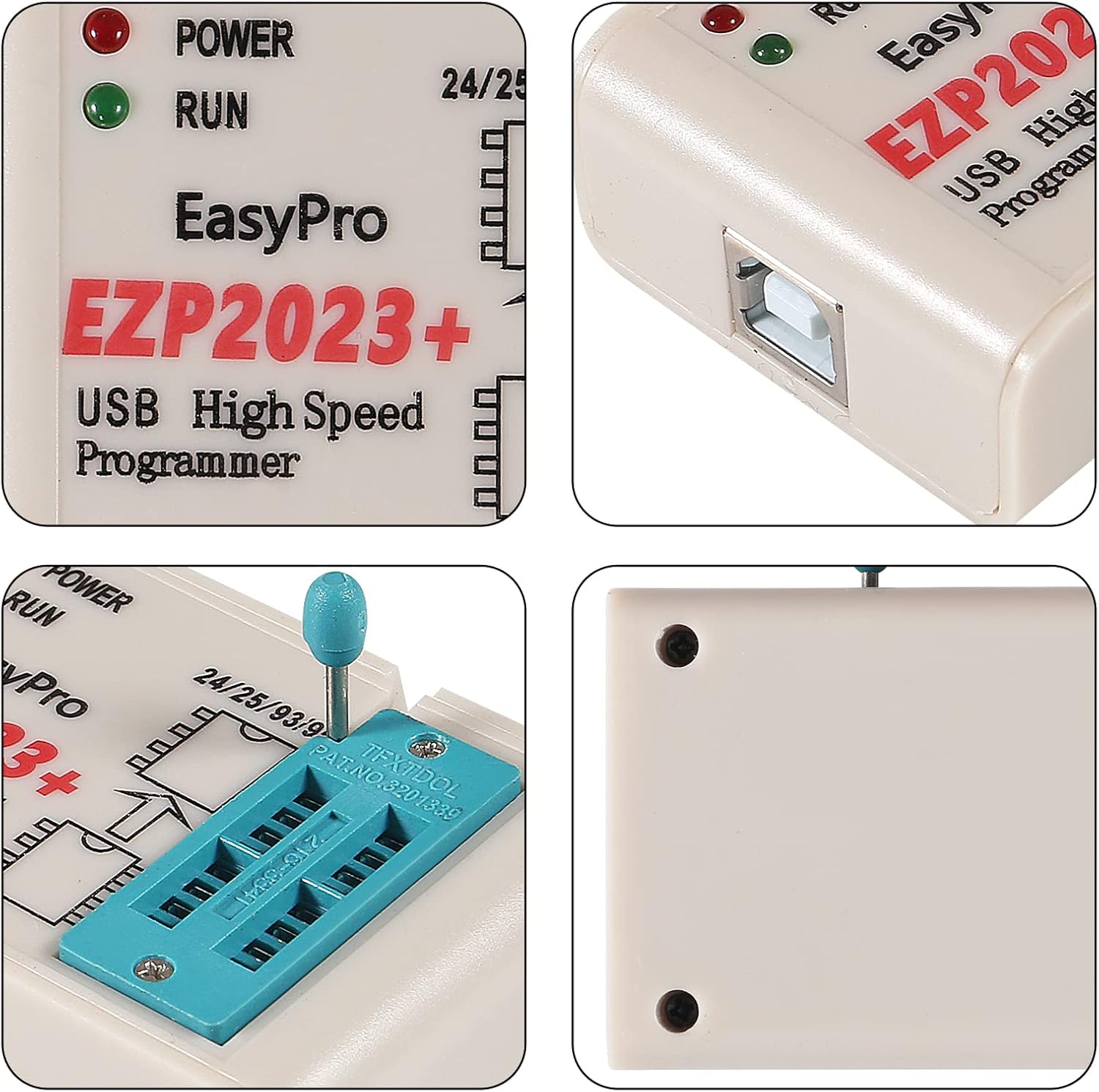
Image 4.1: Close-up view of the EZP2023 programmer's ZIF socket, showing the lever and markings for chip orientation.
4.2 Software Operations
- Launch Software: Open the EZP2023 programming software on your computer.
- Chip Detection: The software can automatically identify 25 series chips. For 24, 93, and 95 series EEPROM chips, you may need to manually select the chip model from the software's database. The software also automatically selects the correct chip supply voltage.
- Read Operation: To read data from a chip, select the "Read" function in the software. The data will be loaded into the software's buffer.
- Erase Operation: Before writing new data, many Flash chips require an erase operation. Select the "Erase" function.
- Write/Program Operation: Load the desired data file (e.g., BIOS image) into the software. The software primarily supports binary format files for reliable operation. Select the "Write" or "Program" function to transfer the data to the chip.
- Verify Operation: After writing, it is highly recommended to perform a "Verify" operation. This compares the data on the chip with the data in the software's buffer to ensure successful programming.
The EZP2023 programmer is known for its high-speed performance, capable of reading an EN25T80 chip in approximately 3 seconds and writing it in about 9 seconds.
5. Maintenance
- Cleaning: Keep the programmer and adapters clean and free from dust and debris. Use a soft, dry cloth for cleaning. Avoid liquid cleaners.
- Storage: Store the programmer and its accessories in a dry, cool place away from direct sunlight and extreme temperatures.
- Handle with Care: The ZIF socket and adapters contain delicate pins. Handle them carefully to prevent bending or damage.
- Software Updates: Periodically check for software updates if available from the manufacturer's official channels (though official channels may be difficult to locate based on user feedback).
6. Troubleshooting
| Problem | Possible Cause | Solution |
|---|---|---|
| Programmer not recognized by computer. | Missing or incorrect USB drivers. | Ensure drivers from the provided CD are correctly installed. Try different USB ports. Run software as administrator. |
| Software interface is in Chinese. | Default language setting. | Locate the language selection option within the software (often a drop-down menu) and select English. |
| Chip not detected or read/write errors. | Incorrect chip placement, wrong adapter, unsupported chip, or poor connection. | Verify chip orientation and secure placement in the ZIF socket/adapter. Ensure the correct adapter is used. Manually select chip model if auto-detection fails (especially for 24/93/95 series). Clean chip pins if necessary. |
| Programming fails or data is corrupted. | Incorrect file format, chip not erased, or faulty chip. | Ensure you are using binary file format. Perform an erase operation before writing. Verify the integrity of the data file. Test with a known good chip if possible. |
| Software crashes or freezes. | Software bug, system incompatibility, or resource conflict. | Restart the software and computer. Ensure your Windows operating system is up to date. Close other demanding applications. |
7. Specifications
- Model: EZP2023
- Brand: ACEIRMC
- Supported Chip Series: 24 EEPROM, 25 SPI FLASH, 93 EEPROM, 95 EEPROM
- Interface: USB Type A
- Operating System Compatibility: Windows (7, 8, 10, 11)
- Read Speed (e.g., EN25T80): Approximately 3 seconds
- Write Speed (e.g., EN25T80): Approximately 9 seconds
- Features: Automatic chip model identification (primarily 25 series), automatic chip placement detection, automatic chip supply voltage selection.
- Item Weight: 4.9 ounces
- Package Dimensions: 5.91 x 4.06 x 1.54 inches
8. Warranty and Support
For technical support or inquiries regarding your ACEIRMC EZP2023 programmer, please refer to the contact information provided with your purchase or visit the official ACEIRMC store on Amazon. While specific warranty details are not provided in this manual, standard return and replacement policies typically apply within 30 days of purchase.
For further assistance, you may visit the ACEIRMC Store on Amazon.
