
1. Introduction
Thank you for choosing the KKnoon 2-in-1 Laser Rangefinder and Tape Measure. This device combines a 40m laser distance meter with a 5m traditional tape measure, offering versatility for various measurement tasks. Please read this manual carefully before use to ensure safe and proper operation.
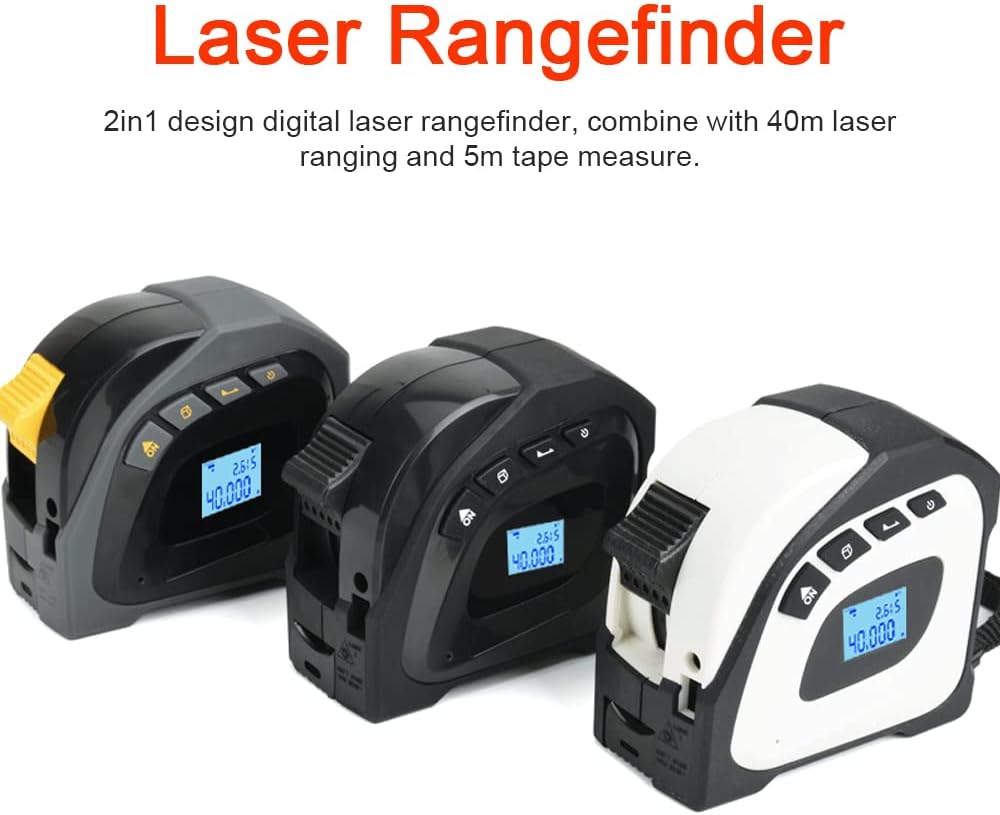
Image 1.1: The KKnoon 2-in-1 Laser Rangefinder and Tape Measure, available in multiple color options.
2. Safety Information
Always observe the following safety precautions to prevent injury or damage to the device:
- Laser Safety: This device uses a Class 2 laser. Do not stare directly into the laser beam or direct it at other people or reflective surfaces.
- Battery Safety: Use only the specified charging method. Do not disassemble, puncture, or expose the battery to extreme temperatures.
- Environmental Conditions: Do not use the device in explosive atmospheres or near flammable materials. Avoid exposure to water or high humidity (device is not water-resistant).
- Maintenance: Do not attempt to modify or repair the device yourself. Refer all servicing to qualified personnel.
3. Product Features
The KKnoon 2-in-1 Laser Rangefinder and Tape Measure offers the following key features:
- Dual Measurement: Combines a 40m digital laser rangefinder with a 5m steel tape measure.
- Durable Construction: Features a high-hardness ABS housing for wear resistance, drop resistance, and effective dust protection, ensuring a long service life.
- Clear Display: Equipped with an LCD display with backlight for clear data visibility, even in low-light conditions.
- Accurate Tape Measure: The 5m manganese steel tape includes both imperial and metric scales, with a movable ruler hook for precise measurements.
- Benchmark Compensation: The tape measure features a retraction compensation function, allowing the hook to move inside or beyond the 0-scale for accurate readings.
4. Package Contents
Upon unpacking, please verify that all items are present and in good condition:
- 1 x KKnoon 2-in-1 Laser Rangefinder and Tape Measure
- 1 x USB Charging Cable
- 1 x User Manual (this document)
5. Setup
5.1 Charging the Device
Before first use, fully charge the device. Connect the provided USB charging cable to the charging port on the side of the device and to a standard USB power adapter (not included).
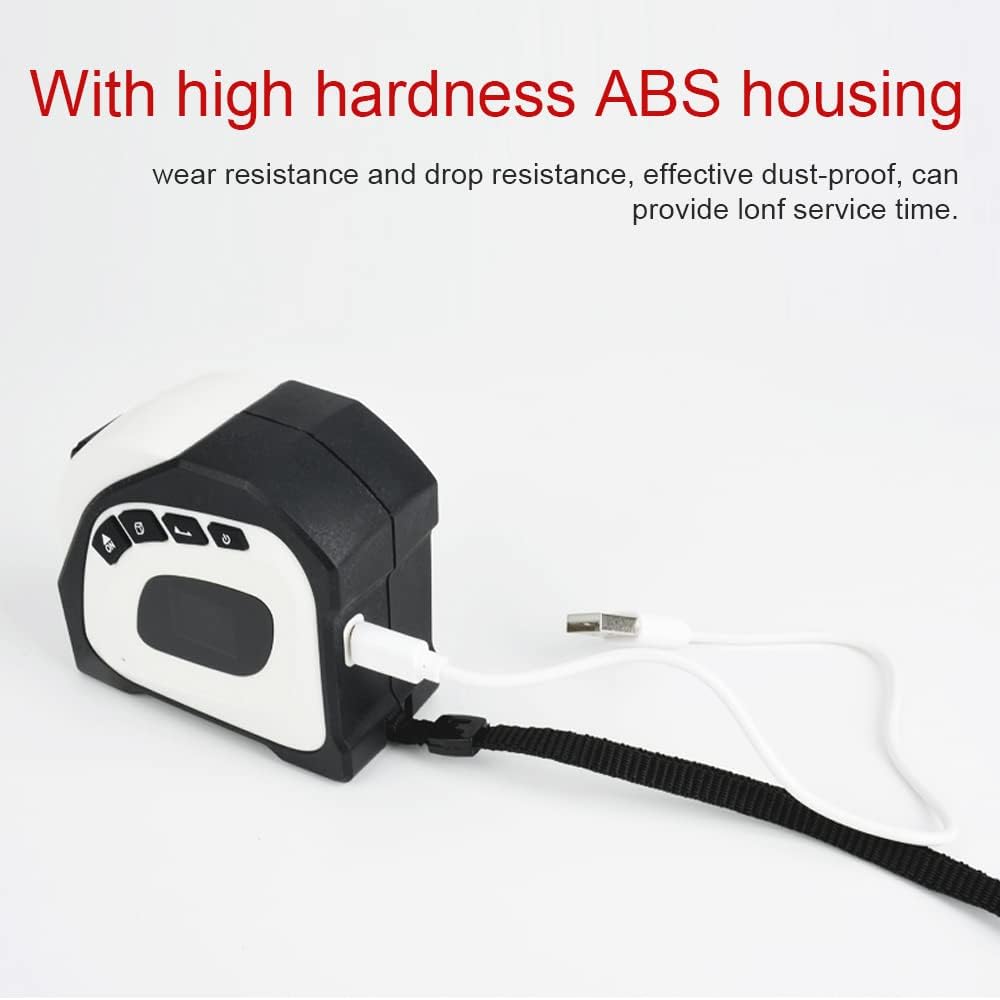
Image 5.1: Charging the device via USB cable.
The battery indicator on the LCD display will show the charging status. A full charge typically takes a few hours.
5.2 Powering On/Off
To power on the device, press and hold the ON/MEAS button. To power off, press and hold the OFF button.
6. Operating Instructions
6.1 Using the Laser Rangefinder
- Power On: Press the ON/MEAS button to turn on the device. The laser will activate.
- Measure: Point the laser beam at the target surface. Press the ON/MEAS button again to take a measurement. The distance will be displayed on the LCD.
- Continuous Measurement: Some models support continuous measurement. Refer to the display for a real-time distance update as you move the device.
- Area/Volume Measurement: If your model supports these functions, press the FUNC button (if present) to cycle through measurement modes (single distance, area, volume). Follow the on-screen prompts to take multiple measurements for area (length x width) or volume (length x width x height).

Image 6.1: Using the laser rangefinder function.
6.2 Using the Tape Measure
- Extend Tape: Pull the tape measure out from the side of the device to the desired length.
- Lock Tape: The tape measure features an automatic locking mechanism. To retract, press the release button located on the side of the device.
- Measurement: Place the end hook of the tape measure against the starting point and extend to the endpoint. Read the measurement from the tape.

Image 6.2: Measuring with the integrated tape measure.
6.3 Understanding the LCD Display
The LCD display provides clear readings and status indicators:
- Main Measurement: Displays the primary laser distance measurement.
- Secondary Measurement: May show previous measurements or calculated values (e.g., for area/volume).
- Unit Indicator: Shows the current unit of measurement (e.g., m, ft, in).
- Battery Indicator: Shows the remaining battery level.
- Laser Status: Indicates if the laser is active.

Image 6.3: Detailed view of the LCD display.
7. Maintenance
- Cleaning: Use a soft, dry cloth to clean the device. Do not use abrasive cleaners or solvents. Ensure the laser lens and display are kept clean for accurate readings.
- Storage: Store the device in a cool, dry place away from direct sunlight and extreme temperatures. If storing for an extended period, ensure the battery is partially charged.
- Battery Care: Recharge the battery regularly, even if the device is not in use, to maintain battery health.
8. Troubleshooting
| Problem | Possible Cause | Solution |
|---|---|---|
| Device does not power on | Low battery; Device malfunction | Charge the battery; Contact customer support if issue persists. |
| Laser measurement inaccurate | Dirty laser lens; Unstable measurement surface; Environmental interference | Clean the laser lens; Ensure a stable measurement; Avoid strong light or reflective surfaces. |
| Tape measure does not retract | Release button not pressed; Internal mechanism obstruction | Press the tape release button firmly; Do not force retraction. |
| LCD display is dim or blank | Low battery; Backlight off; Device malfunction | Charge the battery; Check backlight settings (if available); Contact customer support. |
9. Specifications
- Product Name: 2-in-1 Laser Rangefinder and Tape Measure
- Brand: KKnoon
- Model: B0BZD7Q2QF
- Material: ABS, Acrylonitrile Butadiene Styrene, Metal
- Color: Black (other colors may be available)
- Laser Measuring Range: 40 meters
- Tape Measure Length: 5 meters
- Display: LCD with Backlight
- Battery: 1 x 3.7V, 180mAh Lithium-ion Polymer battery (included)
- Item Dimensions: 155 x 133 x 55 mm (approx. 6.10 x 5.24 x 2.17 inches)
- Item Weight: 300 g (approx. 10.58 ounces)
- International Protection Rating: IP5X (Dust protected)
- Water Resistance Level: Not water resistant
- UPC: 755672701488

Image 9.1: Key measurement ranges of the device.
10. Warranty and Support
This product comes with a standard manufacturer's warranty. For specific warranty terms, please refer to the documentation included with your purchase or contact the retailer. For technical support, troubleshooting assistance, or to inquire about replacement parts, please contact KKnoon customer service through their official channels or the retailer where the product was purchased.
Please retain your proof of purchase for warranty claims.