
1. Introduction and Safety Information
This manual provides detailed instructions for the operation, maintenance, and troubleshooting of your ANENG A3009 Pen Type Digital Multimeter and ANENG AC28 Socket Tester. Please read this manual thoroughly before using the devices to ensure safe and correct operation.
1.1 Safety Precautions
- Always read and understand this manual completely before operating the devices.
- Do not use the devices if they appear damaged or are not functioning correctly.
- Ensure proper battery installation and replacement as described in this manual.
- Do not exceed the maximum input values specified for each measurement function.
- Exercise extreme caution when working with live electrical circuits. Always assume circuits are live until verified otherwise.
- The AC28 Socket Tester is designed for standard household outlets. Do not use it on industrial or non-standard outlets.
- If the AC28 Socket Tester indicates a wiring fault, consult a qualified electrician immediately.
- Keep the devices away from water, moisture, and extreme temperatures.
2. Product Overview
The ANENG A3009 Pen Type Digital Multimeter and AC28 Socket Tester are designed for various electrical testing applications, from basic household checks to more professional troubleshooting. The A3009 offers multiple measurement functions in a compact pen-style design, while the AC28 provides quick and clear indications of socket wiring status and leakage detection.

Figure 2.1: The ANENG A3009 Pen Type Digital Multimeter and AC28 Socket Tester, shown with included accessories such as test leads, batteries, and various probe tips.
2.1 Key Features of ANENG A3009 Pen Multimeter
- AC/DC Voltage Measurement
- Resistance Measurement
- Continuity Test
- Frequency Measurement
- Diode Test
- Live Wire Detection
- Non-Contact Voltage (NCV) Detection
- Voice Broadcast Function
- Phase Sequence Detection
- Data Retention (HOLD)
- Flashlight and VA Reverse Display Screen
- Automatic Shut-down (after 5 minutes of inactivity)
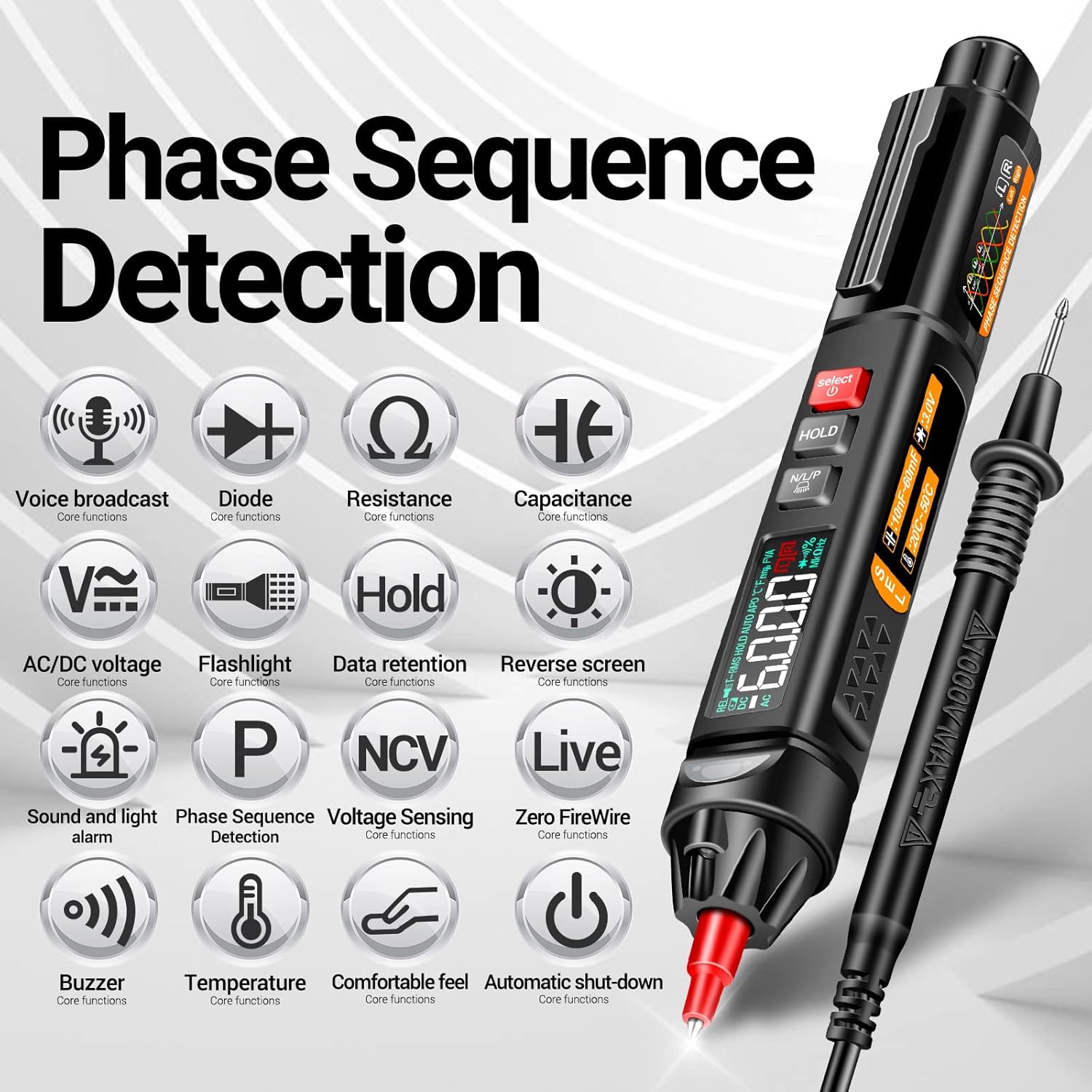
Figure 2.2: Detailed illustration of the ANENG A3009 Pen Multimeter's various functions and features, including voice broadcast, phase sequence detection, and NCV.
2.2 Key Features of ANENG AC28 Socket Tester
- One-click Leakage Detection (RCD Test)
- Wiring Status Indication (Correct, Open Ground, Open Neutral, Live/Neutral Reverse, Live/Ground Reverse, Open Live & Live Neutral Reverse)
- Digital Voltage Display
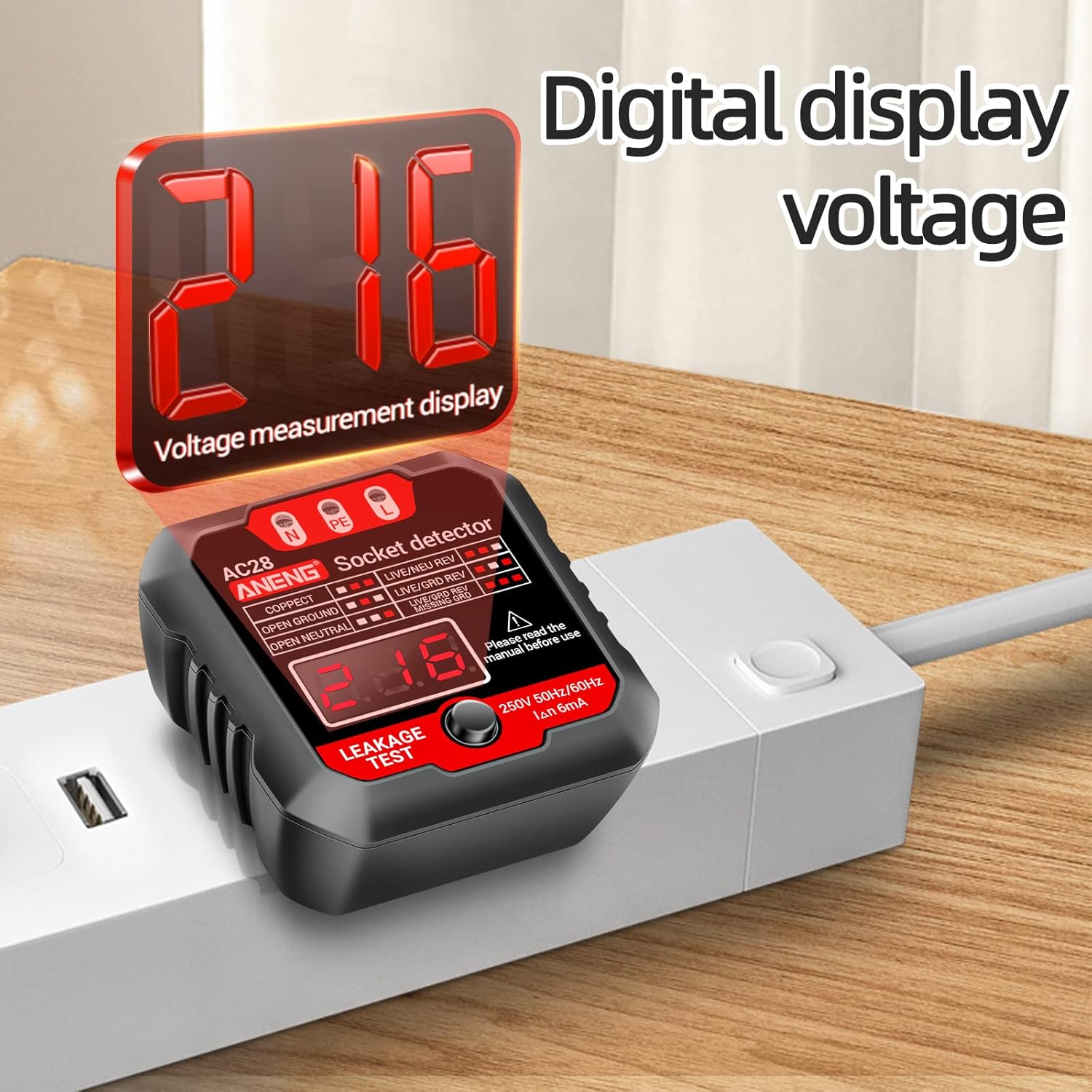
Figure 2.3: The ANENG AC28 Socket Detector, highlighting its LED indicators for wiring status and the digital voltage display.
3. Setup
3.1 Battery Installation (A3009 Pen Multimeter)
- Locate the battery compartment cover on the back of the A3009 multimeter.
- Use a small screwdriver or coin to open the battery compartment.
- Insert two (2) 1.5V AAA batteries, ensuring correct polarity (+/-).
- Replace the battery compartment cover and secure it.
The AC28 Socket Tester does not require separate battery installation as it draws power directly from the outlet.
3.2 Attaching Test Leads/Probes (A3009 Pen Multimeter)
- The A3009 comes with a detachable metal nib. To attach, screw the desired probe tip (e.g., pointed needle, U-shaped insert) onto the end of the multimeter.
- For certain measurements, connect the included test lead to the appropriate input jack on the multimeter.

Figure 3.1: The detachable metal nib of the ANENG A3009 Pen Multimeter, illustrating how different probe tips can be attached for various testing needs.
4. Operating Instructions: ANENG A3009 Pen Multimeter
4.1 Power On/Off
Press and hold the power button to turn the multimeter on or off. The device will automatically shut down after approximately 5 minutes of inactivity to conserve battery life.
4.2 Function Selection
Use the 'SELECT' button to cycle through different measurement functions such as AC/DC voltage, resistance, continuity, frequency, diode, live wire detection, and NCV. The selected function will be indicated on the VA reverse display screen.
4.3 Measurement Procedures
- Voltage Measurement (AC/DC): Select the appropriate voltage mode. Connect the probe to the circuit points to measure voltage.
- Resistance/Continuity: Select resistance mode. Touch the probes to the component. For continuity, a beep indicates a continuous circuit.
- Live Wire Detection: Select 'LIVE' mode. Touch the probe to the live wire. The device will indicate the presence of live voltage.
- NCV (Non-Contact Voltage) Detection: Select 'NCV' mode. Bring the tip of the multimeter close to a wire or outlet. The device will detect AC voltage without direct contact.
- Phase Sequence Detection: Select the phase sequence detection mode. Follow the on-screen prompts or voice broadcast instructions to test the phase sequence of a three-phase power supply.
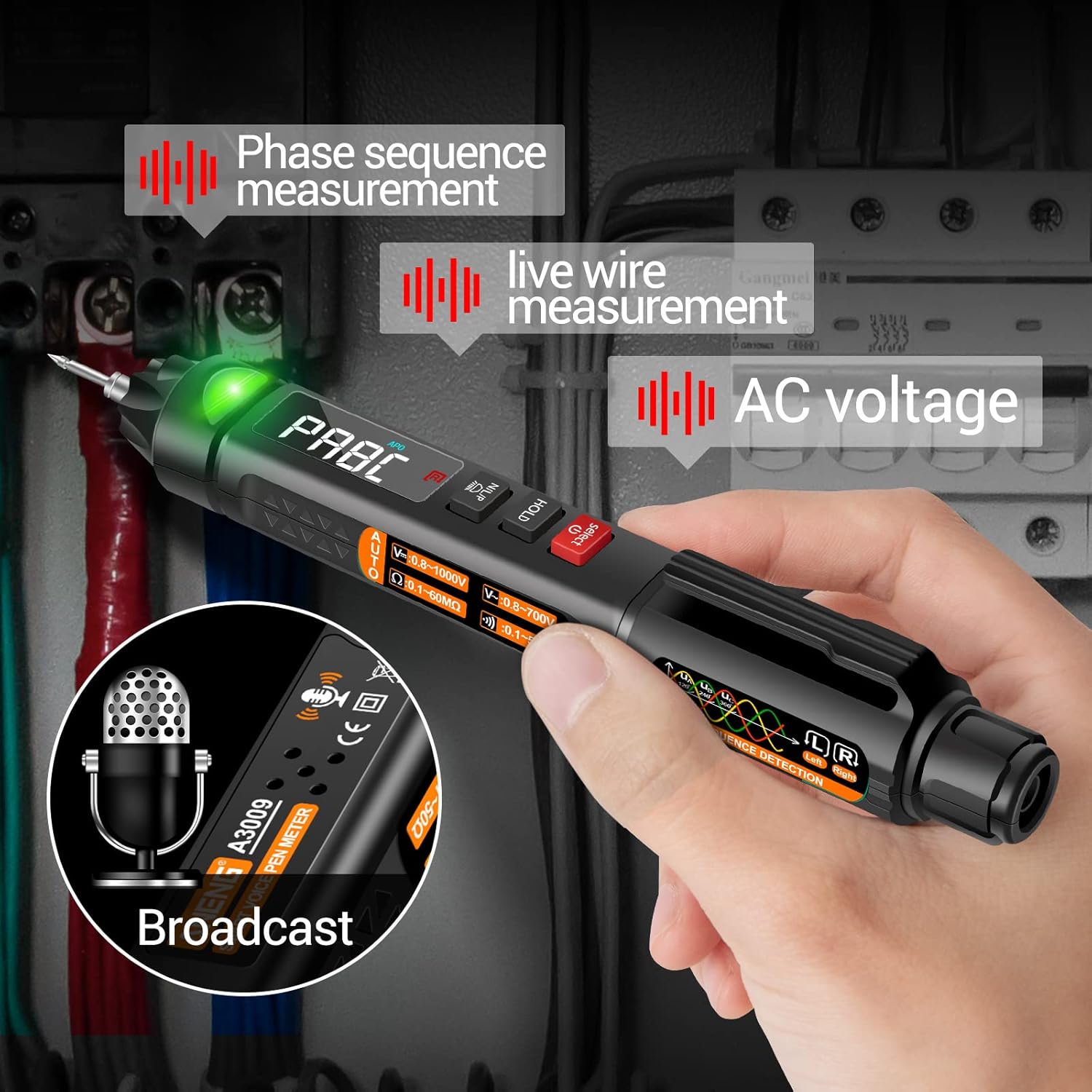
Figure 4.1: The ANENG A3009 Pen Multimeter in action, demonstrating its capabilities for phase sequence measurement, live wire detection, and AC voltage measurement, accompanied by its voice broadcast feature.
4.4 Data Retention (HOLD)
Press the 'HOLD' button to freeze the current reading on the display. Press it again to release the hold function.
4.5 Flashlight and Backlit Display
The A3009 features a built-in flashlight and a backlit VA reverse display screen for improved visibility in dimly lit environments. These features activate automatically or can be toggled via specific button presses (refer to on-device markings).
5. Operating Instructions: ANENG AC28 Socket Tester
5.1 Basic Wiring Test
- Plug the AC28 Socket Tester into a standard 3-prong electrical outlet.
- Observe the LED indicators on the front panel. The combination of lit LEDs will indicate the wiring status of the outlet. Refer to the legend on the device for interpretation (e.g., Correct, Open Ground, Open Neutral, Live/Neutral Reverse).
- The digital display will show the current voltage of the outlet.
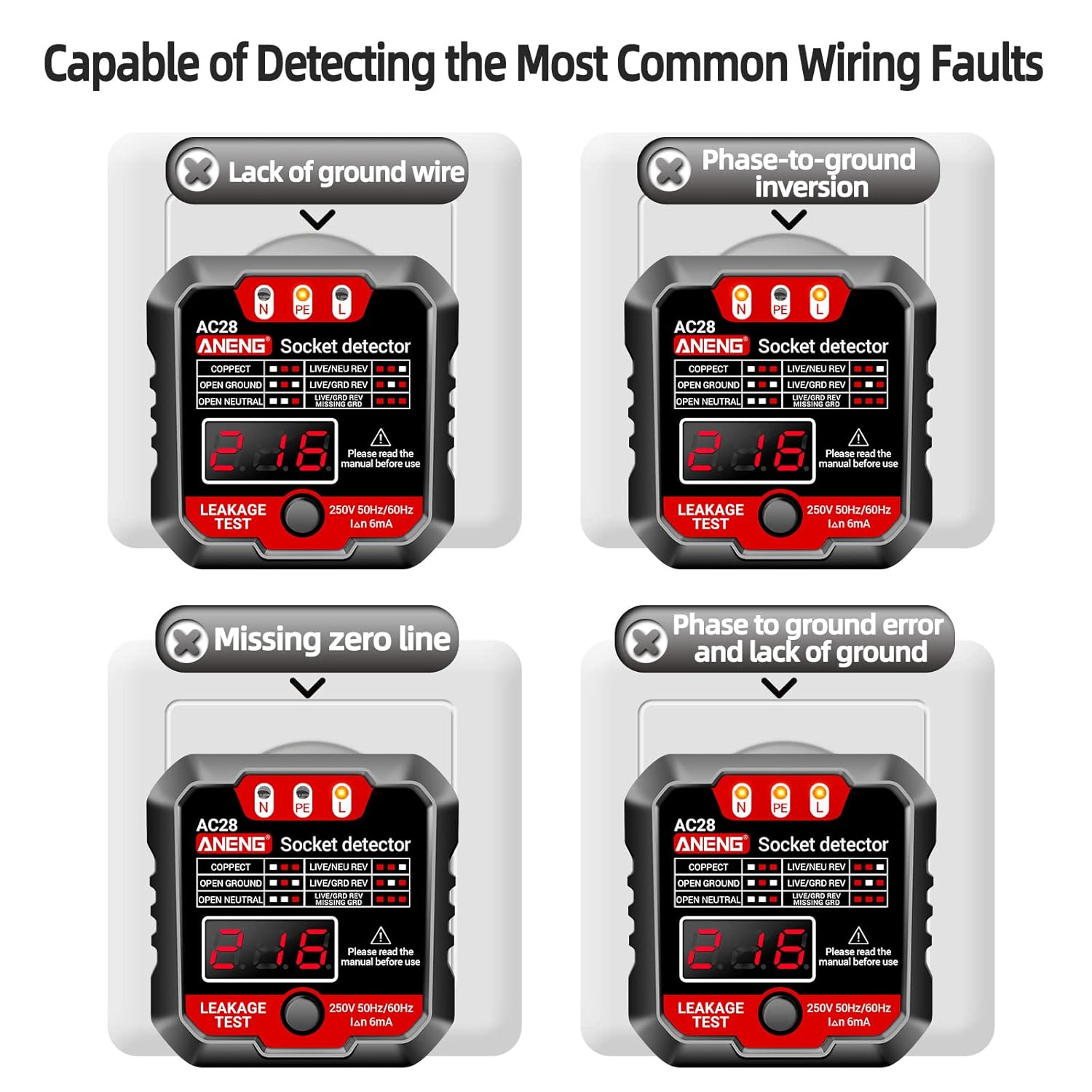
Figure 5.1: The ANENG AC28 Socket Detector illustrating its capability to detect common wiring faults such as lack of ground wire, phase-to-ground inversion, missing neutral line, and phase-to-ground error with lack of ground.
5.2 One-Click Leakage Detection (RCD Test)
The AC28 Socket Tester includes a leakage detection function to test Residual Current Devices (RCDs) or Ground Fault Circuit Interrupters (GFCIs) in the circuit.
- With the AC28 plugged into the outlet and showing a 'Correct' wiring indication, press the 'LEAKAGE TEST' button.
- If the receptacle trips (power cuts off), it indicates that the RCD/GFCI protection is functioning correctly.
- If the receptacle does not trip, the RCD/GFCI may be faulty or absent. Consult a qualified electrician.

Figure 5.2: The ANENG AC28 Socket Detector demonstrating its one-click leakage detection feature, which tests the integrity of the circuit's protective measures.
5.3 Digital Voltage Display
The AC28 Socket Tester provides a clear digital display of the measured voltage, allowing for quick verification of power supply levels.

Figure 5.3: The ANENG AC28 Socket Detector displaying the measured voltage digitally, providing an immediate and clear reading of the outlet's power.
6. Maintenance
- Cleaning: Wipe the devices with a dry, soft cloth. Do not use abrasive cleaners or solvents.
- Storage: Store the devices in a cool, dry place, away from direct sunlight and extreme temperatures. If storing for extended periods, remove the batteries from the A3009 multimeter.
- Battery Replacement: Replace the AAA batteries in the A3009 multimeter when the low battery indicator appears on the display to ensure accurate readings.
- Automatic Shutdown: The A3009 multimeter features an automatic shutdown function after 5 minutes of no operation to conserve battery power.
7. Troubleshooting
| Problem | Possible Cause | Solution |
|---|---|---|
| A3009 does not power on | Dead or incorrectly installed batteries | Replace batteries, ensuring correct polarity. |
| Inaccurate readings on A3009 | Incorrect function selected; low battery | Ensure the correct measurement function is selected. Replace batteries if low. |
| AC28 shows a wiring fault | Actual wiring issue in the outlet | Do not use the outlet. Consult a qualified electrician for inspection and repair. |
| AC28 leakage test does not trip | Faulty RCD/GFCI or no RCD/GFCI protection | Consult a qualified electrician to check the RCD/GFCI or install one if necessary. |
| A3009 display is dim or flickering | Low battery | Replace batteries. |
8. Specifications
| Feature | Detail |
|---|---|
| Brand | ANENG |
| Model (Multimeter) | A3009 |
| Model (Socket Tester) | AC28 |
| Power Source (A3009) | 2 x 1.5V AAA Batteries |
| Measurement Type | Multimeter (A3009), Socket Tester (AC28) |
| Auto Shutdown (A3009) | Yes (after 5 minutes of inactivity) |
| Display (A3009) | VA Reverse Display, Backlit |
| Socket Tester Voltage (AC28) | 250V 50Hz/60Hz |
| Socket Tester Leakage Current (AC28) | IΔn 6mA |
9. Warranty and Support
ANENG provides lifetime service and technical support for this electrical tester. For any inquiries, technical assistance, or warranty claims, please contact ANENG customer support through the official channels provided at the point of purchase or on the ANENG brand website.
Please retain your purchase receipt as proof of purchase for warranty purposes.


