
Wheeler 710909
Wheeler Digital Firearms Accurizing Torque Wrench User Manual
Model: 710909 | Brand: Wheeler
Introduction
The Wheeler Digital F.A.T. Wrench is designed to provide precise and repeatable torque settings for firearm components such as scope rings, bows, and other screws. Its digital display and audible/visual indicators ensure accurate application of torque, crucial for proper firearm maintenance and gunsmithing.
Safety Information
- Always ensure the firearm is unloaded and safe before performing any maintenance.
- Wear appropriate safety glasses to protect your eyes.
- Do not exceed the recommended torque specifications for any component. Overtightening can cause damage to the firearm or the tool.
- Keep the tool clean and free from debris to ensure accurate readings.
- Store the tool in its protective case when not in use to prevent damage.
Package Contents
Your Wheeler Digital F.A.T. Wrench package includes the following items:
- Wheeler Digital F.A.T. Wrench
- 10 S2 tool steel bits (hardened to 56-58 Rockwell "C")
- Molded storage case
- 1 Lithium Ion battery (included)
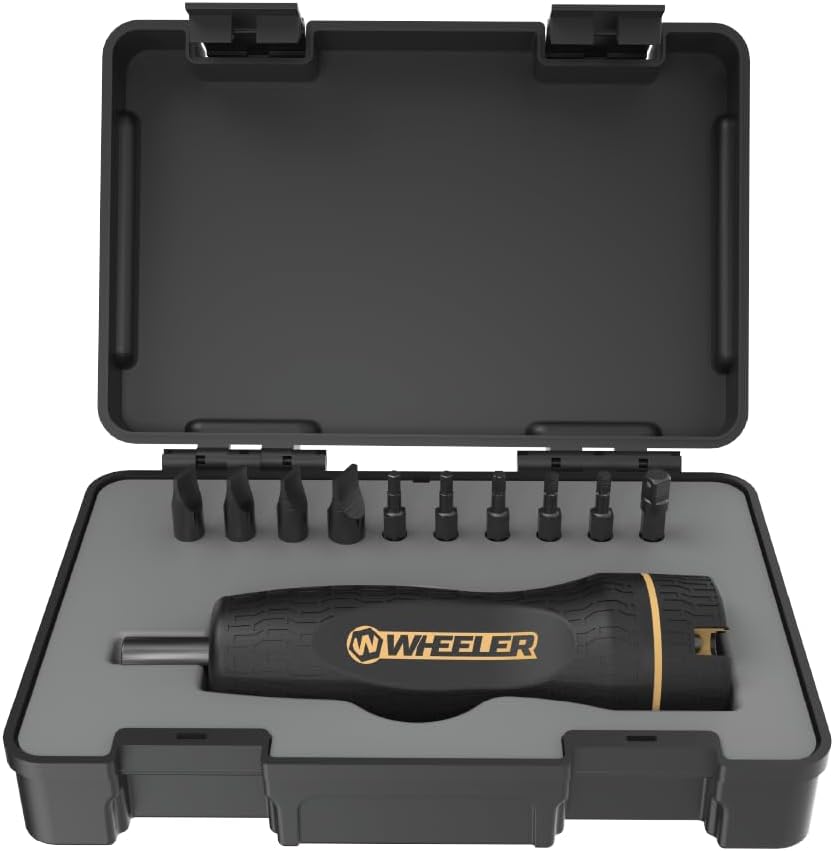
Image: Wheeler Digital F.A.T. Wrench and included bits neatly organized in its durable molded storage case.
Setup
- Battery Installation: Locate the battery compartment, typically at the base of the wrench. Insert the included Lithium Ion battery, ensuring correct polarity. Secure the battery cover.
- Bit Insertion: Select the appropriate bit for your application. Insert the bit firmly into the wrench's bit holder until it clicks into place.
- Power On: Press the power button (usually marked with a power symbol) to turn on the wrench. The LCD display will illuminate.

Image: A detailed view of the wrench's digital display, showing the torque reading and control buttons for unit selection and power.
Operating Instructions
- Select Measurement Unit: Press the 'UOM' button to cycle through available measurement units: lb-in (inch-pounds), kg-cm (kilogram-centimeters), and N-m (Newton-meters).
- Set Desired Torque: Use the '+' and '-' buttons to adjust the target torque value on the LCD display. The wrench has a range of 15-100 in/lb.
- Apply Torque: Place the bit into the screw head. Apply steady, even pressure while rotating the wrench. The LCD display will show the real-time torque being applied.
- Audible and Visual Indicators: As you approach the set torque value, the wrench will provide audible beeps and visual cues on the display. Once the target torque is reached, a continuous tone will sound, and the display will indicate the achieved torque.
- Power Off: Press and hold the power button to turn off the wrench when finished.

Image: A user applying torque to a screw on a pistol using the Wheeler Digital F.A.T. Wrench, demonstrating its ergonomic design and ease of use.

Image: The torque wrench in action, tightening a screw on a rifle scope mount, highlighting its application in gunsmithing.

Image: A hand holding the wrench, with the digital display clearly visible, showing a torque reading during operation.

Image: An informational graphic detailing the wrench's display modes (Peak and Live) and its measurement capabilities, including range, units, and accuracy.
Maintenance
- Cleaning: Wipe the wrench and bits with a clean, dry cloth after each use. Do not use harsh chemicals or abrasive cleaners.
- Storage: Always store the wrench and its bits in the provided molded case to protect them from dust, moisture, and impact.
- Battery Care: If the wrench will not be used for an extended period, remove the battery to prevent leakage and corrosion.
Troubleshooting
| Problem | Possible Cause | Solution |
|---|---|---|
| Wrench does not power on. | Low or dead battery; incorrect battery installation. | Replace battery with a new Lithium Ion battery. Ensure correct polarity during installation. |
| Inaccurate torque readings. | Dirty bit or bit holder; improper application technique; tool damage. | Clean bit and bit holder. Ensure steady, even pressure. If problem persists, contact customer support. |
| Audible alarm not sounding. | Volume setting too low (if applicable); internal malfunction. | Check user manual for volume adjustment. If no adjustment, contact customer support. |
Specifications
- Brand: Wheeler
- Model Number: 710909
- Material: Alloy Steel
- Color: Black
- Item Length: 4.8 Inches
- Item Weight: 16 ounces (0.45 kg)
- Torque Range: 15-100 in/lb
- Measurement Units: lb-in, kg-cm, N-m
- Accuracy: +/- 2%
- Power Source: Battery (1 Lithium Ion battery included)
- Average Battery Life: 10 Hours
- Head Style: Open End
- Finish Type: Polished
- UPC: 661120109099
Warranty and Support
This product is covered by a limited lifetime warranty provided by Wheeler. For assistance, troubleshooting, or warranty claims, please contact Wheeler customer service directly.
For more information and support, you may visit the official Wheeler website or refer to the user guide PDF available online.
Ask a question about this manual
Ask about setup, troubleshooting, compatibility, parts, safety, or missing instructions. Manuals+ will review the question and use this page’s manual context to help answer it.