
WANAI BCD72-BLACK
Contents
WANAI Compact Refrigerator User Manual
Model: BCD72-BLACK
1. Product Overview
The WANAI Compact Refrigerator (Model BCD72-BLACK) is a versatile 3.5 Cu.Ft retro black fridge designed for small spaces such as apartments, dorms, and offices. It features a convenient two-door design with separate freezer and refrigerator compartments, 7 temperature modes, LED interior lighting, and removable shelves for flexible storage.

Figure 1: WANAI 3.5 Cu.Ft Retro Black Compact Refrigerator with 3.5 Cu.Ft capacity label.
2. Key Features
- Space-Saving Compact Design: Measures 17.7 x 18.8 x 35.4 inches with a 3.5 cubic feet capacity, ideal for limited spaces.
- Dual-Door Configuration: Separate refrigeration and freezing compartments for optimal organization and temperature control.
- Low Noise Operation: Equipped with an efficient R600a compressor, ensuring a quiet environment.
- Energy Efficient: Conforms to energy certification standards, consuming only 0.56 kWh per day.
- Adjustable Shelves: Removable glass shelves allow for customized storage of various container sizes.
- LED Interior Lighting: Provides clear visibility of contents.
- 7 Temperature Modes: Adjustable thermostat for precise temperature control.
- Adjustable Legs: User-friendly design to adapt to uneven surfaces.
- Egg Tray: Dedicated storage for eggs on the door.

Figure 2: Visual representation of key features including energy saving, space saving, eco-friendliness, and multilevel temperature control.
3. Setup and Installation
- Unpacking: Carefully remove all packaging materials, including tape and protective films. Ensure all accessories are present.
- Placement: Choose a location with adequate ventilation, away from direct sunlight or heat sources. Allow at least 4 inches of space around the refrigerator for proper air circulation.
- Leveling: Use the adjustable legs at the bottom of the unit to ensure the refrigerator is level. This helps with proper door sealing and efficient operation.
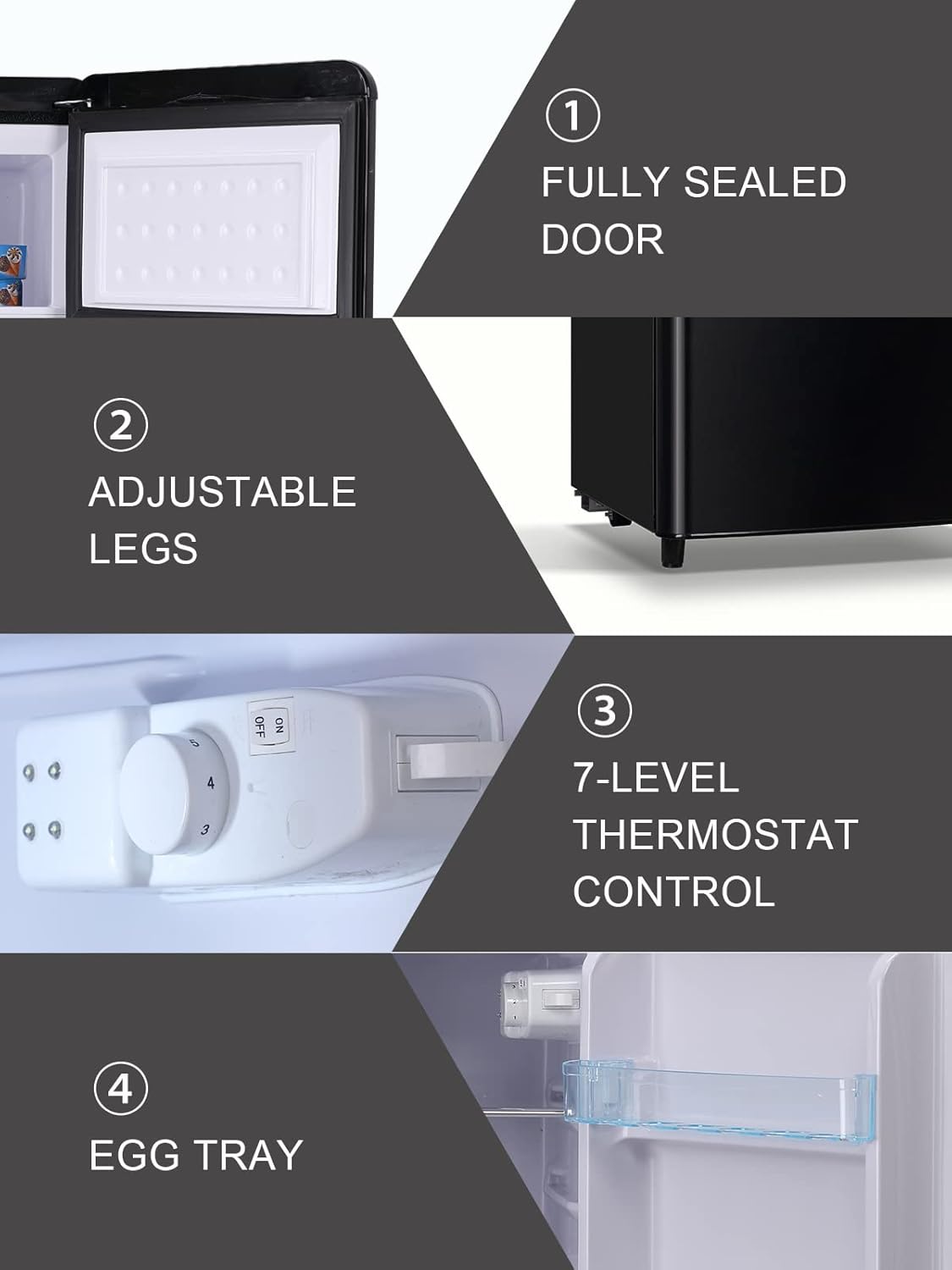
Figure 3: Detail of the adjustable legs and fully sealed door for optimal performance.
- Initial Power-On: Before plugging in, allow the refrigerator to stand upright for at least 2-4 hours to allow refrigerants to settle. Plug the unit into a dedicated grounded electrical outlet.
- First Use: Set the thermostat to a medium setting (e.g., 4) and allow the refrigerator to cool for several hours before loading with food.
4. Operating Instructions
4.1 Temperature Control
The refrigerator features a 7-level thermostat control located inside the fresh food compartment. Turn the knob to adjust the temperature. Setting '0' is off, and '7' is the coldest setting. It is recommended to start with a medium setting (e.g., 4) and adjust as needed based on ambient temperature and food load.
Video 1: Demonstration of the WANAI Compact Refrigerator's features, including the temperature control knob and interior layout.
4.2 Interior Lighting
The refrigerator is equipped with an LED light that automatically illuminates when the fresh food compartment door is opened, providing clear visibility of your stored items.

Figure 4: Interior view of the refrigerator, highlighting the separate freezer and fresh food sections, along with the LED lighting.
5. Maintenance and Care
- Cleaning: Regularly clean the interior and exterior of the refrigerator with a mild detergent and warm water. Avoid abrasive cleaners or solvents. Ensure the unit is unplugged before cleaning.
- Defrosting: This model features manual defrost. When frost builds up to about 1/4 inch thick in the freezer, unplug the unit and allow the frost to melt. Remove melted water and dry the interior thoroughly before restarting.
- Adjustable Shelves and Drawers: The glass shelves and crisper drawer can be removed for easy cleaning.

Figure 5: Detailed view of the refrigerator's interior, showcasing the adjustable glass shelves and the removable crisper drawer for vegetables.
- Door Seals: Periodically check the door seals for any damage or gaps. Clean them with warm, soapy water to maintain an airtight seal, which is crucial for energy efficiency. The fully sealed door design helps maintain internal temperature.
6. Troubleshooting
If you encounter issues with your WANAI Compact Refrigerator, please refer to the following common troubleshooting steps:
| Problem | Possible Cause | Solution |
|---|---|---|
| Refrigerator does not operate. | Not plugged in; circuit breaker tripped; temperature control set to "0" (off). | Ensure plug is secure; reset circuit breaker; turn temperature control to desired setting. |
| Temperature is not cold enough. | Door opened too frequently; large amount of warm food added; poor ventilation; temperature control set too high. | Minimize door openings; allow food to cool before placing in fridge; ensure adequate space around unit; adjust temperature control to a lower setting. |
| Excessive frosting/icing. | Door not sealed properly; high humidity; frequent door openings. | Check and clean door seals; ensure door closes completely; defrost unit as needed. |
| Unusual noises. | Unit not level; objects vibrating against the unit; normal compressor operation. | Adjust leveling legs; ensure nothing is touching the back or sides; gurgling or humming sounds are normal. |
7. Specifications
| Specification | Value |
|---|---|
| Brand Name | WANAI |
| Model Info | 72-BLACK |
| Item Model Number | 72-BLACK |
| Part Number | BCD72-BLACK |
| Item Weight | 50 pounds |
| Product Dimensions | 17.7 x 18.8 x 35.4 inches |
| Capacity | 3.5 Cubic Feet |
| Annual Energy Consumption | 40 Watts |
| Refrigerator Fresh Food Capacity | 2.5 Cubic Feet |
| Freezer Capacity | 1 Cubic Feet |
| Installation Type | Freestanding |
| Form Factor | Compact |
| Special Features | Adjustable Shelves |
| Color | Black |
| Voltage | 110 Volts |
| Crispers/Drawers | 1 |
| Defrost System | Manual |
| Door Hinges | Right |
| Shelf Type | removable shelves |
| Shelves | 3 |
| Certification | certification,energy |
| Included Components | Light |
| Number Of Doors | 2 |
8. Warranty and Customer Support
WANAI is committed to providing high-quality products and excellent customer service. For any questions regarding your product, warranty information, or technical support, please contact WANAI customer service. They are dedicated to solving any after-sales problems and will reply within 24 hours to provide a satisfactory answer.
Please refer to your purchase documentation or the official WANAI website for the most up-to-date contact information and detailed warranty terms.
Documents and downloads
Ask a question about this manual
Ask about setup, troubleshooting, compatibility, parts, safety, or missing instructions. Manuals+ will review the question and use this page’s manual context to help answer it.