1. Product Overview
The SKMEI Digital Sports Waterproof Watch is designed for men, featuring a unique square dial and a minimalist design. It offers multiple functions including dual time display, 50M water resistance, week display, alarm clock, calendar, chronograph, countdown timer, and EL backlight. Its robust construction with an ABS case and PU band ensures durability and comfort.

Figure 1.1: Front view of the SKMEI Digital Sports Watch, showcasing its digital display and transparent white casing.
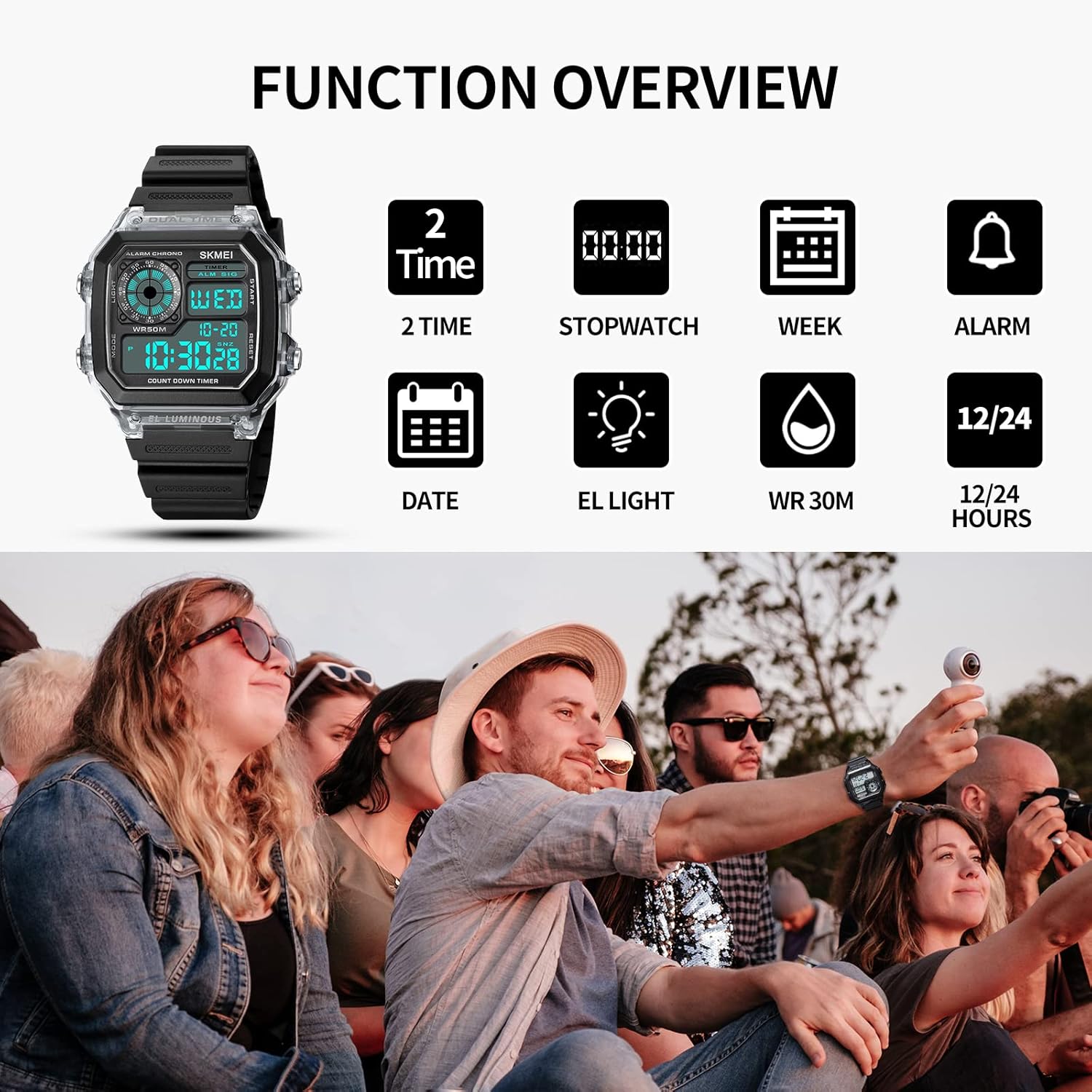
Figure 1.2: Overview of the watch's key functions, including dual time, stopwatch, week display, alarm, date, EL light, water resistance, and 12/24 hour format.
2. Setup
2.1 Button Identification
Familiarize yourself with the watch's buttons:
- LIGHT Button: Activates the EL backlight.
- MODE Button: Cycles through different modes (Time, Alarm, Chronograph, Countdown, Dual Time).
- START/STOP Button: Used to start/stop functions in Chronograph/Countdown modes, and to adjust settings.
- RESET Button: Used to reset values in Chronograph/Countdown modes, and to adjust settings.

Figure 2.1: Detailed diagram illustrating the location and function of each button on the watch.
2.2 Initial Time Setting
- From the normal time display mode, press the MODE button repeatedly until the seconds begin to flash. This indicates you are in time setting mode.
- Press the RESET button to cycle through the settings: Seconds → Hours → Minutes → Year → Month → Day.
- Use the START/STOP button to adjust the flashing value.
- Once all settings are correct, press the MODE button to exit the setting mode and return to the normal time display.
3. Operating Instructions
3.1 Mode Switching
Press the MODE button to cycle through the following modes:
- Time Display (with Date and Day of Week)
- Alarm Setting
- Chronograph (Stopwatch)
- Countdown Timer
- Dual Time
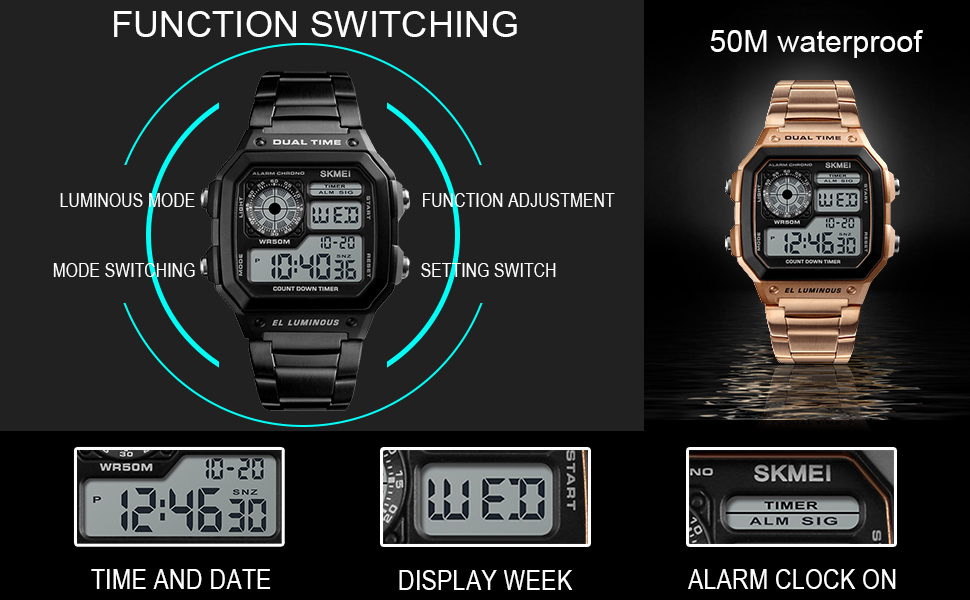
Figure 3.1: Illustration of function switching and the watch's 50M water resistance.
3.2 Alarm Setting
- From the normal time display, press MODE until the alarm time is displayed and the hour digits flash.
- Press RESET to switch between hour and minute settings.
- Use START/STOP to adjust the flashing value.
- Press MODE to confirm and exit.
- To turn the alarm ON/OFF, in alarm mode, press START/STOP to toggle the alarm symbol.
3.3 Chronograph (Stopwatch)
- Press MODE to enter Chronograph mode (display shows 00:00:00).
- Press START/STOP to start timing.
- Press START/STOP again to pause timing.
- Press RESET to reset the chronograph to zero.
- To resume timing after pausing, press START/STOP.
3.4 Countdown Timer
- Press MODE to enter Countdown mode.
- To set the countdown time, press and hold RESET until the hour digits flash.
- Press RESET to switch between hour, minute, and second settings.
- Use START/STOP to adjust the flashing value.
- Press MODE to confirm the countdown time.
- Press START/STOP to start the countdown.
- Press START/STOP again to pause/resume.
- When the countdown reaches zero, an alarm will sound. Press any button to stop the alarm.
3.5 EL Backlight
Press the LIGHT button to illuminate the display for a few seconds, allowing for clear viewing in low-light conditions.

Figure 3.2: Comparison of the watch display in normal mode versus with the EL backlight activated.
3.6 Water Resistance
This watch is water-resistant to 5ATM (50 meters / 164 feet). This means it is suitable for daily use, such as sweating, hand washing, and rain. It can withstand splashes or brief immersion in water. However, it is not suitable for sauna, bathing, or diving. Do not operate buttons underwater.
4. Maintenance
4.1 Cleaning
Wipe the watch regularly with a soft, dry cloth to remove dirt and moisture. For stubborn dirt, a slightly damp cloth can be used, followed by immediate drying.
4.2 Battery Replacement
The watch uses a standard watch battery. When the display becomes dim or functions become erratic, it may be time for a battery replacement. It is recommended to have the battery replaced by a qualified watch technician to ensure proper sealing and maintain water resistance.
4.3 Water Resistance Precautions
- Avoid exposing the watch to extreme temperature changes (e.g., hot shower followed by cold water).
- Do not press any buttons while the watch is submerged in water.
- Ensure the watch is completely dry before attempting any adjustments or opening the case.
Figure 4.1: Breakdown of watch materials, including the resin mirror, ABS case, stainless steel components, and luminous display.
5. Troubleshooting
| Problem | Possible Cause | Solution |
|---|---|---|
| Display is blank or dim. | Low battery. | Replace the battery. |
| Buttons are unresponsive. | Watch may be in a locked mode or internal issue. | Try pressing all buttons to see if it unlocks. If not, a soft reset (removing and reinserting battery) might be needed by a technician. |
| Water inside the watch. | Water resistance compromised (e.g., buttons pressed underwater, extreme temperature changes, seal damage). | Immediately take the watch to a professional for inspection and repair to prevent further damage. Do not attempt to dry it yourself. |
| Time is inaccurate. | Needs adjustment or low battery. | Re-adjust the time. If the problem persists, consider battery replacement. |
6. Specifications
- Model Number: SKMEI-1998
- Product Dimensions: 10.43 x 0.71 x 0.51 inches
- Item Weight: 3.84 ounces
- Case Material: ABS
- Band Material: PU (Polyurethane)
- Clasp Type: Buckle
- Water Resistance Depth: 50 Meters (5 ATM / 164 Feet)
- Movement: Japanese Quartz
- Battery: 1 Unknown battery (included)
- Features: Dual Time, Chronograph, Countdown, Alarm, EL Backlight, Week Display, 12/24 Hour Format
7. Warranty and Support
7.1 Return Policy
This product is typically eligible for a 30-day return policy, allowing for a refund or replacement if issues arise within this period. Please refer to your purchase platform's specific return guidelines for detailed information.
7.2 Protection Plans
Extended protection plans may be available for purchase, offering coverage beyond the standard return period. Options may include 2-Year or 3-Year protection plans, or comprehensive monthly plans. Check with your retailer for available protection plan details.
7.3 Manufacturer Support
For further assistance, technical support, or warranty claims, please contact SKMEI Official customer service. Refer to the contact information provided with your purchase or visit the official SKMEI website for support resources.