
1. Introduction
The SEQURE SI012 Soldering Iron is a portable and intelligent welding tool designed for various soldering projects. It features rapid heating, precise temperature control, and multiple power supply options, making it suitable for both beginners and experienced users in field repair, circuit board welding, appliance repair, and more.

The SEQURE SI012 Soldering Iron is versatile for both outdoor and indoor use, ideal for various electronic repairs.
2. Package Contents
Please verify that all items listed below are included in your package:
- SI012 Soldering Iron Controller
- T12-B2 Soldering Iron Tip
- TS-K Soldering Iron Tip
- 19V Power Adapter
- TX60 Power Cable
- Soldering Iron Holder
- Disassembly Tools
- Instruction Manual
- Storage Bag

The complete SEQURE SI012 Soldering Iron kit, ready for use.
3. Setup
Follow these steps to set up your SEQURE SI012 Soldering Iron:
3.1 Power Supply Options
The SI012 supports multiple power supply modes:
- 3S-6S Lipo Batteries: Connect a compatible 3S-6S Lipo battery using the TX60 power cable.
- 12-24V Power Adapter: Use the provided 19V adapter or any compatible 12-24V power adapter.
- PD Power 3.0: Connect via the Type-C interface to a PD 3.0 compatible power source.

Different power supply methods for flexible use.
3.2 Tip Assembly
The SI012 supports both T12 and TS soldering iron tips. Ensure correct assembly for optimal performance.
- T12 Tip: No additional fastener is required. Simply insert the T12 tip into the soldering iron.
- TS Tip: An additional fastener must be installed when using a TS tip to secure it properly.
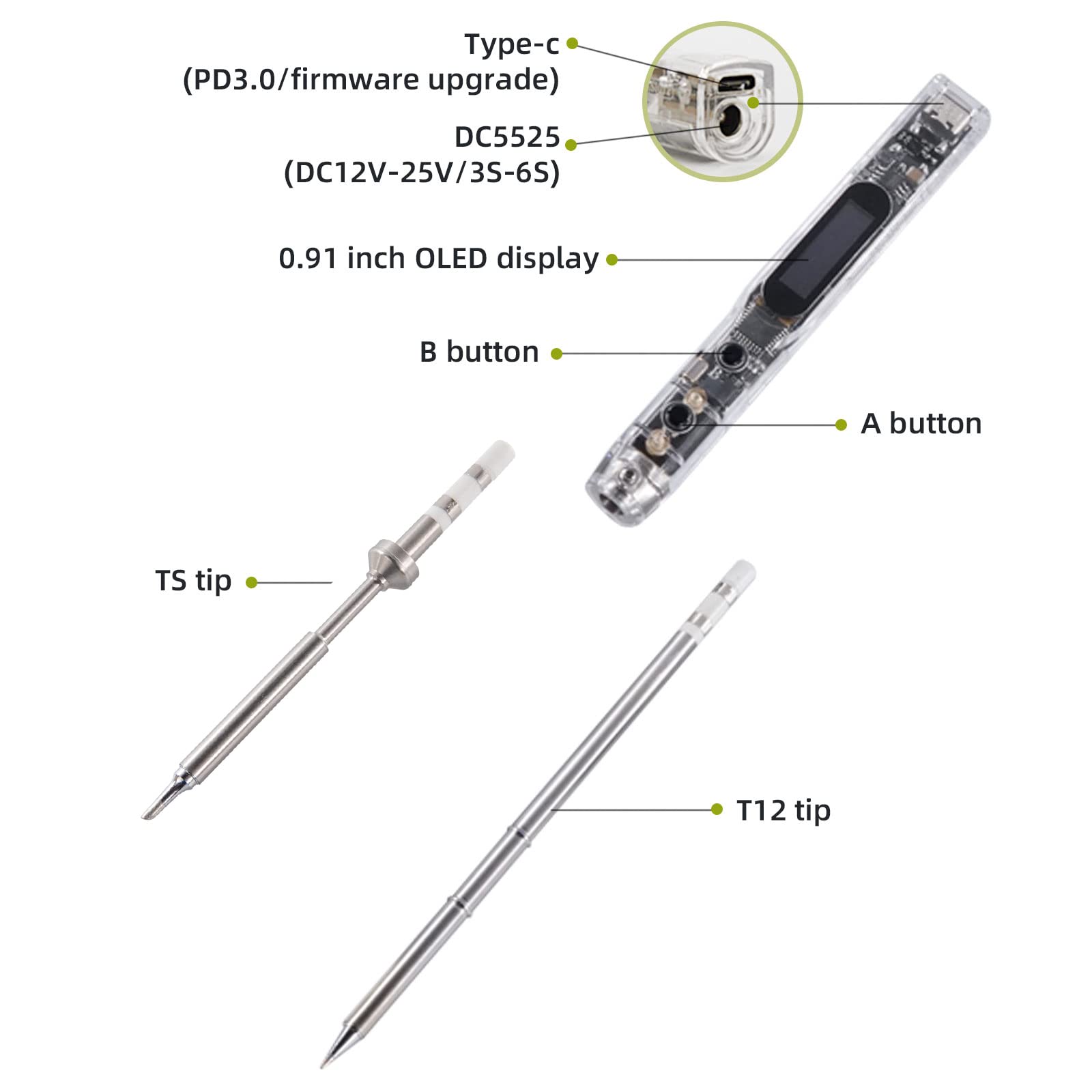
Key components and tip types of the SI012 soldering iron.
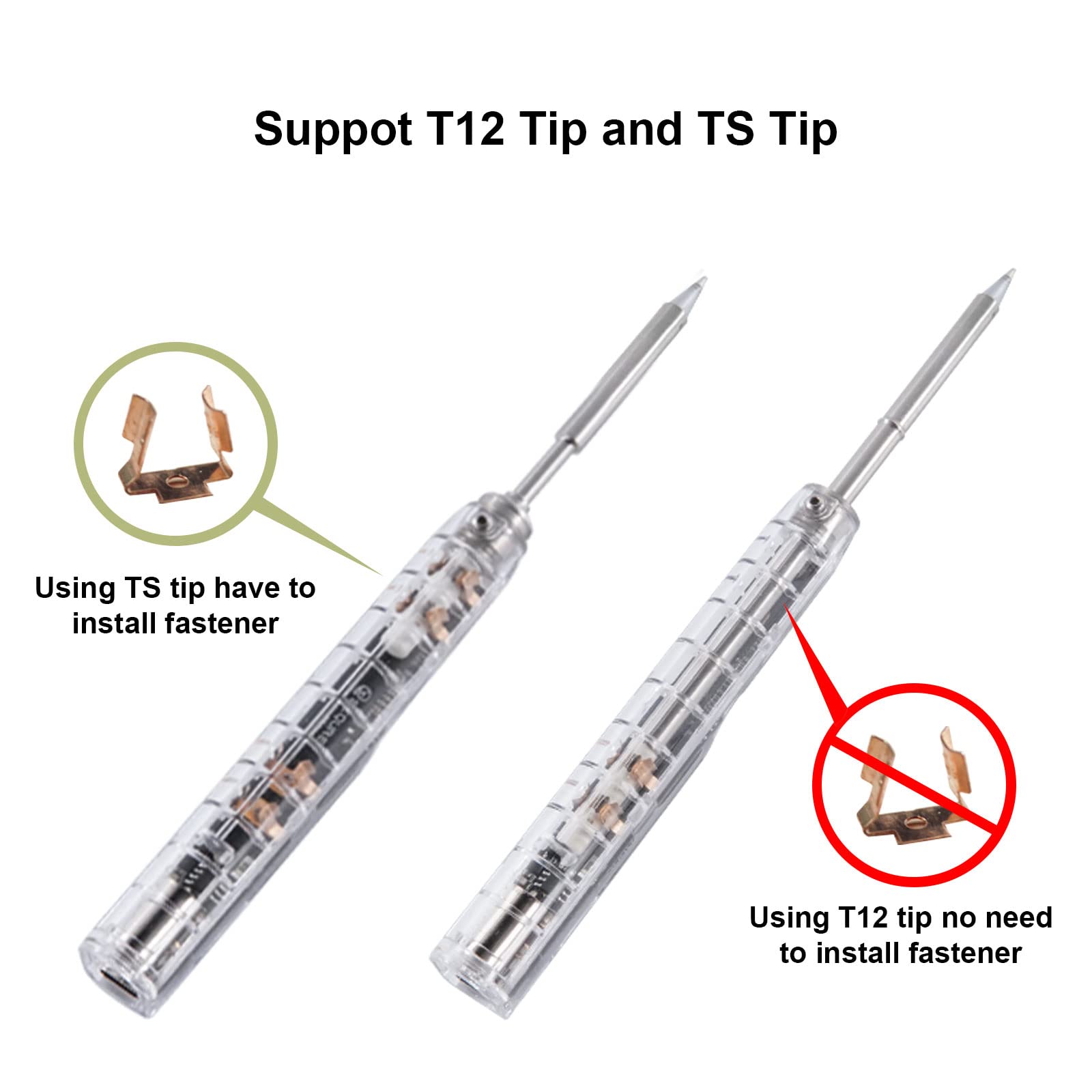
Instructions for installing T12 and TS soldering tips.
3.3 Initial Power On
Once powered, the OLED display will show the current temperature and voltage. The iron will begin heating to the set temperature.
Official product video demonstrating the setup and initial operation of the SEQURE SI012 Soldering Iron.
4. Operating Instructions
4.1 Fast Heating
The SI012 portable soldering iron reaches the melting point of 572°F (300°C) in just 8 seconds, eliminating long heating processes before use. You can set an auto-heating mode to save time.
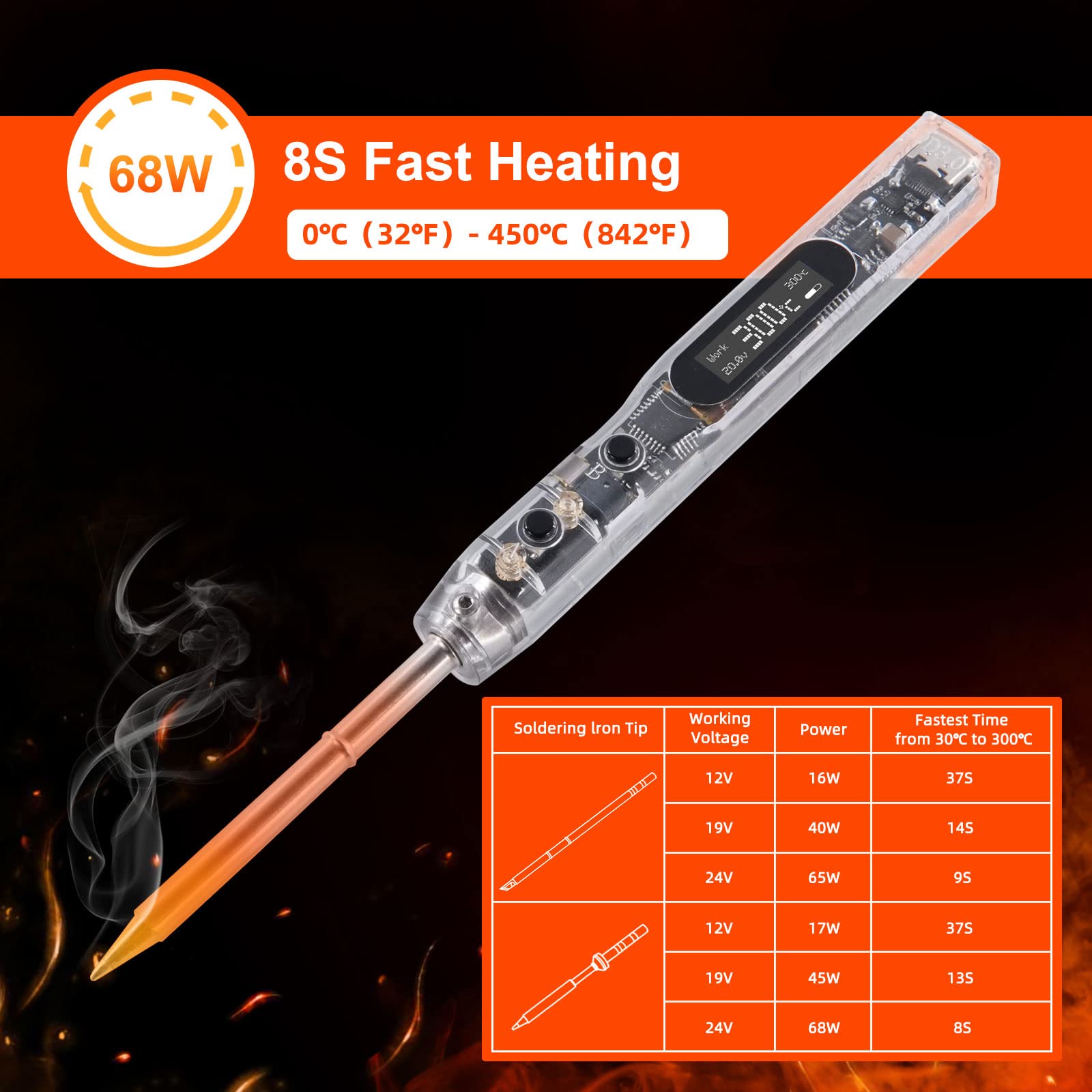
The SI012 heats up rapidly for efficient soldering.
4.2 Temperature Control
The intelligent temperature control range is 100°C-450°C / 212°F-842°F. Temperature stability is ±1% to provide constant temperature while soldering.

The soldering iron features automatic heating for convenience.
4.3 Operating Modes
This electric soldering iron has 3 modes: Work, Sleep, and Stop.
- Work Mode: Standard operating mode for soldering.
- Sleep Mode: After 3 minutes without any operation, the solder iron automatically enters sleep mode to reduce wear. It can be woken up by key operations or shaking.
- Stop Mode: If not woken up after 6 minutes in sleep mode, it will automatically stop to protect the soldering iron and prolong its lifespan.

Understanding the different operational modes of the soldering iron.
4.4 Function Parameter Adjustment
You can change various default parameter settings of this digital soldering iron according to your preference via the OLED display and control buttons.

The OLED display allows for easy adjustment of various settings.
4.5 Screen Orientation
The direction of the screen is adjustable to meet your habits, providing comfortable viewing whether you are left-handed or right-handed.

Adjust the screen orientation for comfortable use.
5. Key Features
The SEQURE SI012 Soldering Iron is equipped with several advanced features for enhanced performance and safety:
- Fast Heating: Reaches 572°F (300°C) in 8 seconds.
- 3 Operating Modes: Work, Sleep, and Stop modes for efficient power management and extended lifespan.
- Smart & Portable: Compact size (172mm long) and lightweight (33g) for easy portability and field repair. Firmware upgradeable via Type-C.
- Safe & User-friendly: Built-in buzzer for warnings (high/low voltage, high temperature, wrong soldering tips). Temperature stability of ±1%.
- Digital OLED Display: 0.91 inch HD display for clear information.
- Celsius & Fahrenheit Conversion: Easily switch between temperature units.
- Iron Wake-up Sensitivity: Adjustable sensitivity for waking the iron from sleep mode.
- Type C PD Power Charging: Supports modern power delivery standards.
- Tip Compatibility: Supports both T12 and TS tips.
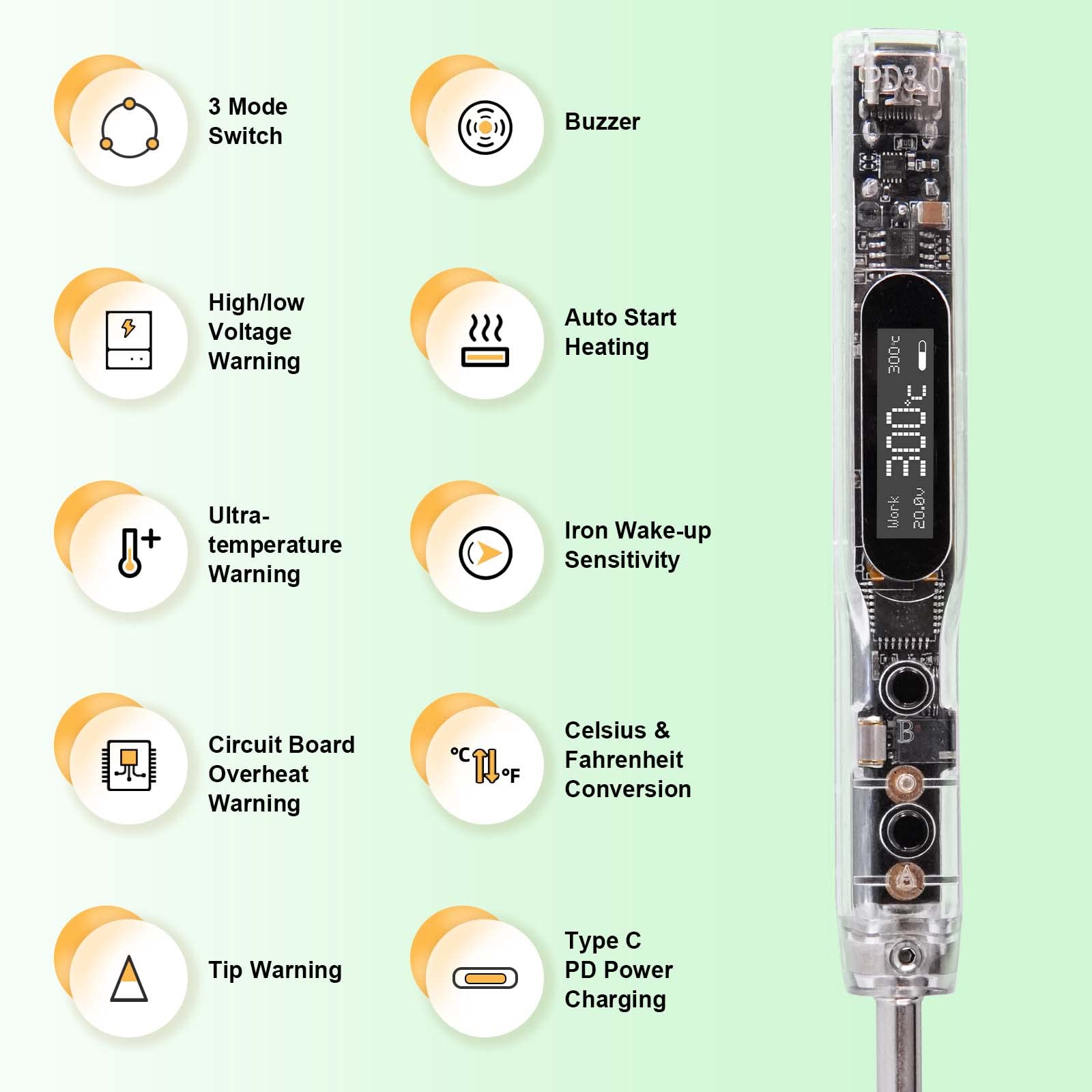
Overview of the intelligent features of the SI012.

The clear OLED display provides essential information.

The device supports firmware upgrades for continuous improvement.
5.1 Safety Warnings
The SI012 includes built-in warnings to ensure user safety and protect the device:
- High/Low Voltage Warning: Alerts when voltage is outside the safe operating range.
- Ultra-temperature Warning: Notifies if the iron reaches excessively high temperatures.
- Circuit Board Overheat Warning: Protects the internal circuitry from overheating.
- Wrong Soldering Tips Warning: Indicates if an incompatible or improperly installed tip is detected.

The soldering iron provides warnings for voltage issues.

High temperature alerts ensure safe operation.

The device warns against PCB overheating.
6. Maintenance
Proper maintenance ensures the longevity and optimal performance of your soldering iron:
- Clean the Soldering Tip: Regularly clean the tip with a damp sponge or brass wool to remove excess solder and oxidation. This helps maintain good heat transfer and extends tip life.
- Tin the Tip: After cleaning and before storing, apply a small amount of fresh solder to the tip. This 'tins' the tip, preventing oxidation and corrosion.
- Store Properly: When not in use, place the soldering iron in its holder. Store the entire kit in a dry, dust-free environment.
- Inspect Cables: Periodically check power cables for any signs of wear, cuts, or damage. Replace if necessary.
- Avoid Drops: Handle the soldering iron with care to prevent physical damage to the internal components and the OLED display.
7. Troubleshooting
If you encounter issues with your SEQURE SI012 Soldering Iron, refer to the following common problems and solutions:
- Iron Not Heating:
- Ensure the power supply is correctly connected and providing sufficient voltage (12-24V DC or PD 3.0).
- Check if the soldering tip is properly installed and making good contact.
- Verify the iron is not in 'Stop' mode. Press a button or shake to wake it up.
- Temperature Fluctuations:
- Ensure the tip is clean and tinned. Oxidation can affect temperature stability.
- Check the power supply for stable output.
- Error Messages on OLED:
- Refer to the specific error code displayed. Common errors relate to voltage (high/low), temperature (overheat), or tip issues. Address the underlying cause as indicated by the warning.
- Buttons Unresponsive:
- Ensure the device is powered on.
- Try disconnecting and reconnecting the power.
If the issue persists after attempting these troubleshooting steps, please contact customer support.
8. Specifications
| Attribute | Value |
|---|---|
| Brand | SEQURE |
| Model Number | SI012-T12 B2+TS BC2 |
| Wattage | 68 watts |
| Power Source | DC (12-24 Volts) |
| Upper Temperature Rating | 842 Degrees Fahrenheit (450°C) |
| Item Weight | 33 Grams (1.16 ounces) |
| Item Length | 6.77 Inches (172mm) |
| Handle Material | PC |
| Head Style | Soldering tips (T12, TS) |
| Burner Type | Ceramic |
| Special Feature | Portable |
| Specific Uses For Product | Outdoor & Indoor Use, Jewelry Soldering |
9. Warranty and Support
For warranty information or technical support, please refer to the contact details provided with your product packaging or visit the official SEQURE website. Keep your purchase receipt for warranty claims.

