
1. Introduction
The MLOVE BV800 is a versatile and portable Bluetooth speaker designed for a wide range of audio experiences. It features wireless connectivity, FM radio, and support for Micro SD cards and USB memory, making it an ideal companion for music on the go. This manual provides detailed instructions to help you set up, operate, and maintain your BV800 speaker.

Figure 1.1: MLOVE BV800 Bluetooth Speaker
This image shows the MLOVE BV800 Bluetooth Speaker from a front-side angle, highlighting its compact design, extendable antenna, digital display, control buttons, and integrated lanyard.
2. Safety Information
Please read and follow these safety guidelines to ensure safe operation and prolong the life of your speaker:
- Do not expose the speaker to extreme temperatures, direct sunlight, or high humidity.
- Avoid dropping or subjecting the speaker to strong impacts.
- Do not disassemble, repair, or modify the speaker yourself. Refer all servicing to qualified personnel.
- Keep the speaker away from water and liquids, despite its waterproof rating, to prevent damage to internal components.
- Use only the provided USB Type-C charging cable for charging.
- Dispose of the battery responsibly according to local regulations.
3. Package Contents
Verify that all items are present in the package:
- 1x MLOVE BV800 Bluetooth Speaker
- 1x USB Type-C Charging Cable/Data Cable
- 1x Lanyard
- 1x Instruction Manual (this document)
4. Product Features and Components
Key Features
- Wireless Connectivity: Easy connection with electronic devices wirelessly, offering a working range of 8-10 meters (30 feet).
- Super Portable Design: Mini size (120x78x35.7mm, 195g) for convenience, easily slips into a bag or pocket, includes a lanyard.
- Hands-Free Calling: Built-in microphone allows for easy call management.
- Multi-functional Playback: Features FM radio, speakerphone function, and supports Micro SD card & USB memory playback.
- Long Battery Life: Built-in 1800 mAh rechargeable lithium polymer battery provides up to 12 hours of playback at 50% volume.
- High-Quality Audio: Equipped with a 40mm full-range loudspeaker and large runway-type low-frequency amplifiers, powered by a Class D amplifier with 8W output.
Internal Components and Audio Technology
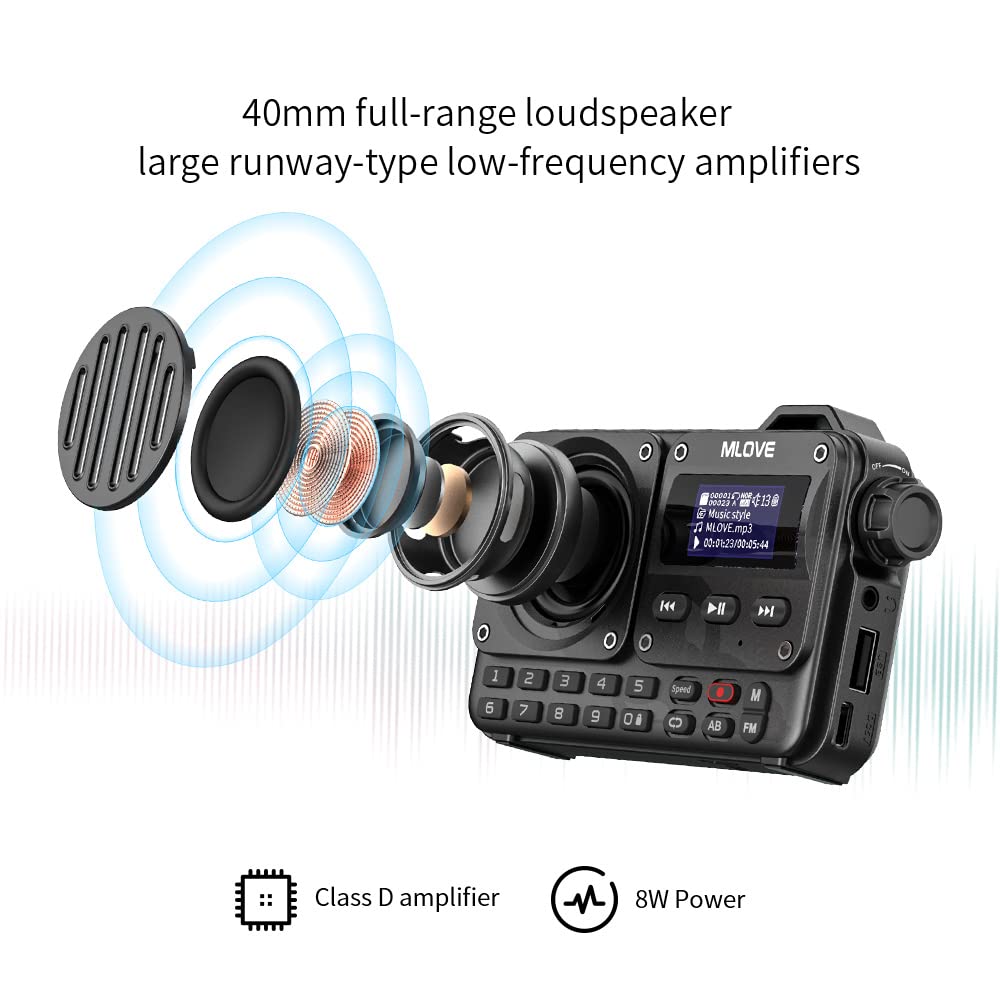
Figure 4.1: Internal Audio Components
This diagram illustrates the internal 40mm full-range loudspeaker and low-frequency amplifiers, highlighting the Class D amplifier and 8W power output for enhanced sound quality.
Connectivity Options

Figure 4.2: Available Connectivity Modes
This image displays the various connectivity options supported by the BV800 speaker, including Bluetooth 5.0, FM Radio, USB Flash Drive, Micro SD Card, and USB Sound Card functionality.
Digital Keypad and Display

Figure 4.3: Digital Keypad and HD LED Screen
This image highlights the speaker's digital keypad for direct input and its clear HD LED screen display, providing essential information during operation.
5. Setup
5.1 Charging the Speaker
Before first use, fully charge the speaker. Connect the provided USB Type-C cable to the speaker's charging port and the other end to a USB power adapter (not included) or a computer's USB port. The charging time is approximately 3 hours for a full charge.
5.2 Initial Power On
Press and hold the Power button (usually marked with a power symbol) for a few seconds until the display lights up and you hear an audible prompt, indicating the speaker is powered on.
6. Operating Instructions
6.1 Bluetooth Pairing
- Ensure the speaker is powered on and in Bluetooth mode. If not, press the 'M' (Mode) button to switch to Bluetooth mode. The display will show a Bluetooth icon, and the speaker will enter pairing mode.
- On your mobile device, enable Bluetooth and search for available devices.
- Select "MLOVE BV800" from the list of found devices.
- Once paired, the speaker will confirm with an audible prompt, and the Bluetooth icon on the display will become solid.
6.2 FM Radio Operation

Figure 6.1: FM Radio Functionality
This image illustrates the FM radio capabilities of the BV800, showing the speaker on a shelf with visual cues for automatic and semi-automatic station search, and various FM frequencies.
- Press the 'M' (Mode) button to switch to FM Radio mode. The display will show the FM frequency.
- Extend the antenna for better reception.
- Automatic Station Search: Press and hold the Play/Pause button (▶▶) to initiate an automatic scan for available FM stations. The speaker will save all found stations.
- Manual Tuning: Use the Previous (◀◀) and Next (▶▶) buttons to manually tune to specific frequencies or navigate through saved stations.
6.3 Micro SD Card and USB Playback
- Insert a Micro SD card or USB memory stick (with supported audio files) into the respective slot on the speaker.
- The speaker will automatically switch to the corresponding playback mode (SD or USB) and begin playing audio files. If it doesn't, press the 'M' (Mode) button to cycle through modes until you reach the correct one.
- Use the Play/Pause, Previous, and Next buttons to control playback.
6.4 Hands-Free Calling

Figure 6.2: Hands-Free Calling Feature
This image demonstrates the hands-free calling capability of the BV800 speaker, showing a person using the speaker for a two-way conversation with 360-degree sound pickup and clear audio.
When connected via Bluetooth to your smartphone:
- Answer Call: Press the Play/Pause button once to answer an incoming call.
- End Call: Press the Play/Pause button once during a call to end it.
- Reject Call: Press and hold the Play/Pause button to reject an incoming call.
- Redial Last Number: Double-press the Play/Pause button to redial the last dialed number.
6.5 Using the Digital Keypad
The digital keypad (0-9) on the front of the speaker can be used for direct input, particularly useful in FM radio mode for direct frequency input or in music playback modes for track selection (if supported by the file system).
6.6 Earphone Playback

Figure 6.3: Earphone Playback
This image shows a woman enjoying music through headphones connected to the MLOVE BV800 speaker, demonstrating its support for any 3.5mm earphone for private listening.
The BV800 supports any standard 3.5mm earphone. Simply plug your earphones into the designated earphone jack on the speaker to enjoy private listening.
7. Maintenance and Care
- Cleaning: Use a soft, dry cloth to clean the speaker's surface. Do not use abrasive cleaners, alcohol, or chemical solvents.
- Storage: When not in use for extended periods, store the speaker in a cool, dry place away from direct sunlight.
- Battery Care: To preserve battery life, charge the speaker at least once every three months if not used regularly.
8. Troubleshooting
If you encounter issues with your MLOVE BV800 speaker, refer to the following table for common problems and solutions:
| Problem | Possible Cause | Solution |
|---|---|---|
| Speaker does not power on | Low battery; Power button not pressed correctly | Charge the speaker fully; Press and hold the Power button for a few seconds. |
| Cannot pair via Bluetooth | Speaker not in pairing mode; Device Bluetooth off; Too far from speaker | Ensure speaker is in Bluetooth pairing mode; Enable Bluetooth on your device; Move device closer to speaker (within 10m). |
| No sound from speaker | Volume too low; Incorrect mode selected; Audio source issue | Increase speaker volume; Press 'M' button to select correct mode; Check audio source (e.g., phone volume, media player). |
| FM radio reception is poor | Antenna not extended; Weak signal area | Fully extend the antenna; Try moving to a location with better signal. |
| Micro SD/USB not playing | Unsupported file format; Card/USB not inserted correctly; Corrupted files | Ensure audio files are in supported format; Reinsert card/USB; Try different card/USB. |
9. Technical Specifications
| Feature | Specification |
|---|---|
| Model Name | BV800 |
| Material | Plastic |
| Colour | Black |
| Speaker Type | Tweeter (Full-range loudspeaker) |
| Speaker Maximum Output Power | 8 Watts |
| Wireless Communication Technology | Bluetooth |
| Connectivity Technology | Bluetooth |
| Maximum Wireless Range | 30 Feet (approx. 8-10 meters) |
| Power Source | Battery Powered (1 Lithium Ion battery included) |
| Battery Capacity | 1800 mAh (rechargeable lithium polymer) |
| Charging Time | Approx. 3 hours |
| Playtime | Up to 12 hours (at 50% volume) |
| Product Dimensions | 7.8D x 12W x 3.6H Centimeters |
| Item Weight | 300 g |
| Is Waterproof | TRUE |
| Control Method | App (implied, but primary control is physical buttons) |
| Mounting Type | Tabletop Mount |
10. Warranty Information
The MLOVE BV800 Bluetooth Speaker comes with a Limited Warranty. Please refer to the warranty card included in your package for specific terms, conditions, and duration of the warranty. Keep your purchase receipt as proof of purchase for any warranty claims.


