
1. Product Overview
The Takki S892 Portable Power Station is a compact and efficient solar generator designed to provide reliable power for a wide range of electronic devices. With its robust 148Wh (equivalent to 40,000mAh/3.7V) lithium-ion battery, it serves as an ideal power backup for outdoor adventures, home emergencies, and mobile work setups. Its multiple output options ensure compatibility with various devices, from smartphones and laptops to small appliances.

The Takki S892 portable power station, shown alongside its detachable LED light panel, features a compact design with a red and black casing and a sturdy handle.
Key Features:
- High Capacity: 148Wh (40,000mAh/3.7V) rechargeable battery pack.
- Multiple Outputs: 2x 200W (Peak 300W) AC outlets, 1x PD 30W USB-C port, 1x 18W USB-C port, 2x USB ports (18W QC3.0), and 1x 12V DC outlet.
- Integrated LED Light: Features 4 brightness levels and an SOS mode for emergencies.
- Portable Design: Solid handle for easy carrying, weighing approximately 1.58 kg.
- Safety Features: Built-in battery management system and cooling fans to prevent damage and extend lifespan.
2. Package Contents
Please verify that all items are present in the package:
- 1 x Takki 148Wh Portable Power Station
- 1 x Power Adapter (for AC charging)
- 1 x Car Charger
- 1 x Cigarette Lighter Adapter
- 1 x User Manual
3. Setup and Charging
Before first use, it is recommended to fully charge the power station.
Charging Methods:
- AC Wall Outlet Charging: Connect the included power adapter to the 'INPUT' port on the power station and plug the adapter into a standard wall outlet. A full charge typically takes approximately 4.5 hours.
- Car Charger Charging: Use the included car charger to connect the power station to your vehicle's 12V cigarette lighter socket. This method can charge the unit up to 80% in about 4-5 hours.
- Solar Panel Charging (Solar Panel Not Included): The power station supports 12-23 volt solar panels. Connect a compatible solar panel to the 'INPUT' port. Charging time will vary depending on solar intensity and panel wattage. This method can charge the unit up to 80% in about 4-5 hours under optimal sunlight conditions.

This image illustrates the three convenient ways to recharge the Takki S892 portable power station: via a standard AC wall outlet, a solar panel, and a car charger, offering flexible charging options.
4. Operation Guide
Powering Your Devices:
The Takki S892 offers various output ports to power different types of devices:
- AC Outlets (110V, 200W Max, 300W Peak): Press the AC power button to activate the AC outlets. These are suitable for small household appliances, laptops, and other devices requiring up to 200W of continuous power.
- USB Ports (PD 30W USB-C, 18W USB-C, 2x 18W QC3.0 USB-A): Simply plug your USB charging cables into the respective ports. These ports are ideal for fast charging smartphones, tablets, cameras, and other USB-powered devices.
- DC Outlet (12V, 150W Max): Press the DC power button to activate the DC outlet. This port is compatible with 12V devices such as mini car refrigerators, car vacuum cleaners, and dash cams.

A detailed graphic highlighting the various output ports of the Takki S892 portable power station, including DC output, USB-A, USB-C, and AC outlets.
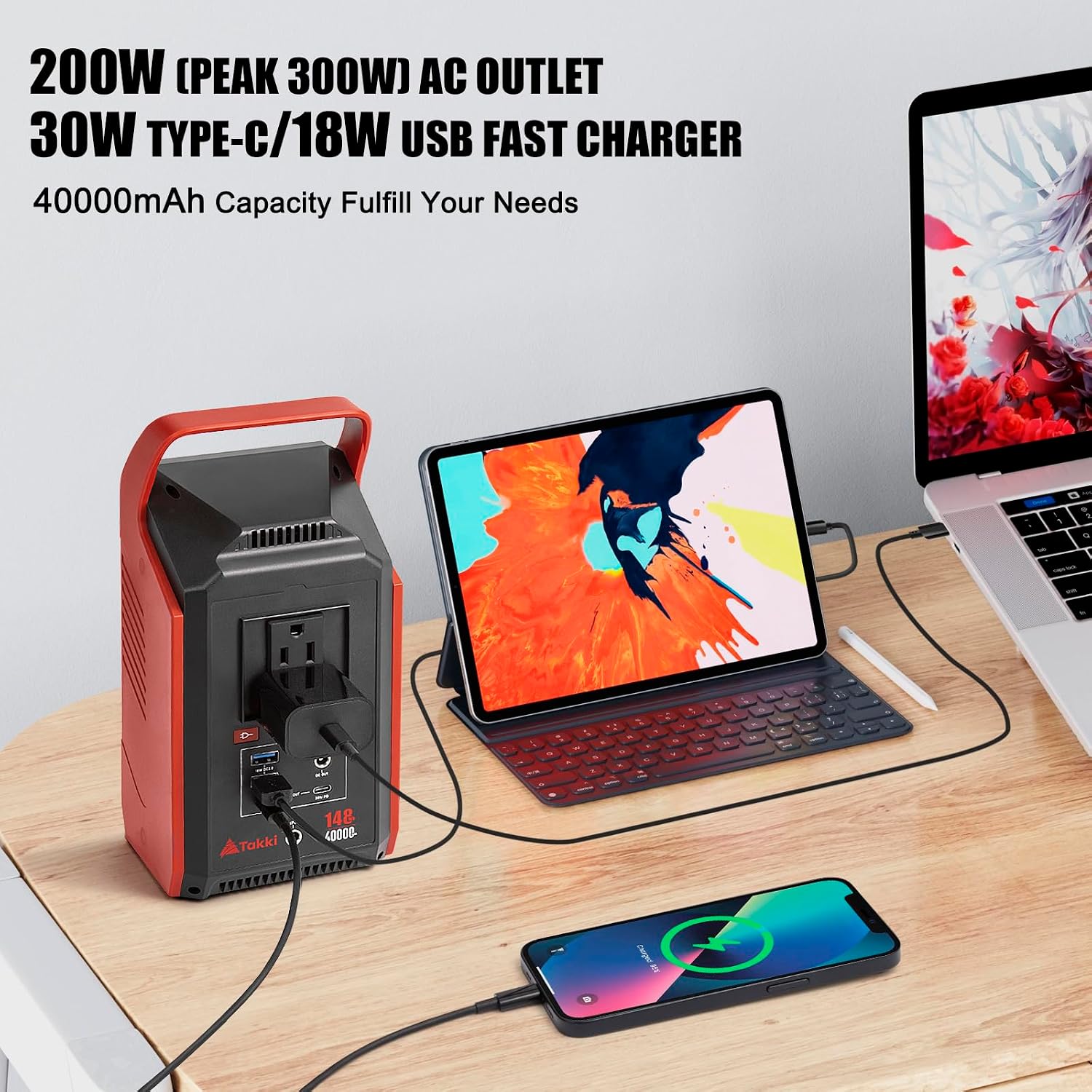
This image demonstrates the Takki S892 portable power station in use, simultaneously charging a laptop, a tablet, and a smartphone, highlighting its multi-device charging capability.
LED Light Function:
The integrated LED light board provides illumination for various situations:
- Press the LED flashlight button once to turn on the light at its lowest brightness setting.
- Subsequent presses will cycle through 4 different brightness levels.
- Press and hold the button to activate the SOS mode, which flashes a distress signal.

The powerful LED light feature of the Takki S892 portable power station is shown illuminating a dark campsite, providing ample light for outdoor activities and emergency situations.
5. Maintenance
Proper maintenance ensures the longevity and optimal performance of your Takki Portable Power Station.
- Cleaning: Use a soft, dry cloth to wipe the exterior of the power station. Do not use abrasive cleaners or solvents. Ensure all ports are free of dust and debris.
- Storage: When not in use for extended periods, store the power station in a cool, dry place away from direct sunlight and extreme temperatures. It is recommended to charge the unit to 50-80% every 3-6 months to maintain battery health.
- Battery Care: Avoid fully discharging the battery frequently. For best battery lifespan, try to keep the charge level between 20% and 80% during regular use.
- Ventilation: Ensure the cooling fans are not obstructed during operation to allow for proper heat dissipation.
6. Troubleshooting
If you encounter issues with your Takki Portable Power Station, refer to the following common problems and solutions:
- Power Station Not Charging:
- Ensure the power adapter/car charger/solar panel is properly connected to the 'INPUT' port.
- Verify the power source (wall outlet, car socket, solar panel) is functional.
- Check if the charging indicator lights are active.
- Devices Not Charging from Output Ports:
- Ensure the specific output (AC, USB, DC) is activated by pressing its respective power button.
- Verify that the device you are trying to charge is within the power station's output limits (e.g., AC devices must be under 200W).
- Check the charging cable for damage and ensure it is securely connected.
- If using AC, some high-power devices (150W-200W) may have limited usage duration (approx. 30 minutes).
- Solar Charging is Slow or Ineffective:
- Ensure the solar panel is placed in direct sunlight without any obstructions.
- Adjust the angle of the solar panel to maximize sun exposure.
- Solar charging efficiency can be affected by weather conditions, cloud cover, and time of day.
- Confirm the solar panel's voltage output is within the 12-23V range supported by the power station.
- LED Light Not Functioning:
- Ensure the power station has sufficient charge.
- Press the LED flashlight button firmly to cycle through modes.
- Overload Protection Activated:
- If the power station shuts down, it may be due to an overload. Disconnect the device, wait a few minutes, and then restart the power station.
- Ensure the total wattage of connected devices does not exceed 200W (continuous) or 300W (peak).
If the issue persists after attempting these troubleshooting steps, please contact customer support.
7. Technical Specifications

A detailed view of the Takki S892 portable power station with its dimensions clearly marked.
| Specification | Value |
|---|---|
| Model Number | S892 |
| Battery Capacity | 148Wh (40,000mAh/3.7V) |
| AC Output | 110V, 200W (Peak 300W) |
| USB-C Output (PD) | 30W |
| USB-C Output | 18W |
| USB-A Output | 2x 18W QC3.0 |
| DC Output | 12V, 150W Max |
| Input Voltage (Solar) | 12-23 Volts |
| Dimensions | 28 x 22.8 x 13.7 cm (11.02 x 8.98 x 5.39 inches) |
| Item Weight | 1.58 kg (3.48 lbs) |
| Battery Type | Lithium Ion |
| Material | ABS |
| Color | Black |
8. Warranty and Support
Warranty Information:
The Takki Portable Power Station (Model S892) comes with a 12-month manufacturer's warranty from the date of purchase. This warranty covers defects in materials and workmanship under normal use. It does not cover damage caused by misuse, accidents, unauthorized modifications, or natural disasters.
Customer Support:
For technical assistance, warranty claims, or any questions regarding your Takki Portable Power Station, please visit the official Takki Store on Amazon or contact their customer service directly. You can find more information and contact details at the Takki Brand Store.