
Introduction
This manual provides comprehensive instructions for the Flashpoint R2 XPro II 2.4GHz TTL Wireless Flash Trigger, designed specifically for Nikon cameras. This device serves as a command center for the Flashpoint R2 wireless flash system, offering precise control over compatible flash units. It is an advanced version of the acclaimed FP R2 Pro, enhancing your photographic workflow with expanded capabilities and intuitive operation.
Please read this manual thoroughly before using the product to ensure proper operation and to maximize its potential.
Setup
1. Powering On and Battery Installation
The Flashpoint R2 XPro II is powered by two AA batteries. Locate the battery compartment on the device, insert the batteries according to the polarity indicators, and close the compartment. To power on the device, slide the ON/OFF switch located on the side of the unit to the 'ON' position.

Image: The Flashpoint R2 XPro II Wireless Flash Trigger, showcasing its display and control buttons. This image provides a general overview of the device's physical appearance.
2. Mounting to Camera
Slide the trigger onto your Nikon camera's hot shoe. Ensure it is fully seated and then rotate the locking ring or lever to secure the trigger firmly in place. This ensures a stable connection for reliable communication between the camera and the trigger.
3. Initial Settings
Upon first power-on, the device will display the main control interface. You may need to set the channel (CH) and group (GR) to match your Flashpoint R2 compatible flash units. Use the navigation dial and 'SET' button to adjust these parameters. The device supports 32 channels to prevent interference.

Image: A direct front view of the Flashpoint R2 XPro II's display, showing channel (CH21) and group settings (A, B, C, D, E) with their respective power levels and modes (Manual, TTL).
Operating Instructions
Understanding the Display and Controls
The R2 XPro II features a large, clear display and intuitive controls. The left side of the display panel has dedicated Group buttons for quick access to individual flash groups (A, B, C, D, E). The navigation dial and 'SET' button are used for adjusting values and confirming selections. 'MODE LOCK' and 'MENU' buttons provide access to additional functions and settings.
Flash Modes: TTL, Manual, and Multi
- TTL (Through-The-Lens): This mode automatically adjusts flash output for correct exposure. The R2 XPro II supports TTL functionality for Nikon cameras, simplifying exposure settings.
- Manual (M): Allows precise manual control over flash power output. You can adjust power in fine increments.
- Multi (Stroboscopic): Fires a series of rapid flashes to capture multiple movements in a single exposure.

Image: A hand holding the Flashpoint R2 XPro II, illustrating its compact size. Text overlays emphasize its High-Speed Sync (HSS) capability up to 1/8000s and TTL Auto Flash functionality.
TCM (TTL Convert Manual) Function
The TCM function allows you to convert a TTL exposure value directly into a manual power setting. This is useful for maintaining consistent exposure values for repeat shots, providing the convenience of TTL with the precision of manual control. You can effortlessly switch between Manual and TTL modes.
High-Speed Sync (HSS)
The R2 XPro II supports High-Speed Sync (HSS) up to 1/8000s. This feature allows you to use flash at shutter speeds faster than your camera's native sync speed, enabling wider apertures in bright conditions or freezing fast motion effectively.
Wireless Control and Range
The trigger operates on a robust 2.4 GHz radio frequency, providing a reliable transmission range of 300-400 feet (approximately 90-120 meters). This extended range offers flexibility in positioning your off-camera flashes. The 32 available channels help prevent interference from other wireless devices.
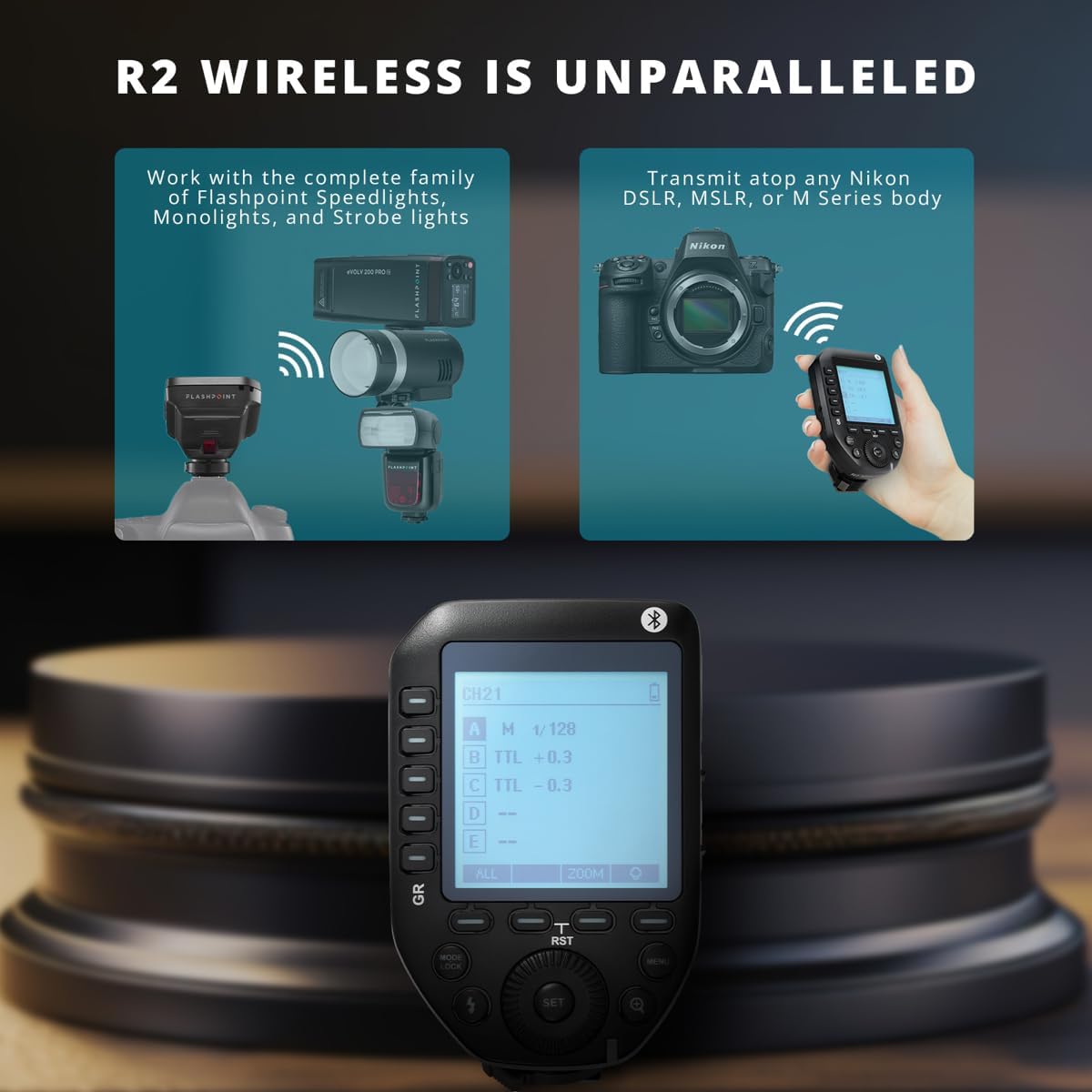
Image: A visual representation of the Flashpoint R2 wireless system in action. It shows the R2 XPro II controlling various Flashpoint speedlights, monolights, and strobe lights, while also transmitting signals to a Nikon DSLR, Mirrorless, or M Series camera body.
Bluetooth Connectivity and Smartphone App
Built-in Bluetooth connectivity allows you to link the R2 XPro II to the Flashpoint Smartphone APP (available for Apple and Android devices). This enables remote operation and control of flash functions from your mobile device, extending your control range up to 328 feet (100 meters).
Maintenance
Cleaning
To clean the trigger, use a soft, dry cloth. For stubborn dirt, a slightly damp cloth can be used, but ensure no moisture enters the device. Avoid using strong detergents or solvents, as these can damage the finish or internal components.
Battery Care
When the trigger is not in use for an extended period, remove the AA batteries to prevent leakage, which can damage the battery contacts and internal circuitry.
Storage
Store the device in a cool, dry place, away from direct sunlight and extreme temperatures. Protect it from dust and moisture.
Troubleshooting
Flash Not Firing
- Check Batteries: Ensure the batteries in both the trigger and the flash unit are correctly installed and have sufficient charge.
- Channel and Group Mismatch: Verify that the trigger and the flash unit are set to the same channel and group.
- Hot Shoe Connection: Ensure the trigger is securely mounted on the camera's hot shoe.
- Distance/Obstacles: Confirm the flash unit is within the operational range and there are no significant obstructions blocking the signal.
Inconsistent Exposure
- TTL Mode Issues: If using TTL, ensure your camera's exposure settings are appropriate for the scene.
- Manual Power Settings: In Manual mode, double-check the power output settings for each group.
- Ambient Light: Consider the influence of ambient light on your exposure.
Bluetooth Connection Issues
- App Compatibility: Ensure you are using the official Flashpoint Smartphone APP and that it is updated to the latest version.
- Device Bluetooth: Verify Bluetooth is enabled on both the trigger and your mobile device.
- Range: Ensure your mobile device is within the Bluetooth operational range (up to 328 feet / 100 meters).
Specifications
| Feature | Detail |
|---|---|
| Product Dimensions | 5.25 x 4 x 3 inches |
| Item Weight | 6.4 ounces |
| Model Number | R2 XPro II |
| Manufacturer | Flashpoint |
| Wireless Frequency | 2.4 GHz |
| Channels | 32 |
| Transmission Range | 300-400 feet (approx. 90-120 meters) |
| Power Supply | 2x AA batteries |
| High-Speed Sync (HSS) | Up to 1/8000s |
| Flash Exposure Compensation | Yes, +/-3 stops in 1/3 EV increments |
| TCM Function | Yes (TTL to Manual conversion) |
| Bluetooth Connectivity | Yes, for Smartphone APP control |

Image: A detailed table outlining the special features of the Flashpoint R2 XPro II, including HSS, flash exposure compensation, focus assist, modeling lamp control, and transmission range.
Warranty and Support
For warranty information and technical support, please contact Flashpoint directly. Details regarding product registration and service can typically be found on the manufacturer's official website or through your point of purchase.
You can visit the official Flashpoint store for more information and support: Flashpoint Store on Amazon.


