
Eques EQ-A30S
Contents
Eques EQ-A30S Veiu Mini 3S Digital Door Viewer User Manual
Model: EQ-A30S
1. Introduction
The Eques VEIU Mini 3S is an advanced digital door viewer designed to enhance your home security and convenience. It replaces traditional peepholes with a modern system featuring a high-resolution camera, an indoor display, and smartphone connectivity. This manual provides comprehensive instructions for the installation, operation, and maintenance of your VEIU Mini 3S.

Figure 1: The Eques VEIU Mini 3S Digital Door Viewer, showcasing both the indoor display unit and the sleek outdoor camera module. The display unit is shown active, presenting a clear view of a family, indicating its primary function as a visual interface for visitors at your door.
2. Key Features
- 120° Wide-Angle Lens: Provides a broad view of your porch, ensuring comprehensive coverage.
- High-Resolution Capture: Records clear images and videos to capture every moment.
- Long Battery Life: Built-in lithium battery offers approximately 3 months of standby time.
- Smartphone Connectivity: Receive video calls and alerts on your smartphone via the free Eques app (Android/iOS).
- Motion Detection: Automatically detects movement, can be set to take snapshots, send notifications, or record videos.
- Infrared Night Vision (850nm): Ensures clear visibility in low-light conditions and at night.
- Two-Way Audio: Communicate directly with visitors at your door through the app.
- Local Storage: Supports MicroSD card up to 32GB (not included) for storing recordings.
- Anti-Peeping Design: Prevents outsiders from seeing into your home through the viewer.
- User-Friendly Display: LCD display at home is easy to set up and use, suitable for children and seniors.
3. Package Contents
Please verify that all items are present in your package:
- 1 x Eques VEIU Mini 3S Digital Door Viewer (Indoor Display Unit)
- 1 x Optical PIR 1.3 Megapixel Camera (Outdoor Unit)
- 1 x Screw Set (6 pieces)
- 1 x USB Cable
- 1 x Bracket
- 1 x User Manual (this document)
4. Setup and Installation
The Eques VEIU Mini 3S is designed for easy installation. Follow these steps carefully:
4.1 Compatibility Check
- Door Hole Diameter: Compatible with door holes from 14mm to 50mm (0.6 - 2.2 inches).
- Door Thickness: Compatible with door thickness from 35mm to 110mm (1.4 - 4.3 inches).
4.2 Installation Steps
- Remove Old Door Viewer: Carefully remove your existing traditional door peephole.
- Insert Outdoor Unit: Insert the optical PIR 1.3 megapixel camera (outdoor unit) through the door hole from the outside. Ensure the unit is flush with the door surface.
- Attach Bracket: From the inside of the door, attach the mounting bracket to the outdoor unit's cable, securing it with the provided screws.
- Connect Indoor Display: Connect the cable from the outdoor unit to the corresponding port on the back of the indoor display unit.
- Mount Indoor Display: Securely attach the indoor display unit to the mounting bracket.
- Power On: Ensure the built-in lithium battery is charged. If not, connect the USB cable to charge the device.

Figure 2: The Eques VEIU Mini 3S indoor display unit. This image highlights the sleek design of the monitor that is mounted on the inside of your door, providing a clear view of who is outside.
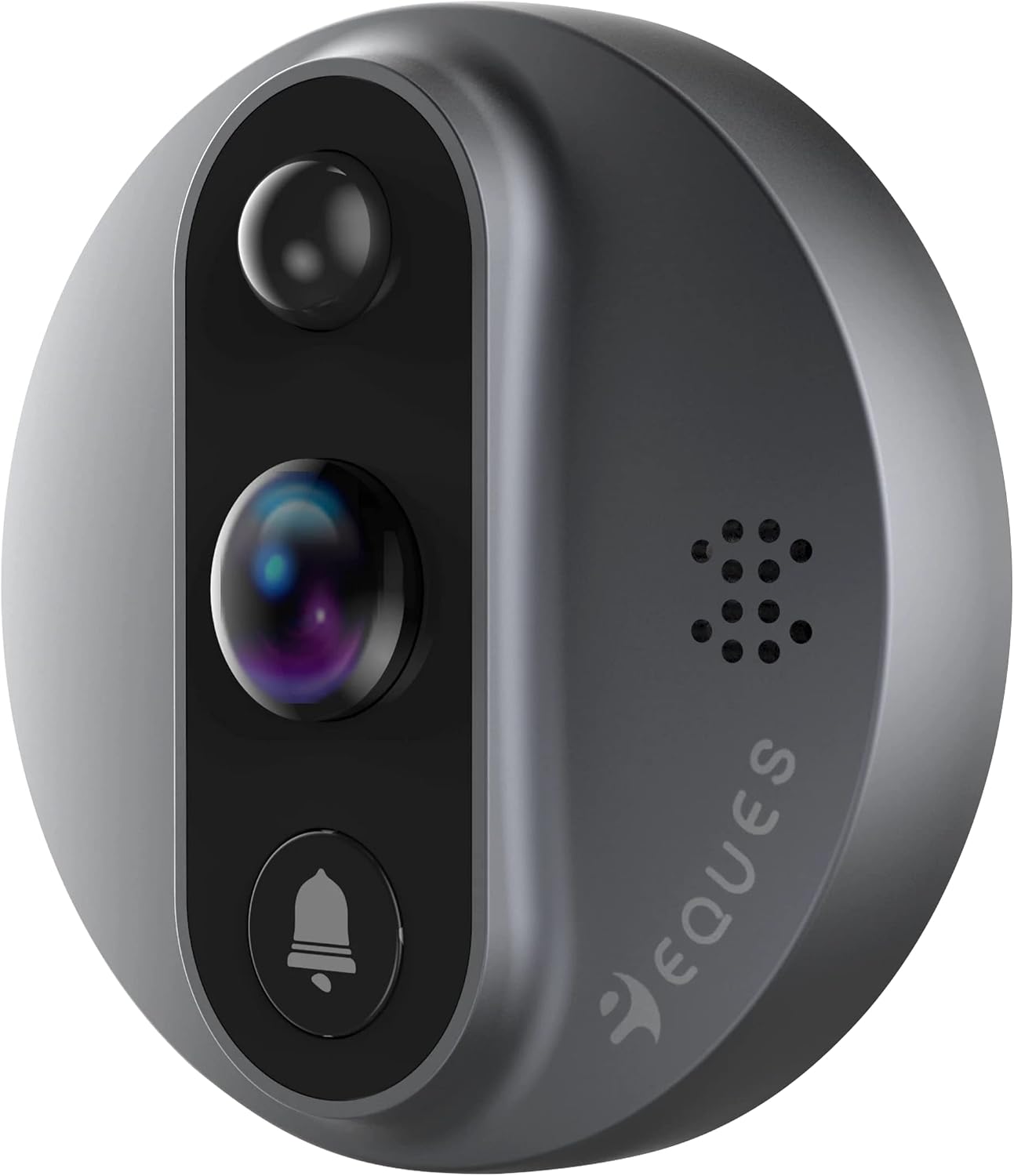
Figure 3: The Eques VEIU Mini 3S outdoor camera unit. This image shows the compact and robust design of the camera that replaces your traditional peephole, featuring the lens, PIR sensor, and doorbell button.
4.3 App Download and Setup
To unlock the full potential of your VEIU Mini 3S, download the free Eques app:
- Search for "Eques" in the Apple App Store (for iOS devices) or Google Play Store (for Android devices).
- Download and install the app.
- Follow the in-app instructions to register an account and pair your VEIU Mini 3S device with your smartphone via your home Wi-Fi connection.
5. Operating Instructions
5.1 Basic Operation (Indoor Display)
The indoor LCD display provides immediate access to the camera feed:
- When someone presses the doorbell button on the outdoor unit, the indoor display will activate, showing the visitor.
- You can also manually activate the display by pressing the button on the indoor unit to view outside.
- The display is designed to be user-friendly for all ages, including children and seniors.
5.2 Smartphone App Functions
The Eques app extends the functionality of your VEIU Mini 3S to your smartphone, allowing remote monitoring and interaction:
- Video Calls: Receive video calls on your smartphone when someone rings the doorbell, even when you are away from home.
- Two-Way Audio: Talk directly to visitors through your smartphone, providing a convenient way to communicate.
- Motion Detection Alerts: Configure motion detection settings to receive instant notifications on your phone when movement is detected at your door. You can set it to take snapshots or start video recordings.
- Live View: Access a live feed from your door viewer anytime, anywhere, using your internet connection.
- Recording and Playback: View and save snapshots or video clips directly from the app. These can be stored on the MicroSD card (if installed) or in the free cloud storage.
- Night Vision: The app will display the clear infrared night vision feed when lighting conditions are low.
Ensure your VEIU Mini 3S is connected to a stable Wi-Fi network for optimal app performance.
6. Maintenance
- Cleaning: Gently wipe the indoor display and outdoor camera lens with a soft, dry cloth. Avoid using abrasive cleaners or solvents.
- Battery Management: The built-in lithium battery provides approximately 3 months of standby time. Recharge the device using the provided USB cable when the battery level is low.
- Software Updates: Periodically check the Eques app for firmware updates for your device to ensure optimal performance and access to new features.
- MicroSD Card: If using a MicroSD card, ensure it is properly inserted and periodically check its storage capacity. Format the card through the device settings if necessary.
7. Troubleshooting
If you encounter issues with your Eques VEIU Mini 3S, please refer to the following common solutions:
- Device Not Powering On: Ensure the battery is charged. Connect the device to a power source using the USB cable and allow it to charge for at least 30 minutes before attempting to power on again.
- No Image on Display/App:
- Check if the cable connecting the outdoor unit to the indoor display is securely connected.
- For app issues, ensure your device is connected to your home Wi-Fi network and that your internet connection is stable.
- Restart both the VEIU Mini 3S and your smartphone.
- Motion Detection Not Working:
- Verify that motion detection is enabled in the Eques app settings.
- Adjust the sensitivity settings in the app.
- Ensure the outdoor unit's PIR sensor is clean and unobstructed.
- Poor Wi-Fi Connection:
- Ensure the VEIU Mini 3S is within range of your Wi-Fi router.
- Restart your Wi-Fi router.
- Consider repositioning your router or using a Wi-Fi extender if the signal is weak.
- App Notifications Not Received:
- Check your smartphone's notification settings to ensure the Eques app has permission to send notifications.
- Ensure the app is running in the background or allowed to run in the background.
If the problem persists, please contact Eques customer support for further assistance.
8. Specifications
| Attribute | Detail |
|---|---|
| Manufacturer | Eques |
| Part Number | EQ-A30S |
| Product Dimensions | 12.3 x 18.5 x 7.4 cm |
| Item Weight | 600 Grams |
| Item Model Number | EQ-A30S |
| Batteries | 1 Lithium Polymer battery (included) |
| Colour | Silver / Black (Outdoor unit: shiny bronze; Indoor display: satin bronze) |
| Material | Plastic ABS galvanised steel |
| Item Package Quantity | 1 |
| Compatible Door Hole Diameter | 14mm - 50mm (0.6 - 2.2 inches) |
| Compatible Door Thickness | 35mm - 110mm (1.4 - 4.3 inches) |
| Camera Resolution | 1.3 Megapixel (Optical PIR) |
| Viewing Angle | 120° (up to 180° in wide degree mode) |
| Night Vision | 850nm Infrared |
| Storage | MicroSD card up to 32GB (not included), Free Cloud Storage |
9. Warranty and Support
Specific warranty details are not provided in the product information. Please refer to the warranty card included with your product or visit the official Eques website for the most up-to-date warranty information.
For technical support, troubleshooting assistance, or any inquiries regarding your Eques VEIU Mini 3S, please contact Eques customer support through their official channels. Contact information can typically be found on the product packaging or their official website.
Documents and downloads
Ask a question about this manual
Ask about setup, troubleshooting, compatibility, parts, safety, or missing instructions. Manuals+ will review the question and use this page’s manual context to help answer it.