
Introduction
This manual provides instructions for the safe and efficient use of your Global Industrial Wall or Desk Tablet Charging Station, Model LLTMW8-G. This steel cabinet is designed for safely charging and storing up to 8 devices in an organized manner. Its compact size allows for versatile placement, either wall-mounted or on a desktop. The unit arrives fully assembled, simplifying initial setup.
Safety Information
- Read all instructions before operating the charging station.
- Ensure the unit is placed on a stable, level surface if used as a desk unit, or securely mounted to a wall using appropriate hardware.
- Do not overload the electrical power strip. The unit includes a UL-Listed 12-outlet 120V/15A horizontal electrical power strip.
- Keep the cabinet's ventilated sides clear to ensure constant airflow and prevent overheating of devices.
- Use only the provided keys for locking and unlocking the cabinet to prevent theft.
- Avoid exposing the unit to moisture or extreme temperatures.
- Do not attempt to modify or disassemble the unit. Refer servicing to qualified personnel.
Package Contents
The Global Industrial Wall or Desk Tablet Charging Station (Model LLTMW8-G) arrives fully assembled and includes the following:
- 1 x Tablet Charging Station Cabinet
- 1 x UL-Listed 12-outlet 120V/15A Horizontal Electrical Power Strip (pre-installed)
- 2 x Keys for the lockable door
- Drywall mounting hardware
Setup Instructions
The charging station is designed for both desktop use and wall mounting. No assembly is required for the cabinet itself.
Desktop Placement
- Choose a stable, level surface capable of supporting the unit's weight (approximately 17.96 lbs) plus the weight of up to 8 devices.
- Ensure adequate space around the unit for ventilation, especially on the sides.
- Plug the power strip's cord into a grounded 120V/15A electrical outlet.
Wall Mounting
- Identify a suitable wall location that can safely support the unit's weight and is near a grounded 120V/15A electrical outlet.
- Use the included drywall mounting hardware. For other wall types (e.g., concrete, brick), consult a professional for appropriate hardware and installation methods.
- Ensure the mounting is secure to prevent the unit from falling.
- Once mounted, plug the power strip's cord into the electrical outlet.

Figure 1: Back view of the charging station, highlighting the mounting holes and power cord for installation.
Operating Instructions
Storing and Charging Devices
- Open the cabinet door using one of the provided keys.
- Place up to 8 tablets or similar devices into the individual slots. The padded interior and rubber-coated dividers protect devices from scratches and damage.
- Connect each device to the pre-installed 12-outlet power strip using your device's charging cables (not included).
- Ensure the power strip is switched ON (if it has a switch) and the main power cord is plugged into a live electrical outlet.
- Close and lock the cabinet door to secure the devices and prevent theft.
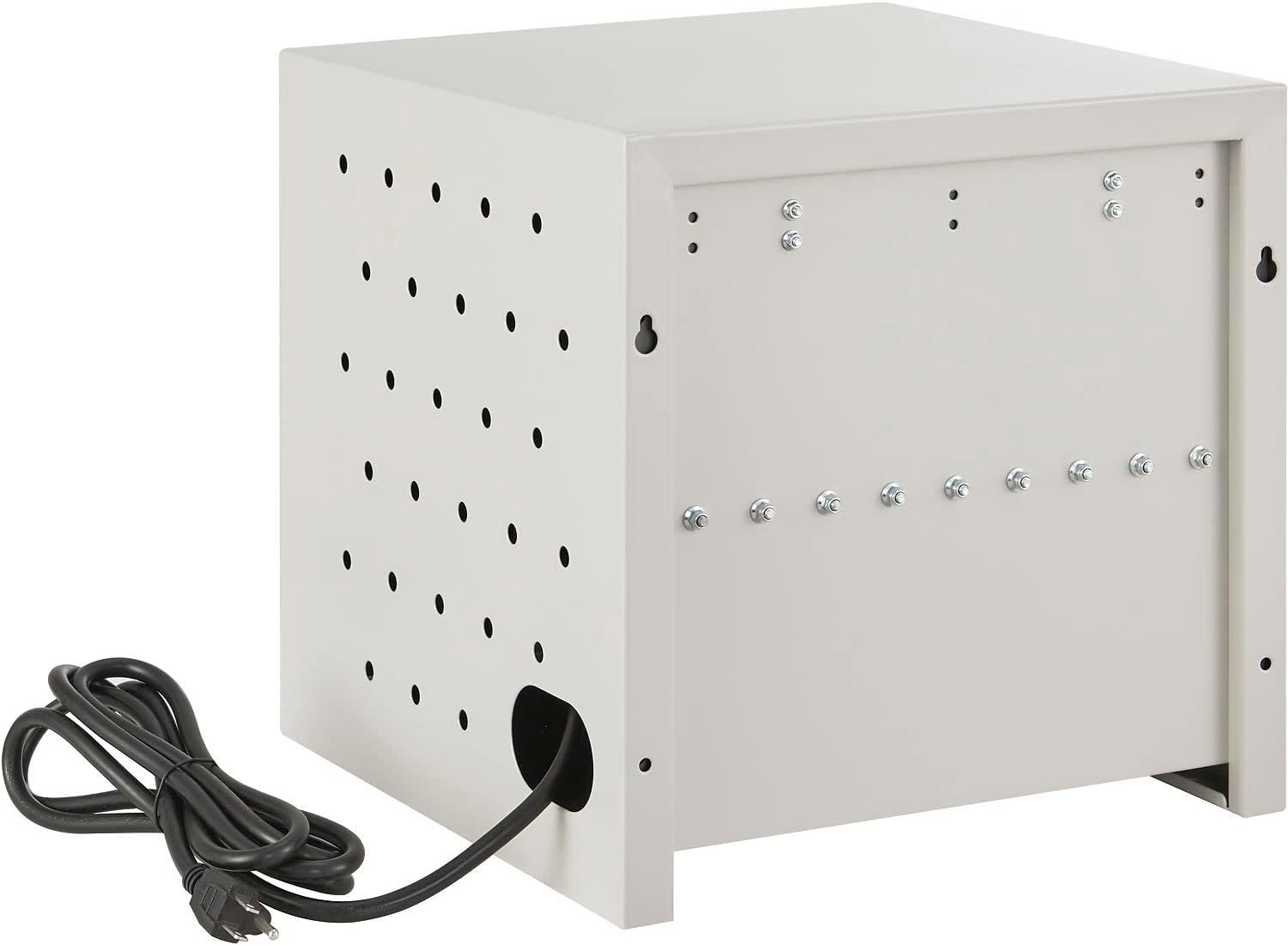
Figure 2: Interior of the charging station, displaying the integrated 12-outlet power strip and the padded slots for devices.

Figure 3: Tablets being charged and stored within the cabinet, demonstrating the organized layout.
Security
The cabinet features a lockable door. Always ensure the door is securely locked when devices are stored inside to protect against unauthorized access or theft. Keep the spare key in a safe, accessible location.
Maintenance
- Cleaning: Wipe the exterior and interior surfaces with a damp cloth. Avoid abrasive cleaners or solvents that could damage the finish.
- Ventilation: Periodically check that the side ventilation holes are not obstructed to maintain proper airflow.
- Lock Mechanism: Ensure the lock operates smoothly. Do not force the key if it feels stiff.
Troubleshooting
| Problem | Possible Cause | Solution |
|---|---|---|
| Devices are not charging. | Power strip is off or unplugged; outlet is not live; device cables are faulty. | Ensure power strip is ON and plugged into a live outlet. Check individual device charging cables. |
| Cabinet feels warm. | Ventilation holes are blocked; too many devices charging simultaneously. | Ensure side ventilation holes are clear. Reduce the number of devices charging if necessary. |
| Door is difficult to lock/unlock. | Lock mechanism is stiff or obstructed. | Apply a small amount of graphite lubricant to the lock mechanism. Do not force the key. |
Specifications
| Feature | Detail |
|---|---|
| Brand | Global Industrial |
| Model Number | LLTMW8-G |
| Capacity | Up to 8 devices |
| Material | Steel, Alloy Steel |
| Color | Beige |
| Product Dimensions (D x W x H) | 13" x 19" x 14" |
| Item Weight | 17.96 Pounds |
| Maximum Weight Capacity | 30 Pounds |
| Power Strip | UL-Listed 12-outlet 120V/15A Horizontal Electrical Power Strip |
| Mounting Type | Wall Mount, Desktop |
| Assembly Required | No (Arrives Assembled) |
| Security Features | Lockable door with 2 keys |
| Ventilation | Ventilated sides for airflow |
Warranty and Support
For warranty information or technical support, please refer to the documentation provided with your purchase or contact Global Industrial customer service directly. Keep your purchase receipt for warranty claims.