
VILTROX DC-550Pro-1200Nits
VILTROX DC-550 Pro 5.5 inch Camera Field Monitor User Manual
Model: DC-550Pro-1200Nits | Brand: VILTROX
1. Introduction
The VILTROX DC-550 Pro is a high-brightness 5.5-inch camera field monitor designed for professional videography and photography. It features a 4K HDMI touchscreen, 1200 nits brightness, 3D LUT support, and various monitoring functions to assist with precise focus and exposure. This manual provides detailed instructions for setting up, operating, and maintaining your DC-550 Pro monitor.
2. What's in the Box
Upon opening the package, please verify that all the following items are included:
- 1x DC-550Pro Camera Video Monitor
- 1x Sunshade Hood
- 1x VILTROX NP-F550 Battery
- 1x VL-550 Cold Shoe Adapter
- 1x Type-C Cable
- 2x HDMI Cable
- 1x Plastic Carry Case
- 1x User Manual (this document)
- 1x Packing Box

Image: VILTROX DC-550 Pro Camera Field Monitor with all included accessories, such as the sunshade, battery, cables, and cold shoe adapter.
3. Product Overview
3.1 Key Features
- 1200 Nits High Brightness: True 1200 nits display for clear outdoor monitoring. Full HD 1920x1080 resolution, 1200:1 contrast ratio, and 178° ultra-wide viewing angle.
- Quick-Released Hood & Compact Design: Detachable sunshade hood for light interference blocking. Four custom buttons and stepwise knobs for efficient function setting.
- 4K HDMI Input/Output: Supports 4K 30Hz (3840x2160p, 4096x2160p) signal pass-through for simultaneous monitoring. Dual HDMI (In/Output) jacks for lossless high-definition transmission.
- Multiple Power Supply Options: Supports NP-F series lithium battery, DC IN 12-18V, and Type-C 5V 3A power bank.
- Custom 3D LUT Support: Import 3D LUTs via SD card for various creative styles and camera Log mode monitoring. Includes RGB Parade waveform, vectorgraph, RGB & brightness histogram, auxiliary focus, audio column, image flip, false color, etc.
3.2 Monitor Components

Image: Detailed diagram showing the various ports, buttons, and features of the VILTROX DC-550 Pro monitor, including SD card cover, F1/F2/F3 shortcut keys, Return key, Type-C interface, locating holes, 1/4 screw holes, DC power interface, Battery Release key, Cooling air inlet, Headphone jack, ON/OFF key, Knob/Adjusted key, Monitor Display, HDMI output, and HDMI input.
| No. | Component | No. | Component |
|---|---|---|---|
| 1 | SD card cover | 10 | Headphone jack |
| 2 | F1/F2/F3 shortcut keys | 11 | ON/OFF key |
| 3 | Return key | 12 | Knob/Adjusted key |
| 4 | Type-C interface | 13 | Monitor Display |
| 5 | Locating hole | 14 | HDMI output |
| 6 | 1/4 screw hole | 15 | HDMI input |
| 7 | DC power interface | 16 | Locating hole |
| 8 | Battery Release key | 17 | 1/4 screw hole |
| 9 | Cooling air inlet | 18 | Fan outlet |
4. Setup
4.1 Powering the Monitor
The DC-550 Pro offers flexible power options:
- NP-F Series Lithium Battery: Insert a compatible NP-F series battery (one NP-F550 is included) into the battery slot on the back of the monitor.
- DC IN 12-18V: Connect a 12-18V DC power adapter to the DC power interface (7).
- Type-C 5V 3A Power Bank: Use a Type-C cable to connect a 5V 3A power bank to the Type-C interface (4).
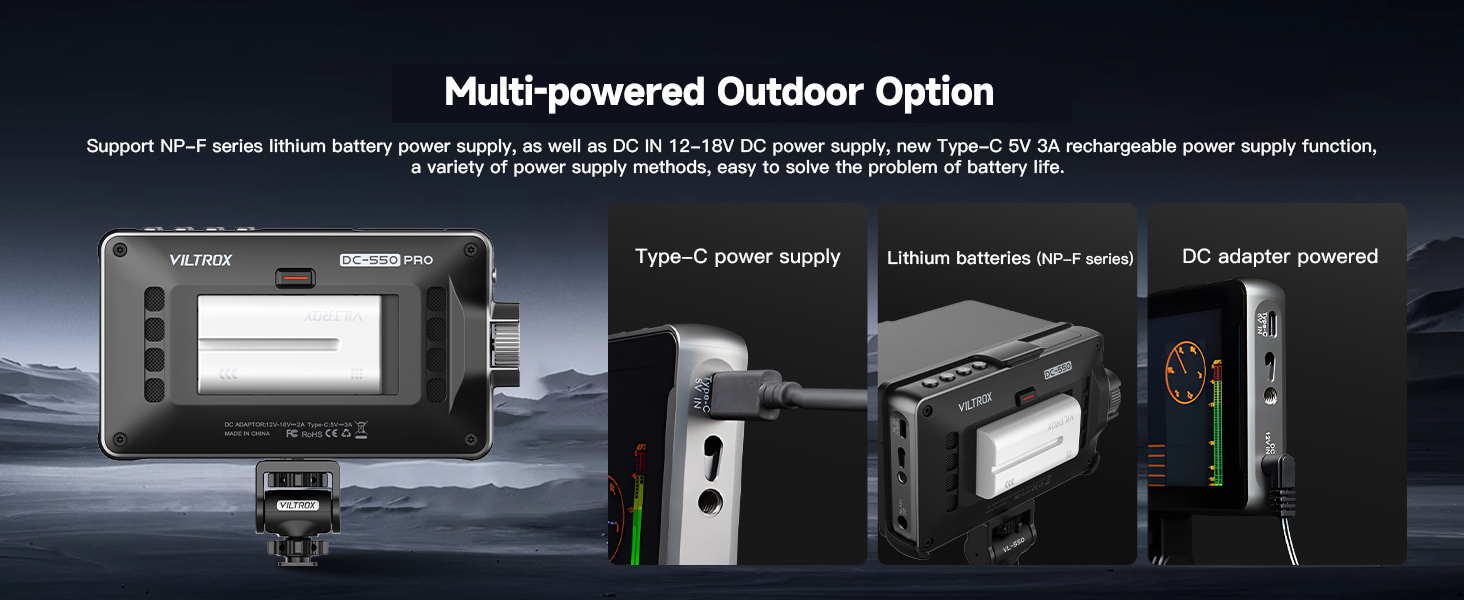
Image: Illustration of the three power supply methods for the monitor: Type-C power bank, NP-F series lithium battery, and DC adapter.
4.2 Attaching the Sunshade Hood
The detachable sunshade hood helps block strong light interference for better outdoor monitoring. Simply align and attach the hood to the top of the monitor. It can be quickly released when not needed.

Image: Visual guide demonstrating the quick open and close mechanism of the sunshade hood.
4.3 Mounting the Monitor
Use the included VL-550 Cold Shoe Adapter to mount the monitor to your camera's hot shoe or other compatible mounting points. The adapter allows for 360° pitch angle and ±85° horizontal rotation for optimal viewing.

Image: Illustration of the VL-550 cold shoe adapter's flexibility, allowing for 360-degree pitch and 85-degree horizontal rotation.
4.4 Initial Language Setting
If your monitor's default language is not English, follow these steps to change it:
- Double tap the screen to wake up the menu.
- Click on the top right corner to access the system settings.
- Then click the button that corresponds to "English" (often labeled with Chinese characters first, then English after selection).
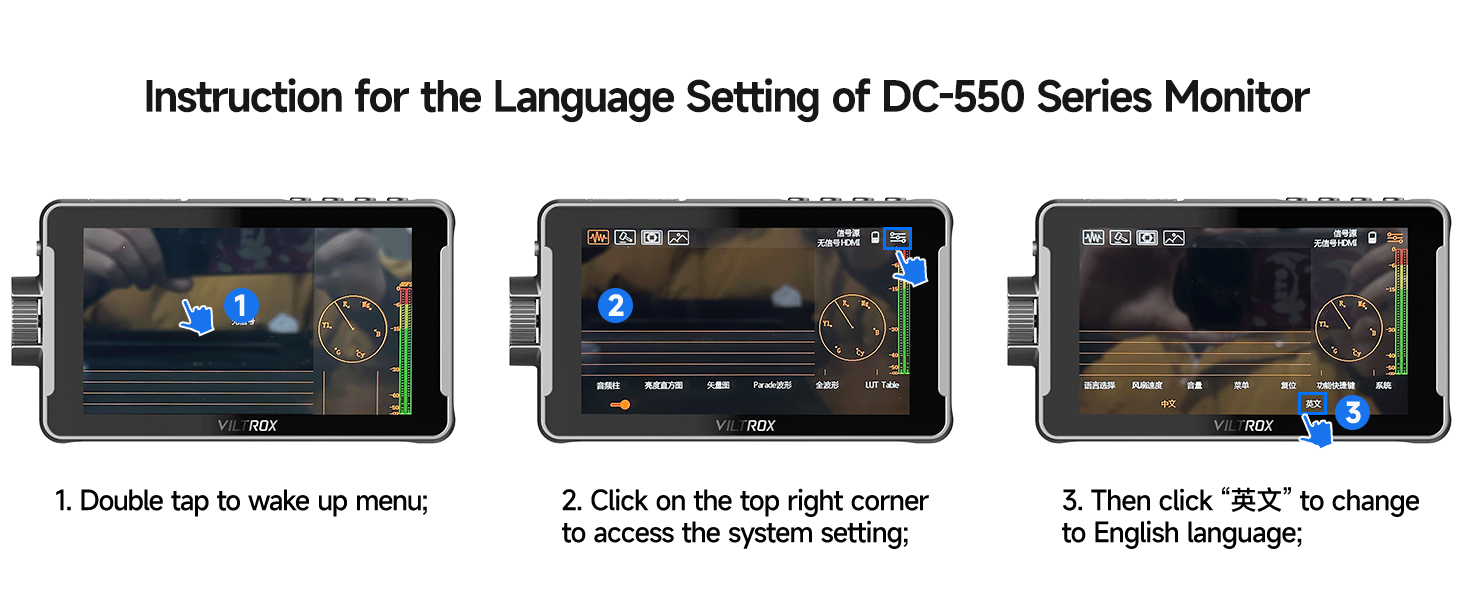
Image: Step-by-step visual instructions for changing the monitor's language setting.
Video: An official VILTROX video demonstrating the features and usage of the DC-550/550Pro monitor, including menu navigation and setup.
5. Operating the Monitor
5.1 Connecting to a Camera (HDMI)
Connect your camera's HDMI output to the monitor's HDMI input (15) using one of the provided HDMI cables. If you wish to loop the signal to another monitor, use the HDMI output (14).

Image: Detailed view of the 4K HDMI Input and Output ports on the VILTROX DC-550 Pro monitor.
5.2 Touch Screen Controls
The DC-550 Pro features a sensitive touchscreen for intuitive navigation and control:
- Double Tap: Access menus and settings.
- Double Finger Swipe: Zoom in/out.
- Swipe Right Side: Adjust backlight.
- Swipe Left Side: Adjust volume.
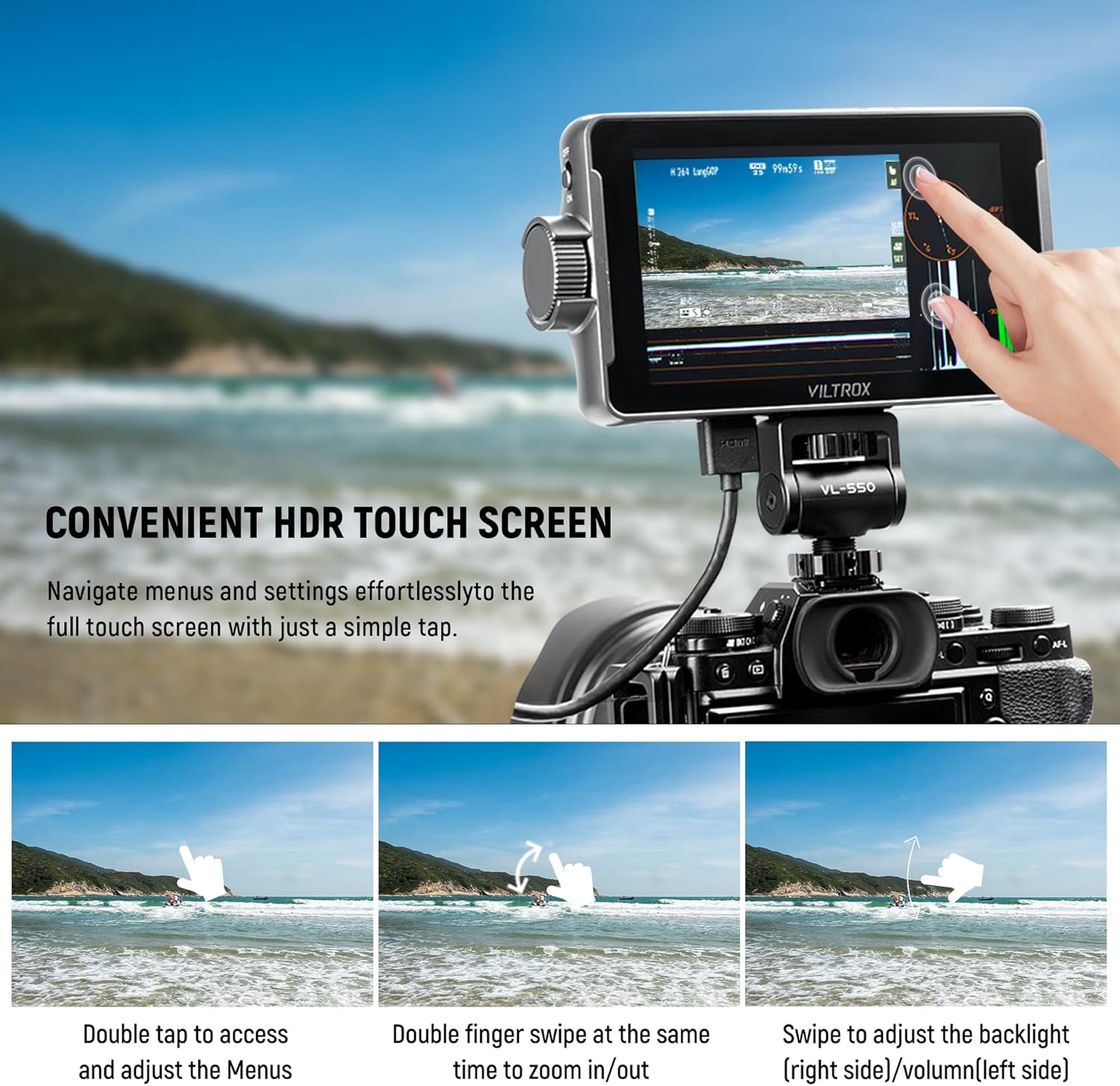
Image: Demonstrates various touch screen gestures for controlling the monitor's functions.
5.3 Monitoring Functions
The monitor provides a comprehensive suite of professional monitoring tools:
- 3D LUT: Import custom 3D LUTs via SD card (slot 1) to preview different color grades or camera Log modes.
- Auxiliary Focus (Peaking): Highlights in-focus areas for precise focusing.
- False Color: Displays exposure levels using a color overlay.
- Histogram: Visualizes the tonal distribution of the image (RGB & Brightness).
- Waveform (RGB Parade): Shows the luminance and color levels across the image.
- Vectorgraph: Displays color saturation and hue.
- Other functions include Volume Bar, Image Flip, Zoom, Scanning Mode, Safe Mark, Mark Ratio, and Camera Mode.
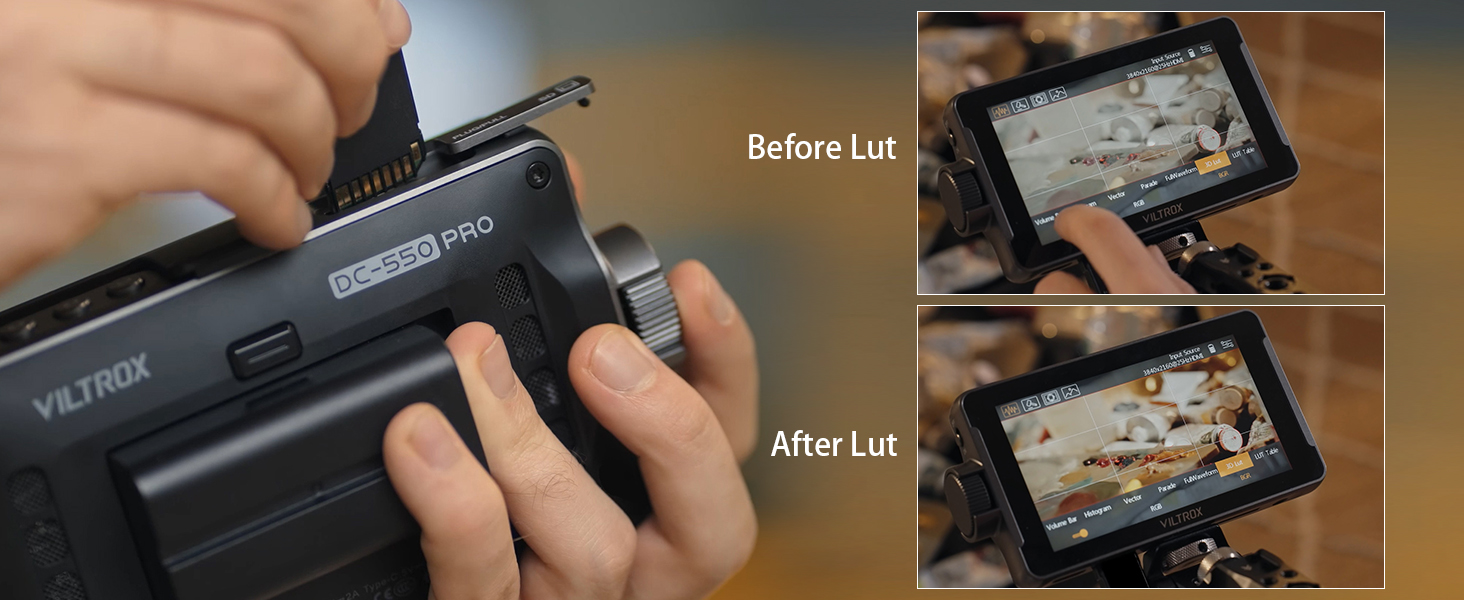
Image: Demonstrates the effect of applying a 3D LUT to the video feed, showing "Before Lut" and "After Lut" views.

Image: A visual representation of the professional monitoring functions available on the monitor, including Parade Wave, RGB Histogram, Vectorscope, Brightness Histogram, Mirror Image, Image Freeze, Pixel to Pixel, Monochrome, Safe Mark, Volume Bar, Peaking, False Colors, Exposure, Zoom, Scanning Mode, 3D LUT, Mark Ratio, and Camera Mode.
6. Maintenance
6.1 Cleaning the Monitor
To ensure optimal performance and longevity, regularly clean your VILTROX DC-550 Pro monitor:
- Use a soft, lint-free cloth to gently wipe the screen and body.
- For stubborn smudges, slightly dampen the cloth with water or a screen-safe cleaning solution. Avoid harsh chemicals.
- Ensure no liquid enters the ports or ventilation openings.
6.2 Storage
When not in use, store the monitor in its plastic carry case in a cool, dry place away from direct sunlight and extreme temperatures.

Image: The included plastic carry case, designed to protect the monitor and its accessories during storage and transport.
6.3 Cooling System
The monitor is equipped with cooling air inlets (9) and a fan outlet (18) to dissipate heat during operation. Ensure these areas are not obstructed to maintain proper ventilation.

Image: Close-up view of the cooling air inlets on the monitor, indicating airflow for heat dissipation.
7. Troubleshooting
If you encounter issues with your VILTROX DC-550 Pro monitor, please refer to the following common problems and solutions:
| Problem | Possible Cause | Solution |
|---|---|---|
| Monitor does not power on. | Low or depleted battery; incorrect power connection. | Ensure battery is charged and properly inserted. Check DC or Type-C power connections. |
| No signal displayed. | Incorrect HDMI connection; camera output settings; incompatible resolution. | Verify HDMI cables are securely connected to input (15). Check camera's HDMI output settings (resolution, format). Ensure monitor is set to correct input source. |
| Screen is too dim/bright. | Brightness settings. | Adjust brightness using the touchscreen swipe gesture (swipe right side) or through the menu. |
| Touchscreen unresponsive. | Temporary software glitch; screen protector interference. | Restart the monitor. Ensure screen is clean and free of debris. If a screen protector is installed, ensure it's properly applied. |
| Monitor overheating. | Obstructed ventilation; prolonged use in high temperatures. | Ensure cooling air inlets (9) and fan outlet (18) are clear. Operate in a well-ventilated area. Allow monitor to cool down if necessary. |
8. Specifications
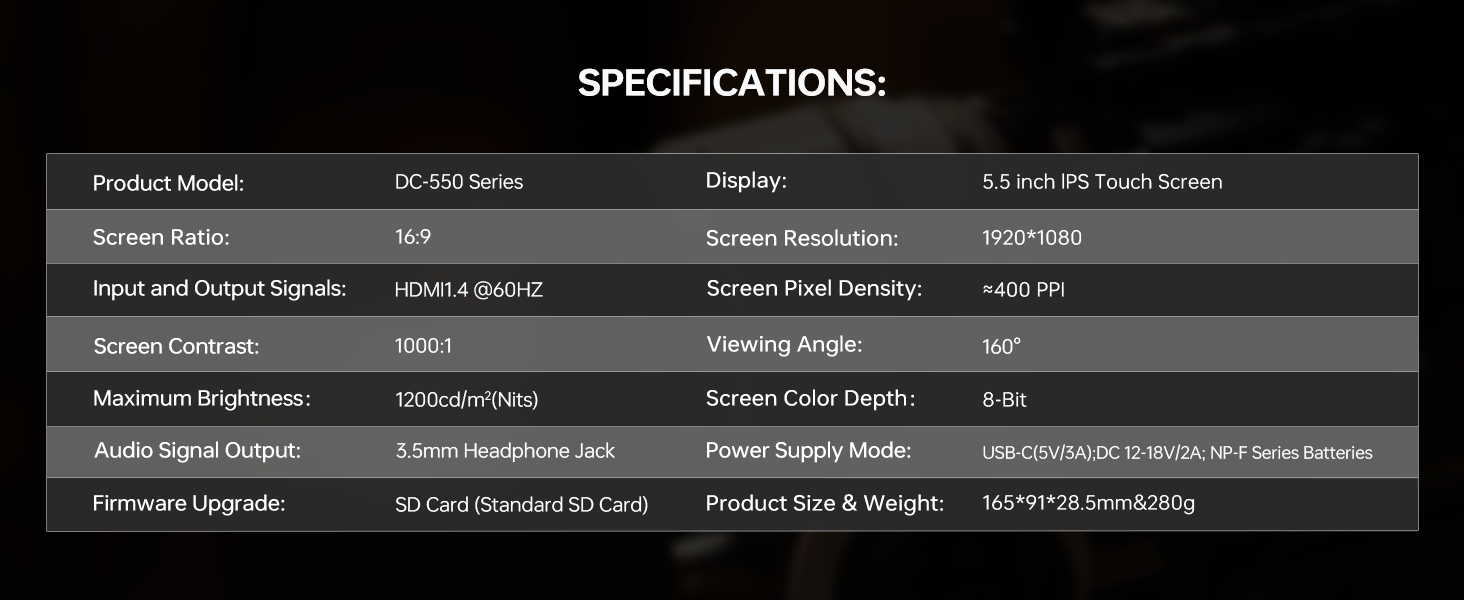
Image: Official specifications table for the VILTROX DC-550 Series monitor.
| Feature | Detail |
|---|---|
| Product Model | DC-550 Series |
| Display | 5.5 inch IPS Touch Screen |
| Screen Ratio | 16:9 |
| Screen Resolution | 1920*1080 |
| Input and Output Signals | HDMI1.4 @60HZ |
| Screen Pixel Density | ≈400 PPI |
| Screen Contrast | 1000:1 |
| Viewing Angle | 160° |
| Maximum Brightness | 1200cd/m² (Nits) |
| Screen Color Depth | 8-Bit |
| Audio Signal Output | 3.5mm Headphone jack |
| Power Supply Mode | USB-C (5V/3A), DC 12-18V/2A, NP-F Series Batteries |
| Firmware Upgrade | SD Card (Standard SD Card) |
| Product Size & Weight | 165*91*28.5mm & 280g |
9. Warranty and Support
VILTROX provides a 1-year replacement service and friendly after-sales service support to all customers. For any inquiries or support needs, please contact VILTROX customer service through their official channels or the retailer where you purchased the product.
For more information, visit the official VILTROX Store: VILTROX Official Store
Related documentsDC-550Pro-1200Nits


Ask a question about this manual
Ask about setup, troubleshooting, compatibility, parts, safety, or missing instructions. Manuals+ will review the question and use this page’s manual context to help answer it.