
Introduction
This manual provides detailed instructions for the assembly, operation, and maintenance of your Sauder Miscellaneous Office Computer Desk with Drawers, Timber Oak Finish. Please read all instructions carefully before beginning assembly or use to ensure proper setup and longevity of your product.
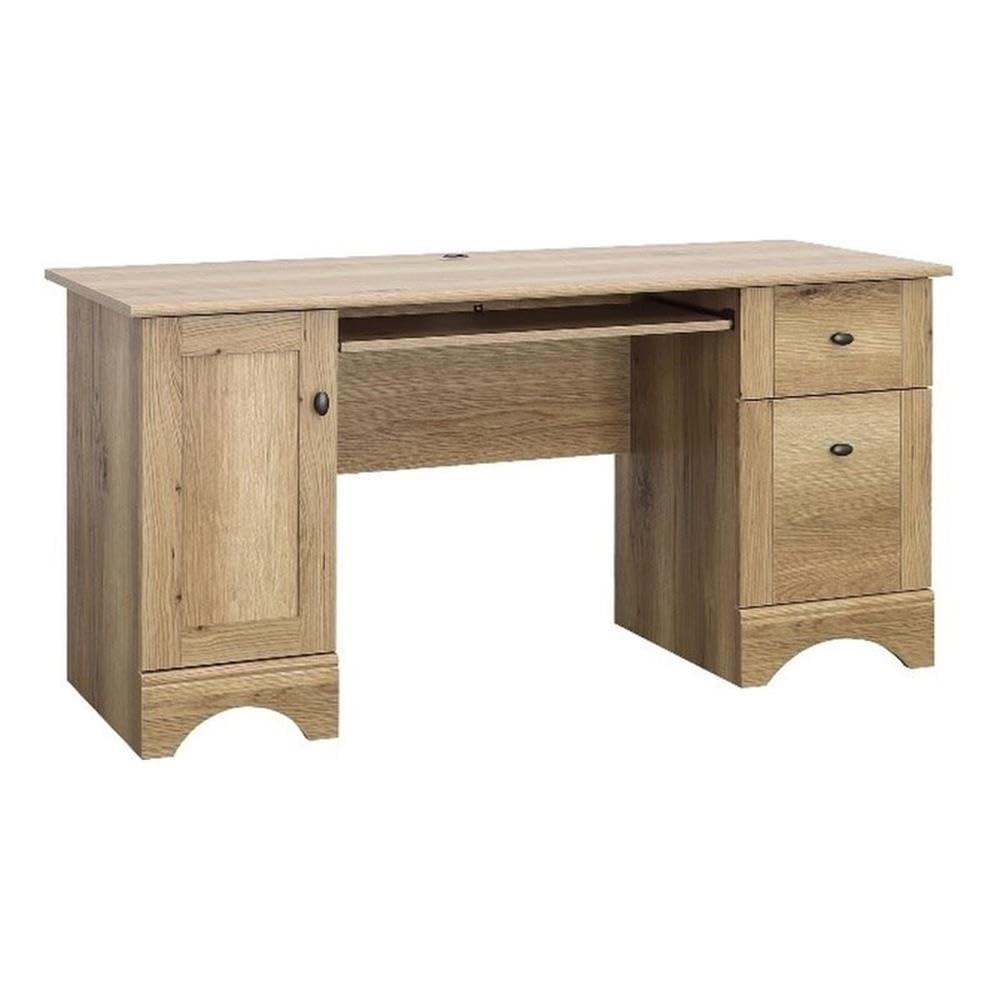
Image: The Sauder Miscellaneous Office Computer Desk with Drawers, Timber Oak Finish, featuring a spacious top, keyboard tray, and storage compartments.
The desk is designed for functionality and style, offering ample storage and a comfortable workspace. Key features include:
- Slide-out keyboard/mouse shelf with metal runners and safety stops.
- Two easy-gliding drawers for storage.
- Lower filing cabinet designed for letter or European sized hanging files.
- Space behind a swinging cabinet door for a vertical CPU tower, with an adjustable shelf.
- Durable Timber Oak finish.
Setup and Assembly
Assembly of this desk is designed to be straightforward with its T-slot drawer system. Two people are recommended for assembly. All necessary assembly tools are included.
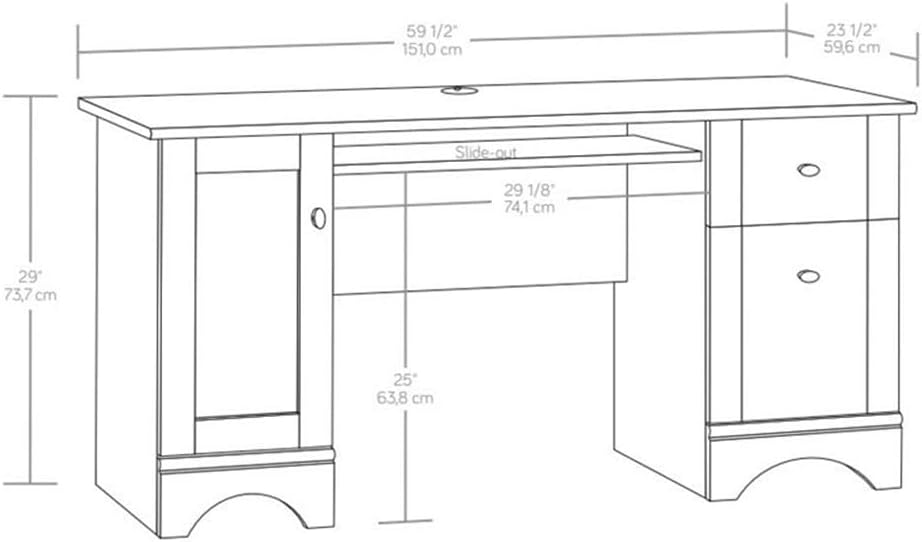
Image: Technical drawing illustrating the overall dimensions of the desk: 59 1/2 inches (151.0 cm) width, 23 1/2 inches (59.6 cm) depth, and 29 inches (73.7 cm) height.
Assembly Components and Techniques
Familiarize yourself with the common assembly components and techniques used in Sauder furniture.
Video: Instructions on how to assemble Cam & Dowel fasteners, a common component in Sauder furniture assembly.
Drawer Assembly (T-Slot System)
The desk features a T-slot drawer system for easy and secure drawer construction.
Video: Detailed guide on how to assemble a T-Slot Box Drawer for your Sauder furniture.
Video: Instructions on how to adjust a T-Slot Drawer to ensure proper alignment and smooth operation.
Attaching the Back Panel
Properly attaching the back panel is crucial for the unit's squareness, stability, and strength.
Video: Guide on how to attach the back panel to your unit, ensuring stability and proper alignment.
Adjusting Hinges
If your desk includes hinged doors, follow these instructions for proper installation and adjustment.
Video: Instructions on how to install and adjust the adjustable hinges for doors on your unit.
Operating Your Desk
Your Sauder computer desk is designed for efficient and organized use.
Keyboard/Mouse Shelf

Image: The slide-out keyboard/mouse shelf, providing ergonomic benefits and keeping the main desktop clear.
The slide-out keyboard/mouse shelf operates on metal runners with safety stops. Gently pull the tray forward to extend and push back to retract. Avoid forcing the tray.
Drawers and Filing Cabinet

Image: The top drawer, suitable for storing pens, paperclips, notepads, and other small office supplies.

Image: The lower drawer configured as a filing cabinet, capable of holding letter or European sized hanging files.
The two easy-gliding drawers provide convenient storage. The top drawer is ideal for small office supplies, while the lower drawer functions as a filing cabinet. Ensure drawers are closed completely when not in use.
CPU Tower Storage

Image: The desk with the left cabinet door open, showing space for a vertical CPU tower and an adjustable shelf.
The cabinet on the left side of the desk is designed to house a vertical CPU tower. It includes an adjustable shelf to accommodate various CPU sizes or other storage needs. Ensure adequate ventilation for your CPU.
Maintenance
To maintain the appearance and longevity of your Sauder desk, follow these simple care instructions:
- Wipe surfaces with a damp cloth. Avoid harsh chemicals or abrasive cleaners.
- Promptly clean up spills to prevent staining.
- Avoid placing hot items directly on the surface; use coasters or protective pads.
- Keep the desk away from direct sunlight and extreme temperature changes to prevent warping or fading.
Troubleshooting
If you encounter any issues with your desk, consider the following common solutions:
- Wobbly Desk: Ensure all cam and dowel connections are securely tightened. Check that the back panel is properly squared and fastened.
- Sticking Drawers: Verify that the drawer slides are correctly installed and free of obstructions. Refer to the 'Adjust T-Slot Drawer' video for alignment tips.
- Misaligned Doors: Use the adjustable hinges to correct door alignment. Refer to the 'Adjustable Hinge Video' for detailed instructions.
- Missing Parts: If any parts are missing or damaged, contact Sauder customer support for replacements.
Specifications
| Feature | Detail |
|---|---|
| Brand | Sauder |
| Model Number | 433952 |
| Dimensions (D x W x H) | 23.47"D x 59.45"W x 29.02"H |
| Item Weight | 100.5 Pounds |
| Color | Timber Oak |
| Style | Modern |
| Base Material | Wood |
| Top Material Type | Engineered Wood |
| Finish Type | Timber Oak finish |
| Special Feature | Keyboard Tray Included |
| Number of Drawers | 2 |
| Number Of Shelves | 1 (adjustable within CPU cabinet) |
| Required Assembly | Yes |
| Recommended Number of People for Assembly | 2 |
| Includes All Assembly Tools | Yes |
| UPC | 042666130264 |
Warranty and Support
Your Sauder Miscellaneous Office Computer Desk with Drawers is covered by a 5-year parts warranty from the manufacturer. This warranty covers defects in materials and workmanship under normal use.
For warranty claims, replacement parts, or additional assembly assistance, please contact Sauder customer support. You can find contact information on the official Sauder website or within the packaging materials.
Video: A brief overview of the Sauder Miscellaneous Office Computer Desk with Drawers, Timber Oak Finish, highlighting its features and design.