
1. Introduction
Thank you for choosing the MLOVE BV230 Portable Bluetooth Speaker. This manual provides essential information for setting up, operating, and maintaining your speaker. The BV230 is designed for portability, delivering high-quality audio with enhanced bass, and features IP56 dust and water resistance, making it suitable for various environments.
2. Package Contents
Please ensure all items are present in the package:
- 1 x MLOVE BV230 Bluetooth Speaker
- 1 x USB Type-C Charging Cable
- 1 x Lanyard
- 1 x Instruction Manual (this document)
3. Product Overview
Familiarize yourself with the speaker's components and controls.
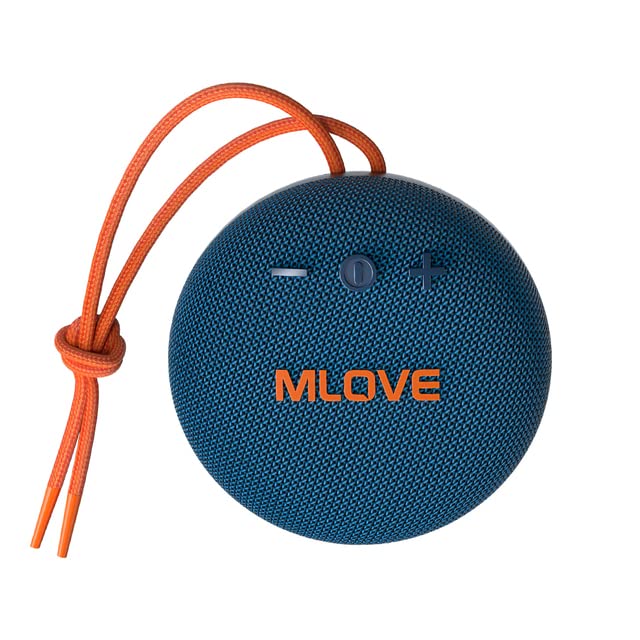
Figure 3.1: Front view of the MLOVE BV230 speaker, showing the power button, volume controls, and MLOVE branding.
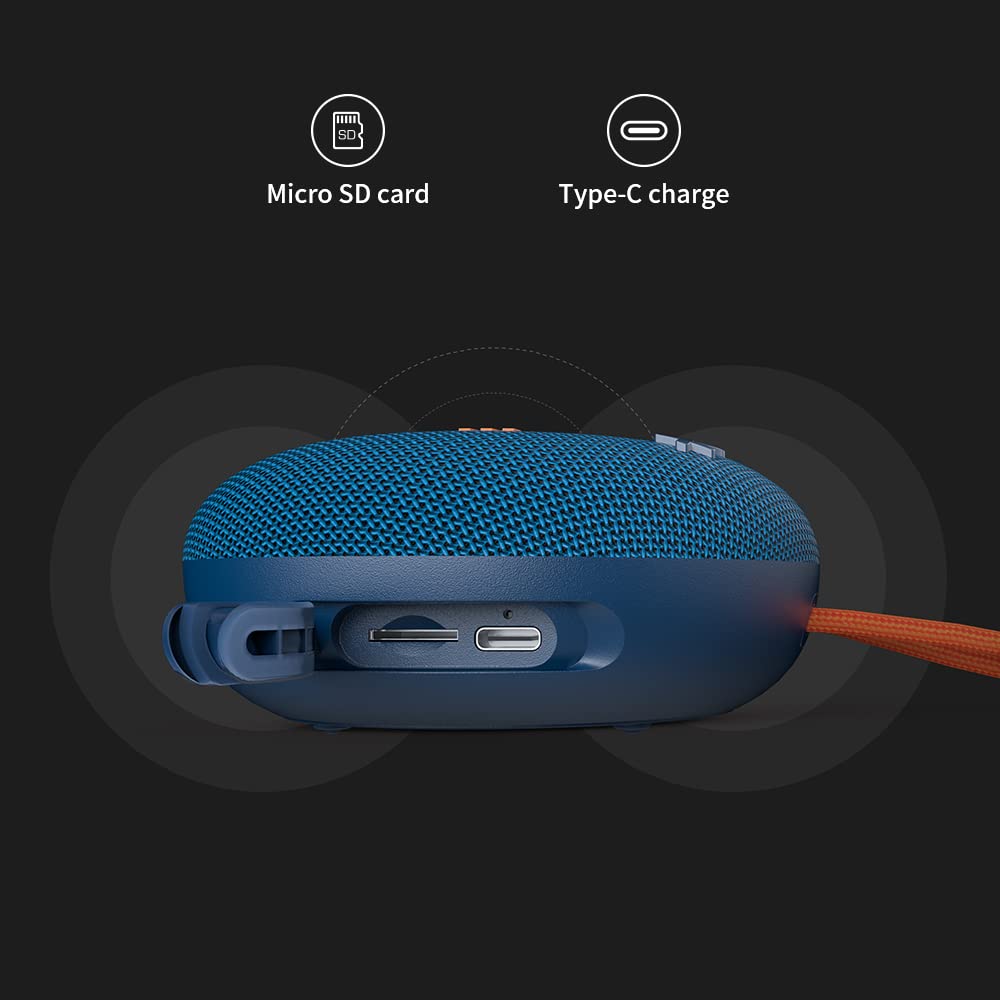
Figure 3.2: Side view of the MLOVE BV230 speaker, highlighting the Micro-SD card slot and the USB Type-C charging port, protected by a rubber flap.
Control Buttons:
- Power Button: Press and hold to power on/off. Short press to play/pause music or answer/end calls.
- Volume Up (+): Short press to increase volume. Long press for next track.
- Volume Down (-): Short press to decrease volume. Long press for previous track.
4. Setup
4.1 Charging the Speaker
Before first use, fully charge the speaker.
- Open the rubber flap on the side of the speaker to expose the charging port.
- Connect the included USB Type-C charging cable to the speaker's charging port.
- Connect the other end of the cable to a USB power adapter (not included) or a computer's USB port.
- The charging indicator light will illuminate during charging and turn off once fully charged. A full charge takes approximately 3 hours.
4.2 Powering On/Off
- To Power On: Press and hold the Power button for approximately 2-3 seconds until you hear an audible prompt.
- To Power Off: Press and hold the Power button for approximately 2-3 seconds until you hear an audible prompt.
4.3 Bluetooth Pairing
Connect your BV230 speaker to a Bluetooth-enabled device.
- Ensure the speaker is powered on and in Bluetooth pairing mode (indicated by a flashing LED).
- On your device (smartphone, tablet, etc.), enable Bluetooth and search for available devices.
- Select "BV230" from the list of found devices.
- Once connected, the speaker will provide an audible confirmation, and the LED indicator will stop flashing.
- The speaker will automatically reconnect to the last paired device when powered on, if within range (up to 10 meters).
4.4 True Wireless Stereo (TWS) Pairing
Connect two MLOVE BV230 speakers for a true wireless stereo experience.

Figure 4.1: Two BV230 speakers demonstrating True Wireless Stereo (TWS) pairing for enhanced audio.
- Ensure both BV230 speakers are powered on and not connected to any other Bluetooth device.
- On one of the speakers (this will be the primary speaker), double-press the Power button. The speaker will enter TWS pairing mode.
- The two speakers will automatically search for and connect to each other. You will hear an audible confirmation once TWS pairing is successful.
- Now, connect your Bluetooth device to the primary speaker (the one you initiated TWS pairing on) as described in Section 4.3.
- Audio will now play in stereo across both speakers.
4.5 Micro-SD Card Playback
Play music directly from a Micro-SD card.
- Open the rubber flap on the side of the speaker.
- Insert a Micro-SD card (with supported audio files) into the Micro-SD card slot until it clicks into place.
- The speaker will automatically switch to Micro-SD card playback mode.
- Use the Power button for play/pause and the Volume +/- buttons for track control.
5. Operating Instructions
5.1 Music Playback
- Play/Pause: Short press the Power button.
- Volume Up: Short press the '+' button.
- Volume Down: Short press the '-' button.
- Next Track: Long press the '+' button.
- Previous Track: Long press the '-' button.
5.2 Hands-Free Calling
The built-in microphone allows for hands-free calls when connected via Bluetooth.

Figure 5.1: The BV230 speaker facilitating a hands-free call, demonstrating its built-in microphone functionality.
- Answer Call: Short press the Power button when an incoming call is received.
- End Call: Short press the Power button during a call.
- Reject Call: Long press the Power button when an incoming call is received.
6. Maintenance
6.1 Cleaning
To maintain the speaker's appearance and functionality:
- Wipe the speaker with a soft, damp cloth.
- Do not use abrasive cleaners, alcohol, or chemical solvents.
- Ensure the charging port and Micro-SD slot are dry before use or charging.
6.2 Water and Dust Resistance (IP56)
The MLOVE BV230 speaker is rated IP56, meaning it is protected against dust ingress and can withstand water jets from any direction. This makes it suitable for outdoor use and splashes.

Figure 6.1: The BV230 speaker in water, illustrating its IP56 water resistance.
- Ensure the rubber flap covering the charging port and Micro-SD slot is securely closed to maintain water and dust resistance.
- Do not intentionally submerge the speaker in water for extended periods.
- Avoid exposing the speaker to saltwater or other chemicals, as this may damage the seals.
- If the speaker gets wet, wipe it dry before charging or opening the port flap.
6.3 Storage
- Store the speaker in a cool, dry place away from direct sunlight and extreme temperatures.
- If storing for an extended period, charge the battery to approximately 50% every few months to prolong battery life.
7. Troubleshooting
If you encounter issues with your speaker, refer to the following solutions:
| Problem | Possible Solution |
|---|---|
| Speaker does not power on. | Ensure the battery is charged. Connect the speaker to a power source using the USB Type-C cable. |
| Cannot pair via Bluetooth. |
|
| No sound or low volume. |
|
| TWS pairing fails. |
|
| Charging issue. |
|
8. Specifications
Key technical specifications for the MLOVE BV230 speaker:
| Feature | Detail |
|---|---|
| Model Name | BV230 |
| Dimensions (L x W x H) | 100.8 x 100.8 x 46 mm (approx. 108D x 46W x 108H Millimeters) |
| Item Weight | 198 g (approx. 280 g with packaging) |
| Speaker Output Power | 5 Watts |
| Battery Capacity | 1500 mAh Lithium Polymer |
| Playtime | Up to 8 hours (at 70% volume) |
| Charging Time | Approximately 3 hours |
| Charging Port | USB Type-C |
| Bluetooth Version | 5.0 |
| Wireless Range | Up to 10 meters (33 feet) |
| Water & Dust Resistance | IP56 |
| Material | Fabric |
| Control Method | Touch |
| Audio Output Mode | Stereo (with TWS pairing) |
9. Warranty and Support
The MLOVE BV230 Portable Bluetooth Speaker comes with a 12-month warranty from the date of purchase, covering manufacturing defects.
For technical support, warranty claims, or further assistance, please contact your retailer or the manufacturer directly. Please retain your proof of purchase for warranty service.


