1. Introduction
The GOYOJO GF500N Digital Force Gauge is a high-precision instrument designed for accurate and efficient force measurement across various industries, including automotive, chemical, and construction hardware. It supports tension and compression testing with multiple measurement modes and units.

Figure 1: GOYOJO GF500N Digital Force Gauge overview with key features highlighted.
2. What's in the Box
Your GOYOJO GF500N Digital Force Gauge package includes the following items:
- 1 x Digital Force Gauge Unit
- 5 x Measurement Adapters (various shapes for push/pull tests)
- 1 x Extension Rod
- 1 x Hook Attachment
- 1 x Instruction Manual
- 1 x Packing Box
- Multiple Spare Screws
- 2 x AAA Batteries

Figure 2: All components included in the GOYOJO GF500N Digital Force Gauge kit.
Video 1: An unboxing and overview of the GOYOJO Force Gauge and its accessories, demonstrating the contents of the package.
3. Setup
- Battery Installation: Open the battery compartment cover on the back of the unit. Insert 2 AAA batteries, ensuring correct polarity. Close the battery cover securely.
- Attaching Adapters: Select the appropriate measurement adapter (e.g., flat tip, conical, V-groove, hook, or extension rod) for your testing needs. Screw the chosen adapter firmly onto the threaded shaft at the top of the force gauge.
- Power On: Press the POWER button to turn on the device. The LCD display will illuminate.
- Zeroing the Gauge: Before each measurement, ensure the gauge reads 0.0. If not, press the ZERO button to reset the reading.
4. Operating Instructions
4.1 Measurement Modes
The GF500N offers three measurement modes:
- Real-Time Mode (Tracking): Displays the current force being applied. Ideal for continuous monitoring of force changes.
- Peak Mode (P): Captures and holds the maximum force value recorded during a test. The display will update only if a higher force is detected.
- First Peak Mode (PT): Records the first peak force value measured within a period of time. This is useful for applications where the initial impact force is critical.

Figure 3: Illustration of the three switchable measurement modes.
4.2 Unit Selection
The device supports four units of measurement:
- Newtons (N)
- Kilograms (kg)
- Pounds (lb)
- Ounces (oz)
Press the UNIT button to cycle through the available measurement units.

Figure 4: Available measurement units on the force gauge.
4.3 Setting Upper and Lower Limits
You can set upper and lower force limits for statistical analysis. If the measured force exceeds these limits, the device will emit a buzzer alarm.
- Press the SET button to enter the settings menu.
- Navigate to the limit setting options using the PEAK and UNIT buttons.
- Adjust the values using the PEAK and UNIT buttons.
- Press SET to save the settings and exit.
4.4 Auto Power Off Function
The device features an auto power-off function to conserve battery life. This can be set for 0 to 15 minutes of inactivity.

Figure 5: Auto Power Off feature for battery conservation.
4.5 LCD Backlight
The LCD display includes a backlight function for improved visibility in low-light conditions. This can be toggled on or off via the settings menu.
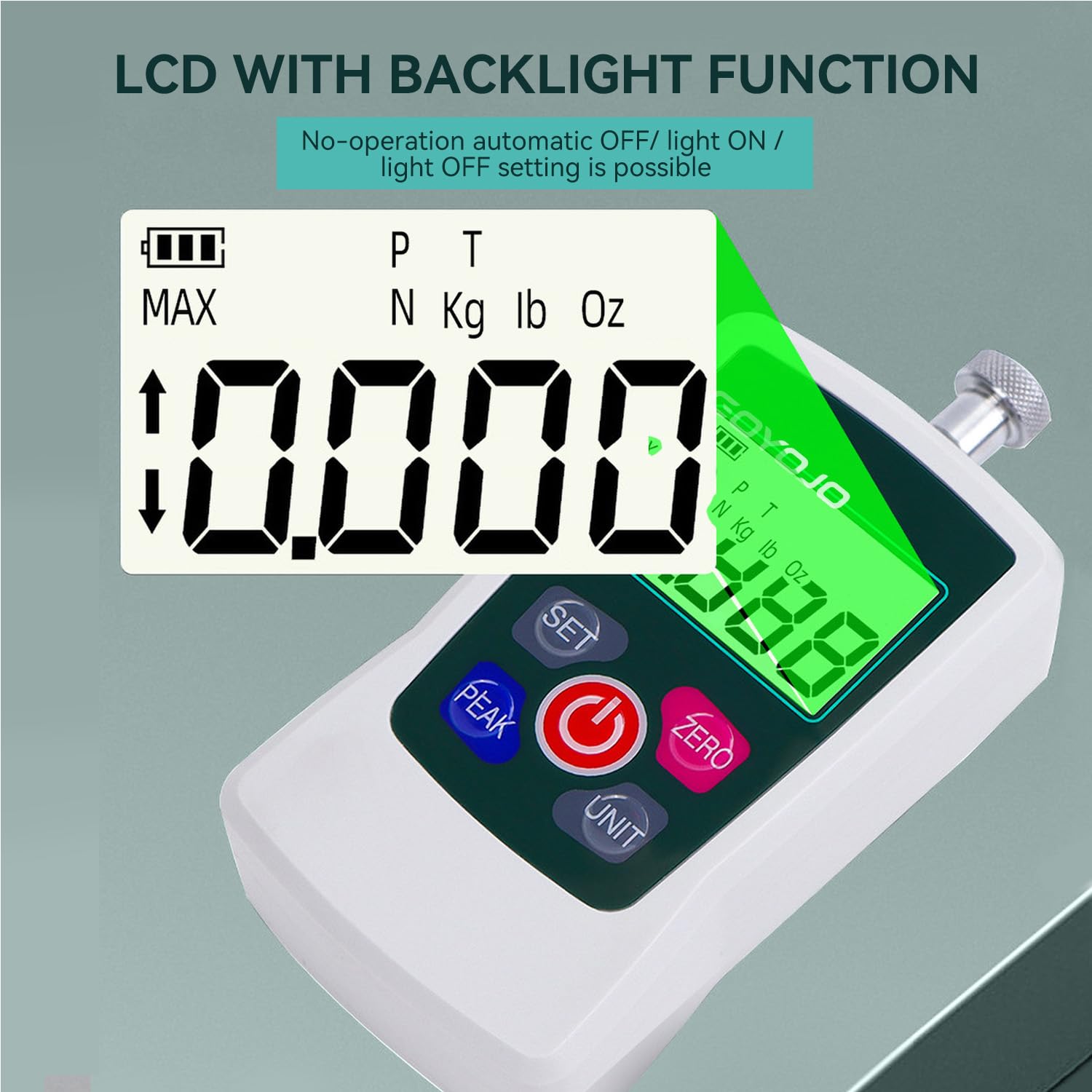
Figure 6: LCD with Backlight Function for enhanced readability.
5. Maintenance
- Cleaning: Wipe the device with a soft, dry cloth. Do not use abrasive cleaners or solvents.
- Storage: Store the force gauge in its protective case in a dry, cool place away from direct sunlight and extreme temperatures.
- Battery Replacement: Replace batteries when the low battery indicator appears on the display. Ensure correct polarity during installation.
- Calibration: Regular calibration is recommended to maintain accuracy, especially after prolonged use or if readings appear inconsistent. Refer to the manual for calibration procedures.
6. Troubleshooting
- No Display: Check battery installation and ensure batteries are not depleted. Replace if necessary.
- Inaccurate Readings: Ensure the gauge is properly zeroed before measurement. Check that the correct unit is selected. If issues persist, recalibrate the device.
- Buzzer Not Working: Check settings to ensure the buzzer alarm is enabled.
- Device Not Responding: Try turning the device off and on again. If the problem continues, remove and reinsert the batteries.
7. Specifications
The following table details the specifications of the GOYOJO GF500N Digital Force Gauge:
| Feature | Description |
|---|---|
| Brand | GOYOJO |
| Model | GF500N |
| Maximum Rated Value | 500N / 110Lb / 50Kg / 1800Oz |
| Accuracy | ±1% (within 10%-100% of full scale) |
| Measurement Units | Newton (N), Kilogram (kg), Pound (lb), Ounce (oz) |
| Measurement Modes | Tracking, Peak (P), First Peak (PT) |
| Display | LCD with Backlight |
| Auto Power Off | Adjustable (0-15 minutes) |
| Power Source | 2 x AAA batteries (included) |
| Dimensions (L x W x H) | 4.2 x 1.22 x 2.4 inches |
| Item Weight | 14.1 ounces / 400 Grams |
| UPC | 738058401509 |

Figure 7: Product parts diagram and detailed specifications table.
8. Warranty and Support
GOYOJO offers protection plans for its products. For detailed information regarding warranty coverage, returns, and technical support, please refer to the official GOYOJO website or contact customer service.
- Protection Plans: Optional 2-Year and 3-Year Protection Plans are available for extended coverage.
- Returns: A 30-day return policy is typically offered for refunds or replacements.
For further assistance, please visit the GOYOJO Store on Amazon.


