
oviitech OVTE-51
oviitech 24 Hour Outdoor Mechanical Timer Switch User Manual
Model: OVTE-51
Product Overview
The oviitech 24 Hour Outdoor Mechanical Timer Switch is designed to automate the power supply to various outdoor and indoor devices. It features two grounded outlets and allows for precise scheduling with a 48-pin setting dial, enabling up to 24 on/off events per day.

Image: Two oviitech 24 Hour Outdoor Mechanical Timer Switches, showcasing their design and dual outlets.
This timer is suitable for controlling holiday lights, pool pumps, fountains, and other electrical devices, providing convenience and energy efficiency. Its robust design includes a transparent cover for weather protection, making it ideal for outdoor use, though it is not recommended for highly humid environments.
Key Features
- 24-Hour Mechanical Timer: Allows for precise scheduling with a 48-pin setting dial.
- Multiple Events: Capable of setting up to 24 on/off events per day, with 30-minute intervals.
- Dual Grounded Outlets: Equipped with two ground sockets for connecting multiple devices.
- Outdoor Transparent Cover: Provides protection against weather elements, ensuring durability.
- Heavy-Duty Construction: Made with durable materials for long-lasting performance.
- Electrical Specifications: 0.5FT, 14AWG SJTW cord, 15Amp, 125V, 1875W.

Image: A close-up view of the oviitech timer highlighting its two available grounded outlets.
Setup and Installation
Follow these steps to set up your oviitech Outdoor Mechanical Timer Switch:
- Unpack the Timer: Carefully remove the timer from its packaging.
- Initial Pin Setup: Lift all the pins on the 48-pin setting dial to their 'up' position. This resets the timer and prepares it for programming.
- Set Desired ON Times: Press down the pins corresponding to the specific 30-minute intervals when you want your connected device to turn ON. Each pressed-down pin represents an 'ON' period.
- Set Current Time: Rotate the entire dial clockwise until the "TIME NOW" arrow aligns with the current time of day. Ensure accuracy for proper scheduling.
- Activate Timer Mode: Locate the manual override switch (usually labeled "ON/OFF/TIMER") and slide it to the "TIMER" position. This activates the programmed schedule.
- Plug in Devices: Connect your outdoor or indoor electrical devices to the two grounded outlets at the bottom of the timer.
- Plug into Power: Plug the timer's power cord into a suitable 125V grounded electrical outlet.
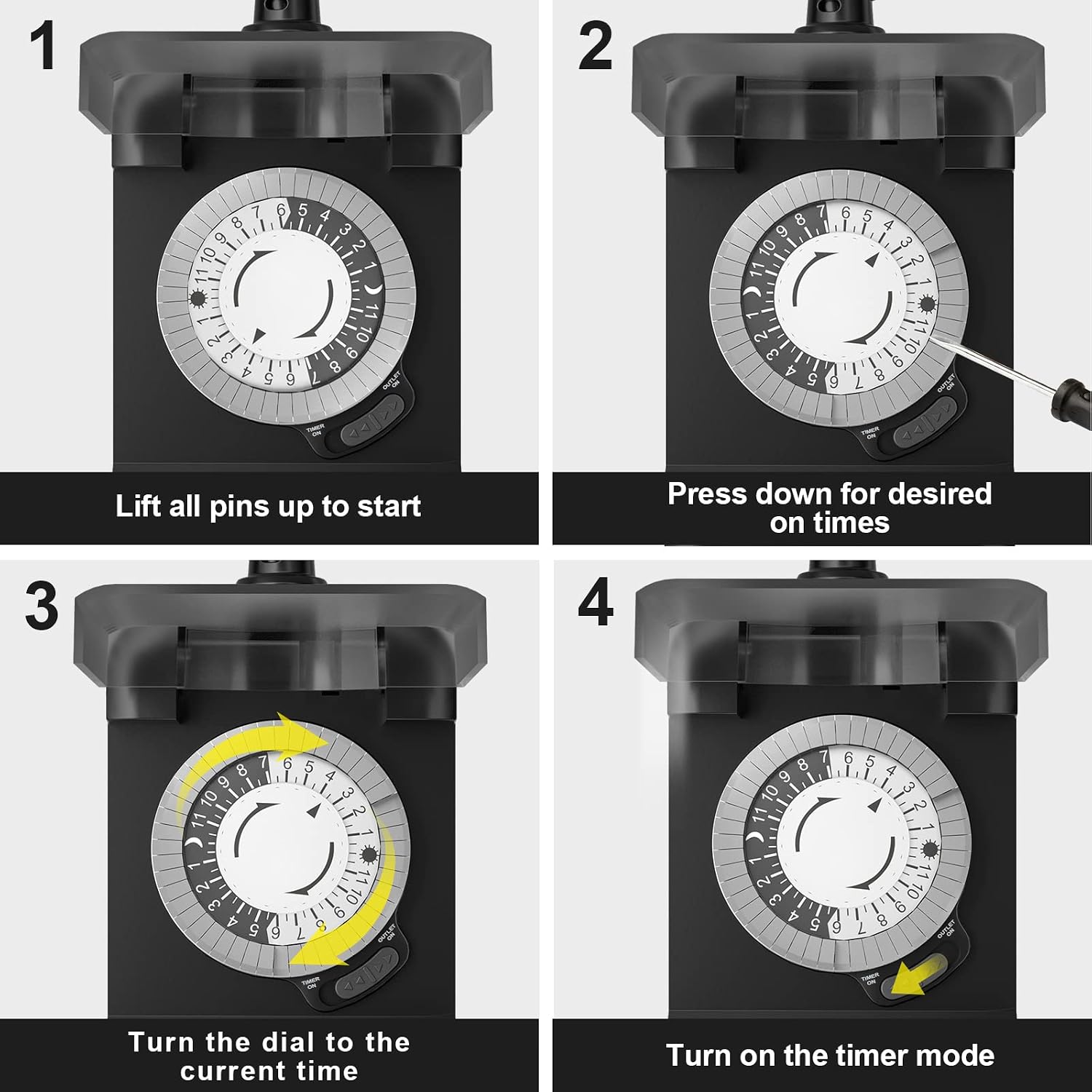
Image: A visual guide demonstrating the four key steps for setting the timer: lifting pins, pressing down for desired ON times, setting the current time, and activating timer mode.
Important Note for Outdoor Use:
When installing outdoors, please mount the timer approximately 2 feet (60 cm) off the ground vertically, with the outlets facing downward. This orientation, combined with the transparent cover, helps protect the unit from weather exposure.

Image: Illustration of the recommended outdoor installation, showing the timer mounted vertically on a wall, 2 feet above ground, with outlets pointing downwards for weather protection.
Operating Instructions
The oviitech timer offers both a programmed timer mode and a manual override option.
Timer Mode
Once the pins are set and the current time is aligned, ensure the manual override switch is in the "TIMER" position. The timer will then automatically turn your devices ON and OFF according to your programmed schedule. The dial will continuously rotate to keep track of time.
Manual Mode
To manually turn the connected devices ON or OFF, regardless of the programmed schedule, use the manual override switch. Slide the switch to "ON" for continuous power or "OFF" to cut power. Remember to return the switch to "TIMER" mode for the programmed schedule to resume.

Image: A detailed view of the timer's face, indicating the 24-hour timer dial and the manual override switch for selecting between timer and manual operation.
Maintenance
- Cleaning: Disconnect the timer from the power source before cleaning. Wipe the exterior with a soft, damp cloth. Do not use harsh chemicals or abrasive cleaners.
- Inspection: Periodically inspect the power cord, plug, and outlets for any signs of damage, wear, or corrosion.
- Storage: When not in use, especially during off-seasons, store the timer in a cool, dry place away from direct sunlight and extreme temperatures.
- Environmental Conditions: While designed for outdoor use with a transparent cover, avoid prolonged exposure to extreme weather conditions, heavy rain, or submersion in water. The product is not recommended for use in highly humid environments.
Troubleshooting
| Problem | Possible Cause | Solution |
|---|---|---|
| Timer not turning ON/OFF at set times. |
|
|
| Connected device is not receiving power. |
|
|
| Timer dial is not moving. |
|
|
Specifications
- Model Number: OVTE-51
- Brand: oviitech
- Color: Black
- Input Voltage: 125V AC
- Current Rating: 15 Amps
- Power Rating: 1875 Watts
- Cord Length: 0.5 FT (16 CM)
- Wire Gauge: 14AWG SJTW
- Minimum ON/OFF Time: 30 minutes
- Maximum Daily Events: 48 (24 ON/OFF cycles)
- Outlets: Two grounded outlets
- Dimensions (approx.): 5 inches (Height) x 3 inches (Width) - Note: These are approximate dimensions based on image, not from specifications.
- Certifications: ETL Listed
- Manufacturer: NINGBO LITESUN ELECTRIC CO., LTD

Image: A diagram illustrating the physical dimensions of the timer, including its height, width, and the length of its power cord.
Warranty and Support
oviitech is committed to delivering high-quality power solutions. For any questions or concerns regarding your 24 Hour Outdoor Mechanical Timer Switch, please contact our customer support team. We aim to reply within 24 hours.
While specific warranty details are not provided in this manual, the manufacturer stands by the quality of its products. Please retain your proof of purchase for any warranty claims.
For further assistance, please refer to the contact information provided with your product packaging or visit the official oviitech website.
Applications
The oviitech 24 Hour Outdoor Mechanical Timer Switch is versatile and can be used for a variety of home automation needs, both indoors and outdoors (avoiding highly humid environments). Common applications include:
- Controlling holiday and Christmas lights.
- Automating garden and landscape lighting.
- Scheduling pool pumps and fountain operation.
- Managing timing for light boxes or other decorative outdoor features.
- General power management for energy saving.

Image: A collage showcasing diverse uses for the timer, including outdoor garden lighting, festive holiday decorations, pool area illumination, and automated sprinkler systems.
Ask a question about this manual
Ask about setup, troubleshooting, compatibility, parts, safety, or missing instructions. Manuals+ will review the question and use this page’s manual context to help answer it.