
1. Product Overview
The ErgoFocus Dual Monitor Mount is designed to securely hold two computer screens, ranging from 13 to 32 inches in size, with a weight capacity of 4.4 to 19.8 lbs (2-9 kg) per arm. This full-motion gas spring monitor stand offers extensive adjustability to enhance ergonomic comfort and optimize desk space. It is compatible with VESA 75x75mm and 100x100mm mounting patterns.

Image: ErgoFocus Dual Monitor Mount supporting two screens on a desk, illustrating its space-saving design.
2. Setup and Installation
This monitor mount offers two stable installation options: C-clamp mounting and grommet mounting. Ensure your desk meets the specified thickness requirements for secure installation.
2.1 Mounting Options
- C-Clamp Mounting: Suitable for desk thicknesses from 0.39 to 2.76 inches (10-70mm).
- Grommet Mounting: Suitable for desk thicknesses from 0.39 to 2.76 inches (10-70mm) with a hole diameter of 0.39 to 2.36 inches (10-60mm).

Image: Illustration of the two available mounting methods: C-clamp for desk edges and grommet for desk holes, with compatible desk thickness ranges.
2.2 Step-by-Step Installation
- Choose Mounting Method: Select either the C-clamp or grommet kit based on your desk setup.
- Assemble Base: Attach the chosen mounting base to your desk, ensuring it is tightened securely.
- Attach Arms: Slide the lower and upper arms onto the central pole.
- Mount Monitors: Attach the VESA plates to the back of your monitors (compatible with 75x75mm and 100x100mm). Then, slide the monitors onto the arms.
- Adjust Gas Spring: Use the provided Allen key to adjust the gas spring tension. Turn clockwise ('-') for lighter monitors to raise them, and counter-clockwise ('+') for heavier monitors to prevent dropping. Hold the arm in a horizontal position during adjustment.
- Cable Management: Route monitor cables through the integrated cable management clips on the arms to maintain a tidy workspace.
Video: Official ErgoFocus installation guide demonstrating the assembly process, including mounting options, arm attachment, and cable management.
3. Operating and Adjustments
The ErgoFocus Dual Monitor Mount provides full motion capabilities for optimal viewing and ergonomic comfort.
3.1 Height Adjustment
The gas spring system allows for smooth and effortless vertical height adjustments. The monitor can be adjusted from a minimum height of 5.5 inches to a maximum height of 17.7 inches (measured from the desk surface to the center of the VESA plate).

Image: Visual representation of the monitor's vertical height adjustment capabilities, indicating minimum and maximum heights.
3.2 Tilt, Swivel, and Rotation
Each monitor arm offers extensive movement:
- Tilt: +90° to -90° for optimal viewing angles and glare reduction.
- Swivel: 180° at the arm joints and 90° at the VESA plate for flexible screen positioning.
- Rotation: 360° for easy switching between landscape and portrait orientations.

Image: Close-up of the gas spring adjustment and tilt angle adjustment mechanisms on the monitor arm.
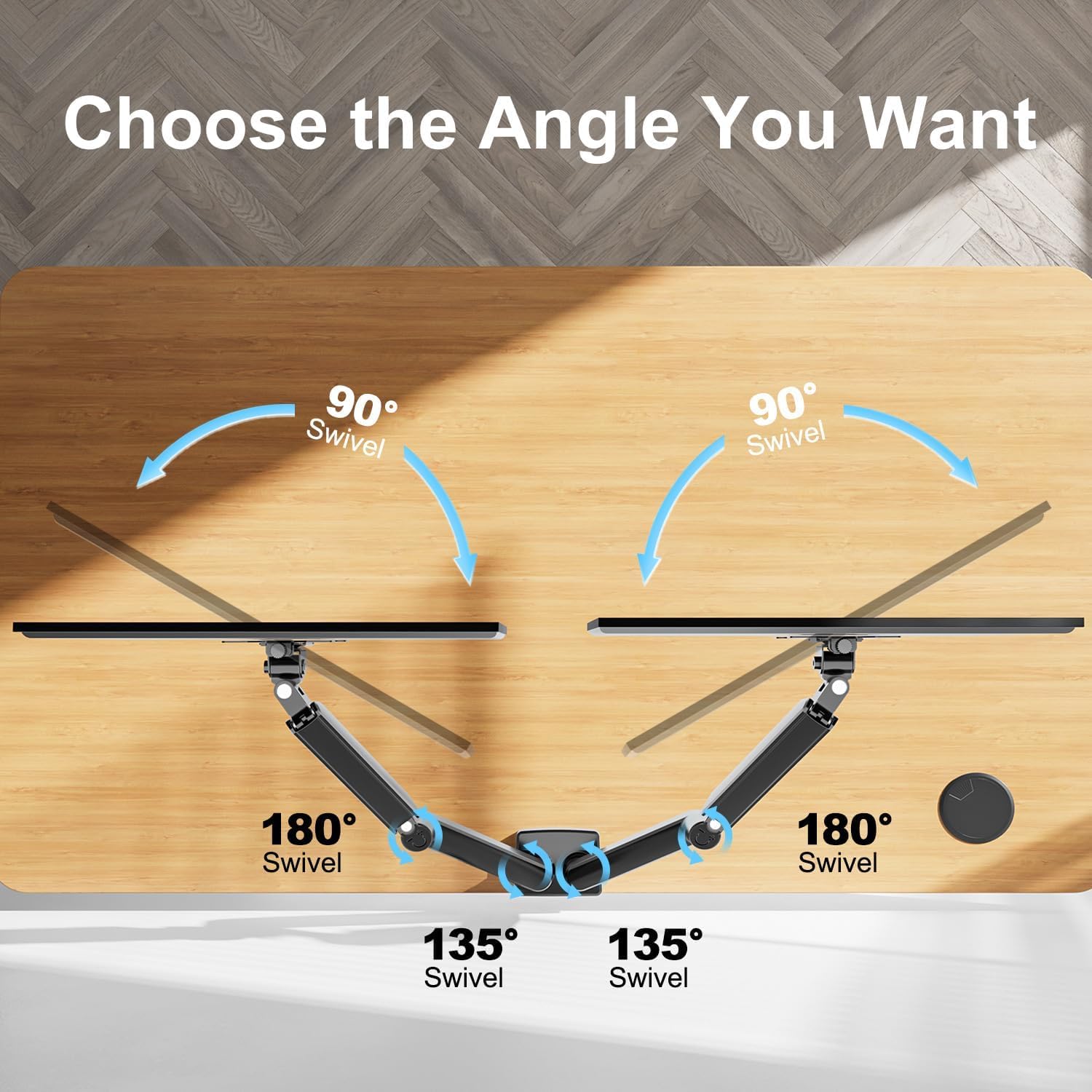
Image: Visual guide to the swivel capabilities of the monitor arm, showing 90° at the base and 180° at the arm joint.

Image: A monitor mounted on the arm demonstrating its 360° rotation capability.
4. Maintenance
Regular maintenance ensures the longevity and optimal performance of your ErgoFocus Dual Monitor Mount.
- Cleaning: Wipe down the arms and base with a soft, damp cloth. Avoid abrasive cleaners or solvents.
- Check Connections: Periodically check all screws and bolts to ensure they remain tight. Re-tighten if necessary to maintain stability.
- Gas Spring Adjustment: If monitors feel too loose or too stiff, re-adjust the gas spring tension as described in Section 3.1.
5. Troubleshooting
If you encounter issues with your monitor mount, refer to the following common solutions:
- Monitor Sags or Won't Stay Up: The gas spring tension may be too low for your monitor's weight. Increase the tension by turning the adjustment screw counter-clockwise ('+') with the provided Allen key. Ensure the arm is held horizontally during adjustment.
- Monitor Won't Go Down or is Too Stiff: The gas spring tension may be too high. Decrease the tension by turning the adjustment screw clockwise ('-').
- Monitor Wobbles: Ensure all mounting screws (desk clamp/grommet and VESA plate) are securely tightened. Check that the desk surface is stable.
- Limited Movement: Verify that no cables are obstructing the arm's movement and that the arms are not hitting a wall or other objects. Ensure all pivot points are free to move.
- Cables Not Staying in Clips: Ensure cables are properly routed and secured within the cable management clips. If cables are too thick, consider using alternative cable ties.
6. Specifications
| Brand | ErgoFocus |
| Model Number | B0BYZ2NRD9 |
| Mounting Type | Tabletop Mount (C-Clamp or Grommet) |
| Movement Type | Articulating, Rotate, Swivel, Tilt |
| Material | Metal |
| Color | Black |
| Compatible Devices | Monitors |
| Screen Size Compatibility | 13 to 32 Inches |
| Weight Capacity (Per Arm) | 4.4 - 19.8 lbs (2 - 9 kg) |
| VESA Compatibility | 75x75mm, 100x100mm |
| Maximum Tilt Angle | 90 Degrees |
| Desk Thickness (C-Clamp) | 0.39 - 2.76 Inches (10-70mm) |
| Desk Thickness (Grommet) | 0.39 - 2.76 Inches (10-70mm) |
| Grommet Hole Diameter | 0.39 - 2.36 Inches (10-60mm) |
7. Warranty and Support
The ErgoFocus Dual Monitor Mount comes with a 2-year warranty, ensuring peace of mind regarding product quality and performance.
For technical support, warranty claims, or any inquiries, please contact ErgoFocus customer service through the retailer where the product was purchased or visit the official ErgoFocus website for contact information.
Return Policy: This product is subject to a 30-day return policy from the date of purchase, as per retailer terms.
